GraphiC™ 2026 — Online Reference Manual
The complete scientific and technical graphics reference for C/C++, Modern Fortran (2003/2018), Python 3, Julia (GraphiC.jl), and Java 22 (FFM). Use the language selector in the top navigation bar to translate all explanations, architectural guides, and parameter descriptions into any of 104 languages while keeping all source code and function signatures intact.
Copyright © 1983–2026 Dr. James A. Rome / jamesrome.com. All Rights Reserved.
GraphiC™ is a trademark of jamesrome.com (formerly Scientific Endeavors Corporation).
GraphiC™ Software License Agreement
jamesrome.com
Oak Ridge, TN 37830
Website: https://jamesrome.com • Email: support@jamesrome.com
PLEASE READ THE FOLLOWING TERMS AND CONDITIONS BEFORE USING THIS SOFTWARE. USE OF THE SOFTWARE INDICATES YOUR ACCEPTANCE OF THESE TERMS AND CONDITIONS.
jamesrome.com provides this software and licenses its use worldwide. You assume responsibility for the selection of the software to achieve your intended results and for the installation, use, and results obtained from the software.
Software License Grant
You may: 1. System & Machine Installation: Install and execute the software on any computer, workstation, server, or cloud node in your possession. 2. Backups & Reproductions: Copy the software into any machine-readable or printed form for backup, research, educational, or modification purposes in support of your use. 3. Modification & Integration: Modify the software or merge it into another program for your personal, scientific, institutional, or academic use. Any portion of this software merged into another program will continue to be subject to the terms and conditions of this agreement. 4. License Transfer: Transfer the software and license to another party if the other party agrees to accept the terms and conditions of this agreement. If you transfer the software, you must at the same time either transfer all copies (printed and digital) to the same party or destroy any copies not transferred; this includes all modifications and portions merged into other programs.
Source Code & Redistribution
THE GRAPHIC SOURCE CODE IS PROVIDED FOR SCIENTIFIC, RESEARCH, EDUCATIONAL, AND PROFESSIONAL ENGINEERING USE. REDISTRIBUTION OF GRAPHIC SOURCE CODE, COMPILED OBJECT MODULES, OR DERIVATIVE RUNTIME ENGINES WITHIN COMMERCIAL APPLICATION PACKAGES FOR CONVEYANCE TO THIRD PARTIES REQUIRES AN EXTENDED LICENSING AGREEMENT WITH JAMESROME.COM.
You must reproduce and include the original copyright notices on any copy, modification, or portion merged into another program. You may not use, copy, modify, or transfer the program, in whole or in part, except as expressly provided for in this license.
Term & Governing Law
This license is effective until terminated. You may terminate it at any time by destroying the software together with all copies, modifications, and merged portions. It will also terminate if you fail to comply with any term of this agreement.
This Agreement is governed by the laws of the State of Tennessee, United States of America.
Limited Warranty & Disclaimer
jamesrome.com provides the GraphiC library source code, modern 64-bit drivers, language packages, and technical documentation substantially in accordance with this reference manual. Because GraphiC is a foundational suite of scientific programming tools, rendering precision and system behavior depend to a significant extent upon the host compiler, operating platform, and skills of the user.
(The historic 1980s/1990s physical magnetic media warranty is retired; all modern releases are distributed in electronic archive and source repository form).
jamesrome.com shall not in any case be liable for special, incidental, consequential, indirect, or similar damages arising from the use or inability to use this software, even if advised of the possibility of such damages. This includes, without limitation, loss of profits or revenue, loss of computer time, loss of data, costs of recreating lost data, hardware damage, or claims by third parties.
Limitation of Remedies
If within 30 days of acquisition the GraphiC tools do not perform substantially in accordance with the manual, remedies shall be limited to the provision of corrected source code, updated documentation, or a refund of any license fees paid directly to jamesrome.com for the software. In no case shall liability exceed the amount of license fees paid for the right to use the software.
YOU ACKNOWLEDGE THAT YOU HAVE READ THIS AGREEMENT, UNDERSTAND IT, AND AGREE TO BE BOUND BY ITS TERMS AND CONDITIONS. YOU FURTHER AGREE THAT IT REPRESENTS THE COMPLETE AND EXCLUSIVE AGREEMENT SUPERSEDING ANY PRIOR PROPOSAL OR ORAL/WRITTEN COMMUNICATION.
Table of Contents
- Section 1. Executive Summary & Historical Background
- Section 2. Architectural Overview
- Section 3. Platform Overview & Deployment Guide
- Section 4. Memory Management: Legacy DOS vs Modern 64-Bit Systems
- Section 5. Typography, Fonts, and Text Systems
- Section 6. Directory Layout and Clean Workspace Policy
- Section 7. Compilation, Quickstart & Live Monitor Display
- Section 8. Complete GraphiC Procedural API Technical Reference (§8.1–§8.19)
- 8.1 Initialization Routines
- 8.2 Plot Termination Routines
- 8.3 Page and Axis Options
- 8.4 Simultaneous Plots
- 8.5 2-D Axes Routines
- 8.6 Smith Charts
- 8.7 Polar Plots
- 8.8 Contour Plots
- 8.9 Triangle Plots
- 8.10 Three-Dimensional Plots
- 8.11 Pie Charts & Statistical Plots
- 8.12 Line-Drawing Routines
- 8.13 Line and Symbol Styles
- 8.14 Color & Palettes
- 8.15 Text Routines
- 8.16 Interactive Crosshairs & Digitization
- 8.17 Spline Interpolation & Numerical Methods
- 8.18 Polygons & Panel Filling
- 8.19 Memory, File I/O & Utility Routines
- Section 9. High-Level Modern APIs & Object-Oriented Interfaces Technical Reference (§9.1–§9.5)
- 9.1 Architectural Overview & Automated Capabilities
- 9.2 Julia High-Level 1-Line API Reference (
GraphiC.jl) - 9.3 Python 3 Object-Oriented & Context-Manager Reference (
graphic.Figure) - 9.4 Java 22 Foreign Function & Memory High-Level API (
com.sciend.graphic.Figure) - 9.5 Modern Fortran 2003/2018 Module Reference (
graphic.f90)
- Section 10. Visual Gallery, Computational Recipes & Industrial Applications
- 10.1 2D Linear Calibration & Curve Plots (
sample) - 10.2 3D Perspective Surface Mesh with Hidden-Line Removal (
d3test) - 10.3 2D Contour Topography with Elevation Labels (
cnttest) - 10.4 RF Microwave Impedance Smith Chart (
smtest) - 10.5 Polar Antenna Radiation Patterns (
poltest) - 10.6 Logarithmic & Semi-Log Plots (
logtest) - 10.7 2D Velocity Vector Fields (
vfield) - 10.8 Ternary Phase Equilibrium Diagrams (
tritest) - 10.9 Grouped Bar Charts with Vector Hatching (
bartest) - 10.10 Exploded Pie Charts (
pietest) - 10.11 3D Perspective Column Bars (
bar3d) - 10.12 16 Vector Hatching & Stippling Patterns (
pattern) - 10.13 256-Color Palette Grid (
patrn256) - 10.14 Multiple Independent Y-Axes (
multi_y) - 10.15 Multi-Panel Composite Subplots (
d2test) - 10.16 Cylindrical Bessel Functions (
bess) - 10.17 Continuous 3D Surface Shading (
bess3d) - 10.18 Error Functions and Normal Distributions (
erftest) - 10.19 Celestial Mechanics & Orbital Trajectories (
orbits) - 10.20 Industrial Applications: Airline Delay Propagation & Network Scheduling (NWA)
- 10.21 FAA Airport Runway Demand & Capacity Queuing Dynamics (CLT)
- 10.22 FAA National Airspace System Flow & Airport Performance Gallery (ORD, EWR, ZOB)
- 10.23 Typography & Vector Stroke Font Showcase (
fnttest) - 10.24 Simultaneous Plots: Fermi Acceleration (
fermi) - 10.25 SVG Auto-Crop, Preview & Telemetry Push (
svgtest) - 10.26 Continuous Color Scale Plots (
turbulence)
- 11.1 Simplex Roman Font Plate (
simplex.fnt) - 11.2 Complex Roman Font Plate (
complex.fnt) - 11.3 Triplex Bold Roman Font Plate (
triplex.fnt) - 11.4 Duplex Roman Font Plate (
duplex.fnt) - 11.5 Triplex Italic Font Plate (
tripital.fnt) - 11.6 Complex Italic Font Plate (
compital.fnt) - 11.7 Complex Script Font Plate (
comscr.fnt) - 11.8 Simplex Greek & Math Font Plate (
simgrma.fnt) - 11.9 Simplex Script Font Plate (
simscr.fnt) - 11.10 Complex Greek & Math Font Plate (
compgrma.fnt) - 11.11 Swiss Regular Font Plate (
swiss.fnt) - 11.12 Swiss Bold Font Plate (
swissbld.fnt) - 11.13 Swiss Italic Font Plate (
swissitl.fnt) - 11.14 Swiss Bold Italic Font Plate (
swissbit.fnt) - 11.15 Swiss Narrow Font Plate (
swissn.fnt) - 11.16 News Roman Font Plate (
news.fnt) - 11.17 News Greek & Math Font Plate (
newsgrm.fnt) - 11.18 Block Heavy Gothic Font Plate (
block.fnt) - 11.19 English Gothic Font Plate (
engoth.fnt) - 11.20 Russian (Cyrillic) Font Plate (
russian.fnt) - 11.21 Matrix Font Plate (
matrix.fnt) - 11.22 Micro Bold Font Plate (
microb.fnt) - 11.23 Micro Graphic Font Plate (
microg.fnt)
Section 1. Executive Summary & Historical Background
The IBM PC was released in 1981. At the time, George Kelley and I (James Rome) were plasma physicists working in the Thermonuclear Division at Oak Ridge National Laboratory. We realized that generating graphical plots would give us critical insight into plasma equilibria and physical behavior, but the original IBM PC had very low-resolution graphics (CGA 320×200). To overcome this, we each purchased a Corona PC, which offered an amazing 640×480 pixel display.
However, we soon discovered that there was no software available to produce publication-grade scientific plots on microcomputers. We had been using the DISSPLA Fortran package on mainframes and were heavily influenced by its methodology. In both DISSPLA and GraphiC, plotting is a structured, procedural state machine:
- Initialize Session:
bgnplot(device, mode, file) - Page Dimensions & Units:
page(width, height) - Start Page Canvas:
startplot(bgcolor) - Set Plot Area & Origin:
area2d(xlen, ylen)andphysor(x, y) - Calibrate Axes & Labels:
box(),heading(title),xname(x),yname(y),graf(...) - Execute Plot Routines: Calling the authentic GraphiC routines across all languages (
conmat,curve,surmat,smdraw,polgrid,xlog, etc.) without obscuring them behind generic OOP abstractions. - Close Frame & Subsystem: Always concluded with
endplot()followed bystopplot().
We insisted on vector graphics—where everything is a discrete point, stroke, or filled polygon—so that we could zoom in to inspect fine details on our computer screens and reproduce plots cleanly across pen plotters and laser printers.
We decided that the C language was best suited to run efficiently on a personal computer, but we had to learn it from scratch! We also studied 8086 assembly language and hand-coded critical inner loops in assembly to maximize rendering speed, since numerical math co-processors (like the 8087) were not yet available. It took us several years to perfect our lean, mean, fast C graphics engine. We subsequently founded Scientific Endeavors Corporation to market GraphiC worldwide to universities, national laboratories, and aerospace firms.
After George passed away, his son Steve Kelley took his place in the company. Steve cleaned up numerous bugs, expanded features, and managed dedicated customer support. When Steve suffered an untimely death, we terminated Scientific Endeavors. And there the codebase sat, untouched, for 30 years…
The 2026 Renaissance: Enter AI and Google Antigravity
In 2026, working in close collaboration with me, Google’s Antigravity autonomous AI coding agent resurrected the original GraphiC C archives.
Over the course of this modernization: - Archaic 16-bit DOS segmented pointers, expanded memory (EMS) page banking, and disk overlays were eliminated in favor of a clean, flat 64-bit POSIX/C99 architecture running natively across macOS (Apple Silicon ARM64 & Intel), Linux, and Windows. - Obsolete pen plotters and Tektronix storage tubes were replaced by a modern W3C Scalable Vector Graphics (SVG) driver with an interactive browser-based viewer and live monitor streaming. - Complete multi-language parity was established—delivering first-class bindings for Modern Fortran (2003/2018/legacy F77), Python 3, Java 22 (Foreign Function & Memory API), and Julia (native Libdl FFI).
Most importantly, the core mathematical soul of GraphiC remains unaltered: the exact procedural state machine, analytical 3D hidden-surface horizon algorithms, Hershey stroke vector fonts, and precision coordinate transforms developed four decades ago are now preserved and running at native 64-bit speed for the next generation of scientific research.
Section 2. Architectural Overview
GraphiC modernizes the classic UNIX philosophy: a lean, fast, rock-solid native C core paired with clean, zero-overhead bindings for modern dynamic and managed languages.
2.1 Native C99 / POSIX Core Engine (Source/, Include/)
- Implemented in clean, portable C99 with standard POSIX headers.
- Completely free of external third-party dependencies; links strictly with the standard C runtime (
libc) and mathematics library (libm). - Builds simultaneously as a shared library (
lib/libgraphic.dylibon macOS,libgraphic.soon Linux,graphic.dllon Windows) and static archive (lib/libgraphic.a). - Manages 2D/3D transformations, viewport clipping, polygon filling, contour elevation calculation, and drawing pipelines.
2.2 Modern Vector SVG Driver & Interactive Web Viewer
-
Native Scalable Vector Graphics (SVG): Replaces legacy Tektronix 4014 / 4105 rasterization with clean, standalone W3C Scalable Vector Graphics (SVG). Features resolution-independent vector lines, crisp circle/arc primitives, inline
<defs>vector hatch patterns, and automaticviewBoxscaling. Generates fully responsive output that renders natively in modern web browsers, Microsoft Word, LaTeX/PDF documents, and publication vector editors (Inkscape, Adobe Illustrator). -
Automated Companion Web Viewer (
<plotname>.html): Whenever any C, Fortran, Python, Java, or Julia program creates an SVG plot (viabgnplot(0, SVG, "plot.svg")or language bindings), GraphiC’s SVG driver automatically generates a companion HTML viewer file (plot.html) in the same directory. Opening this file in any web browser (open plot.html) provides immediate interactive capabilities:- Mouse-Wheel Zooming: Smoothly zoom in and out centered on the canvas.
- Click-and-Drag Panning: Freely navigate high-density multi-curve or 3D surface plots.
- Toolbar Controls: Instant buttons for Reset View (1:1), Zoom In (+), Zoom Out (-), and Download SVG.
-
Master Interactive Gallery Viewer (
docs/viewer.html/viewer.html): For exploring the entire GraphiC visual library in one place, GraphiC includes a standalone master gallery application:- Location: Located at
docs/viewer.html(and mirrored atviewer.htmlin the repository root). Open directly in Safari, Chrome, Edge, or Firefox viaopen docs/viewer.html. - Portfolio Catalog: Browse all 26 figures categorized into Industrial Airport Queuing & Delay Cascades, 3D Horizon Surfaces, Contour Maps, Smith & Polar Charts, 2D Scientific Curves, Categorical Bar & Pie Charts, and Typography & Vector Fonts.
- Multi-Language Code Inspector: Includes real-time code tabs displaying the exact code required to generate each plot across C, Fortran 2023, Python 3, Java 22 FFM, and Julia.
- Canvas Customization: Toggle between Light, Dark, and Blueprint Grid canvas backgrounds, inspect raw SVG vector markup, and export publication assets.
- Location: Located at
2.3 Python 3 Language Package (python/graphic/)
-
Zero-Copy C-Types Binding: Interfaces directly with the native
libgraphicdynamic library using standard libraryctypes. Transparently accepts Python lists, tuples, or NumPy 1D and 2D arrays with zero memory duplication. -
Authentic GraphiC Procedural State Machine: Directly mirrors the classic procedural pipeline using authentic GraphiC routine names:
import graphic as gp # 1. Initialize session & page dimensions gp.bgnplot(0, 'S', "oscillator.svg") gp.page(8.0, 6.0) gp.startplot(gp.BRT_WHITE) # 2. Define plot window & origin gp.area2d(6.5, 4.5) gp.physor(0.75, 0.75) # 3. Calibrate axes, labels & borders gp.box() gp.heading("Damped Oscillator") gp.xname("Time (seconds)") gp.yname("Amplitude (volts)") gp.graf("%3.1f", 0.0, 1.0, 10.0, "%3.1f", -1.0, 0.5, 1.0) # 4. Plot vector curves & conclude gp.color(gp.BLUE) gp.curve(x, y, len(x), 0) gp.endplot() # or gp.stopplot() -
Optional Context-Manager Ergonomics: For developers preferring Pythonic
withblocks,Figurepreserves the exact same authentic GraphiC routine names:from graphic import Figure, BLUE with Figure(8.0, 6.0, background="white", output_path="oscillator.svg") as fig: fig.heading("Damped Oscillator") fig.xname("Time (seconds)") fig.yname("Amplitude (volts)") fig.graf("%3.1f", 0.0, 1.0, 10.0, "%3.1f", -1.0, 0.5, 1.0) fig.box() fig.color(BLUE) fig.curve(x, y)
2.4 Java 22 Foreign Function & Memory (FFM) Package (com.sciend.graphic)
-
Zero-Overhead Panama FFM Architecture: Built upon the modern JDK 22 Foreign Function & Memory API (
java.lang.foreign). Directly downcalls native C symbols viaLinker.nativeLinker()and off-heapArenamemory segments, eliminating legacy JNI boilerplate, C glue code, and runtime compilation wrappers. -
Authentic GraphiC Procedural State Machine: Provides direct static access via
com.sciend.graphic.Graphicusing authentic GraphiC routine names:import com.sciend.graphic.Graphic; import static com.sciend.graphic.Graphic.*; // 1. Initialize session & page canvas bgnplot(0, 'S', "oscillator.svg"); page(8.0f, 6.0f); startplot(BRT_WHITE); // 2. Define plot window & origin area2d(6.5f, 4.5f); physor(0.75f, 0.75f); // 3. Calibrate axes, labels & borders box(); heading("Damped Oscillator"); xname("Time (seconds)"); yname("Amplitude (volts)"); graf("%3.1f", 0.0f, 1.0f, 10.0f, "%3.1f", -1.0f, 0.5f, 1.0f); // 4. Plot vector curves & conclude color(BLUE); curve(x, y, x.length, 0); endplot(); // or stopplot() -
Deterministic Resource Management (
AutoCloseable): For modern Java workflows,FigureimplementsAutoCloseablewith automatic cleanup while maintaining authentic GraphiC routine names:import com.sciend.graphic.Figure; import static com.sciend.graphic.Color.*; try (Figure fig = new Figure(8.0f, 6.0f, WHITE, "oscillator.svg")) { fig.heading("Damped Oscillator"); fig.xname("Time (seconds)"); fig.yname("Amplitude (volts)"); fig.graf("%3.1f", 0.0f, 1.0f, 10.0f, "%3.1f", -1.0f, 0.5f, 1.0f); fig.box(); fig.color(BLUE); fig.curve(x, y); }
2.5 Modern & Legacy Fortran Packages (fortran/src/ and Source/gpcfor_compat.c)
Fortran has been an essential scientific computing language throughout GraphiC’s history (originally supported on 32-bit Windows via gpcfor.dll). The modernized library provides two distinct Fortran interop layers: 1. Modern Fortran 2003/2008/2018/2023 (iso_c_binding): - fortran/src/graphic_iso.f90: Type-safe standard C interoperability interface declarations mapping C entry points directly into Fortran with zero runtime glue overhead. - fortran/src/graphic.f90: High-level idiomatic Fortran module providing constants (COLOR_BLUE, STYLE_DASHED), subroutines (gpc_begin, gpc_graf, gpc_curve, gpc_surface, gpc_contour), and automatic Fortran string null-termination (trim(str) // c_null_char). 2. Legacy Fortran 77 ABI Compatibility Shim (Source/gpcfor_compat.c): - Re-implements the classic gpcfor.dll pass-by-reference symbols in both uppercase (CALL BGNPLOT(...), CALL GRAF(...), CALL CURVE(...)) and lowercase trailing underscore (bgnplot_, graf_, curve_). - Automatically handles fixed-length Fortran character array padding and hidden string lengths, allowing legacy scientific simulation and analysis codes to link without modification. 3. Official Fortran Package Manager (fpm) Integration (fpm.toml): - Full native support for the official modern Fortran build tool and package manager across macOS, Linux, and Windows. - Automated mixed-language compilation: typing fpm build compiles both the C99 engine core and Fortran 2003 modules into libgraphic.a with zero configuration or manual Makefile maintenance. - Built-in example runner: fpm run --example sample, fpm run --example d2test, fpm run --example d3test. - Seamless dependency management: external computational physics and simulation programs can declare GraphiC as a local dependency directly in their own fpm.toml via graphic = { path = "../GraphiC" }.
2.6 Julia Language Package (julia/src/GraphiC.jl)
Julia has become a cornerstone of modern scientific computing, computational physics, and numerical simulation. GraphiC provides native, zero-overhead Julia bindings via the standard Libdl library without requiring external C wrapper packages or intermediate translation layers: - Dual Programming Paradigms: - High-Level Idiomatic API: Single-line plotting functions (GraphiC.plot, GraphiC.scatter, GraphiC.surface_plot, GraphiC.contour_plot) with automatic bounds calculation, nice tick steps, Cartesian grid toggles, and tight SVG canvas auto-cropping. - Procedural State-Machine API: 1:1 parity with the classic C and Fortran GraphiC procedural pipelines (bgnplot
page
startplot
area2d
box
graf
curve
endplot
stopplot). - Multi-Series Plotting & Legends: Incremental multi-curve workflows via plot! and scatter!, automatic legend calculation and placement (label="Series", legend=:best), and explicit vector SVG export with savefig(fig, "file.svg"). - Plots.jl Ecosystem Integration: Full compatibility with Julia’s premier Plots.jl plotting frontend via Julia 1.9+ package extensions (GraphiCPlotsExt.jl), activated seamlessly via graphic(). - Makie.jl Ecosystem Integration: Dedicated vector backend for Julia’s next-generation Makie.jl data visualization ecosystem via Julia 1.9+ package extensions (GraphiCMakieExt.jl), activated seamlessly via graphic_makie(). Enables standard Makie commands (lines, scatter, contour, and surface) to generate compact, publication-ready vector SVGs with true analytic 3D hidden-surface removal. - Rich Interactive Display in Notebooks & IDEs: The Figure (and PlotOutput) type implements Base.show(io, MIME"image/svg+xml", ...) for inline vector SVG display inside Jupyter Notebooks, Pluto.jl, and the VS Code Julia interactive window. - Smart Resolvers: Colors and line styles accept Symbols (:red, :blue, :dashed, :circle), strings ("red", "#ff0000"), hex values (0xRRGGBB), Colorant/RGB objects, or raw integer constants. - Full Scientific Visualization Coverage: - 2D Cartesian curves, marker symbols, symmetric error bars, fine grid subdivisions. - Grouped bar charts (GraphiC.bar) and exploded pie charts (GraphiC.pie). - Polar coordinate grids (polgrid) and spiral curves (polcurv). - 3D perspective wireframe meshes with hidden-line removal (surmat, surface, volm3d, vuabs, graf3d, d3base, plane3d). - 2D contour maps with numeric elevation annotations (conmat, contour). - RF and microwave Smith charts (smdraw, plotrx).
Example multi-series high-level Julia usage with automatic legends:
using GraphiC

x = range(0.0, 4π, length=120)

# Create base figure with first curve
fig = GraphiC.plot(x, sin.(x);
    title="Harmonic Oscillator Modes",
    xlabel="Time t (s)",
    ylabel="Amplitude A(t)",
    label="sin(x)",
    color=:blue,
    thick=1.5,
    ltype=:solid,
    grid=true
)

# Overlay second series
GraphiC.plot!(fig, x, cos.(x);
    label="cos(x)",
    color=:red,
    ltype=:dashed
)

# Overlay scatter measurement points
GraphiC.scatter!(fig, [1.0, 3.0, 5.0, 7.0, 9.0], [0.8, -0.9, -0.3, 0.7, 0.4];
    label="Sensor Data",
    color=:magenta,
    symbol=:circle
)

# Save crisp vector SVG directly
GraphiC.savefig(fig, "oscillator_multiseries.svg")
Example procedural state-machine Julia usage:
using GraphiC

GraphiC.bgnplot(1, 'S', "cosine.svg")
GraphiC.page(8.0, 6.0)
GraphiC.startplot(GraphiC.WHITE)
GraphiC.svgcrop(0.25)
GraphiC.area2d(5.0, 3.5)
GraphiC.physor(1.5, 1.2)
GraphiC.box()

GraphiC.title("Cosine Curve Demonstration", "Angle (Degrees)", "Amplitude")
GraphiC.graf("%3.0f", 0.0, 60.0, 360.0, "%3.1f", -1.0, 0.5, 1.0)

x = range(0.0, 360.0, length=73)
y = cos.(deg2rad.(x))

GraphiC.color(GraphiC.BLUE)
GraphiC.thick(1.2)
GraphiC.curve(x, y, length(x), GraphiC.SOLID)

GraphiC.endplot()
GraphiC.stopplot()
2.7 How You See GraphiC Plots
When you run a GraphiC program, two files are created on disk in the same directory: - myplot.svg: The pure vector graphics file (resolution-independent, publication-ready). - myplot.html: A lightweight companion web page that displays the SVG inside an interactive canvas.
| Target | What Opens It | Experience |
|---|---|---|
myplot.svg |
Default SVG app (Browser, Preview, Illustrator) | Static vector image. No pan, no zoom controls. |
myplot.html |
Default Web Browser (Safari, Chrome, Edge) | Interactive viewer: Mouse-wheel zoom, drag-to-pan, Reset View, and live auto-updating as the plot draws. |
What Happens When You Call svgopen()
When you call svgopen(NULL) (or when GPC_AUTOPREVIEW=1 is set at plot startup), GraphiC dispatches your operating system’s native desktop application launcher: - macOS: open myplot.html (opens in Safari or default system browser) - Windows: start myplot.html (opens in Microsoft Edge or default browser) - Linux: xdg-open myplot.html (opens in default desktop browser)
Your browser window pops up showing myplot.html. The JavaScript inside myplot.html displays the vector plot with interactive controls (zoom, pan, download SVG) and automatically refreshes when endplot() finalizes the graphic.
You can also pass a specific file if you ever want to open the raw SVG directly: - svgopen(NULL)
Opens myplot.html in your default browser with pan/zoom controls. - svgopen("myplot.svg")
Opens the raw .svg file directly in whatever viewer your OS associates with .svg.
Section 3. Platform Overview & Deployment Guide
GraphiC 2026 is engineered as a universal, 64-bit C99/POSIX scientific graphics engine with native bindings for Modern Fortran (Fortran 2003/2018), Python 3, and Java 22. Unlike modern web-based charting widgets or bloated GUI frameworks that demand heavy background runtimes, display servers (X11/Wayland), or dynamic interpreters, GraphiC operates entirely in-process with zero external library dependencies beyond the standard host C library (libc) and math library (libm).
This chapter provides an exhaustive deployment reference for running, compiling, and distributing GraphiC across macOS, Linux, Microsoft Windows, and modern package managers.
3.1 Core Architectural Principles & Linking Strategy
Static vs. Dynamic Linking in Scientific Computing
In computational physics, aerospace simulations, and laboratory instrumentation, static linking (libgraphic.a or graphic.lib) is the strongly recommended default:
| Criterion | Static Linking (.a / .lib) |
Shared / Dynamic (.so / .dylib / .dll) |
|---|---|---|
| Runtime Portability | 100% Self-Contained: Binary runs on any machine without installer. | Requires matching runtime libraries in search path. |
| HPC Cluster Execution | Zero Setup: Submit batch jobs directly to SLURM/PBS worker nodes. | Requires environment configuration (LD_LIBRARY_PATH). |
| Version Stability | Immune to OS updates or system library overwrites. | Vulnerable to shared library version mismatch (“DLL Hell”). |
| Call Overhead | Direct in-process symbol resolution (< 100 nanoseconds). | PLT/GOT indirection via dynamic linker. |
| Footprint | Linker prunes unused functions; final .exe is typically < 1 MB. |
Distributes full runtime shared library alongside executable. |
3.2 macOS (Apple Silicon & Intel)
GraphiC is a first-class citizen on macOS, natively supporting both Apple Silicon (ARM64 M1/M2/M3/M4) and Intel (x86_64) architectures.
1. Prerequisites & Toolchains
-
C/C++: Apple Clang installed via standard Xcode Command Line Tools:
xcode-select --install -
Modern Fortran: GNU Fortran (
gfortran) installed via Homebrew:brew install gcc
2. Building and Linking
-
Static Linking (Recommended):
# C / C++ Application clang -O2 -IInclude my_app.c lib/libgraphic.a -lm -o my_app # Modern Fortran Application (Fortran 2003/2018) gfortran -O2 -I fortran/bin my_app.f90 lib/libgraphic.a -lm -o my_app -
Dynamic Linking (
libgraphic.dylib): If building againstlibgraphic.dylib, macOS locates libraries via runtime search paths (@rpath) or theDYLD_LIBRARY_PATHenvironment variable:clang -O2 -IInclude my_app.c -Llib -lgraphic -lm -o my_app export DYLD_LIBRARY_PATH="$(pwd)/lib:$DYLD_LIBRARY_PATH" ./my_app
3. Python 3 Deployment on macOS
-
Supported Environments: Native Apple Silicon (
arm64M1/M2/M3/M4) and Intel (x86_64) via Homebrew Python (brew install python), Apple Xcode system Python, or Conda. -
Dynamic Binding: Loads
lib/libgraphic.dylibvia standard libraryctypes. -
Quick Setup & Execution:
# Editable install (or set PYTHONPATH): pip install -e python # Or: export PYTHONPATH="$(pwd)/python:$PYTHONPATH" # Run Python examples: python3 python/examples/sample.py python3 python/examples/d3test.py -
Interactive Desktop Preview: Calling
gp.svgopen()launches Safari or your default browser instantly via macOSopen <plot>.html.
4. Julia Package Deployment on macOS
-
Supported Versions: Native Julia 1.6 through 1.11+ for macOS (ARM64 and x86_64), available via
brew install --cask juliaorjuliaup. -
Zero-Overhead FFI: Loads
lib/libgraphic.dylibusing standardLibdl.dlopenwith zero external glue libraries or compiler prerequisites. -
Running Julia on macOS:
# Run 1-line modern high-level plotting: julia --project=julia julia/examples/highlevel.jl # Run Julia examples or full unit test suite (40 assertions): julia --project=julia julia/examples/sample.jl julia --project=julia julia/test/runtests.jl -
Notebooks & Pluto.jl: Fully implements
Base.show(io, MIME"image/svg+xml", p)for rich inline vector rendering in Pluto.jl, JupyterLab, and VS Code.
3.3 Linux (HPC Clusters, Workstations & Servers)
On Linux (x86_64 and AArch64), GraphiC is designed for headless servers, high-performance computing (HPC) clusters, cloud containers (Docker/Podman), and engineering workstations.
1. Supported Compilers
- GNU Compiler Collection (GCC):
gcc,g++,gfortran(version 9 through 14+). - LLVM / Clang:
clang,flang. - Intel oneAPI:
icx,ifx(formerlyicc/ifort). - NAG Fortran Compiler:
nagfor.
2. HPC Cluster Compilation & SLURM Deployment
Because GraphiC has zero graphical windowing dependencies (all vector drawing streams to W3C SVG), simulation jobs can be submitted directly across headless compute nodes without virtual framebuffers (Xvfb) or display forwarding:
# Compile with static archive:
gfortran -O3 -march=native -I fortran/bin simulation.f90 lib/libgraphic.a -lm -o simulation

# SLURM batch job submission:
srun -n 64 ./simulation
3. Shared Library Usage on Linux (libgraphic.so)
If using shared objects, either bake the library path into the binary with -Wl,-rpath:
gcc -O2 -IInclude my_app.c -Llib -Wl,-rpath,'$ORIGIN/lib' -lgraphic -lm -o my_appor export the dynamic linker path:
export LD_LIBRARY_PATH=/path/to/graphic/lib:$LD_LIBRARY_PATH4. Python 3 Deployment on Linux (Headless, Containers & HPC)
-
Supported Environments: RHEL, Rocky, AlmaLinux, Ubuntu, Debian, Fedora, Arch, and Docker/Podman container images.
-
Zero-X11 Headless Execution: GraphiC outputs pure W3C SVG directly to disk. Python scripts run seamlessly on headless Linux servers, SLURM batch nodes, and CI/CD pipelines without
DISPLAYenvironment variables orXvfbvirtual display framebuffers. -
Execution:
export PYTHONPATH="/path/to/graphic/python:$PYTHONPATH"
export LD_LIBRARY_PATH="/path/to/graphic/lib:$LD_LIBRARY_PATH"

python3 python/examples/sample.py
python3 python/examples/d3test.py
5. Julia Package Deployment on Linux
-
Supported Environments: Official Linux glibc binaries (x86_64, AArch64) via
juliaupor HPC environment modules (module load julia). -
HPC Batch Visualization: Julia simulation codes can compute massive matrix operations and emit publication vector SVGs in single batch runs with zero windowing or OpenGL dependencies.
-
Execution:
export LD_LIBRARY_PATH="/path/to/graphic/lib:$LD_LIBRARY_PATH"
julia --project=julia julia/examples/highlevel.jl
julia --project=julia julia/examples/sample.jl
julia --project=julia julia/test/runtests.jl
3.4 Microsoft Windows (64-Bit Windows 10, 11 & Windows Server)
On 64-bit Windows, GraphiC supports all major compilers and development environments:
Option A: MinGW-w64 / MSYS2 / GCC (Open Source & fpm)
The standard open-source toolchain on Windows compiles GraphiC identically to Unix: * Static Linking (libgraphic.a):
```powershell
# Compile directly to a standalone Windows executable:
gfortran -O2 -I fortran/bin my_sim.f90 libgraphic.a -o my_sim.exe
```- Deployment Benefit: The resulting
my_sim.exeis completely self-contained. It can be distributed as a single executable file and run on any modern 64-bit Windows system without installing runtime redistributables or external DLLs.
Option B: Microsoft Visual Studio (MSVC) & Intel oneAPI Fortran (ifx / ifort)
The industry standard in aerospace, automotive, defense, and CAD engineering: * Static Library (graphic.lib):
```cmd
:: Compile and link into standalone executable:
ifx -O2 -I fortran\bin my_sim.f90 graphic.lib -Fe:my_sim.exe
```
Option C: Dynamic Link Libraries (graphic.dll)
When deploying with graphic.dll: * Windows DLL Search Order: 1. The application’s own directory (the folder where my_sim.exe resides). 2. The current working directory. 3. The Windows system directory (C:\Windows\System32). 4. Directories enumerated in the user and system PATH environment variable. * No LD_LIBRARY_PATH Needed: Unlike Linux or macOS, Windows does not have a separate library path variable. Placing graphic.dll in the same directory as my_sim.exe ensures instant, foolproof loading.
Option D: Python 3 Deployment on 64-Bit Windows
GraphiC provides native, zero-copy Python bindings on 64-bit Windows without requiring a C compiler: * Runtime Compatibility: Compatible with official Python 64-bit (Python 3.8 through 3.13+ from python.org, Windows Store, Anaconda, Miniconda, or WinPython). * DLL Resolution: The graphic Python module utilizes Python’s standard ctypes library to bind directly to graphic.dll. On Windows, Python automatically discovers graphic.dll when placed in: 1. The python/graphic/ package directory (pre-shipped). 2. The current working directory where your script is executed. 3. Any directory registered via os.add_dll_directory("C:/path/to/graphic/lib") (Python 3.8+). 4. The system user/system PATH. * Quick Installation & Execution:
```powershell
# Editable install (or pip install from local repository):
pip install -e python

# Alternatively, run directly via PYTHONPATH without installing:
$env:PYTHONPATH = "python;$env:PYTHONPATH"

# Execute scientific Python examples:
python python/examples/sample.py
python python/examples/d3test.py
```- Jupyter & VS Code: Full interactive vector SVG rendering and live browser preview (
graphic.svgopen()) work natively in VS Code, JupyterLab, and Windows Terminal.
Option E: Julia Package Deployment on 64-Bit Windows
GraphiC offers native Julia bindings with zero compilation overhead on 64-bit Windows: * Supported Versions: Official Julia 64-bit (Julia 1.6 through 1.11+), installed via winget install JuliaLang.Julia, juliaup, or the official installer from julialang.org. * Zero-Compiler Architecture: Julia uses the standard library Libdl to link directly into graphic.dll. Windows users do not need Microsoft Visual Studio, MinGW, or any C compiler installed to generate plots in Julia. * Quickstart & Example Execution:
```powershell
# Launch Julia with the GraphiC project environment:
julia --project=julia

# Or run any example script directly:
julia --project=julia julia/examples/highlevel.jl
julia --project=julia julia/examples/sample.jl
julia --project=julia julia/examples/d3test.jl

# Run the full automated Julia test suite (40 unit assertions):
julia --project=julia julia/test/runtests.jl
```- Interactive Notebooks & Windows GUI: Integrates with Pluto.jl, Jupyter, and VS Code. In Pluto and Jupyter, vector SVGs render inline via native
MIME"image/svg+xml". In command-line scripts, callingGraphiC.svgopen()launches the companion HTML viewer directly in Microsoft Edge or your default browser via the native Windowsstartshell service.
3.5 Fortran Package Manager (fpm) Across Platforms
GraphiC natively supports the official Fortran Package Manager (fpm), providing unified, zero-configuration compilation across macOS, Linux, and Windows.
Supported Compilers
GraphiC is implemented in portable ANSI C99 and modern standard Fortran 2003+ via ISO_C_BINDING. It is tested, benchmarked, and fully supported across all industry-standard compiler toolchains:
- Fortran Compilers:
- GNU Fortran (
gfortran4.8+): Default compiler on Linux, macOS (via Homebrew), and Windows (via MinGW-w64). - Intel oneAPI Fortran Compiler (
ifx&ifort): High-performance compiler for x86-64 workstations and supercomputing clusters. - LLVM Flang (
flang): Modern LLVM-based Fortran compiler across Unix architectures. - NVIDIA HPC SDK (
nvfortran): Optimized for accelerated and GPU-adjacent scientific simulation codes. - NAG Fortran Compiler (
nagfor): Strict standards-conforming compiler for numerical algorithms. (Any standard Fortran 2003/2008/2018/2023 compiler implementingISO_C_BINDINGis fully compatible).
- GNU Fortran (
- C / C++ Compilers:
- GCC (
gcc4.9+): Default on Linux and MinGW-w64. - Clang / Apple LLVM (
clang): Default on macOS Xcode and FreeBSD. - Microsoft Visual C++ (MSVC /
cl.exe): Visual Studio 2017, 2019, and 2022 (x64 native). - Intel oneAPI DPC++/C++ (
icx).
- GCC (
Mixed-Language Architecture: Do Fortran Users Need a C Compiler?
Because GraphiC’s core plotting engine, coordinate transforms, 3D hidden-surface algorithms, and SVG vector drivers are implemented in portable C99 (Source/*.c), while the Fortran API is delivered in standard Fortran 2003+ (Source/*.f90):
- When building from source via
fpm(or local path dependency): Yes, a C compiler is required on the build machine. However,fpmcoordinates mixed C/Fortran builds 100% automatically—it detects your companion C compiler (gcc,clang,cl.exe, oricx), compiles all C core files alongside the Fortran modules, and archives both intolibgraphic.awith zero manual Makefile maintenance. - Companion C Compilers Already Present: In virtually all scientific workstation and HPC environments, a companion C compiler is already bundled with or is a prerequisite for the Fortran compiler:
- macOS:
gfortran(via Homebrew) requires Xcode Command Line Tools, which installs Appleclang. - Linux / HPC Supercomputers:
gccis installed alongsidegfortranas part of the core GNU compiler collection (build-essential). - Intel oneAPI: Intel oneAPI HPC Toolkit installs
icxalongsideifx. - Windows (MSYS2 / MinGW-w64): Installing
mingw-w64-x86_64-gccinstallsgccandgfortrantogether in the exact same package. - Windows (Visual Studio + Intel): Visual Studio C++ workload provides MSVC
cl.exealongside Intel Fortranifx.
- macOS:
- When linking against pre-compiled libraries: No C compiler is needed. If
libgraphic.a(orgraphic.lib) has already been built for your platform, Fortran developers only need their Fortran compiler (gfortran my_sim.f90 libgraphic.a -lm -o my_sim).
Obtaining and Installing fpm
fpm is available on all major operating systems via standard package managers: * macOS (Homebrew):
```bash
brew install fpm
```-
Windows, macOS & Linux (Conda / Mamba):
conda install -c conda-forge fpm -
Windows (Standalone Binary or MSYS2): Download the standalone
fpm.exeexecutable from GitHub Releases and place it in your systemPATH, or install via MSYS2:pacman -S mingw-w64-x86_64-fpm -
Linux (Package Managers):
- Fedora / RHEL:
sudo dnf install fpm - Arch Linux:
sudo pacman -S fortran-package-manager - Ubuntu / Debian: Download the standalone Linux binary from GitHub Releases.
- Fedora / RHEL:
-
Compiler Selection with
fpm: By default,fpmautomatically detects and usesgfortran. To compile with an alternative compiler (such as Intelifxor LLVMflang), use the--compilerflag or exportFC:fpm build --compiler ifx # or: export FC=ifx && fpm build
1. Building the Library and Running Examples
Users who clone or download the GraphiC package can build and run tests with single commands:
# Build the library and Fortran modules
fpm build

# Run any example program
fpm run --example sample
fpm run --example d2test
fpm run --example d3test
2. Consuming GraphiC in External Projects
To embed GraphiC inside an independent scientific simulation, DAQ system, or aerospace analysis package, declare it as a local path dependency in your application’s fpm.toml.
Both GraphiC 2D Community Edition and GraphiC Professional are distributed as self-contained, standalone source packages (Community as a free download, and Professional as the complete licensed suite via Lemon Squeezy).
Extract your downloaded distribution archive onto your workstation or HPC cluster, and reference the directory in your project’s fpm.toml:
[dependencies]
graphic = { path = "../GraphiC" }  # Path to extracted Community or Pro folder
(Users and organizations wishing to maintain GraphiC in version control can simply initialize their own internal Git repository within the extracted directory).
Example: Building an External Fortran Project with GraphiC
Consider an external scientific project directory structure:
my_simulation/
├── fpm.toml
└── app/
    └── run_sim.f90
Where my_simulation/fpm.toml specifies the local dependency:
[package]
name = "my_simulation"
version = "1.0.0"

[dependencies]
graphic = { path = "../GraphiC" }
And app/run_sim.f90 utilizes GraphiC plotting routines:
program run_sim
  use graphic
  implicit none
  real, dimension(100) :: x, y
  integer :: i

  ! Generate sample dataset
  do i = 1, 100
    x(i) = real(i) * 0.1
    y(i) = sin(x(i))
  end do

  call bgnplot(1, 4, "simulation_output.svg")  ! Native SVG vector output
  call linplt(x, y, 100)                      ! Cartesian polyline plot
  call endplot()
end program run_sim
When you execute fpm build or fpm run, fpm automatically compiles GraphiC’s C99 core and Fortran 2003 modules from the local folder, links libgraphic.a, and produces your finished executable with zero external network dependencies.
3.6 Runtime Configuration, Automation & Fonts
1. Headless Automation (GPC_NONINTERACTIVE=1)
By default, interactive GraphiC plots wait for a user keypress upon plot termination (endplot). When running automated batch simulations, SLURM scripts, cron jobs, background web daemons, or headless CI/CD pipelines, set the non-interactive environment variable: * macOS / Linux / Bash:
```bash
export GPC_NONINTERACTIVE=1
```-
Windows PowerShell:
$env:GPC_NONINTERACTIVE="1" -
Windows Command Prompt:
set GPC_NONINTERACTIVE=1When set,
endplotimmediately flushes all SVG and HTML files to disk and returns control to the calling application without blocking.
2. Font File Resolution (GPC_FONTS)
GraphiC searches for font files (*.fnt and Unicode.ttf) in the following order: 1. Directory path specified by the GPC_FONTS environment variable (e.g. export GPC_FONTS=/usr/local/share/graphic/fonts). 2. The current working directory.
Section 4. Memory Management: Legacy DOS vs Modern 64-Bit Systems
Historical 16-Bit Memory Architecture
In the original 1980s DOS implementation, IBM PC software operated under the infamous 640 KB conventional memory barrier with 16-bit segmented real-mode pointers (segment:offset). Generating high-resolution 3D surface meshes (e.g.,
floating-point arrays) or multi-thousand point curves easily exceeded available physical RAM.
To survive, GraphiC incorporated a custom virtual memory subsystem: - getbuf() and freebuf(): Custom dynamic allocators that partitioned small memory heaps. - Disk Paging & Temporary Spill Files: Array buffers were swapped to temporary scratch files on floppy disks or slow early hard drives. - Expanded / Extended Memory (EMS / XMS): Routines to bank-switch 16 KB pages into DOS memory windows. - Byte-Offset Seek Files (.OFF): Auxilliary index files written alongside .TKF plot files so that multi-page plots could be randomly accessed by seeking to byte offsets without parsing the entire file.
Modern 64-Bit Architecture
In modern 64-bit computing environments: 1. Flat 64-bit Virtual Address Space: Operating systems provide
to
bytes of addressable memory per process. Datasets of millions of points fit effortlessly in active memory without paging overhead. 2. Virtual Memory & Hardware MMU: The kernel and hardware Memory Management Unit (MMU) automatically handle page faults, demand paging, and translation lookaside buffer (TLB) caching orders of magnitude faster than any userland disk-swapping algorithm. 3. Elimination of Obsolete .OFF Files: Modern SVG files are self-contained XML documents. The legacy .OFF files served only DOS-era PLAY.EXE tools and have been permanently disabled, eliminating disk I/O overhead and directory clutter. 4. Standard Heap Allocation: The modern library uses standard C malloc(), calloc(), and free() for dynamic temporary buffers, ensuring thread safety, memory sanitizer (ASan) validation, and zero leaks.
Section 5. Typography, Fonts, and Text Systems
GraphiC incorporates a comprehensive, multi-engine typographic subsystem engineered specifically for scientific plotting and technical publication. Rather than forcing all text through a single font model, GraphiC natively integrates three distinct font architectures—Hershey vector stroke fonts, standard TrueType (.ttf) outline fonts, and Adobe PostScript Type 1 (.pfb / .pfa) fonts. All three engines can be freely intermixed within the same plot, or switched dynamically in mid-string using in-line escape characters.
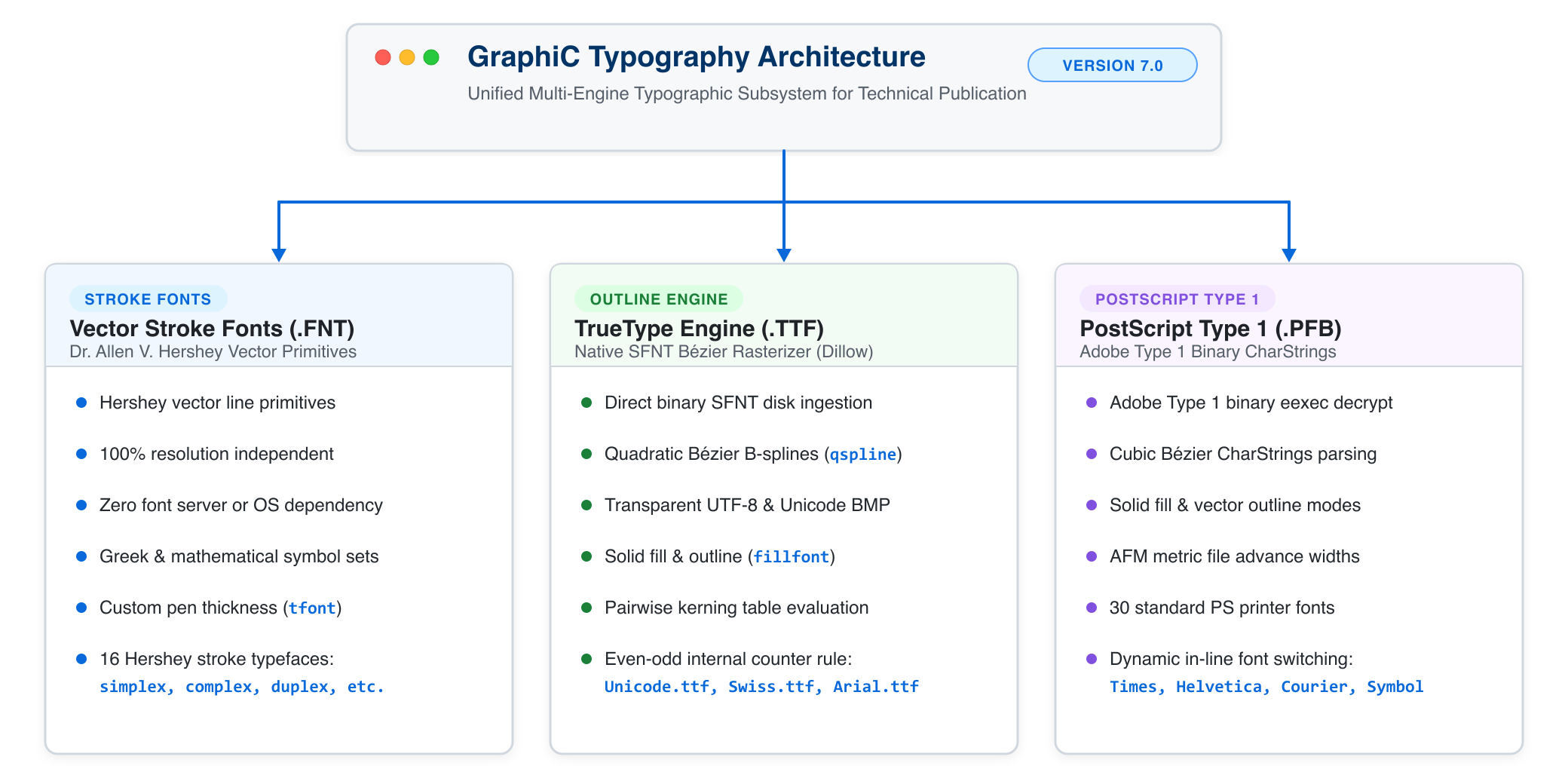
Figure 5.1 — GraphiC Multi-Engine Typography Architecture
4.1 The Three Native Typography Engines
1. The Hershey Vector Stroke Font Engine (.fnt)
Originally compiled by Dr. Allen V. Hershey at the U.S. Naval Weapons Laboratory, Hershey fonts represent characters as connected vector line strokes: - Zero Dependencies: Because characters are drawn directly with line segments, they require no operating system font managers, rasterizers, or display servers. - Arbitrary Scaling & Rotation: Can be scaled to any cap height or rotated to arbitrary angles without raster blur, anti-aliasing artifacts, or loss of clarity. - Scientific Symbol Suites: Complete coverage of uppercase and lowercase Greek alphabets, mathematical operators (
,
,
), astronomical symbols, and accented characters. - Included Typefaces: simplex.fnt (clean technical sans-serif), complex.fnt (double-stroke Roman serif), duplex.fnt (bold sans-serif), triplex.fnt (heavy Roman), script.fnt (flowing cursive), italics.fnt (slanted serif), and simgrma.fnt (Greek mathematical).
2. The Native TrueType Engine (.ttf)
Developed for GraphiC Version 7.0 by David Dillow (Source/Truetype.c, Source/Ttfntld.c, Source/Ttfntplt.c) and modernized for 64-bit platforms: - Direct TrueType File Parsing: Reads standard Microsoft/Apple .ttf font files directly from disk via gfopen(). - 64-Bit Clean Binary SFNT Directory Ingestion: Portable big-endian binary parsing of TrueType tables, removing legacy 64KB table size limits. Tables parsed include cmap (Format 0 and Format 4 Microsoft Unicode BMP character mapping), glyf (glyph quadratic Bézier geometry), head, hhea, hmtx (horizontal metrics and advance widths), kern (pairwise kerning tables), loca (16-bit short and 32-bit long glyph location offsets), and maxp. - Transparent UTF-8 Sequence Decoding: Multi-byte UTF-8 sequences in strings (Greek letters, math symbols, degree signs) are automatically decoded on the fly into Unicode code points and resolved through the cmap Format 4 table. - Quadratic B-Splines (qspline): Evaluates second-order Bézier curves into smooth polygonal contours with configurable tessellation tolerance (SetTTMaxError). - Solid Filling & Outlines with Even-Odd Rule: Supports hollow vector outlines (fillfont(0)) and solid filled glyph interiors (fillfont(1)). In vector output (SVG, PDF), filled glyphs apply fill-rule="evenodd" so internal counters (‘O’, ‘0’, ‘B’, ‘8’, ‘R’, ‘e’, ‘a’) remain hollow. - Pairwise Kerning: TrueType kern tables are automatically parsed to produce proportional, publication-quality letter spacing (SetTTKerning(1, 0)).
3. The PostScript Type 1 Engine (.pfb / .pfa) & GrafText
Also engineered by David Dillow (Source/Psfont.c): - Direct Adobe Type 1 Ingestion: Reads binary (.pfb) and ASCII (.pfa) PostScript font files. - In-Memory eexec Decryption: Automatically decrypts the encrypted private dictionary and character outlines using the standard Adobe Type 1 deciphering key (55665). - Cubic Bézier Curve Parsing: Interprets PostScript CharStrings bytecodes and subroutines (Subrs), converting third-order Bézier splines into polygon outlines or solid filled glyphs. - Adobe Font Metrics (.afm) Integration: Parses corresponding .afm metric files for character advance widths and pairwise kerning adjustments. - GrafText 30 Standard Typefaces: For PostScript (.ps) and Encapsulated PostScript (.eps) printing, GTfont(number) selects from 30 standard printer-resident Adobe PostScript fonts.
4.2 Font Selection and Registration: font()
The public font() routine loads and registers up to FNTNUM (default 10) fonts in memory simultaneously:
void font(int nfont, ...);Calling Syntax
The first parameter nfont specifies the total number of fonts to be loaded. It is followed by variable argument pairs: font(nfont, font_path_1, escape_char_1, font_path_2, escape_char_2, ...): - font_path (char *): Path to the font file. The file extension automatically routes the font to the correct engine: - .TTF or .ttf
TrueType outline engine (TRUETYPE). - .PFB or .pfb
PostScript Type 1 filled engine (PSFILLED). - .FNT or .fnt
Hershey stroke vector engine (REGULARFONT). - escape_char (char or int): The character used as an in-string trigger to activate this font.
Practical Examples
Loading Mixed TrueType, PostScript, and Hershey Fonts:
/* Load 3 fonts: TrueType Times, PostScript Helvetica, and Hershey Greek */
font(3,
     "times.ttf",    '\\',    /* '\' triggers Times TrueType */
     "helv.pfb",     '|',     /* '|' triggers Helvetica PostScript */
     "simgrma.fnt",  '/'      /* '/' triggers Greek mathematical font */
);
fillfont(1);                  /* Enable solid fill for TrueType and PostScript */
Reloading and Freeing Fonts: - Calling font(-1) reloads the previously registered font set without needing to repeat the arguments. - Calling freememq() unloads all loaded fonts and frees their heap buffers.
4.3 In-Line Multi-Font Switching & Mathematical Notation
Once fonts are registered with font(), they can be switched dynamically anywhere inside titles, axis labels, or annotations simply by including the designated escape character:
heading("Magnetic Field \\B(r) |[Tesla] /m/b");- The text starts in the primary active font (
times.ttf). \\switches to Font 0 (times.ttf).|switches to Font 1 (helv.pfb)./switches to Font 2 (simgrma.fnt), printing
in Greek notation.
- Doubling the escape character (e.g.,
//or\\\\) prints the literal character without triggering a font change.
Subscripts and Superscripts
GraphiC features automatic baseline displacement and scaling for scientific scripts: - ^ enters superscript mode (configurable with supsym(char)). - _ enters subscript mode (configurable with subsym(char)). - scrht(factor): Adjusts the character height scale factor (default
cap height). - scrshft(factor): Adjusts the baseline shift percentage.
Example:
xname("Density n_e (10^1^9 m^-^3)");
yname("Electron Temperature T_e (keV)");
4.4 Typography Controls, Styling, and Effects
| Function | Signature | Description |
|---|---|---|
fillfont |
void fillfont(int fill) |
0 = hollow vector outlines; 1 = solid filled glyphs (default for TrueType & PostScript). |
fontfill |
void fontfill(int fill, int pat, int bdr) |
Fills glyph interiors with pattern index pat and outlines characters in color bdr. |
tifont |
void tifont(float wid) |
Sets stroke pen thickness in physical inches (e.g., 0.02f). |
tfont |
void tfont(int wid) |
Sets stroke pen thickness in device pixels (0 = single pixel, 1–7 = bold). |
widen |
void widen(float factor) |
Scales horizontal character aspect ratio (1.0 = normal, 1.4 = wide, 0.8 = condensed). |
skew |
void skew(float slant) |
Slants the vertical stroke axis for oblique or simulated italic styling. |
circtxt |
void circtxt(float x, float y, float r, char *s, float h, float a) |
Renders string s curved along a circular arc of radius r centered at (x, y). |
SetTTKerning |
void SetTTKerning(char onoff, char str) |
1 = enables TrueType pairwise kerning table evaluation; 0 = disables kerning. |
SetTTFull |
void SetTTFull(char onoff, char str) |
1 = enables full 256-character set (Windows ANSI/Latin-1); 0 = standard 128 ASCII. |
SetTTMaxError |
void SetTTMaxError(float err, char str) |
Sets maximum Bézier curve tessellation error tolerance (lower values = smoother curves). |
GTfont |
void GTfont(int font_number) |
Selects one of the 30 standard Adobe PostScript printer fonts for GrafText output. |
4.5 Standard Adobe PostScript Printer Fonts (GrafText)
When exporting plots to Encapsulated PostScript (.eps) or routing to PostScript printer drivers, GTfont(number) provides direct access to the 30 standard PostScript printer fonts:
| Index | Font Name | Index | Font Name | Index | Font Name |
|---|---|---|---|---|---|
| 0 | Times-Roman | 10 | Courier-Oblique | 20 | NewCenturySchlbk-Roman |
| 1 | Times-Bold | 11 | Courier-BoldOblique | 21 | NewCenturySchlbk-Bold |
| 2 | Times-Italic | 12 | Palatino-Roman | 22 | NewCenturySchlbk-Italic |
| 3 | Times-BoldItalic | 13 | Palatino-Bold | 23 | NewCenturySchlbk-BoldItalic |
| 4 | Helvetica | 14 | Palatino-Italic | 24 | Helvetica-Narrow-BoldOblique |
| 5 | Helvetica-Bold | 15 | Palatino-BoldItalic | 25 | Helvetica-Narrow |
| 6 | Helvetica-Oblique | 16 | Bookman-Demi | 26 | Helvetica-Narrow-Bold |
| 7 | Helvetica-BoldOblique | 17 | Bookman-DemiItalic | 27 | Helvetica-Narrow-Oblique |
| 8 | Courier | 18 | Bookman-Light | 28 | Symbol ( ) |
| 9 | Courier-Bold | 19 | Bookman-LightItalic | 29 | ZapfDingbats |
4.6 Modern SVG Vector Typography (2026 Modernization)
In the modern 64-bit SVG driver, text is rendered with dual-mode precision: 1. Geometric Vector Outlines & Filled Polygons: When maximum archival fidelity and 100% device independence are required, TrueType, PostScript, and Hershey characters are decomposed into exact SVG <path> and <polygon> elements. The output is mathematically guaranteed to render identically on every device, operating system, and vector graphics suite (Inkscape, Illustrator, Word) without requiring local font files. 2. Semantic SVG <text> Elements: When searchability, screen reader accessibility, and text selection in web browsers or PDF viewers are preferred, GraphiC emits semantic <text> nodes with standard CSS font family cascades (font-family: "Times New Roman", Times, serif;).
4.7 Native Unicode (UTF-8) and TrueType Typography
Modern 64-bit GraphiC introduces transparent Unicode (UTF-8) decoding alongside the fully modernized TrueType outline engine. Scientific users can now use standard UTF-8 string literals directly in C, C++, Python, Java, and Fortran code without relying on legacy character codes or awkward multi-font escape switches.
1. Transparent UTF-8 Multi-Byte Decoding
When a TrueType font (.ttf) is active, GraphiC’s string measurement and rendering pipelines (strsizq() and TrueTypeOut() in Source/Ttfntplt.c) automatically decode UTF-8 multi-byte sequences on the fly into 16-bit and 32-bit Unicode scalar values: - 2-Byte Sequences (0xC0–0xDF): Standard Greek characters (
), degree symbols (
), plus-minus (
), and Latin accents. - 3-Byte Sequences (0xE0–0xEF): Mathematical operators (
), arrows (
), and geometric shapes. - 4-Byte Sequences (0xF0–0xF7): Extended mathematical alphanumeric symbols and specialized notations.
The decoded Unicode value is queried directly against the font’s OpenType/TrueType cmap table (Format 4 Unicode BMP), retrieving the exact vector glyph contour definitions without intermediate transliteration.
2. Character Counter Geometry & Even-Odd Hole Punching
TrueType glyphs represent character shapes using quadratic Bézier contour loops. Glyphs with enclosed “counters” or holes—such as O, 0, B, 8, R, e, a, %, and Greek letters like
and
—contain an outer contour followed by one or more interior cutout contours.
In the modernized SVG vector driver, all filled TrueType glyphs are rendered with:
<path d="..." fill="#000000" fill-rule="evenodd" stroke="#000000" stroke-width="1"/>The standard evenodd fill rule ensures that the interior counters remain completely transparent and hollow, preventing glyph holes from being erroneously filled in by vector renderers, web browsers, or PDF converters.
3. TrueType Outline vs. Hershey Vector Fonts
GraphiC provides both font technologies so developers and researchers can choose the optimal approach for each technical application:
| Feature | Hershey Vector Fonts (.fnt) |
Modern TrueType Fonts (.ttf) |
|---|---|---|
| Storage & Architecture | Compact vector stroke tables | Quadratic Bézier B-spline outlines |
| System Dependency | Zero (100% self-contained in GraphiC) | Requires standard .ttf font files |
| Counter / Hole Geometry | Stroke fonts (simplex, duplex, triplex): Natural hollows between vector line strokes.Outline fonts ( swiss, news): Multi-piece polygon cutouts via fontfill(). |
All glyphs: Closed quadratic Bézier contours with automatic inner hole cutouts via fill-rule="evenodd". |
| Scaling & Zooming | Arbitrary vector scaling without blur | Infinite Bézier resolution; crisp at any zoom level |
| Character Sets | Standard ASCII + Hershey Greek/Math plates | Full Unicode BMP (Format 4 cmap), Latin, Greek, Math |
| String Syntax | Requires font escape switches (e.g. /a/b) |
Direct UTF-8 literals ("λ = 532 nm, T = 25 °C") |
| Kerning | Fixed or proportional stroke advances | Automatic pairwise kerning from kern SFNT table |
| Best Used For | Archival plots, headless servers, pure C/embedded | High-impact publications, journal figures, poster charts |
4. Scientific Example: Native UTF-8 Spectroscopy Plot
#include <graphic.h>

int main(void) {
    float x[] = {0.0f, 1.0f, 2.0f, 3.0f};
    float y[] = {25.0f, 30.0f, 45.0f, 60.0f};

    bgnplot(1, 'g', "spectroscopy.svg");
    startplot(WHITE);

    /* Load system Arial font as TrueType Font 0 with trigger '\310' */
    font(1, "/System/Library/Fonts/Supplemental/Arial.ttf", '\310');
    fillfont(1); /* Enable solid glyph fill with even-odd counter hollowing */

    page(8.0f, 6.0f);
    area2d(6.5f, 4.5f);
    color(BLUE);

    /* Direct UTF-8 string literals: Greek symbols, math relations, degree signs */
    heading("\310Laser Spectroscopy: λ = 532 nm, T = 25 °C, ΔV ≤ 5.0 V");
    xname("\310Wavelength Offset Δλ (nm) [α = 0.05, β = 1.2, π ≈ 3.14]");
    yname("\310Temperature T (°C) [±0.5 °C]");

    graf("%-4.1f", 0.0f, 1.0f, 3.0f, "%-4.1f", 20.0f, 10.0f, 70.0f);
    color(RED);
    curve(x, y, 4, 0);

    endplot();
    stopplot();
    return 0;
}
Section 6. Directory Layout and Clean Workspace Policy
The repository is structured to maintain strict separation of concerns and a 100% clean root directory:
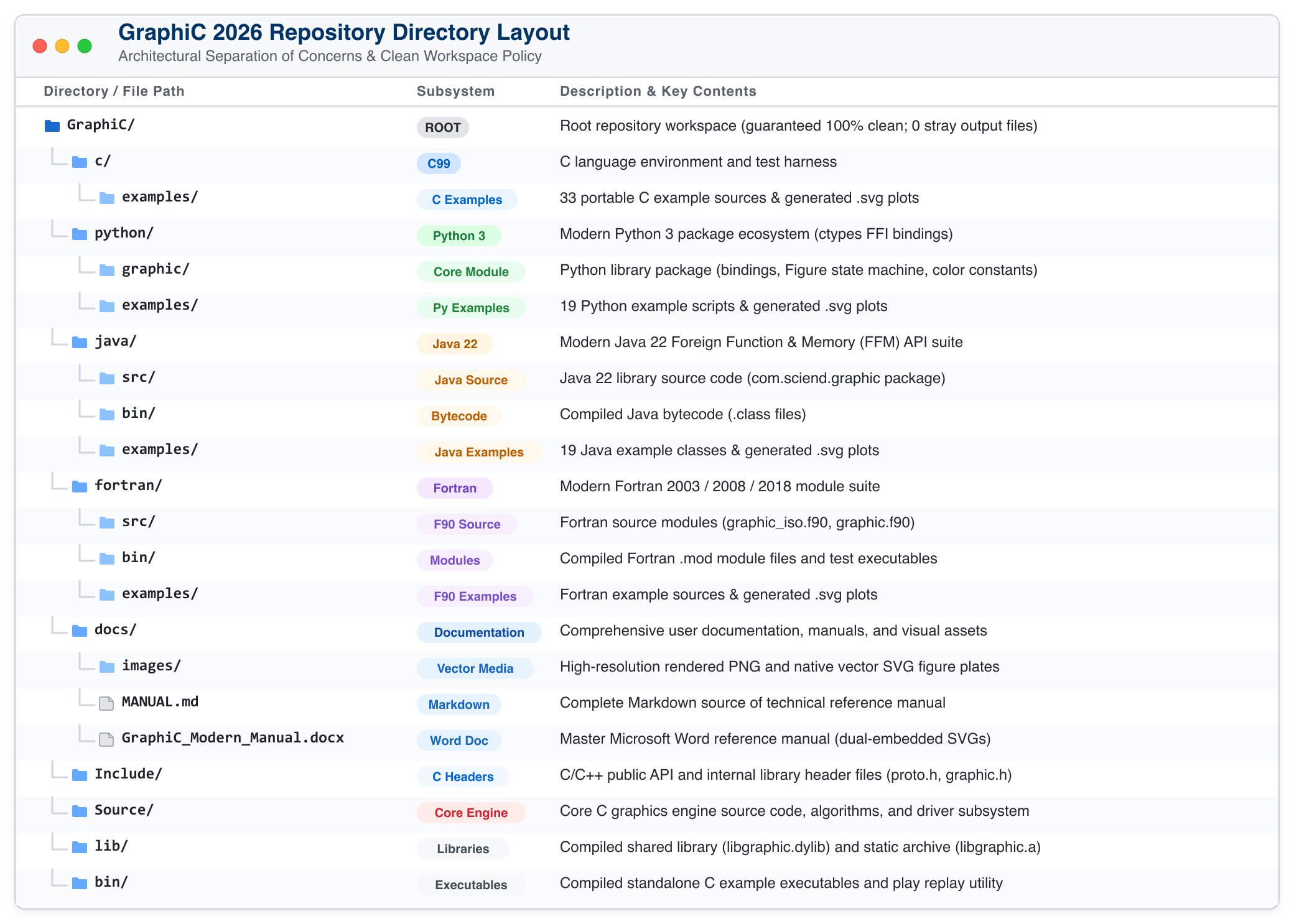
Clean Workspace Policy: - No stray
.svg,.tkf,.html, or.offfiles are ever permitted in the root repository directory. - All example executables and scripts must write their vector output files strictly inside their respective language directory (c/examples/,python/examples/, orjava/examples/). - The obsolete.OFFfile generation has been permanently disabled in the C driver.
Section 7. Compilation, Quickstart & Live Monitor Display
Building C/C++ Libraries and Examples
cd <GraphiC_Dir>

# 1. Clean build artifacts
make clean

# 2. Build libgraphic.a, libgraphic.dylib, and play utility
make all

# 3. Compile all 33 portable C example executables into bin/
make examples

# 4. Run all C examples to generate SVGs in c/examples/
make run_c_examples
Running Python 3 Examples
export PYTHONPATH=<GraphiC_Dir>/python:$PYTHONPATH

# Run individual examples
python3 python/examples/d2test.py
python3 python/examples/d3test.py
python3 python/examples/cnttest.py
python3 python/examples/smtest.py
Compiling and Running Java 22 Examples
cd <GraphiC_Dir>/java

# Compile library and examples with Java 22 FFM preview enabled
javac --enable-preview --source 22 -d bin src/main/java/com/sciend/graphic/*.java examples/*.java

# Run individual examples
java --enable-preview -cp bin examples.D2Test
java --enable-preview -cp bin examples.D3Test
java --enable-preview -cp bin examples.CntTest
java --enable-preview -cp bin examples.SmTest
Compiling and Running Fortran Examples
GraphiC provides 100% standards-compliant Fortran 2003+ modules via ISO_C_BINDING. It is fully compatible out-of-the-box with all major industry Fortran compilers including Intel oneAPI (ifx/ifort), LLVM (flang), GNU (gfortran), NAG (nagfor), and NVIDIA (nvfortran):
# Compile library, Fortran modules, and example executables
make fortran_examples

# Run all Fortran examples (generates SVGs in fortran/examples/)
make run_fortran_examples
Example modern Fortran usage:
program harmonic
  use graphic
  implicit none

  call gpc_begin(DRIVER_SVG, "fortran/examples/d2test.svg")
  call gpc_page(8.0, 6.0)
  call gpc_start(COLOR_WHITE)
  call gpc_area2d(5.5, 4.0)
  call gpc_physor(1.5, 1.2)
  call gpc_box()
  call gpc_title("Harmonic Oscillations", "Time (s)", "Amplitude (V)")
  call gpc_graf("%3.1f", 0.0, 1.0, 10.0, "%3.1f", -1.0, 0.5, 1.0)
  call gpc_color(COLOR_BLUE)
  call gpc_curve(x, y, 100, 0)
  call gpc_end()
  call gpc_stop()
end program harmonic
Running Julia Examples & Test Suite
GraphiC provides zero-overhead native Julia bindings (GraphiC.jl) using Libdl with support for both 1-line high-level plotting and classic procedural pipelines:
# Run individual examples
julia --project=julia julia/examples/highlevel.jl
julia --project=julia julia/examples/sample.jl
julia --project=julia julia/examples/d2test.jl
julia --project=julia julia/examples/d3test.jl
julia --project=julia julia/examples/bess3d.jl
julia --project=julia julia/examples/cnttest.jl
julia --project=julia julia/examples/smtest.jl
julia --project=julia julia/examples/polar.jl
julia --project=julia julia/examples/bartest.jl
julia --project=julia julia/examples/piechart.jl

# Or execute all 10 examples via Makefile:
make run_julia_examples

# Run the automated Julia unit test suite (40 assertions):
make test_julia
Example 1-line idiomatic modern Julia usage:
using GraphiC

x = range(0.0, 4π, length=120)
y = exp.(-0.25 .* x) .* sin.(x)

# 1-Line publication-quality vector plot with automatic layout and crop
p = GraphiC.plot(x, y;
    title="Damped Harmonic Oscillator",
    xlabel="Time t (s)",
    ylabel="Amplitude A(t)",
    color=:blue,
    thick=1.5,
    ltype=:solid,
    symbol=:circle,
    grid=true,
    filename="oscillator.svg"
)
Cross-Platform Deployment & Linking Guide: macOS, Linux, Windows, and fpm
GraphiC 2026 is designed as a portable, flat 64-bit C99 engine with native ISO C bindings for Modern Fortran, Python 3 CFFI/ctypes bindings, and Java 22 Foreign Function & Memory (FFM) bindings. Because it relies solely on standard POSIX/C99 system calls and the standard math library (-lm), it builds and runs natively across modern operating systems without external rendering engines, display servers, or GUI dependencies.
1. Core Principles: Static vs. Dynamic Linking
In computational physics and high-performance engineering, static linking (libgraphic.a or graphic.lib) is strongly recommended: * Zero Runtime Dependencies: The entire GraphiC vector rendering engine is compiled directly into your simulation binary. * Portable Deployment: You can copy your compiled executable across compute clusters, cloud nodes, or student laptops without configuring library search paths or encountering shared library version mismatches (“DLL Hell”). * Sub-Millisecond Execution: In-process execution eliminates inter-process communication (IPC) and file serialization overhead.
2. macOS (Apple Silicon M1/M2/M3/M4 & Intel x86_64)
-
Toolchains: Apple Clang (via Xcode Command Line Tools
xcode-select --install) and GNU Fortran (gfortranvia Homebrew). -
Static Linking (Recommended):
# C / C++ clang -O2 -IInclude my_sim.c lib/libgraphic.a -lm -o my_sim # Modern Fortran (Fortran 2003/2018) gfortran -O2 -I fortran/bin my_sim.f90 lib/libgraphic.a -lm -o my_sim -
Dynamic Linking (
libgraphic.dylib): If linking againstlibgraphic.dylib, macOS locates libraries via runtime search paths (@rpath) or theDYLD_LIBRARY_PATHenvironment variable:clang -O2 -IInclude my_sim.c -Llib -lgraphic -lm -o my_sim export DYLD_LIBRARY_PATH="$(pwd)/lib:$DYLD_LIBRARY_PATH" ./my_sim
3. Linux (x86_64 & AArch64 / ARM64)
-
Toolchains: GCC (
gcc,gfortran), LLVM/Clang, or Intel oneAPI (icx,ifx). -
Static Linking (HPC Standard):
# GCC / gfortran
gfortran -O2 -I fortran/bin my_sim.f90 lib/libgraphic.a -lm -o my_sim

# Intel oneAPI (ifx)
ifx -O2 -I fortran/bin my_sim.f90 lib/libgraphic.a -lm -o my_sim
The resulting binary is completely self-contained and ready to execute across SLURM cluster nodes, compute clouds, or containerized Docker environments.
-
Shared Library (
libgraphic.so): When using shared objects, either embed the run-time library path using-Wl,-rpath:gcc -O2 -IInclude my_sim.c -Llib -Wl,-rpath,'$ORIGIN/lib' -lgraphic -lm -o my_simor export the environment variable:
export LD_LIBRARY_PATH=/path/to/graphic/lib:$LD_LIBRARY_PATH
4. Microsoft Windows (64-bit Windows 10, 11, and Windows Server)
GraphiC supports all standard 64-bit Windows compilation toolchains:
Option A: MinGW-w64 / MSYS2 / GCC / gfortran
The standard open-source toolchain on Windows compiles GraphiC identically to Unix: * Static Linking (libgraphic.a):
```powershell
# Compile directly to a standalone Windows executable:
gfortran -O2 -I fortran/bin my_sim.f90 libgraphic.a -o my_sim.exe
```- Advantage: Produces a single, self-contained
my_sim.exethat runs on any modern Windows PC. No installers, no external DLLs, and no runtime environments required.
Option B: Microsoft Visual Studio (MSVC) & Intel oneAPI Fortran (ifx / ifort)
The industry standard in corporate aerospace, defense, and CAD engineering: * Static Library (graphic.lib):
```cmd
ifx -O2 -I fortran\bin my_sim.f90 graphic.lib -Fe:my_sim.exe
```
The plotting routines are linked directly into my_sim.exe.
Option C: Windows Dynamic Link Library (graphic.dll)
If you choose to distribute graphic.dll: * Windows locates DLLs in a strict order: 1. The application’s own directory (the folder where my_sim.exe resides). 2. The current working directory. 3. The system directories (C:\Windows\System32). 4. Directories listed in the user and system PATH environment variable. * Deployment Tip: Unlike Linux (LD_LIBRARY_PATH) or macOS (DYLD_LIBRARY_PATH), Windows does not use a library path variable. Simply place graphic.dll in the same directory as your .exe (or add its directory to PATH), and Windows loads it automatically.
5. Fortran Package Manager (fpm)
GraphiC natively supports the official Fortran Package Manager (fpm) across macOS, Linux, and Windows: * Building the Library & Modules:
```bash
fpm build
```-
Running Example Demos:
fpm run --example sample fpm run --example d2test fpm run --example d3test -
Consuming GraphiC in Your Own Project: Both Community and Professional editions are distributed as standalone source archives. Extract the archive onto your system and add the local directory path to your project’s
fpm.toml:[dependencies] graphic = { path = "../GraphiC" } # Path to extracted Community or Pro folderWhen you run
fpm build,fpmautomatically compiles GraphiC’s C99 core and Fortran modules, linkslibgraphic.a, and embeds the plotting engine directly into your program with zero external network dependencies.
6. Runtime Configuration & Environment Variables
GPC_NONINTERACTIVE=1:
By default, interactive GraphiC plots wait for a user keypress upon plot termination (endplot). When running automated batch simulations, SLURM scripts, cron jobs, background web daemons, or headless CI/CD pipelines, setexport GPC_NONINTERACTIVE=1(or$env:GPC_NONINTERACTIVE="1"on Windows PowerShell) to disable the interactive pause and immediately flush vector outputs to disk.GPC_FONTS=/path/to/fonts:
Specifies the search directory for GraphiC outline fonts (Swiss.fnt,News.fnt), stroke fonts (Simplex.fnt,Complex.fnt), and TrueType fonts (Unicode.ttf). If omitted, GraphiC searches the current working directory.
Real-Time Live Monitor Display & Early Run Abort
A major architectural advantage of GraphiC is its ability to draw graphics directly to the screen monitor as data is generated (bgnplot(mode, ...) with mode = 0 for monitor only or mode = 2 for dual monitor and file output).
Why Live Monitor Display Is Mission-Critical
In scientific computing, aerospace trajectory modeling, finite-element analysis, and laboratory data acquisition (DAQ), calculations often run for many minutes, hours, or days: 1. Interactive Data Streaming: Rather than running “blind” in batch mode and inspecting a static plot file hours later, the engineer can observe the physical state, orbital path, or voltage trace evolving point-by-point in real time. 2. Early Error Detection & Run Cancellation: If an integration step diverges, numerical instability emerges, boundary conditions are violated, or a physical sensor drops data, the anomaly is immediately visible on the monitor. The user can press Ctrl+C or click Stop to abort the run immediately, refine parameters, and restart—saving valuable time and computational resources. 3. Dual-Channel Logging: Mode 2 directs graphics to the interactive display while simultaneously logging the complete, publication-grade vector graphics file (.svg or .tkf) to disk for documentation and archival reporting.
Section 8. Complete GraphiC Procedural API Technical Reference (§8.1–§8.19)
This reference documents the complete public API of the GraphiC library reconstructed from the original C source code implementation, parameter tables, and algorithmic commentary (Source/*.c and Include/Proto.h). Each routine is specified in the clean, high-contrast format of the original printed reference manual detailing its operational level, source mapping, coordinate systems, multi-language signatures, parameter constraints, and algorithmic behavior.
Routine Level Classifications
As in the original printed GraphiC reference manual (Page L-01), routines are classified into functional operational levels: - Level 0 (Pre-Initialization): Global configuration routines invoked before bgnplot() (e.g. rotate()). - Level 1 (Basic / Primary): Foundational routines invoked immediately following session initialization (bgnplot, startplot, page, area2d, graf, curve, surmat, conmat, smdraw, polgrid, etc.). - Level 2 (Intermediate / Customization): Specialized styling, font attributes, custom tick spacing, grid controls, 3D viewing angles, legends, and statistical fitting. - Level 3 (Advanced / Low-Level & Interactive): Complex mathematical transformations, interactive crosshair digitizers, simultaneous subplot context switching, raw clipping windows, and coordinate conversion pipelines.
8.1 Initialization Routines
Covers global plotting subsystem initialization, screen monitor bindings, driver allocation, and mode configuration.
void bgnplot(char mode, char driver, char *plotfile)int mode |
0 = Monitor/Screen interactive display only; 1 = Vector file logging only (.svg / .tkf); 2 = Simultaneous live monitor display AND vector file logging (dual-channel). |
char driver |
Output driver / display target: 'S' = SVG vector graphics (default modern); 'g' = Live graphics monitor display; 't' = Text terminal; 'T' = Tektronix stream. |
char* plotfile |
Output destination filename (e.g. "plot.svg"), or "notek" to suppress file output. |
Initializes a graphics plotting session, allocates internal device state tables, and binds the output vector stream, display driver, and live screen monitor.
bgnplot() must be called prior to any other GraphiC routine (with the exception of static configuration routines like rotate()).
Multi-Language Signatures:
| C | void bgnplot(char mode, char driver, char *plotfile) |
|---|---|
| Python 3 | graphic.bgnplot(mode: int, driver: str, plotfile: str) -> None |
| Java 22 | GraphiC.bgnplot(int mode, char driver, String plotfile) |
| Fortran | call gpc_bgnplot(mode, driver, plotfile) |
| Julia | GraphiC.bgnplot(mode, driver, plotfile) |
void startplot(int bcolor)int bcolor |
Canvas background palette color index. |
Begins a new plotting canvas page and initializes background fill.
Clears the active frame, resets clipping boundaries to full canvas dimensions, resets pen state to UP at origin, and sets background color. In multi-page sessions, each startplot() constitutes an independent page frame.
Multi-Language Signatures:
| C | void startplot(int bcolor) |
|---|---|
| Python 3 | graphic.startplot(bcolor: int) -> None |
| Java 22 | GraphiC.startplot(int bcolor) |
| Fortran | call gpc_startplot(bcolor) |
| Julia | GraphiC.startplot(bcolor) |
void NewFile(char *NewName)char* NewName |
Destination filename for subsequent plots. |
Closes the current output file stream and redirects subsequent pages to NewName.
Allows generating a sequential series of separate vector graphics files from a single continuous calculation or simulation loop.
Multi-Language Signatures:
| C | void NewFile(char *NewName) |
|---|---|
| Python 3 | graphic.NewFile(NewName: str) -> None |
| Java 22 | GraphiC.NewFile(String NewName) |
| Fortran | call gpc_NewFile(NewName) |
| Julia | GraphiC.NewFile(NewName) |
8.2 Plot Termination Routines
Handles canvas page closure, vector buffer flushing, plot additions, and complete session termination.
void dateit(Uchar font)char font |
Font selector character; '0' turns date/time off. |
Enables or disables automatic date and time stamping on the current plot page.
The timestamp is printed along the top edge of the active picture using the stroke font specified by the font selector character. Passing '0' disables timestamping (default).
or '0' to disable date and time output. Enclose in single quotes.
Multi-Language Signatures:
| C | void dateit(Uchar font) |
|---|---|
| Python 3 | graphic.dateit(font: str) -> None |
| Java 22 | GraphiC.dateit(byte font) |
| Fortran | call gpc_dateit(font) |
| Julia | GraphiC.dateit(font) |
void plotadd(void)Returns GraphiC to Level 1 while keeping the current page and screen active.
Used when multiple overlapping coordinate systems or independent curve overlays must be composited onto the same physical drawing region without re-erasing the screen or writing an end-of-page trailer.
See Also: startplot, endplot
Multi-Language Signatures:
| C | void plotadd(void) |
|---|---|
| Python 3 | graphic.plotadd() -> None |
| Java 22 | GraphiC.plotadd() |
| Fortran | call gpc_plotadd() |
| Julia | GraphiC.plotadd() |
int endplot(void)Completes drawing for the current page, flushes pending polygon and polyline buffers to the output driver, and closes active vector container elements.
In interactive environments, endplot() pauses for user inspection or keypress. When GPC_NONINTERACTIVE=1 or batch driver is active, it completes immediately.
@return [int] Status code (0 for success, non-zero for abort or error).
See Also: startplot, stopplot
Multi-Language Signatures:
| C | int endplot(void) |
|---|---|
| Python 3 | graphic.endplot() -> int |
| Java 22 | GraphiC.endplot() -> int |
| Fortran | status = gpc_endplot() |
| Julia | GraphiC.endplot() |
void stopplot(void)Terminates the GraphiC session.
Flushes and closes the active file stream (e.g. final </svg> closing tag), frees dynamically allocated workspace memory (horizons, spline buffers, font tables), and resets terminal or display hardware to initial state.
See Also: bgnplot, endplot
Multi-Language Signatures:
| C | void stopplot(void) |
|---|---|
| Python 3 | graphic.stopplot() -> None |
| Java 22 | GraphiC.stopplot() |
| Fortran | call gpc_stopplot() |
| Julia | GraphiC.stopplot() |
8.3 Page and Axis Options
Defines physical sheet dimensions, active plotting viewports, curve cropping, axis offsets, borders, tick geometries, text heights, and legend positioning.
void acrop(char flag)char flag |
0 = crop curves at the edge of the plot region (default); 1 = turn off line cropping, extending vectors to the drawing page boundary. |
The GraphiC default is to crop lines and curves at the edges of the plot region (i.e. the rectangular viewport defined by the call to area2d()). To turn off this feature, call acrop(1); this automatically moves the clipping boundary to the physical edge of the drawing page, allowing vectors and curves to span across the entire sheet. Line cropping is automatically reset to the default value (acrop(0)) after each call to curve drawing routines.
Multi-Language Signatures:
| C | void acrop(char flag); |
|---|---|
| Python 3 | graphic.acrop(flag: int) -> None |
| Java 22 | GraphiC.acrop(int flag) |
| Fortran | call gpc_acrop(flag) |
| Julia | GraphiC.acrop(flag) |
void svgcrop(float margin_inches)float margin_inches |
Crop margin surrounding the drawn plot in inches. When margin_inches >= 0.0, automatic tight bounding-box cropping is enabled with the specified margin (default is 0.25 inches / 1/4 inch). When margin_inches < 0.0, cropping is disabled and the full standard drawing sheet (viewBox="0 0 8192 6266") is emitted. |
In GraphiC, all SVG output files automatically crop to the tight bounding box of the area filled by the plot (including axes, labels, numbers, ticks, curves, titles, and legends) plus a user-configurable margin. This eliminates excess white space surrounding the graphic, allowing plots to be cleanly embedded into LaTeX documents, Microsoft Word, web pages, or publication figures without requiring a separate post-processing clipping step.
When to Call: Autocrop is enabled by default with a 1/4" (0.25 inch) margin, so applications requiring standard cropping do not need to make any explicit call. When a custom margin is desired (e.g. svgcrop(0.1f) for 0.1" margin, or svgcrop(0.0f) for flush cropping), svgcrop() can be called at any point before the plot is closed with endplot() or stopplot(). Calling svgcrop() prior to bgnplot() or immediately following bgnplot() establishes the cropping margin for the current plot and all subsequent plots in the session. To completely disable cropping and preserve the traditional uncropped 8.5" x 11" landscape canvas, call svgcrop(-1.0f).
Multi-Language Signatures:
| C | void svgcrop(float margin_inches); /* alias: svg_crop */ |
|---|---|
| Python 3 | graphic.svgcrop(margin_inches: float = 0.25) -> None |
| Java 22 | GraphiC.svgcrop(float marginInches) / fig.svgcrop(marginInches) |
| Fortran | call gpc_svgcrop(margin) / call gpc_svg_crop(margin) |
| Julia | GraphiC.svgcrop(margin_inches) |
int svgopen(char *filepath);int svgpush(char *url, char *filepath);char *filepath |
Path to generated SVG or companion HTML viewer file (or NULL to auto-open current plot). |
char *url |
Destination HTTP/HTTPS POST endpoint URL receiving streamed SVG XML payload. |
Native vector viewer launcher and real-time network streaming telemetry interface. svgopen(filepath): Launches system default web browser (macOS open, Windows start, Linux xdg-open) to view interactive plot. svgpush(url, filepath): Transmits vector SVG file payload across local network or cloud dashboard via HTTP POST.
Multi-Language Signatures:
| C | int svgopen(char *filepath);int svgpush(char *url, char *filepath); |
|---|---|
| Python 3 | graphic.svgopen(filepath=None) -> intgraphic.svgpush(url=None, filepath=None) -> int |
| Java 22 | GraphiC.svgopen(String filepath);GraphiC.svgpush(String url, String filepath); |
| Fortran | call gpc_svgopen(filepath)call gpc_svgpush(url, filepath) |
| Julia | GraphiC.svgopen(filepath)GraphiC.svgpush(url, filepath) |
int svgpush(char *url, char *filepath)char *url |
Target HTTP or HTTPS destination URL (e.g. "http://localhost:8080/live" or "https://example.com/api/plot"). If url is NULL or an empty string (""), svgpush() automatically reads the destination URL from the GPC_SVG_PUSH_URL environment variable. |
char *filepath |
Path to the SVG plot file to upload. If filepath is NULL or an empty string (""), svgpush() automatically pushes the most recently rendered plot file from the active session. |
svgpush() transmits an SVG plot over the network to a remote web server, dashboard, or live monitoring service using an HTTP/HTTPS POST request with Content-Type: image/svg+xml. This routine directly modernizes and supersedes the historical 2007 tkfpush socket streaming mechanism, providing high-efficiency telemetry integration for IoT monitors (such as live water temperature tracking), automated web publishing, and compute-cluster simulations streaming progress plots directly to a researcher's web browser without manual file copying or external shell scripts. Returns 0 upon successful HTTP transmission, or a negative error code if the destination cannot be reached.
Multi-Language Signatures:
| C | int svgpush(char *url, char *filepath); /* alias: svg_push */ |
|---|---|
| Python 3 | graphic.svgpush(url: str | None = None, filepath: str | None = None) -> int |
| Java 22 | GraphiC.svgpush(String url, [String filepath]) / fig.svgpush(url) |
| Fortran | call gpc_svgpush(url, [filepath]) / call gpc_svg_push(url, [filepath]) |
| Julia | GraphiC.svgpush(url, filepath) |
void area2d(float xinch, float yinch)float xinch |
Active plotting box width. |
float yinch |
Active plotting box height. |
Establishes the physical bounding dimensions of the active 2D plotting box.
The area2d dimensions define the length of the horizontal (X) and vertical (Y) axes. Data points outside this boundary are clipped unless clipping is overridden. Must be called prior to graf(), scales(), or box().
Multi-Language Signatures:
| C | void area2d(float xinch, float yinch) |
|---|---|
| Python 3 | graphic.area2d(xinch: float, yinch: float) -> None |
| Java 22 | GraphiC.area2d(float xinch, float yinch) |
| Fortran | call gpc_area2d(xinch, yinch) |
| Julia | GraphiC.area2d(xinch, yinch) |
void physor(float xphys, float yphys)float xphys |
Horizontal origin offset from canvas left edge. |
float yphys |
Vertical origin offset from canvas bottom edge. |
Establishes the physical offset of the lower-left corner of the plot area from the bottom-left corner of the canvas page in physical inches.
Allows leaving margins for axes numerical labels, axis titles, and page headings, or positioning multiple separate subplots across a single page.
Multi-Language Signatures:
| C | void physor(float xphys, float yphys) |
|---|---|
| Python 3 | graphic.physor(xphys: float, yphys: float) -> None |
| Java 22 | GraphiC.physor(float xphys, float yphys) |
| Fortran | call gpc_physor(xphys, yphys) |
| Julia | GraphiC.physor(xphys, yphys) |
void orel(float xorel, float yorel)float xorel |
Horizontal relative displacement in inches. |
float yorel |
Vertical relative displacement in inches. |
Translates the current physical origin by relative increments dx, dy.
Useful for stepping through regular grid arrangements of subplots in multi-panel figures without recalculating absolute page coordinates.
Multi-Language Signatures:
| C | void orel(float xorel, float yorel) |
|---|---|
| Python 3 | graphic.orel(xorel: float, yorel: float) -> None |
| Java 22 | GraphiC.orel(float xorel, float yorel) |
| Fortran | call gpc_orel(xorel, yorel) |
| Julia | GraphiC.orel(xorel, yorel) |
void box(void)Draws a rectangular border enclosing the active 2D plotting area defined by area2d().
Uses current line style, thickness, and color. Must be called after area2d() and physor().
See Also: area2d, pbox
Multi-Language Signatures:
| C | void box(void) |
|---|---|
| Python 3 | graphic.box() -> None |
| Java 22 | GraphiC.box() |
| Fortran | call gpc_box() |
| Julia | GraphiC.box() |
void rotate(char isrot)char isrot |
0 for landscape, 1 for portrait. |
Configures orientation of the physical drawing coordinate system.
0 = Upright / Landscape orientation. 1 = Rotated 90 degrees / Portrait orientation.
Must be called before bgnplot() or startplot().
Multi-Language Signatures:
| C | void rotate(char isrot) |
|---|---|
| Python 3 | graphic.rotate(isrot: int) -> None |
| Java 22 | GraphiC.rotate(char isrot) |
| Fortran | call gpc_rotate(isrot) |
| Julia | GraphiC.rotate(isrot) |
void axesoff(int noaxes)int noaxes |
Bitmask controlling axes visibility: |
Selectively disables the rendering of axis lines and/or numeric labels.
Either scales() or graf() must still be called so that GraphiC can calculate data-to-pixel transformation matrices.
Bit 0 (0x01, AXESOFF): Turn all axes and labels off. Bit 1 (0x02, XAXIS): Suppress X-axis line. Bit 2 (0x04, YAXIS): Suppress Y-axis line. Bit 3 (0x08, XLAB): Suppress X-axis numerical labels. Bit 4 (0x10, YLAB): Suppress Y-axis numerical labels. Value 0 (AXESON): All axes and labels visible (default).
Multi-Language Signatures:
| C | void axesoff(int noaxes) |
|---|---|
| Python 3 | graphic.axesoff(noaxes: int) -> None |
| Java 22 | GraphiC.axesoff(int noaxes) |
| Fortran | call gpc_axesoff(noaxes) |
| Julia | GraphiC.axesoff(noaxes) |
void frame(int frameon, int ftick)int frameon |
1 = draw bounding frame around axis area; 0 = off (default). |
int ftick |
1 = add tick marks along the entire perimeter frame; 0 = ticks on axes only. |
Enables an enclosing rectangular frame around the 2D plot area.
Must be called before any axis-generating routines (graf or scales).
Multi-Language Signatures:
| C | void frame(int frameon, int ftick) |
|---|---|
| Python 3 | graphic.frame(frameon: int, ftick: int) -> None |
| Java 22 | GraphiC.frame(int frameon, int ftick) |
| Fortran | call gpc_frame(frameon, ftick) |
| Julia | GraphiC.frame(frameon, ftick) |
void cross(int iscross)int iscross |
1 = draw crossed axes passing through (0, 0); 0 = draw axes along left/bottom boundaries (default). |
Selects between boxed perimeter axes and center-crossed axes.
Multi-Language Signatures:
| C | void cross(int iscross) |
|---|---|
| Python 3 | graphic.cross(iscross: int) -> None |
| Java 22 | GraphiC.cross(int iscross) |
| Fortran | call gpc_cross(iscross) |
| Julia | GraphiC.cross(iscross) |
void CrossAt(float x, float y)float x |
X data coordinate of the vertical axis intersection. |
float y |
Y data coordinate of the horizontal axis intersection. |
Sets the intersection coordinates (x, y in data units) where axes intersect.
Rather than binding axes to the left and bottom perimeter of the plot box, CrossAt allows axes to cross at arbitrary values such as (0, 0) for Cartesian graphs. Must be called before graf().
Multi-Language Signatures:
| C | void CrossAt(float x, float y) |
|---|---|
| Python 3 | graphic.CrossAt(x: float, y: float) -> None |
| Java 22 | GraphiC.CrossAt(float x, float y) |
| Fortran | call gpc_CrossAt(x, y) |
| Julia | GraphiC.CrossAt(x, y) |
void pgshift(float xshift, float yshift)float xshift |
Horizontal translation in inches (or cm). |
float yshift |
Vertical translation in inches (or cm). |
Shifts the position of the entire plot by xshift and yshift inches.
If rotate(1) was invoked, shifts are interpreted relative to the rotated screen coordinate frame.
Multi-Language Signatures:
| C | void pgshift(float xshift, float yshift) |
|---|---|
| Python 3 | graphic.pgshift(xshift: float, yshift: float) -> None |
| Java 22 | GraphiC.pgshift(float xshift, float yshift) |
| Fortran | call gpc_pgshift(xshift, yshift) |
| Julia | GraphiC.pgshift(xshift, yshift) |
void axnamht(float inch);void tickht(float height);void titlht(float inch);void numht(float inch);float inch |
Desired size in physical inches (or cm if metricunits(1)). |
Global dimensioning routines for axis typography and tick marks:
axnamht(inch): Sets height of axis title labels (xname, yname). Default 0.15 in. tickht(height): Sets physical height of tick marks. Default 0.08 in. titlht(inch): Sets height of plot title string (heading). Default 0.20 in. numht(inch): Sets height of numeric values along axes. Default 0.10 in.
Multi-Language Signatures:
| C | void axnamht(float inch);void tickht(float height);void titlht(float inch);void numht(float inch); |
|---|---|
| Python 3 | graphic.axnamht(inch: float) -> Nonegraphic.tickht(height: float) -> Nonegraphic.titlht(inch: float) -> Nonegraphic.numht(inch: float) -> None |
| Java 22 | GraphiC.axnamht(float inch);GraphiC.tickht(float height);GraphiC.titlht(float inch);GraphiC.numht(float inch); |
| Fortran | call gpc_axnamht(inch)call gpc_tickht(height)call gpc_titlht(inch)call gpc_numht(inch) |
| Julia | GraphiC.axnamht(inch)GraphiC.tickht(height)GraphiC.titlht(inch)GraphiC.numht(inch) |
void upright(char uplab)char / int uplab |
1 = draw Y-axis numeric labels upright (horizontal); |
Controls orientation of Y-axis numeric labels.
0 = rotate labels 90 degrees parallel to the Y-axis (default).
Multi-Language Signatures:
| C | void upright(char uplab) |
|---|---|
| Python 3 | graphic.upright(uplab: int) -> None |
| Java 22 | GraphiC.upright(byte uplab) |
| Fortran | call gpc_upright(uplab) |
| Julia | GraphiC.upright(uplab) |
void legpos(int entries, float xleg, float yleg, int border);void legend(int marker, char *string, int style, float strhgt, int scolor);int entries |
Maximum number of entries in legend box. |
int border |
Border color (-1 for no border outline). |
int marker |
Symbol marker index (0 for line only). |
char* string |
Descriptive legend text. |
int style |
Line pattern style (0-8). |
float strhgt |
Character font height in inches. |
int scolor |
Color index. |
Publication legend box builder.
legpos(entries, xleg, yleg, border): Establishes legend box position (xleg, yleg) in physical inches, allocates vertical spacing for entries items, and specifies border outline. legend(marker, string, style, strhgt, scolor): Adds an annotated entry containing a sample line segment of style and color, centered marker symbol, and descriptive text label.
Multi-Language Signatures:
| C | void legpos(int entries, float xleg, float yleg, int border);void legend(int marker, char *string, int style, float strhgt, int scolor); |
|---|---|
| Python 3 | graphic.legpos(entries, xleg, yleg, border)graphic.legend(marker, string, style, strhgt, scolor) |
| Java 22 | GraphiC.legpos(int entries, float xleg, float yleg, int border);GraphiC.legend(...); |
| Fortran | call gpc_legpos(entries, xleg, yleg, border)call gpc_legend(...) |
| Julia | GraphiC.legpos(entries, xleg, yleg, border)GraphiC.legend(marker, string, style, strhgt, scolor) |
void grid(int gridon);void fgrid(int fon, int ndiv);int gridon |
1 = major grid on, 0 = major grid off. |
int fon |
Line pattern for fine grid (-1 for fine ticks only, 0-8 for styles). |
int ndiv |
Number of sub-divisions per major grid division. |
Configures major and fine background grid lines across the 2D plotting box.
grid(gridon): If gridon=1, draws dotted grid lines aligned with major tick marks. fgrid(fon, ndiv): Subdivides each major interval into ndiv sub-grid lines using line style fon. Must be called before graf() or scales().
Multi-Language Signatures:
| C | void grid(int gridon);void fgrid(int fon, int ndiv); |
|---|---|
| Python 3 | graphic.grid(gridon: int)graphic.fgrid(fon: int, ndiv: int) |
| Java 22 | GraphiC.grid(int gridon);GraphiC.fgrid(int fon, int ndiv); |
| Fortran | call gpc_grid(gridon)call gpc_fgrid(fon, ndiv) |
| Julia | GraphiC.grid(gridon)GraphiC.fgrid(fon, ndiv) |
void tickout(int is_out);void tickht(float height);int is_out |
1 = point outward, 0 = point inward. |
float height |
Tick height in inches. |
Controls axis tick mark appearance.
tickout(1): Reverses default inward-pointing ticks to point outward from the plot box. tickht(height): Sets physical length of tick marks in inches (default ~ 0.08 in). Must be called before graf().
Multi-Language Signatures:
| C | void tickout(int is_out);void tickht(float height); |
|---|---|
| Python 3 | graphic.tickout(is_out: int)graphic.tickht(height: float) |
| Java 22 | GraphiC.tickout(int is_out);GraphiC.tickht(float height); |
| Fortran | call gpc_tickout(is_out)call gpc_tickht(height) |
| Julia | GraphiC.tickout(is_out)GraphiC.tickht(height) |
void xfgrid(int fon, int nx);void yfgrid(int fon, int ny);int fon |
Line style (1-9) for fine grid lines (uses dashf patterns). Set 0 for no subdivisions (default). |
int nx |
Desired number of tick subdivisions between major grid lines (e.g. nx=9 creates 10 sub-intervals). |
Configures fine grid subdivisions intersecting the X or Y axis.
xfgrid(): Subdivides intervals between main X grid lines. yfgrid(): Subdivides intervals between main Y grid lines.
Multi-Language Signatures:
| C | void xfgrid(int fon, int nx);void yfgrid(int fon, int ny); |
|---|---|
| Python 3 | graphic.xfgrid(fon: int, nx: int) -> Nonegraphic.yfgrid(fon: int, ny: int) -> None |
| Java 22 | GraphiC.xfgrid(int fon, int nx);GraphiC.yfgrid(int fon, int ny); |
| Fortran | call gpc_xfgrid(fon, nx)call gpc_yfgrid(fon, ny) |
| Julia | GraphiC.xfgrid(fon, nx)GraphiC.yfgrid(fon, ny) |
void xlab(char on_off, char **strlab);void ylab(char on_off, char **strlab);char / int on_off |
1 = enable custom string labels; 0 = disable and use numeric format (default). |
char** strlab |
Null-terminated array of string pointers corresponding to tick positions. |
Supplies custom text labels (e.g. month names "Jan", "Feb", categories) for axis tick marks.
When enabled, GraphiC spaces the supplied string labels uniformly along the axis.
Multi-Language Signatures:
| C | void xlab(char on_off, char **strlab);void ylab(char on_off, char **strlab); |
|---|---|
| Python 3 | graphic.xlab(on_off: int, strlab: list[str]) -> Nonegraphic.ylab(on_off: int, strlab: list[str]) -> None |
| Java 22 | GraphiC.xlab(byte on_off, String[] strlab);GraphiC.ylab(byte on_off, String[] strlab); |
| Fortran | call gpc_xlab(on_off, strlab)call gpc_ylab(on_off, strlab) |
| Julia | GraphiC.xlab(on_off, strlab)GraphiC.ylab(on_off, strlab) |
void xname(char *xlabel);void yname(char *ylabel);void heading(char *title);char* xlabel |
Label string for horizontal X-axis. |
char* ylabel |
Label string for vertical Y-axis. |
char* title |
Main heading string centered above plot. |
Sets descriptive title strings for axes and the overall plot heading.
Labels are centered along their respective axes. In modern GraphiC, strings support full formatting escape codes for superscripts, subscripts, Greek characters, and font switching. Must be called before graf() or scales().
Multi-Language Signatures:
| C | void xname(char *xlabel);void yname(char *ylabel);void heading(char *title); |
|---|---|
| Python 3 | graphic.xname(xlabel: str)graphic.yname(ylabel: str)graphic.heading(title: str) |
| Java 22 | GraphiC.xname(String xlabel);GraphiC.yname(String ylabel);GraphiC.heading(String title); |
| Fortran | call gpc_xname(xlab)call gpc_yname(ylab)call gpc_heading(top)call gpc_title(top, xlab, ylab) |
| Julia | GraphiC.xname(xlabel)GraphiC.yname(ylabel)GraphiC.heading(title) |
8.4 Simultaneous Plots
Manages independent simultaneous subplots on a single page, context switching, and multi-threaded independent viewports.
void simuplot(int numplots)int numplots |
Total number of simultaneous subplots; 0 finalizes simultaneous mode. |
Enables simultaneous plotting on multiple independent axes systems.
Allows concurrent rendering of multiple physical perspectives or simulation states within the same overall calculation loop. Subplots are referenced by zero-based index via context(). Calling simuplot(0) terminates simultaneous plotting mode and consolidates all sub-streams into the final output.
Multi-Language Signatures:
| C | void simuplot(int numplots) |
|---|---|
| Python 3 | graphic.simuplot(numplots: int) -> None |
| Java 22 | GraphiC.simuplot(int numplots) |
| Fortran | call gpc_simuplot(numplots) |
| Julia | GraphiC.simuplot(numplots) |
void context(int plot_number)int plot_number |
The active subplot context index. |
Switches the active plotting context to subplot plot_number.
Directs subsequent GraphiC calls (axes, curves, labels, titles) to the coordinate frame, viewport bounds, and scaling factors of the specified subplot. Numbers run consecutively from 0 to (numplots - 1).
Multi-Language Signatures:
| C | void context(int plot_number) |
|---|---|
| Python 3 | graphic.context(plot_number: int) -> None |
| Java 22 | GraphiC.context(int plot_number) |
| Fortran | call gpc_context(plot_number) |
| Julia | GraphiC.context(plot_number) |
void plotabsolute(int set_flag)int set_flag |
1 = absolute positioning, 0 = relative positioning. |
Sets coordinate origin mode for compound multi-plot layouts.
When enabled (set_flag = 1), origin shifts performed by physor() or orel() are referenced to the absolute physical page boundary rather than the current subplot boundary.
Multi-Language Signatures:
| C | void plotabsolute(int set_flag) |
|---|---|
| Python 3 | graphic.plotabsolute(set_flag: int) -> None |
| Java 22 | GraphiC.plotabsolute(int set_flag) |
| Fortran | call gpc_plotabsolute(set_flag) |
| Julia | GraphiC.plotabsolute(set_flag) |
8.5 2-D Axes Routines
Calibrates linear and logarithmic axes, computes optimum round tick intervals, renders data curves, error bars, and bar charts.
void graf(char *xformat, float xori, float xste, float xma, char *yformat, float yori, float yste, float yma)char* xformat |
Format string for X-axis numbers ("%g" or "" for no labels). |
float xori |
Starting X value at left axis boundary. |
float xste |
Major step spacing between X ticks. |
float xma |
Ending X value at right axis boundary. |
char* yformat |
Format string for Y-axis numbers. |
float yori |
Starting Y value at bottom axis boundary. |
float yste |
Major step spacing between Y ticks. |
float yma |
Ending Y value at top axis boundary. |
Establishes mathematical user coordinate mapping and draws calibrated 2D axes.
Calculates coordinate transformation matrix converting data values into physical inches and pixel coordinates. Draws tick marks and formatted numerical labels along the X and Y axes according to the provided C printf format specifications.
Multi-Language Signatures:
| C | void graf(char *xformat, float xori, float xste, float xma, char *yformat, float yori, float yste, float yma) |
|---|---|
| Python 3 | graphic.graf(xformat: str, xori: float, xste: float, xma: float, yformat: str, yori: float, yste: float, yma: float) -> None |
| Java 22 | GraphiC.graf(String xformat, float xori, float xste, float xma, String yformat, float yori, float yste, float yma) |
| Fortran | call gpc_graf(xformat, xori, xste, xma, yformat, yori, yste, yma) |
| Julia | GraphiC.graf(xformat, xori, xste, xma, yformat, yori, yste, yma) |
void scales(int nxdiv, int nydiv, float *x, float *y, int npts)int nxdiv |
Approximate desired number of X divisions (e.g. 5 to 10). |
int nydiv |
Approximate desired number of Y divisions (e.g. 5 to 10). |
float* x |
Input array of X data points. |
float* y |
Input array of Y data points. |
int npts |
Number of points in arrays. |
Automatically inspects data arrays x and y, calculates aesthetically rounded minimum, maximum, and tick step bounds, and invokes graf() automatically.
Multi-Language Signatures:
| C | void scales(int nxdiv, int nydiv, float *x, float *y, int npts) |
|---|---|
| Python 3 | graphic.scales(nxdiv: int, nydiv: int, x: list[float], y: list[float], npts: int) -> None |
| Java 22 | GraphiC.scales(int nxdiv, int nydiv, float[] x, float[] y, int npts) |
| Fortran | call gpc_scales(nxdiv, nydiv, x, y, npts) |
| Julia | GraphiC.scales(nxdiv, nydiv, x, y, npts) |
void xlog(float xorig, float xmax, char *format, float yorig, float ystep, float ymax);void ylog(char *format, float xorig, float xstep, float xmax, float yorig, float ymax);void loglog(float xorig, float xmax, float yorig, float ymax);float xorig |
Minimum decade value ($> 0.0$, e.g. 0.01, 1.0). |
float xmax |
Maximum decade value ($> xorig$, e.g. 1000.0). |
float yorig |
Minimum Y value. |
float ymax |
Maximum Y value. |
Calibrates logarithmic coordinate axes.
xlog(): Logarithmic X-axis, linear Y-axis (semi-log). ylog(): Linear X-axis, logarithmic Y-axis (semi-log). loglog(): Logarithmic X-axis and Logarithmic Y-axis (log-log).
Decades are labeled with scientific powers of 10 ($10^{-2}, 10^{-1}, 10^0, 10^1$). Intermediate tick marks (2, 3, 4, 5, 6, 7, 8, 9) are placed automatically.
Multi-Language Signatures:
| C | void xlog(float xorig, float xmax, char *format, float yorig, float ystep, float ymax);void ylog(char *format, float xorig, float xstep, float xmax, float yorig, float ymax);void loglog(float xorig, float xmax, float yorig, float ymax); |
|---|---|
| Python 3 | graphic.xlog(...)graphic.ylog(...)graphic.loglog(...) |
| Java 22 | GraphiC.xlog(...);GraphiC.ylog(...);GraphiC.loglog(...); |
| Fortran | call gpc_xlog(...)call gpc_ylog(...)call gpc_loglog(...) |
| Julia | GraphiC.xlog(xorig, xmax, format, yorig, ystep, ymax)GraphiC.ylog(format, xorig, xstep, xmax, yorig, ymax)GraphiC.loglog(xorig, xmax, yorig, ymax) |
void lglgscle(float *x, float *y, int npts)float* x |
Array of positive non-zero X data points. |
float* y |
Array of positive non-zero Y data points. |
int npts |
Number of points in arrays. |
Scans arrays x and y, calculates min and max values, and rounds outwards to integer powers of 10 to calibrate a log-log coordinate grid.
Multi-Language Signatures:
| C | void lglgscle(float *x, float *y, int npts) |
|---|---|
| Python 3 | graphic.lglgscle(x: list[float], y: list[float], npts: int) -> None |
| Java 22 | GraphiC.lglgscle(float[] x, float[] y, int npts) |
| Fortran | call gpc_lglgscle(x, y, npts) |
| Julia | GraphiC.lglgscle(x, y, npts) |
void curve(float *x, float *y, int npts, int sym)float* x |
Array of horizontal coordinates. |
float* y |
Array of vertical coordinates. |
int npts |
Total number of points. |
int sym |
Symbol interval: 0 = line only; > 0 = line + symbols; < 0 = symbols only. |
Plots a 2D data series connecting data coordinates (x[i], y[i]).
Transforms data coordinates through the active calibration matrix into physical drawing commands. Automatically clips polyline segments at the area2d boundary.
sym = 0 : Draw connected line only. sym > 0 : Draw line and place marker symbol every sym points. sym < 0 : Draw marker symbol ONLY (scatter plot) every |sym| points.
Multi-Language Signatures:
| C | void curve(float *x, float *y, int npts, int sym) |
|---|---|
| Python 3 | graphic.curve(x: list[float], y: list[float], npts: int, sym: int) -> None |
| Java 22 | GraphiC.curve(float[] x, float[] y, int npts, int sym) |
| Fortran | call gpc_curve(x, y, npts, sym) |
| Julia | GraphiC.curve(x, y, npts, sym) |
void curvfill(float *x, float *y, int npts, float *x1, float *y1, int npts1, int pcolor, int curv)float* x |
X data vector for the first bounding curve. |
float* y |
Y data vector for the first bounding curve. |
int npts |
Number of points in the first curve. |
float* x1 |
X data vector for the second bounding curve. |
float* y1 |
Y data vector for the second bounding curve. |
int npts1 |
Number of points in the second curve. |
int pcolor |
Fill color index or cross-hatch pattern code. |
int curv |
1 = draw curve boundary outlines in active color; 0 = fill region only without drawing outlines. |
Fills the area between curve (x, y) and curve (x1, y1).
If the two curves do not share identical endpoints, GraphiC connects the extremities to form a closed polygon boundary before applying the fill pattern.
Multi-Language Signatures:
| C | void curvfill(float *x, float *y, int npts, float *x1, float *y1, int npts1, int pcolor, int curv) |
|---|---|
| Python 3 | graphic.curvfill(x: list[float], y: list[float], npts: int, x1: list[float], y1: list[float], npts1: int, pcolor: int, curv: int) -> None |
| Java 22 | GraphiC.curvfill(float[] x, float[] y, int npts, float[] x1, float[] y1, int npts1, int pcolor, int curv) |
| Fortran | call gpc_curvfill(x, y, npts, x1, y1, npts1, pcolor, curv) |
| Julia | GraphiC.curvfill(x, y, npts, x1, y1, npts1, pcolor, curv) |
void errorbar(float x, float xmin, float xmax, float y, float ymin, float ymax)float x |
Central X data point. |
float xmin |
Lower X bound (set equal to x to omit horizontal error bar). |
float xmax |
Upper X bound. |
float y |
Central Y data point. |
float ymin |
Lower Y bound (set equal to y to omit vertical error bar). |
float ymax |
Upper Y bound. |
Draws error bars centered at (x, y) with horizontal range [xmin, xmax] and vertical range [ymin, ymax]. End tick bars are drawn automatically.
Multi-Language Signatures:
| C | void errorbar(float x, float xmin, float xmax, float y, float ymin, float ymax) |
|---|---|
| Python 3 | graphic.errorbar(x: float, xmin: float, xmax: float, y: float, ymin: float, ymax: float) -> None |
| Java 22 | GraphiC.errorbar(float x, float xmin, float xmax, float y, float ymin, float ymax) |
| Fortran | call gpc_errorbar(x, xmin, xmax, y, ymin, ymax) |
| Julia | GraphiC.errorbar(x, xmin, xmax, y, ymin, ymax) |
void bar(int nxdiv, float *x, float *y, int npts, float bwid, int mode, int *car, int *tpe);int nxdiv |
Number of bar groups along the X axis. |
float* x |
Bar center coordinates. |
float* y |
Bar height values. |
int npts |
Total number of data values. |
float bwid |
Bar physical width in inches (e.g. 0.35 in). |
int mode |
Stacking mode (0 = side-by-side, 1 = stacked). |
int* car |
Array of color indices for each bar segment. |
int* tpe |
Array of hatch fill patterns (0-15) for each bar segment. |
Renders statistical column or bar charts with pattern hatching and color fills.
Renders grouped or segmented bars. Supports custom widths, side-by-side comparisons, and distinct hatch fills per category.
Multi-Language Signatures:
| C | void bar(int nxdiv, float *x, float *y, int npts, float bwid, int mode, int *car, int *tpe); |
|---|---|
| Python 3 | graphic.bar(nxdiv, x, y, npts, bwid, mode, car, tpe) |
| Java 22 | GraphiC.bar(int nxdiv, float[] x, float[] y, int npts, float bwid, int mode, int[] car, int[] tpe); |
| Fortran | call gpc_bar(nxdiv, x, y, npts, bwid, mode, car, tpe) |
| Julia | GraphiC.bar(nxdiv, x, y, npts, bwid, mode, car, tpe) |
void barchart(int nbars, float *xarray, float *yarray, int npts, float width, int *carray, int *typearray)int nbars |
Number of bar positions along the X-axis. |
float* xarray |
Array of bar center positions. |
float* yarray |
Array of bar heights. |
int npts |
Total dimension of x and y arrays. |
float width |
Bar width expressed as a fraction of the X interval (1.0 = adjacent touching bars). |
int* carray |
Array of color or hatch pattern indices for bars. |
int* typearray |
Array defining bar arrangement: |
Renders categorized bar charts with custom bar widths and individual colors.
0 = Standard individual bars. 1 = Stacked bars for repeated X positions. 2 = Grouped side-by-side bars for repeated X positions.
Multi-Language Signatures:
| C | void barchart(int nbars, float *xarray, float *yarray, int npts, float width, int *carray, int *typearray) |
|---|---|
| Python 3 | graphic.barchart(nbars: int, xarray: list[float], yarray: list[float], npts: int, width: float, carray: list[int], typearray: list[int]) -> None |
| Java 22 | GraphiC.barchart(int nbars, float[] xarray, float[] yarray, int npts, float width, int[] carray, int[] typearray) |
| Fortran | call gpc_barchart(nbars, xarray, yarray, npts, width, carray, typearray) |
| Julia | GraphiC.barchart(nbars, xarray, yarray, npts, width, carray, typearray) |
void histogram(float *x, float *y, int npts, int type, int *colors)float* x |
Array of bin boundary values. |
float* y |
Array of bin frequency counts. |
int npts |
Number of bins. |
int type |
Histogram style (0 = stepped line profile, 1 = filled vertical columns). |
int* colors |
Array of color indices for bins. |
Plots a statistical histogram given bin boundaries and frequency counts.
Multi-Language Signatures:
| C | void histogram(float *x, float *y, int npts, int type, int *colors) |
|---|---|
| Python 3 | graphic.histogram(x: list[float], y: list[float], npts: int, type: int, colors: list[int]) -> None |
| Java 22 | GraphiC.histogram(float[] x, float[] y, int npts, int type, int[] colors) |
| Fortran | call gpc_histogram(x, y, npts, type, colors) |
| Julia | GraphiC.histogram(x, y, npts, type, colors) |
void scatplot(char dot)char / int dot |
1 = enable dot-only scatter mode; 0 = normal line drawing (default). |
Configures scatter plot marker mode for curve().
When dot=1, passing sym=0 to curve() draws an individual pixel dot at each data point without interconnecting line segments. Passing sym=-1 draws selected glyph symbols at every point without connecting lines.
Multi-Language Signatures:
| C | void scatplot(char dot) |
|---|---|
| Python 3 | graphic.scatplot(dot: int) -> None |
| Java 22 | GraphiC.scatplot(byte dot) |
| Fortran | call gpc_scatplot(dot) |
| Julia | GraphiC.scatplot(dot) |
void gpc_scatter(float *x, float *y, float *z, int dim, float minv, float maxv, int symnum, float symheight, int colormap_id);float *x, *y |
Arrays of Cartesian x and y data coordinates. |
float *z |
Array of scalar values determining continuous point-by-point color shading. |
int dim |
Number of data points. |
float minv, maxv |
Scalar data limits mapped to the colormap extrema. |
int symnum |
Marker symbol index (0 = point, 1 = open circle, 2 = cross, 3 = plus, etc.). |
float symheight |
Physical height of marker symbols in page units (inches). |
int colormap_id |
Scientific colormap identifier (GPC_COLORMAP_VIRIDIS through TURBO). |
Renders 2D scatter points with continuous point-by-point colormap shading based on scalar coordinate z without polyline connection artifacts.
Multi-Language Signatures:
| C | void gpc_scatter(float *x, float *y, float *z, int dim, float minv, float maxv, int symnum, float symheight, int colormap_id); |
|---|---|
| Python 3 | graphic.scatter(x, y, z, minv, maxv, symnum, symheight, colormap_id)fig.scatter(...) |
| Java 22 | GraphiC.scatter(x, y, z, minv, maxv, symnum, symheight, colormap_id);fig.scatter(...); |
| Fortran | call gpc_scatter(x, y, z, minv, maxv, symnum, symheight, colormap_id) |
| Julia | GraphiC.gpc_scatter(x, y, z, dim, minv, maxv, symnum, symheight, colormap_id) |
void ColorKeyGradient(float minv, float maxv, int colormap_id, float legllx, float leglly, float legurx, float legury, int nticks, char *format, char fontc, float height, int angle);float minv, maxv |
Numerical data limits mapped to the color gradient extremes. |
int colormap_id |
Colormap identifier (0...6 or GPC_COLORMAP_*). |
float legllx, leglly |
Lower-left corner coordinates of color bar rectangle in inches. |
float legurx, legury |
Upper-right corner coordinates of color bar rectangle in inches. |
int nticks |
Number of numerical calibration ticks along color bar. |
char *format |
C-style sprintf format string for tick labels (e.g. "%4.2f"). |
char fontc |
Font character code for tick labels ('S' = Swiss, 'A' = Arial, etc.). |
float height |
Height of tick label characters in inches. |
int angle |
Orientation of color key and labels in degrees (0 = horizontal, 90 = vertical). |
Renders continuous linear vector gradient color bar with numerical calibration ticks, border framing, and publication typography.
Multi-Language Signatures:
| C | void ColorKeyGradient(float minv, float maxv, int colormap_id, float legllx, float leglly, float legurx, float legury, int nticks, char *format, char fontc, float height, int angle); |
|---|---|
| Python 3 | graphic.colorkey_gradient(minv, maxv, colormap_id, legllx, leglly, legurx, legury, nticks, format, fontc, height, angle) |
| Java 22 | GraphiC.colorKeyGradient(minv, maxv, colormap_id, legllx, leglly, legurx, legury, nticks, format, fontc, height, angle); |
| Fortran | call gpc_colorkey_gradient(minv, maxv, colormap_id, legllx, leglly, legurx, legury, nticks, format, fontc, height, angle) |
| Julia | GraphiC.ColorKeyGradient(minv, maxv, colormap_id, legllx, leglly, legurx, legury, nticks, format, fontc, height, angle) |
8.6 Smith Charts
Generates transmission line impedance Smith charts, constant-VSWR circles, normalized resistance/reactance arcs, and electrical wavelength translations.
void smdraw(Uchar lcolor)Uchar lcolor |
Grid line palette color index. |
Draws the complete Smith impedance/admittance chart coordinate system.
Renders constant-resistance circles ($R/Z_0 = 0, 0.2, 0.5, 1.0, 2.0, 5.0$), constant-reactance arcs ($\pm j X/Z_0$), outer unit circumference ($|\Gamma| = 1.0$), and reflection coefficient angle scales in physical vector lines.
Multi-Language Signatures:
| C | void smdraw(Uchar lcolor) |
|---|---|
| Python 3 | graphic.smdraw(lcolor: int) -> None |
| Java 22 | GraphiC.smdraw(byte lcolor) |
| Fortran | call gpc_smdraw(lcolor) |
| Julia | GraphiC.smdraw(lcolor) |
void plotrx(float r, float x);void plotrho(float rho, float theta);void smove(float dell);float r |
Normalized resistance R / Z₀ (r ≥ 0). |
float x |
Normalized reactance X / Z₀. |
float rho |
Reflection coefficient magnitude |Γ| (0.0 ≤ ρ ≤ 1.0). |
float theta |
Reflection coefficient phase angle θ in radians. |
float dell |
Electrical length along transmission line in wavelengths (positive toward load). |
Renders impedance or reflection coefficient data onto the active Smith chart.
plotrx(r, x): Plots a normalized impedance point Z = r + j x.
plotrho(rho, theta): Plots a complex reflection coefficient point Γ = |ρ| e^(jθ) (where |ρ| ≤ 1.0).
smove(dell): Draws an arc of constant reflection coefficient |Γ| through an electrical distance dell (in wavelengths).
Multi-Language Signatures:
| C | void plotrx(float r, float x);void plotrho(float rho, float theta);void smove(float dell); |
|---|---|
| Python 3 | graphic.plotrx(r, x)graphic.plotrho(rho, theta)graphic.smove(dell) |
| Java 22 | GraphiC.plotrx(float r, float x);GraphiC.plotrho(float rho, float theta);GraphiC.smove(float dell); |
| Fortran | call gpc_plotrx(r, x)call gpc_plotrho(rho, theta)call gpc_smove(dell) |
| Julia | GraphiC.plotrx(r, x)GraphiC.plotrho(rho, theta)GraphiC.smove(dell) |
void smove(float dell)float dell |
Distance in wavelengths along the line. |
Steps a distance dell along a uniform transmission line toward the generator or load.
Multi-Language Signatures:
| C | void smove(float dell) |
|---|---|
| Python 3 | graphic.smove(dell: float) -> None |
| Java 22 | GraphiC.smove(float dell) |
| Fortran | call gpc_smove(dell) |
| Julia | GraphiC.smove(dell) |
void smithcir(float u, float v, float radius)float u |
Real coordinate of circle center. |
float v |
Imaginary coordinate of circle center. |
float radius |
Radius in reflection coefficient units. |
Draws a circle centered at (u, v) with specified radius on the active Smith chart.
Multi-Language Signatures:
| C | void smithcir(float u, float v, float radius) |
|---|---|
| Python 3 | graphic.smithcir(u: float, v: float, radius: float) -> None |
| Java 22 | GraphiC.smithcir(float u, float v, float radius) |
| Fortran | call gpc_smithcir(u, v, radius) |
| Julia | GraphiC.smithcir(u, v, radius) |
8.7 Polar Plots
Draws circular polar grids, radial decibel/linear scales, polar data curves, and angular sectors.
void polgrid(float rmax, float rmin, int mode, char *larray[], int dim, int ntheta, int col);void polcurve(float *r, float *theta, unsigned int dim, int sym);int ntheta |
Number of angular division rays (e.g. 12 for 30-deg rays, 24 for 15-deg rays). |
int dim |
Number of points. |
Generates polar coordinate systems and angular plots.
polgrid(...): Draws concentric radial range circles (from rmin to rmax) and radial rays dividing 360 degrees into ntheta angular spokes. polcurve(r, theta, dim, sym): Connects polar points (r[i], theta[i]) where theta is in degrees. wedge(...): Fills a circular wedge bounded by [rmin, rmax] and [thmin, thmax] with pattern.
Multi-Language Signatures:
| C | void polgrid(float rmax, float rmin, int mode, char *larray[], int dim, int ntheta, int col);void polcurve(float *r, float *theta, unsigned int dim, int sym); |
|---|---|
| Python 3 | graphic.polgrid(...)graphic.polcurve(...) |
| Java 22 | GraphiC.polgrid(...);GraphiC.polcurve(...); |
| Fortran | call gpc_polgrid(...)call gpc_polcurve(...) |
| Julia | GraphiC.polgrid(rmax, rmin, mode, larray, dim, ntheta, col)GraphiC.polcurve(r, theta, dim, sym) |
void polcurve(float *r, float *theta, int npts, int sym)float* r |
Array of radial magnitudes. |
float* theta |
Array of angles in radians. |
int npts |
Number of points. |
int sym |
Symbol selector (0 = line only, >0 = symbol every sym points, <0 = symbol only). |
Plots data points given radial vector r and angular vector theta (in radians).
Multi-Language Signatures:
| C | void polcurve(float *r, float *theta, int npts, int sym) |
|---|---|
| Python 3 | graphic.polcurve(r: list[float], theta: list[float], npts: int, sym: int) -> None |
| Java 22 | GraphiC.polcurve(float[] r, float[] theta, int npts, int sym) |
| Fortran | call gpc_polcurve(r, theta, npts, sym) |
| Julia | GraphiC.polcurve(r, theta, npts, sym) |
void wedge(float rmin, float rmax, float thmin, float thmax, int pattern, int border)float rmin |
Inner radius. |
float rmax |
Outer radius. |
float thmin |
Starting angle in degrees. |
float thmax |
Ending angle in degrees. |
int pattern |
Fill color index or cross-hatch pattern code. |
int border |
1 = draw outline border; 0 = fill only. |
Fills an annular sector bounded by [rmin, rmax] and angles [thmin, thmax] (in degrees).
Multi-Language Signatures:
| C | void wedge(float rmin, float rmax, float thmin, float thmax, int pattern, int border) |
|---|---|
| Python 3 | graphic.wedge(rmin: float, rmax: float, thmin: float, thmax: float, pattern: int, border: int) -> None |
| Java 22 | GraphiC.wedge(float rmin, float rmax, float thmin, float thmax, int pattern, int border) |
| Fortran | call gpc_wedge(rmin, rmax, thmin, thmax, pattern, border) |
| Julia | GraphiC.wedge(rmin, rmax, thmin, thmax, pattern, border) |
8.8 Contour Plots
Calculates 2D isoclines across regularly or irregularly spaced data grids, elevation color coding, contour stacking, and ternary phase diagrams.
void conmat(float *zmat, float *x, int nx, float *y, int ny, float orig, float step, float maxq, int *lnstyle, int labint)float* zmat |
Matrix of elevation values. |
float* x |
Coordinates of grid columns. |
int nx |
Column dimension. |
float* y |
Coordinates of grid rows. |
int ny |
Row dimension. |
float orig |
Starting contour height. |
float step |
Step spacing between contours. |
float maxq |
Ending contour height. |
int* lnstyle |
Line style assigned to each level. |
int labint |
Label frequency along isoclines. |
Generates and draws contour elevation curves across a regular 2D rectangular grid.
Scans elevation matrix cells, locates isocline crossings via linear interpolation, threads smooth continuous contour lines across adjacent cells, and formats elevation value numbers inline along contour paths according to labint.
0 = no numeric labels, 1 = label every line, 2 = label every 2nd line, etc.
Multi-Language Signatures:
| C | void conmat(float *zmat, float *x, int nx, float *y, int ny, float orig, float step, float maxq, int *lnstyle, int labint) |
|---|---|
| Python 3 | graphic.conmat(zmat, x, nx, y, ny, orig, step, maxq, lnstyle, labint) |
| Java 22 | GraphiC.conmat(float[] zmat, float[] x, int nx, float[] y, int ny, float orig, float step, float maxq, int[] lnstyle, int labint) |
| Fortran | call gpc_conmat(zmat, x, nx, y, ny, orig, step, maxq, lnstyle, labint) |
| Julia | GraphiC.conmat(zmat, x, nx, y, ny, orig, step, maxq, lnstyle, labint) |
void lconmat(float *zmat, float *x, int nx, float *y, int ny, float *level, int *lnstyle, int nlevel, int labint, char *formt)float* level |
Array of explicit contour elevation heights. |
int nlevel |
Number of custom levels. |
char* formt |
Custom printf format string for inline elevation numbers (e.g. "%.1f"). |
Traces contour isoclines at custom arbitrary elevation thresholds.
Unlike conmat() which steps at uniform intervals, lconmat() accepts an explicit array of arbitrary elevation values, allowing clustered lines near steep gradients.
Multi-Language Signatures:
| C | void lconmat(float *zmat, float *x, int nx, float *y, int ny, float *level, int *lnstyle, int nlevel, int labint, char *formt) |
|---|---|
| Python 3 | graphic.lconmat(zmat, x, nx, y, ny, level, lnstyle, nlevel, labint, formt) |
| Java 22 | GraphiC.lconmat(float[] zmat, float[] x, int nx, float[] y, int ny, float[] level, int[] lnstyle, int nlevel, int labint, String formt) |
| Fortran | call gpc_lconmat(zmat, x, nx, y, ny, level, lnstyle, nlevel, labint, formt) |
| Julia | GraphiC.lconmat(zmat, x, nx, y, ny, level, lnstyle, nlevel, labint, formt) |
void contcolor(int *colors, int border, ...);void ColorKeyL(float minv, float maxv, ...);int* colors |
Array of palette color indices matching contour levels. |
Configures color-mapped contour rendering and companion legend key.
contcolor(colors, border): Assigns an array of color indices to successive contour levels. ColorKeyL(...): Draws a graduated color scale key rectangle annotated with numeric tick bounds.
Multi-Language Signatures:
| C | void contcolor(int *colors, int border, ...);void ColorKeyL(float minv, float maxv, ...); |
|---|---|
| Python 3 | graphic.contcolor(colors, border)graphic.ColorKeyL(minv, maxv, ...) |
| Java 22 | GraphiC.contcolor(int[] colors, int border);GraphiC.ColorKeyL(float minv, float maxv, ...); |
| Fortran | call gpc_contcolor(colors, border)call gpc_ColorKeyL(minv, maxv, ...) |
| Julia | GraphiC.contcolor(colors, border)GraphiC.ColorKeyL(minv, maxv) |
void lcontour(GPC_FUNQ fun, float *x, int nx, float *y, int ny, float *level, int nlevel, int *lnstyle, int labint, char *format)GPC_FUNQ fun |
Function pointer returning float elevation z given (float x, float y). |
float* x |
Array of grid X values (length nx). |
int nx |
Number of X grid points (MUST be odd). |
float* y |
Array of grid Y values (length ny). |
int ny |
Number of Y grid points (MUST be odd). |
float* level |
Array of target contour elevation values in ascending order. |
int nlevel |
Number of contour levels. |
int* lnstyle |
Array of 3-digit coded integers specifying line style and color: |
int labint |
Numerical label interval (e.g. 1 = label every line, 2 = alternate lines). |
char* format |
C-style format string for elevation labels (e.g. "%-3.1f"). |
Evaluates function fun across a regular grid of nx by ny points and generates smooth interpolated contour lines at the specified elevation levels.
Grid dimensions nx and ny MUST be odd integers for the interpolation algorithm.
The first 2 digits define line style (1-9); the 3rd digit defines color index (1-15). For example, 104 = line style 1 in color 4.
Multi-Language Signatures:
| C | void lcontour(GPC_FUNQ fun, float *x, int nx, float *y, int ny, float *level, int nlevel, int *lnstyle, int labint, char *format) |
|---|---|
| Python 3 | graphic.lcontour(fun: Callable[[float, float], float], x: list[float], nx: int, y: list[float], ny: int, level: list[float], nlevel: int, lnstyle: list[int], labint: int, format: str) -> None |
| Java 22 | GraphiC.lcontour(MemorySegment fun, float[] x, int nx, float[] y, int ny, float[] level, int nlevel, int[] lnstyle, int labint, String format) |
| Fortran | call gpc_lcontour(fun, x, nx, y, ny, level, nlevel, lnstyle, labint, format) |
| Julia | GraphiC.lcontour(fun, x, nx, y, ny, level, nlevel, lnstyle, labint, format) |
void stack(char stacked)char / int stacked |
1 = enable 3D perspective stacking; 0 = standard flat 2D contours (default). |
Enables or disables 3D elevation stacking for 2D contour maps.
When stacked=1, subsequent contour maps or workboxes are offset in 3D space according to plane3d calibration, creating multi-tier topographical slices.
Multi-Language Signatures:
| C | void stack(char stacked) |
|---|---|
| Python 3 | graphic.stack(stacked: int) -> None |
| Java 22 | GraphiC.stack(byte stacked) |
| Fortran | call gpc_stack(stacked) |
| Julia | GraphiC.stack(stacked) |
8.9 Triangle Plots
Triangle plots provide for the graphic display of an attribute of a three-component mixture. Each component is associated with a vertex. The fraction of that component is plotted on a line parallel to the opposite side. The position of the line is proportionally closer to the vertex depending on the relative amount of the component.
void trifun(GPC_FUNQ fun, int dim, float zmin, float zstep, float zmax, int *lnstyle, int border)GPC_FUNQ fun |
Function returning attribute z given triangular coordinates (float a, float b). |
int dim |
Number of grid points along each triangular edge. |
float zmin |
Minimum contour level. |
float zstep |
Contour level spacing. |
float zmax |
Maximum contour level. |
int* lnstyle |
Array of 3-digit coded integers for line styles and colors. |
int border |
1 = draw triangular boundary frame; 0 = contours only. |
Evaluates mathematical function fun across a triangular coordinate simplex and renders ternary contour lines.
Multi-Language Signatures:
| C | void trifun(GPC_FUNQ fun, int dim, float zmin, float zstep, float zmax, int *lnstyle, int border) |
|---|---|
| Python 3 | graphic.trifun(fun: Callable[[float, float], float], dim: int, zmin: float, zstep: float, zmax: float, lnstyle: list[int], border: int) -> None |
| Java 22 | GraphiC.trifun(MemorySegment fun, int dim, float zmin, float zstep, float zmax, int[] lnstyle, int border) |
| Fortran | call gpc_trifun(fun, dim, zmin, zstep, zmax, lnstyle, border) |
| Julia | GraphiC.trifun(fun, dim, zmin, zstep, zmax, lnstyle, border) |
void trimat(...);void aname(char *alabel);void bname(char *blabel);void cname(char *clabel);float* z |
Elevation data array over triangular domain. |
Renders ternary phase diagrams where components satisfy A + B + C = 100%.
trimat(): Generates contour isoclines over a triangular phase space. aname(), bname(), cname(): Sets vertex labels for the three constituent components.
Multi-Language Signatures:
| C | void trimat(...);void aname(char *alabel);void bname(char *blabel);void cname(char *clabel); |
|---|---|
| Python 3 | graphic.trimat(...)graphic.aname(al)graphic.bname(bl)graphic.cname(cl) |
| Java 22 | GraphiC.trimat(...);GraphiC.aname(String al);GraphiC.bname(String bl);GraphiC.cname(String cl); |
| Fortran | call gpc_trimat(...)call gpc_aname(al)call gpc_bname(bl)call gpc_cname(cl) |
| Julia | GraphiC.trimat()GraphiC.aname(alabel)GraphiC.bname(blabel)GraphiC.cname(clabel) |
8.10 Three-Dimensional Plots
Renders 3D perspective surface meshes with hidden-line horizon removal, 3D coordinate boxes, space trajectories, and cross-sectional planes.
void volm3d(float x3axis, float y3axis, float z3axis)float x3axis |
Physical width of 3D box along X in inches. |
float y3axis |
Physical depth of 3D box along Y in inches. |
float z3axis |
Physical height of 3D box along Z in inches. |
Sets the physical size of the 3D workbox enclosing the 3D surface plot in inches.
Must be called before graf3d() or vuabs().
Multi-Language Signatures:
| C | void volm3d(float x3axis, float y3axis, float z3axis) |
|---|---|
| Python 3 | graphic.volm3d(x3axis: float, y3axis: float, z3axis: float) -> None |
| Java 22 | GraphiC.volm3d(float x3axis, float y3axis, float z3axis) |
| Fortran | call gpc_volm3d(x3axis, y3axis, z3axis) |
| Julia | GraphiC.volm3d(x3axis, y3axis, z3axis) |
void vuabs(float xvu, float yvu, float zvu);void vuangl(float phi, float theta, float radius);void view(float a, float b, float c);float phi |
Azimuth rotation angle in degrees (e.g. 30.0). |
float theta |
Elevation angle in degrees (e.g. 25.0). |
float radius |
Viewing distance multiplier. |
Establishes the 3D camera eye viewpoint.
vuabs(xvu, yvu, zvu): Positions observer in scaled 3D coordinate space. vuangl(phi, theta, radius): Positions observer via spherical angles: phi = azimuth angle in X-Y plane (degrees), theta = elevation angle above Z plane (degrees), radius = eye distance factor. view(a, b, c): Positions viewpoint in user data space coordinates.
Multi-Language Signatures:
| C | void vuabs(float xvu, float yvu, float zvu);void vuangl(float phi, float theta, float radius);void view(float a, float b, float c); |
|---|---|
| Python 3 | graphic.vuabs(...)graphic.vuangl(...)graphic.view(...) |
| Java 22 | GraphiC.vuabs(...);GraphiC.vuangl(...);GraphiC.view(...); |
| Fortran | call gpc_vuabs(xvu, yvu, zvu)call gpc_vuangl(phi, theta, radius) |
| Julia | GraphiC.vuabs(xvu, yvu, zvu)GraphiC.vuangl(phi, theta, radius)GraphiC.view(a, b, c) |
void graf3d(float xorig, float xstp, float xmax, float yorig, float ystp, float ymax, float zorig, float zstp, float zmax)Draws the 3D coordinate box and sets linear data bounds for X, Y, and Z.
Renders back and front perspective pillars, baseline frames, and tick subdivisions.
Multi-Language Signatures:
| C | void graf3d(float xorig, float xstp, float xmax, float yorig, float ystp, float ymax, float zorig, float zstp, float zmax) |
|---|---|
| Python 3 | graphic.graf3d(...) |
| Java 22 | GraphiC.graf3d(...) |
| Fortran | call gpc_graf3d(...) |
| Julia | GraphiC.graf3d(xorig, xstp, xmax, yorig, ystp, ymax, zorig, zstp, zmax) |
void surmat(float *zmat, int xdim, int ydim);void surmat2(float **zmat, int xdim, int ydim);float* zmat |
Elevation matrix. |
int xdim |
Number of grid points along X. |
int ydim |
Number of grid points along Y. |
Evaluates and draws a 3D perspective surface mesh.
Implements GraphiC's analytical floating horizon algorithm: Traces grid lines from front to back, updating upper and lower horizon profile arrays. Vector segments occluded by foreground peaks are clipped in analytical coordinate space, producing clean vector output without depth-buffering artifacts.
surmat(): 1D row-major array zmat[xdim * ydim]. surmat2(): 2D pointer-to-pointer array zmat[ydim][xdim]. surfun(): Evaluates an analytical C function f(x, y) dynamically.
Multi-Language Signatures:
| C | void surmat(float *zmat, int xdim, int ydim);void surmat2(float **zmat, int xdim, int ydim); |
|---|---|
| Python 3 | graphic.surmat(zmat, xdim, ydim)graphic.surmat2(zmat, xdim, ydim) |
| Java 22 | GraphiC.surmat(float[] zmat, int xdim, int ydim);GraphiC.surmat2(float[][] zmat, int xdim, int ydim); |
| Fortran | call gpc_surmat(zmat, nx, ny)call gpc_surmat2(zmat, nx, ny) |
| Julia | GraphiC.surmat(zmat, xdim, ydim)GraphiC.surmat2(zmat, xdim, ydim) |
void surfun(GPC_FUNQ zfun, int ixpts, float xdel, int iypts, float ydel)GPC_FUNQ zfun |
User-supplied mathematical function returning z = zfun(x, y). |
int ixpts |
Number of interpolation subdivisions along X. |
float xdel |
Step size between X grid lines in user units. |
int iypts |
Number of interpolation subdivisions along Y. |
float ydel |
Step size between Y grid lines in user units. |
Evaluates function zfun across an interpolated grid and renders a 3D surface mesh with analytical hidden-line horizon removal.
Multi-Language Signatures:
| C | void surfun(GPC_FUNQ zfun, int ixpts, float xdel, int iypts, float ydel) |
|---|---|
| Python 3 | graphic.surfun(zfun: Callable[[float, float], float], ixpts: int, xdel: float, iypts: int, ydel: float) -> None |
| Java 22 | GraphiC.surfun(MemorySegment zfun, int ixpts, float xdel, int iypts, float ydel) |
| Fortran | call gpc_surfun(zfun, ixpts, xdel, iypts, ydel) |
| Julia | GraphiC.surfun(zfun, ixpts, xdel, iypts, ydel) |
void survis(char *str);void nohide(int visible);void tcolor(Uchar value);void bcolor(Uchar value);char* str |
"TOP", "BOTTOM", or "BOTH". |
int visible |
1 = no hidden lines (transparent), 0 = standard hidden lines. |
Uchar value |
Palette color index. |
Configures surface facet visibility and contrasting mesh colors.
survis(str): Selects visible sides: "TOP", "BOTTOM", or "BOTH". nohide(1): Disables hidden-line removal to render a transparent see-through wireframe. tcolor(col): Sets color index for top of surface (e.g. BLUE). bcolor(col): Sets color index for bottom of surface (e.g. RED).
Multi-Language Signatures:
| C | void survis(char *str);void nohide(int visible);void tcolor(Uchar value);void bcolor(Uchar value); |
|---|---|
| Python 3 | graphic.survis(str)graphic.nohide(visible)graphic.tcolor(val)graphic.bcolor(val) |
| Java 22 | GraphiC.survis(String str);GraphiC.nohide(int visible);GraphiC.tcolor(byte val);GraphiC.bcolor(byte val); |
| Fortran | call gpc_survis(str)call gpc_nohide(visible)call gpc_tcolor(val)call gpc_bcolor(val) |
| Julia | GraphiC.survis(str)GraphiC.nohide(visible)GraphiC.tcolor(value)GraphiC.bcolor(value) |
void box3d(void)Draws the 3D workbox framework established by graf3d() and view()/vuabs().
See Also: graf3d, vuabs, sclfix
Multi-Language Signatures:
| C | void box3d(void) |
|---|---|
| Python 3 | graphic.box3d() -> None |
| Java 22 | GraphiC.box3d() |
| Fortran | call gpc_box3d() |
| Julia | GraphiC.box3d() |
void curv3d(float *x, float *y, float *z, int npts)float* x |
Array of X coordinates in user units. |
float* y |
Array of Y coordinates in user units. |
float* z |
Array of Z coordinates in user units. |
int npts |
Number of points in the curve. |
Renders a 3D space curve given coordinate vectors x, y, z.
Multi-Language Signatures:
| C | void curv3d(float *x, float *y, float *z, int npts) |
|---|---|
| Python 3 | graphic.curv3d(x: list[float], y: list[float], z: list[float], npts: int) -> None |
| Java 22 | GraphiC.curv3d(float[] x, float[] y, float[] z, int npts) |
| Fortran | call gpc_curv3d(x, y, z, npts) |
| Julia | GraphiC.curv3d(x, y, z, npts) |
void d3color(int *array, int nlevels, int mesh)int* array |
Array of color palette indices corresponding to elevation intervals. |
int nlevels |
Number of color bands from zmin to zmax. |
int mesh |
1 = render surface mesh lines over color fill; 0 = smooth filled facets only. |
Configures elevation color coding for 3D surfaces.
Multi-Language Signatures:
| C | void d3color(int *array, int nlevels, int mesh) |
|---|---|
| Python 3 | graphic.d3color(array: list[int], nlevels: int, mesh: int) -> None |
| Java 22 | GraphiC.d3color(int[] array, int nlevels, int mesh) |
| Fortran | call gpc_d3color(array, nlevels, mesh) |
| Julia | GraphiC.d3color(array, nlevels, mesh) |
void d3line(float xf, float yf, float zf, float xt, float yt, float zt)Draws a 3D line from (xf, yf, zf) to (xt, yt, zt) in perspective projection.
Multi-Language Signatures:
| C | void d3line(float xf, float yf, float zf, float xt, float yt, float zt) |
|---|---|
| Python 3 | graphic.d3line(xf: float, yf: float, zf: float, xt: float, yt: float, zt: float) -> None |
| Java 22 | GraphiC.d3line(float xf, float yf, float zf, float xt, float yt, float zt) |
| Fortran | call gpc_d3line(xf, yf, zf, xt, yt, zt) |
| Julia | GraphiC.d3line(xf, yf, zf, xt, yt, zt) |
void d3head(char *title, int place);void d3pltfnt(float x, float y, float z, char *string, float height, int angle);Typography in 3D coordinate space:
d3head(title, place): Places a caption string relative to the 3D workbox. d3pltfnt(x, y, z, string, height, angle): Plots text at user coordinate (x, y, z).
Multi-Language Signatures:
| C | void d3head(char *title, int place);void d3pltfnt(float x, float y, float z, char *string, float height, int angle); |
|---|---|
| Python 3 | graphic.d3head(title: str, place: int) -> Nonegraphic.d3pltfnt(x: float, y: float, z: float, string: str, height: float, angle: int) -> None |
| Java 22 | GraphiC.d3head(String title, int place);GraphiC.d3pltfnt(float x, float y, float z, String string, float height, int angle); |
| Fortran | call gpc_d3head(title, place)call gpc_d3pltfnt(x, y, z, string, height, angle) |
| Julia | GraphiC.d3head(title, place)GraphiC.d3pltfnt(x, y, z, string, height, angle) |
void sclfix(int isfixed)int isfixed |
1 = freeze 3D scale; 0 = auto-scale to maximize viewport (default). |
Controls auto-scaling of the 3D workbox.
When isfixed=1, GraphiC maintains a fixed physical workbox scale across multiple frames even as viewing distance or viewing angles change.
Multi-Language Signatures:
| C | void sclfix(int isfixed) |
|---|---|
| Python 3 | graphic.sclfix(isfixed: int) -> None |
| Java 22 | GraphiC.sclfix(int isfixed) |
| Fortran | call gpc_sclfix(isfixed) |
| Julia | GraphiC.sclfix(isfixed) |
void x3name(char *xname);void y3name(char *yname);void z3name(char *zname);char* name |
Axis title string. |
Labels the X, Y, and Z axes of the 3D workbox.
The first character may be a stroke font selector code. Must be called before graf3d().
Multi-Language Signatures:
| C | void x3name(char *xname);void y3name(char *yname);void z3name(char *zname); |
|---|---|
| Python 3 | graphic.x3name(xname: str) -> Nonegraphic.y3name(yname: str) -> Nonegraphic.z3name(zname: str) -> None |
| Java 22 | GraphiC.x3name(String xname);GraphiC.y3name(String yname);GraphiC.z3name(String zname); |
| Fortran | call gpc_x3name(xname)call gpc_y3name(yname)call gpc_z3name(zname) |
| Julia | GraphiC.x3name(xname)GraphiC.y3name(yname)GraphiC.z3name(zname) |
void d3bars(float bwid);float bwid |
Width of the 3D perspective column bars as a fraction of the grid cell interval (0.0 to 1.0). |
d3bars(bwid): Configures surface rendering to draw perspective 3D column bars/histograms of normalized width bwid centered on each grid node, rather than a continuous connected wireframe mesh.
Multi-Language Signatures:
| C | void d3bars(float bwid); |
|---|---|
| Python 3 | graphic.d3bars(bwid)fig.d3bars(bwid) |
| Java 22 | GraphiC.d3bars(bwid);fig.d3bars(bwid); |
| Fortran | call gpc_d3bars(bwid) |
| Julia | GraphiC.d3bars(bwid) |
void plane3d(char wplane, float pos, char hide);char wplane |
Planar orientation axis: 'X', 'Y', or 'Z' orthogonal cross-section. |
float pos |
Coordinate position along the orthogonal axis where the slicing plane intersects the 3D box. |
char hide |
Hidden-line visibility flag: 'H' for hidden-line removal, 'V' for transparent/visible wireframe. |
plane3d(wplane, pos, hide): Draws an intersecting orthogonal planar cross-section inside the 3D bounding box at position pos along the wplane axis, optionally clipping hidden surface polygons.
Multi-Language Signatures:
| C | void plane3d(char wplane, float pos, char hide); |
|---|---|
| Python 3 | graphic.plane3d(wplane, pos, hide)fig.plane3d(wplane, pos, hide) |
| Java 22 | GraphiC.plane3d(wplane, pos, hide);fig.plane3d(wplane, pos, hide); |
| Fortran | call gpc_plane3d(wplane, pos, hide) |
| Julia | GraphiC.plane3d(wplane, pos, hide) |
void d3bars(float bwid);float bwid |
Width of the 3D perspective column bars as a fraction of the grid cell interval (0.0 to 1.0). |
d3bars(bwid): Configures surface rendering to draw perspective 3D column bars/histograms of normalized width bwid centered on each grid node, rather than a continuous connected wireframe mesh.
Multi-Language Signatures:
| C | void d3bars(float bwid); |
|---|---|
| Python 3 | graphic.d3bars(bwid)fig.d3bars(bwid) |
| Java 22 | GraphiC.d3bars(bwid);fig.d3bars(bwid); |
| Fortran | call gpc_d3bars(bwid) |
| Julia | GraphiC.d3bars(bwid) |
void plane3d(char wplane, float pos, char hide);char wplane |
Planar orientation axis: 'X', 'Y', or 'Z' orthogonal cross-section. |
float pos |
Coordinate position along the orthogonal axis where the slicing plane intersects the 3D box. |
char hide |
Hidden-line visibility flag: 'H' for hidden-line removal, 'V' for transparent/visible wireframe. |
plane3d(wplane, pos, hide): Draws an intersecting orthogonal planar cross-section inside the 3D bounding box at position pos along the wplane axis, optionally clipping hidden surface polygons.
Multi-Language Signatures:
| C | void plane3d(char wplane, float pos, char hide); |
|---|---|
| Python 3 | graphic.plane3d(wplane, pos, hide)fig.plane3d(wplane, pos, hide) |
| Java 22 | GraphiC.plane3d(wplane, pos, hide);fig.plane3d(wplane, pos, hide); |
| Fortran | call gpc_plane3d(wplane, pos, hide) |
| Julia | GraphiC.plane3d(wplane, pos, hide) |
void WaterfallCurve(float *x, float *y, float z, int npts);void WaterfallPlot(float *x, float *y, float **z, int nx, int ny);float *x |
Array of X-axis spectral sample coordinates (or common wavelength/frequency channel array). |
float *y |
Array of Y-axis coordinates representing the baseline position or time/sample offset of each successive trace. |
float z / float **z |
For WaterfallCurve, the elevation/amplitude scalar z; for WaterfallPlot, 2D elevation grid z[nx][ny] defining spectral profile amplitudes. |
int npts / int nx, ny |
Number of points in the curve (npts), or dimensions of the spectral surface grid (nx channels by ny traces). |
WaterfallCurve(x, y, z, npts): Renders a single discrete spectral curve at baseline position y with amplitude z and hidden-line removal against preceding traces. WaterfallPlot(x, y, z, nx, ny): Renders a complete 2D matrix of ny successive spectral curves staggered along the Y axis, automatically performing hidden-line removal.
Multi-Language Signatures:
| C | void WaterfallCurve(float *x, float *y, float z, int npts);void WaterfallPlot(float *x, float *y, float **z, int nx, int ny); |
|---|---|
| Python 3 | graphic.waterfall_curve(x, y, z, npts)fig.waterfall_curve(x, y, z, npts)graphic.waterfall_plot(x, y, z, nx, ny)fig.waterfall_plot(x, y, z, nx, ny) |
| Java 22 | GraphiC.waterfallCurve(x, y, z, npts);fig.waterfallCurve(x, y, z, npts);GraphiC.WaterfallPlot(x, y, z, nx, ny);fig.WaterfallPlot(x, y, z, nx, ny); |
| Modern Fortran | call gpc_waterfallcurve(x, y, z, npts)call gpc_waterfallplot(x, y, z, nx, ny) |
| Julia | GraphiC.WaterfallCurve(x, y, z, npts)GraphiC.WaterfallPlot(x, y, z, nx, ny) |
8.11 Pie Charts & Statistical Plots
Generates proportional circular pie charts, normal probability error functions, and statistical distribution metrics.
void pieplot(int dim, float *seg, int *color, float *offset, char *caption[], float size, int border, int txtclr)int dim |
Number of pie sectors. |
float* seg |
Array of sector quantitative values. |
int* color |
Array of palette color indices for each sector. |
float* offset |
Radial displacement distance in inches for exploding slices (0.0 for normal). |
char** caption |
Array of string labels for each sector. |
float size |
Radius of the pie in physical inches (e.g. 2.0 in). |
int border |
Border stroke color index. |
int txtclr |
Sector text caption color index. |
Renders a circular pie chart with optional sector explosion, hatching, and callouts.
Automatically computes percentage wedges from raw input values seg[i], draws radial dividers, applies distinct colors and vector fill patterns, applies radial displacement offsets (offset[i]) to explode highlighted slices, and centers text labels.
Multi-Language Signatures:
| C | void pieplot(int dim, float *seg, int *color, float *offset, char *caption[], float size, int border, int txtclr) |
|---|---|
| Python 3 | graphic.pieplot(dim, seg, color, offset, caption, size, border, txtclr) |
| Java 22 | GraphiC.pieplot(int dim, float[] seg, int[] color, float[] offset, String[] caption, float size, int border, int txtclr) |
| Fortran | call gpc_pieplot(dim, seg, color, offset, caption, size, border, txtclr) |
| Julia | GraphiC.pieplot(dim, seg, color, offset, caption, size, border, txtclr) |
float mean(float *x, int xdim);float median(float *x, int xdim);float StdDev(float *x, int xdim);void BoxPlot(float x, float *y, int ydim, int outlier, int symnum, float width);float *x, *y |
Data array of floating-point numerical observations. |
int xdim / ydim |
Number of elements in data array. |
float x |
X-axis position coordinate for the box-and-whisker glyph. |
int outlier |
Flag enabling (1) or disabling (0) individual display of statistical outliers. |
int symnum |
Symbol marker index for outlier points. |
float width |
Width of the central interquartile range (IQR) box in user X units. |
Statistical analysis and exploratory data visualization routines. mean(x, xdim): Computes arithmetic mean of data array. median(x, xdim): Computes 50th percentile median value of data array. StdDev(x, xdim): Computes sample standard deviation of data array. BoxPlot(x, y, ydim, outlier, symnum, width): Generates standard Tukey box-and-whisker plot displaying median, quartiles, and outliers.
Multi-Language Signatures:
| C | float mean(float *x, int xdim);float median(float *x, int xdim);float StdDev(float *x, int xdim);void BoxPlot(float x, float *y, int ydim, int outlier, int symnum, float width); |
|---|---|
| Python 3 | graphic.mean(x, dim) -> floatgraphic.median(x, dim) -> floatgraphic.StdDev(x, dim) -> floatgraphic.BoxPlot(x, y, ydim, outlier, symnum, width) |
| Java 22 | GraphiC.mean(float[] x, int xdim);GraphiC.median(float[] x, int xdim);GraphiC.stdDev(float[] x, int xdim);GraphiC.BoxPlot(float x, float[] y, int ydim, int outlier, int symnum, float width); |
| Fortran | m = gpc_mean(x, dim)med = gpc_median(x, dim)sd = gpc_stddev(x, dim)call gpc_BoxPlot(x, y, ydim, outlier, symnum, width) |
| Julia | GraphiC.mean(x, xdim)GraphiC.median(x, xdim)GraphiC.StdDev(x, xdim)GraphiC.BoxPlot(x, y, ydim, outlier, symnum, width) |
void erfscales(int nydiv, float *y, int npts);void erfcurve(float *x, float *y, int npts, int sym);void erfgrid(float ymin, float ystep, float ymax, char *yformat);int nydiv |
Number of standard deviation probability division tick lines on vertical axis. |
float *y, *x |
Data arrays containing observations (x) and cumulative probabilities (y). |
int npts |
Number of points in arrays. |
int sym |
Plotting symbol marker index (0 = solid line, >0 = symbol marker). |
float ymin, ystep, ymax |
Range and division interval for error function probability grid. |
char *yformat |
C printf-style format string for probability tick labels (e.g. '%5.2f'). |
Normal probability distribution and Gaussian error function calibration subsystem. erfscales(nydiv, y, npts): Calibrates non-linear Gaussian probability vertical scales. erfcurve(x, y, npts, sym): Plots data points along calibrated Gaussian probability curve. erfgrid(ymin, ystep, ymax, yformat): Draws non-linear probability grid tick lines and labels.
Multi-Language Signatures:
| C | void erfscales(int nydiv, float *y, int npts);void erfcurve(float *x, float *y, int npts, int sym);void erfgrid(float ymin, float ystep, float ymax, char *yformat); |
|---|---|
| Python 3 | graphic.erfscales(nydiv, y)graphic.erfcurve(x, y, npts, sym)graphic.erfgrid(ymin, ystep, ymax, yformat) |
| Java 22 | GraphiC.erfscales(int nydiv, float[] y);GraphiC.erfcurve(float[] x, float[] y, int npts, int sym);GraphiC.erfgrid(float ymin, float ystep, float ymax, String yformat); |
| Fortran | call gpc_erfscales(nydiv, y)call gpc_erfcurve(x, y, npts, sym)call gpc_erfgrid(ymin, ystep, ymax, yformat) |
| Julia | GraphiC.erfscales(nydiv, y, npts)GraphiC.erfcurve(x, y, npts, sym)GraphiC.erfgrid(ymin, ystep, ymax, yformat) |
8.12 Line-Drawing Routines
Low-level vector graphics primitives for arbitrary lines, circles, ellipses, radial vectors, and customizable arrowheads.
void uline(float xfrom, float yfrom, float xto, float yto, int newcurv);void linch(...);void line(...);float xfrom, yfrom |
Starting coordinate of line segment in user data units (uline) or device pixels (line). |
float xto, yto |
Ending coordinate of line segment in user data units (uline) or device pixels (line). |
float x1, y1, x2, y2 |
Starting and ending line coordinates in physical inches (linch). |
int newcurv |
Curve continuity control flag: 1 = start a new line segment (pen moves to start, then draws to end); 0 = continue existing curve (draws line from current pen position to end). |
Fundamental two-point straight line drawing primitives. uline() connects coordinates specified in user mathematical data units. linch() connects coordinates in physical inches on the page canvas. line() connects coordinates in device raster pixels. All line segments respect active dash patterns (dashf), stroke width (tline), and color.
Multi-Language Signatures:
| C | void uline(float xfrom, float yfrom, float xto, float yto, int newcurv);void linch(...);void line(...); |
|---|---|
| Python 3 | graphic.uline(xfrom, yfrom, xto, yto, newcurv=1)graphic.linch(...)graphic.line(...) |
| Java 22 | GraphiC.uline(float xfrom, float yfrom, float xto, float yto, int newcurv);GraphiC.linch(...); |
| Fortran | call gpc_uline(xfrom, yfrom, xto, yto, [newcurv])call gpc_linch(...)call gpc_line(...) |
| Julia | GraphiC.uline(xfrom, yfrom, xto, yto, newcurv)GraphiC.linch()GraphiC.line() |
void uvector(float xfrom, float yfrom, float xto, float yto, float ltow, float size, char *type);void vector(float xfrom, float yfrom, float xto, float yto, float ltow, float size, char *type);float xfrom, yfrom |
Origin point of the arrow shaft in user units (uvector) or physical inches (vector). |
float xto, yto |
Terminal arrowhead coordinate in user units (uvector) or physical inches (vector). |
float ltow |
Arrowhead length-to-width aspect ratio (typical default 2.0 to 3.0). |
float size |
Arrowhead size/length in physical inches. |
char *type |
Arrowhead style string ('F'=solid filled, 'O'=open stroke, 'H'=hollow outline, 'N'=no arrowhead, or numeric '01', '11', '00'). |
Precision scientific vector arrow drawing routines with customizable arrowheads. uvector(xfrom, yfrom, xto, yto, ltow, size, type): Draws vector arrow in user data coordinates. vector(xfrom, yfrom, xto, yto, ltow, size, type): Draws vector arrow in physical page inches.
Multi-Language Signatures:
| C | void uvector(float xfrom, float yfrom, float xto, float yto, float ltow, float size, char *type);void vector(float xfrom, float yfrom, float xto, float yto, float ltow, float size, char *type); |
|---|---|
| Python 3 | graphic.uvector(xfrom, yfrom, xto, yto, ltow, size, type)graphic.vector(xfrom, yfrom, xto, yto, ltow, size, type) |
| Java 22 | GraphiC.uvector(float xfrom, float yfrom, float xto, float yto, float ltow, float size, String type);GraphiC.vector(float xfrom, float yfrom, float xto, float yto, float ltow, float size, String type); |
| Fortran | call gpc_uvector(xfrom, yfrom, xto, yto, ltow, size, type)call gpc_vector(xfrom, yfrom, xto, yto, ltow, size, type) |
| Julia | GraphiC.uvector(xfrom, yfrom, xto, yto, ltow, size, type)GraphiC.vector(xfrom, yfrom, xto, yto, ltow, size, type) |
void ellipse(float xc, float yc, float xr, float yr, float rotation, float th1, float th2, char degrees, int units);void fillellipse(int onoff, int pattern, int border);float rotation |
Tilt orientation angle of the ellipse major axis. |
char degrees |
1 = angles in degrees, 0 = angles in radians. |
int units |
0 = plot data units, 1 = physical inches. |
Draws an ellipse or elliptical arc.
Allows arbitrary center location (xc, yc), semi-major and semi-minor radii (xr, yr), overall orientation tilt angle (rotation), and angular arc span [th1, th2]. fillellipse() sets fill pattern and border color for subsequent ellipse calls.
Multi-Language Signatures:
| C | void ellipse(float xc, float yc, float xr, float yr, float rotation, float th1, float th2, char degrees, int units);void fillellipse(int onoff, int pattern, int border); |
|---|---|
| Python 3 | graphic.ellipse(xc, yc, xr, yr, rotation, th1, th2, degrees, units)graphic.fillellipse(onoff, pattern, border) |
| Java 22 | GraphiC.ellipse(...);GraphiC.fillellipse(...); |
| Fortran | call gpc_ellipse(...)call gpc_fillellipse(...) |
| Julia | GraphiC.ellipse(xc, yc, xr, yr, rotation, th1, th2, degrees, units)GraphiC.fillellipse(onoff, pattern, border) |
8.13 Line and Symbol Styles
Renders line styles, dot-dash patterns, line thickening, marker symbols, and custom symbol scales.
void dashf(int type)int type |
Pattern index (0 to 8). |
Sets stroke pattern for polylines and curves.
type: 0 = Solid line 1 = Short dash 2 = Long dash 3 = Dotted line 4 = Dash-dot 5 = Dash-dot-dot
Multi-Language Signatures:
| C | void dashf(int type) |
|---|---|
| Python 3 | graphic.dashf(type: int) -> None |
| Java 22 | GraphiC.dashf(int type) |
| Fortran | call gpc_dashf(type) |
| Julia | GraphiC.dashf(type) |
void sympick(int symbol);void symbol(float x, float y, int symnum);int symbol |
Marker symbol index (1 to 20). |
float x |
X data coordinate. |
float y |
Y data coordinate. |
int symnum |
Marker symbol index. |
Selects and renders centered vector marker symbols.
sympick(symbol): Selects active marker glyph: 1 = Circle, 2 = Triangle, 3 = Square, 4 = Diamond, 5 = Star, 6 = Cross (+), 7 = Saltire (X), etc. symbol(x, y, symnum): Draws symbol symnum centered directly at data coordinate (x, y).
Multi-Language Signatures:
| C | void sympick(int symbol);void symbol(float x, float y, int symnum); |
|---|---|
| Python 3 | graphic.sympick(symbol: int)graphic.symbol(x: float, y: float, symnum: int) |
| Java 22 | GraphiC.sympick(int symbol);GraphiC.symbol(float x, float y, int symnum); |
| Fortran | call gpc_sympick(symbol)call gpc_symbol(x, y, symnum) |
| Julia | GraphiC.sympick(symbol)GraphiC.symbol(x, y, symnum) |
void tcurve(int width);void tline(int width);int width |
Line stroke thickness (≥ 1). |
Configures line stroke width.
tcurve(width): Sets curve line width in device units (1 = standard, 2 = bold, 3 = heavy). tline(width): Sets general line width for borders, boxes, and axes.
Multi-Language Signatures:
| C | void tcurve(int width);void tline(int width); |
|---|---|
| Python 3 | graphic.tcurve(width: int)graphic.tline(width: int) |
| Java 22 | GraphiC.tcurve(int width);GraphiC.tline(int width); |
| Fortran | call gpc_tcurve(width)call gpc_tline(width) |
| Julia | GraphiC.tcurve(width)GraphiC.tline(width) |
8.14 Color & Palettes
High-precision conversions between RGB, HLS, CMYK, and indexed palette systems.
GraphiC 2026 provides 7 mathematically calibrated, continuous 256-node scientific colormaps: VIRIDIS (0), PLASMA (1), INFERNO (2), MAGMA (3), COOLWARM (4), RAINBOW (5), and TURBO (6). These palettes guarantee perceptual linearity and high aesthetic fidelity across color displays, print publication, and grayscale reproduction.
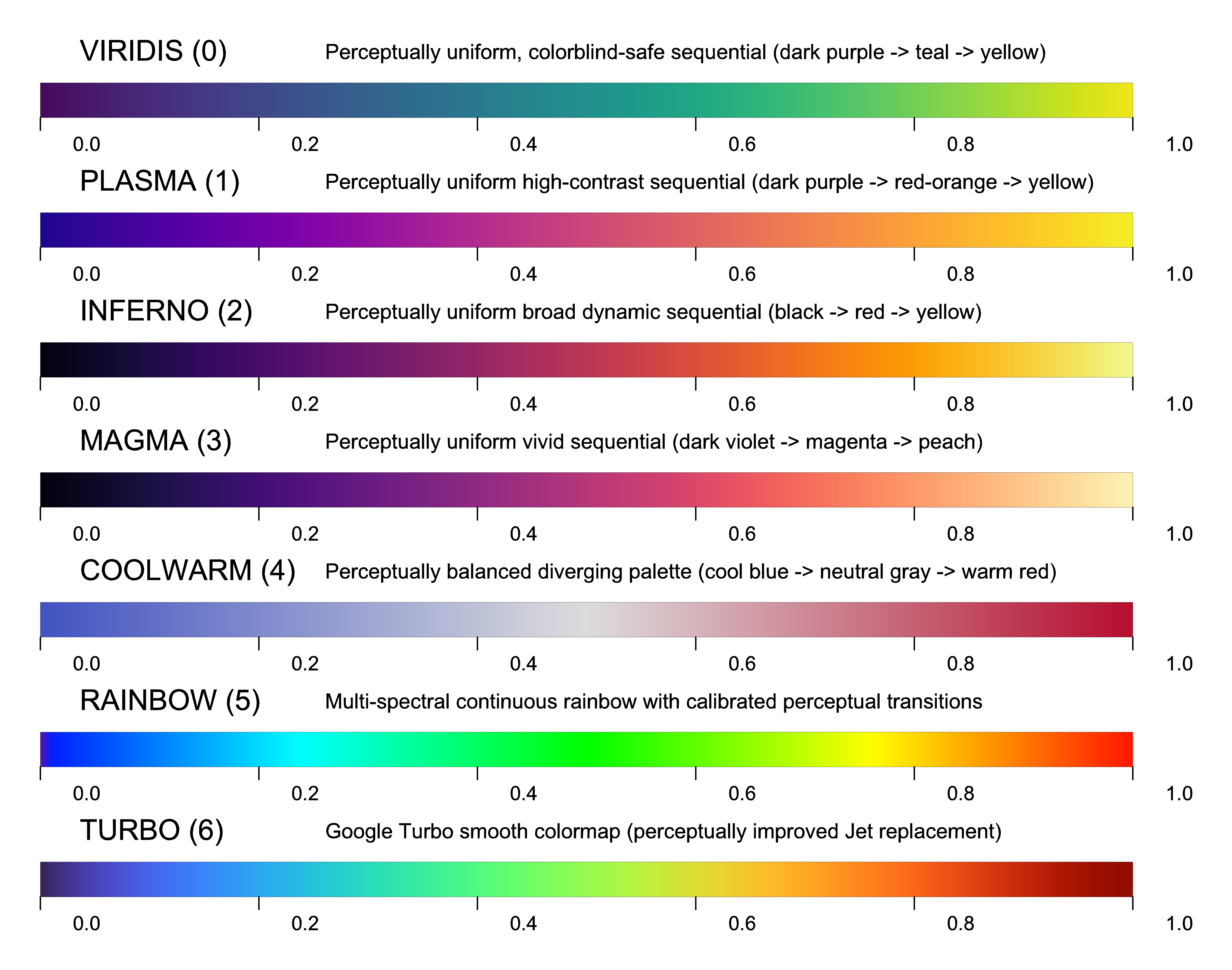
Figure 7.14: Standard Continuous Scientific Colormaps (VIRIDIS, PLASMA, INFERNO, MAGMA, COOLWARM, RAINBOW, and TURBO).
void color(int col);int RGBcolor(int r, int g, int b);int col |
Color index (0-15 standard palette, 16-255 colormap index, or 24-bit TrueColor integer). |
int r, g, b |
Red, Green, Blue color intensity values (0-255). |
Active drawing color and TrueColor RGB integer synthesis. color(col): Sets active vector drawing and text stroke color. RGBcolor(r, g, b): Packs red, green, and blue components into 24-bit TrueColor RGB integer (0x01RRGGBB).
Multi-Language Signatures:
| C | void color(int col);int RGBcolor(int r, int g, int b); |
|---|---|
| Python 3 | graphic.color(col: int)graphic.RGBcolor(r: int, g: int, b: int) -> int |
| Java 22 | GraphiC.color(int col);GraphiC.RGBcolor(int r, int g, int b) -> int; |
| Fortran | call gpc_color(col)clr = gpc_rgb(r, g, b) |
| Julia | GraphiC.color(col)GraphiC.RGBcolor(r, g, b) |
void RGBtoHLS(int r, int g, int b, int *h, int *l, int *s);void HLStoRGB(int h, int l, int s, int *r, int *g, int *b);void RGBtoCMYK(int r, int g, int b, int *c, int *m, int *y, int *k);int RGBtoIBM(int rgb[3]);int r, g, b |
Red, Green, Blue color values (0-255). |
int *h, *l, *s |
Pointers receiving Hue (0-360), Lightness (0-100), and Saturation (0-100). |
int *c, *m, *y, *k |
Pointers receiving Cyan, Magenta, Yellow, and Key/Black components (0-100). |
int rgb[3] |
Array of 3 RGB components mapped to standard 16-color IBM PC palette index. |
Color model transformation and colorimetric conversion routines. RGBtoHLS(r, g, b, &h, &l, &s): Converts RGB color triplet to Hue-Lightness-Saturation color space. HLStoRGB(h, l, s, &r, &g, &b): Converts Hue-Lightness-Saturation values back to Red-Green-Blue intensities. RGBtoCMYK(r, g, b, &c, &m, &y, &k): Converts 24-bit RGB values to 4-color process CMYK printing separations. RGBtoIBM(rgb): Maps 24-bit RGB color to nearest standard 16-color IBM PC palette index.
Multi-Language Signatures:
| C | void RGBtoHLS(int r, int g, int b, int *h, int *l, int *s);void HLStoRGB(int h, int l, int s, int *r, int *g, int *b);void RGBtoCMYK(int r, int g, int b, int *c, int *m, int *y, int *k);int RGBtoIBM(int rgb[3]); |
|---|---|
| Python 3 | graphic.RGBtoHLS(r, g, b) -> (h, l, s)graphic.HLStoRGB(h, l, s) -> (r, g, b)graphic.RGBtoCMYK(r, g, b) -> (c, m, y, k)graphic.RGBtoIBM(rgb) -> int |
| Java 22 | GraphiC.RGBtoHLS(int r, int g, int b, int[] out);GraphiC.HLStoRGB(int h, int l, int s, int[] out);GraphiC.RGBtoCMYK(int r, int g, int b, int[] out);GraphiC.RGBtoIBM(int[] rgb); |
| Fortran | call gpc_RGBtoHLS(r, g, b, h, l, s)call gpc_HLStoRGB(h, l, s, r, g, b)call gpc_RGBtoCMYK(r, g, b, c, m, y, k)call gpc_RGBtoIBM(rgb, idx) |
| Julia | GraphiC.RGBtoHLS(r, g, b, h, l, s)GraphiC.HLStoRGB(h, l, s, r, g, b)GraphiC.RGBtoCMYK(r, g, b, c, m, y, k)GraphiC.RGBtoIBM(rgb) |
int gpc_colormap_eval(int colormap_id, float t);int colormap_id |
Colormap identifier: GPC_COLORMAP_VIRIDIS (0), PLASMA (1), INFERNO (2), MAGMA (3), COOLWARM (4), RAINBOW (5), TURBO (6). |
float t |
Normalized continuous scalar position in [0.0, 1.0]. |
Evaluates normalized parameter t across the designated scientific colormap, returning packed 24-bit TrueColor RGB integer (0x01RRGGBB).
Multi-Language Signatures:
| C | int gpc_colormap_eval(int colormap_id, float t); |
|---|---|
| Python 3 | color = graphic.colormap_eval(colormap_id, t) |
| Java 22 | int color = GraphiC.colormapEval(colormap_id, t); |
| Fortran | clr = gpc_colormap_eval(colormap_id, t) |
| Julia | GraphiC.gpc_colormap_eval(colormap_id, t) |
int gpc_get_color(int colormap_id, float value, float minv, float maxv);int colormap_id |
Colormap identifier (0...6). |
float value |
Scalar data value to evaluate. |
float minv, maxv |
Lower and upper bounds of the scalar data range. |
Queries continuous colormap shading for scalar value in [minv, maxv] in 𝒪(1) time, returning packed 24-bit TrueColor RGB integer (0x01RRGGBB).
Multi-Language Signatures:
| C | int gpc_get_color(int colormap_id, float value, float minv, float maxv); |
|---|---|
| Python 3 | color = graphic.get_color(colormap_id, value, minv, maxv) |
| Java 22 | int color = GraphiC.getColor(colormap_id, value, minv, maxv); |
| Fortran | clr = gpc_get_color(colormap_id, value, minv, maxv) |
| Julia | GraphiC.gpc_get_color(colormap_id, value, minv, maxv) |
void gpc_get_rgb(int colormap_id, float value, float minv, float maxv, int *r, int *g, int *b);int colormap_id |
Colormap identifier (0...6). |
float value |
Scalar data value. |
float minv, maxv |
Bounds of scalar range. |
int *r, *g, *b |
Output pointers receiving individual red, green, blue color components (0...255). |
Queries continuous colormap shading for scalar value, returning discrete R, G, B color channels (0...255).
Multi-Language Signatures:
| C | void gpc_get_rgb(int colormap_id, float value, float minv, float maxv, int *r, int *g, int *b); |
|---|---|
| Python 3 | r, g, b = graphic.get_rgb(colormap_id, value, minv, maxv) |
| Java 22 | int[] rgb = GraphiC.getRgb(colormap_id, value, minv, maxv); |
| Fortran | call gpc_get_rgb(colormap_id, value, minv, maxv, r, g, b) |
| Julia | GraphiC.gpc_get_rgb(colormap_id, value, minv, maxv, r, g, b) |
int gpc_rgb(int r, int g, int b);int r, g, b |
Red, green, and blue intensity channels in range [0...255]. |
Packs individual 8-bit R, G, B channels into GraphiC 24-bit TrueColor integer (0x01RRGGBB).
Multi-Language Signatures:
| C | int gpc_rgb(int r, int g, int b); |
|---|---|
| Python 3 | color = graphic.rgb(r, g, b) |
| Java 22 | int color = GraphiC.rgb(r, g, b); |
| Fortran | clr = gpc_rgb(r, g, b) |
| Julia | GraphiC.gpc_rgb(r, g, b) |
8.15 Text Routines
TrueType (.ttf), PostScript Type 1 (.pfb), and Hershey vector stroke (.fnt) typography, multi-font inline switching, solid glyph filling, pairwise kerning, and mathematical script shifts.
void font(int nfont, ...);void pltfnt(float x, float y, char *string, float height, int angle);void prtfnt(float xinch, float yinch, char *string, float height, int angle);void fillfont(int fill);void fontfill(int fill, int pat, int bdr);void tifont(float wid);void tfont(int wid);void SetTTKerning(char onoff, char str);void SetTTFull(char onoff, char str);void SetTTMaxError(float err, char str);int nfont |
Number of font pairs to load (1-10), or -1 to reload previous font set. |
char* filename |
Path to font file: .TTF (TrueType), .PFB (PostScript Type 1), or .FNT (Hershey stroke). |
int esc_sym |
Trigger character code (e.g. '\', '|', '/') to switch to this font in mid-string. |
int fill |
0 = hollow vector outline; 1 = solid polygon glyph fill (default for TrueType/PostScript). |
int pat, bdr |
Hatch pattern index (pat) and border stroke color (bdr) for fontfill(). |
float / int wid |
Stroke pen thickness in physical page inches (tifont) or raster device pixels (tfont). |
char onoff, str |
Enables (1) or disables (0) kerning (SetTTKerning) or full 256 ANSI Latin-1 character set (SetTTFull). |
Multi-engine typography and vector text rendering subsystem. font(nfont, file1, esc1, ...): Registers and loads up to 10 fonts into memory simultaneously. Automatically selects the rendering engine from file extension (.TTF, .PFB, .FNT). pltfnt(x, y, string, height, angle): Renders string at user data coordinates (x, y). prtfnt(xinch, yinch, string, height, angle): Renders string at physical page coordinates (xinch, yinch). fillfont(fill): 0 = hollow vector outline; 1 = solid polygon glyph fill (default for TrueType/PostScript). fontfill(fill, pat, bdr): Fills characters with hatch pattern pat and draws outline in color bdr. tifont(wid) / tfont(wid): Configures stroke pen thickness in physical inches (float) or raster pixels (int). SetTTKerning(onoff, str): Enables/disables TrueType pairwise kerning tables (kern SFNT table). SetTTFull(onoff, str): 1 = full 256-character set (Windows ANSI/Latin-1); 0 = standard 128 ASCII. SetTTMaxError(err, str): Configures Bézier curve subdivision tolerance for smoothness vs speed.
Multi-Language Signatures:
| C | void font(int nfont, ...);void pltfnt(float x, float y, char *string, float height, int angle);void prtfnt(float xinch, float yinch, char *string, float height, int angle);void fillfont(int fill);void fontfill(int fill, int pat, int bdr);void tifont(float wid);void tfont(int wid);void SetTTKerning(char onoff, char str);void SetTTFull(char onoff, char str);void SetTTMaxError(float err, char str); |
|---|---|
| Python 3 | graphic.font(nfont)graphic.pltfnt(x, y, string, height, angle)graphic.prtfnt(xinch, yinch, string, height, angle)graphic.fillfont(fill=1)graphic.fontfill(fill=1, pattern=0, border=0)graphic.tifont(wid)graphic.tfont(wid)graphic.SetTTKerning(onoff, str)graphic.SetTTFull(onoff, str)graphic.SetTTMaxError(err, str) |
| Java 22 | GraphiC.font(int nfont);GraphiC.pltfnt(float x, float y, String string, float height, int angle);GraphiC.prtfnt(float xinch, float yinch, String string, float height, int angle);GraphiC.fillfont(int fill);GraphiC.fontfill(int fill, int pattern, int border);GraphiC.tifont(float wid);GraphiC.tfont(int wid);GraphiC.setTTKerning(boolean onoff, boolean str);GraphiC.setTTFull(boolean onoff, boolean str);GraphiC.setTTMaxError(float err, boolean str); |
| Fortran | call gpc_font(nfont)call gpc_pltfnt(x, y, string, height, angle)call gpc_prtfnt(xinch, yinch, string, height, angle)call gpc_fillfont(fill)call gpc_fontfill(fill, pattern, border)call gpc_tifont(wid)call gpc_tfont(wid)call gpc_setttkerning(onoff, str)call gpc_setttfull(onoff, str)call gpc_setttmaxerror(err, str) |
| Julia | GraphiC.font(nfont)GraphiC.pltfnt(x, y, string, height, angle)GraphiC.prtfnt(xinch, yinch, string, height, angle)GraphiC.fillfont(fill)GraphiC.fontfill(fill, pat, bdr)GraphiC.tifont(wid)GraphiC.tfont(wid)GraphiC.SetTTKerning(onoff, str)GraphiC.SetTTFull(onoff, str)GraphiC.SetTTMaxError(err, str) |
void ctline(char *string, float height);void ltline(char *string, float height);void rtline(char *string, float height);float strwidth(char *string, float height);char *string |
Null-terminated character string to measure or render. |
float height |
Character height in physical page inches. |
Formatted title and margin text line positioning subsystem. ctline(string, height): Centers text horizontally within the current plot area at the active line position. ltline(string, height): Left-aligns text against the current plot boundary at the active line position. rtline(string, height): Right-aligns text against the right plot boundary at the active line position. strwidth(string, height): Computes exact horizontal advance width of string in physical inches.
Multi-Language Signatures:
| C | void ctline(char *string, float height);void ltline(char *string, float height);void rtline(char *string, float height);float strwidth(char *string, float height); |
|---|---|
| Python 3 | graphic.ctline(string, height)graphic.ltline(string, height)graphic.rtline(string, height)graphic.strwidth(string, height) -> float |
| Java 22 | GraphiC.ctline(String string, float height);GraphiC.ltline(String string, float height);GraphiC.rtline(String string, float height);float w = GraphiC.strwidth(String string, float height); |
| Fortran | call gpc_ctline(string, height)call gpc_ltline(string, height)call gpc_rtline(string, height)w = gpc_strwidth(string, height) |
| Julia | GraphiC.ctline(string, height)GraphiC.ltline(string, height)GraphiC.rtline(string, height)GraphiC.strwidth(string, height) |
void skew(float slant);void widen(float fact);void supsym(char ch);void subsym(char ch);float slant |
Forward italic slant angle tangent (0.0 = upright, 0.3 = standard italic slant). |
float fact |
Character horizontal aspect ratio multiplier (1.0 = normal, >1.0 expands, <1.0 condenses). |
char / int ch |
Delimiter character triggering superscript (supsym) or subscript (subsym) mode. |
Fine typographical styling controls for vector stroke and TrueType fonts. skew(slant): Applies forward italic slant angle transformation to stroked vector characters and TrueType glyphs. widen(fact): Dynamically scales character horizontal advance width and aspect ratio along the baseline without altering vertical font height. supsym(ch): Defines the escape delimiter character triggering superscript mode (default '^' or '['). subsym(ch): Defines the escape delimiter character triggering subscript mode (default '_' or ']').
Multi-Language Signatures:
| C | void skew(float slant);void widen(float fact);void supsym(char ch);void subsym(char ch); |
|---|---|
| Python 3 | graphic.skew(slant)graphic.widen(fact)graphic.supsym(ch)graphic.subsym(ch)fig.skew(slant) |
| Java 22 | GraphiC.skew(slant);GraphiC.widen(fact);GraphiC.supsym(ch);GraphiC.subsym(ch);fig.skew(slant); |
| Fortran | call gpc_skew(slant)call gpc_widen(fact)call gpc_supsym(ch)call gpc_subsym(ch) |
| Julia | GraphiC.skew(slant)GraphiC.widen(fact)GraphiC.supsym(ch)GraphiC.subsym(ch) |
8.16 Interactive Crosshairs & Digitization
Interactive fullscreen cursor crosshairs with live digital coordinate readout and point digitization.
void curson(int srow, int scol, float **fx, float **fy, int *find)int srow, scol |
Position of digital readout on screen ($0, 0$ is top-left). |
float** fx, fy |
Pointers to coordinate arrays (allocated with initial size ≥ 64). |
int* find |
Output pointer receiving total points marked. |
Enables interactive full-screen crosshair cursor and live digital position readout.
Displays a digital readout on the screen at text row srow, column scol in an 8x10 font. Crosshairs are manipulated via arrow keys or mouse pointer. The readout defaults to user data coordinates. Pressing <Alt-i> switches to physical inches; <Alt-u> returns to user data coordinates.
Marked points (<Enter>) are dynamically recorded into arrays fx and fy.
Interactive Key Controls: <Enter> : Mark point at current crosshair location. <Ins> : Draw line segment from previous point to cursor location. <Del> : Erase last drawn segment. <Alt-1>..<9> : Select line pattern for drawing. <q> or <Esc> : Exit crosshairs and return to program execution.
Axis routines (graf, scales) must be called prior to curson().
Multi-Language Signatures:
| C | void curson(int srow, int scol, float **fx, float **fy, int *find) |
|---|---|
| Python 3 | graphic.curson(srow: int, scol: int) -> tuple[list[float], list[float]] |
| Java 22 | GraphiC.curson(int srow, int scol, float[][] fx, float[][] fy, int[] find) |
| Fortran | call gpc_curson(srow, scol, fx, fy, find) |
| Julia | GraphiC.curson(srow, scol, fx, fy, find) |
void curvefollow(int row, int col, float *x, float *y, int npts)int npts |
Number of points on curve. |
Constrains crosshairs to follow an existing discrete data curve (x[i], y[i]).
Arrow keys step forward and backward along the curve index. Digital readout displays exact sampled point values.
Multi-Language Signatures:
| C | void curvefollow(int row, int col, float *x, float *y, int npts) |
|---|---|
| Python 3 | graphic.curvefollow(row, col, x, y, npts) |
| Java 22 | GraphiC.curvefollow(int row, int col, float[] x, float[] y, int npts) |
| Fortran | call gpc_curvefollow(row, col, x, y, npts) |
| Julia | GraphiC.curvefollow(row, col, x, y, npts) |
8.17 Spline Interpolation & Numerical Methods
Cubic spline interpolation, curvature-constrained smoothing, non-linear regression fitting, and matrix solvers.
void spline(float *x, float *y, int n, int n1, float s1, float s2, float *xn, float *yn)int n |
Number of input points. |
int n1 |
Number of output interpolated points to generate. |
Fits a continuous cubic spline curve through input points (x[i], y[i]).
Generates an interpolated smooth curve of n1 densely sampled points (xn, yn). Boundary conditions are controlled by end slope constraints s1 and s2.
Multi-Language Signatures:
| C | void spline(float *x, float *y, int n, int n1, float s1, float s2, float *xn, float *yn) |
|---|---|
| Python 3 | graphic.spline(x, y, n, n1, s1, s2, xn, yn) |
| Java 22 | GraphiC.spline(float[] x, float[] y, int n, int n1, float s1, float s2, float[] xn, float[] yn) |
| Fortran | call gpc_spline(x, y, n, n1, s1, s2, xn, yn) |
| Julia | GraphiC.spline(x, y, n, n1, s1, s2, xn, yn) |
void rfit(float *x, float *y, int npts, int nits, float sfact, int nout, float *xout, float *yout)int npts |
Number of input points. |
int nits |
Number of reweighting iterations (e.g. 3-5). |
float sfact |
Smoothing factor parameter. |
int nout |
Number of fitted points to evaluate. |
Performs iterative robust curve fitting with outlier attenuation.
Uses iteratively reweighted least squares to minimize the influence of experimental outliers and noisy measurement spikes.
Multi-Language Signatures:
| C | void rfit(float *x, float *y, int npts, int nits, float sfact, int nout, float *xout, float *yout) |
|---|---|
| Python 3 | graphic.rfit(x, y, npts, nits, sfact, nout, xout, yout) |
| Java 22 | GraphiC.rfit(...) |
| Fortran | call gpc_rfit(...) |
| Julia | GraphiC.rfit(x, y, npts, nits, sfact, nout, xout, yout) |
void matsolve(double **a, int n, double *b);void matinverse(double **a, double **y, int n);double** a |
2D matrix of coefficients [n][n]. |
int n |
Dimension of system. |
double* b |
Right-hand side vector (returns solution x). |
double** y |
Output matrix receiving inverse A^-1. |
High-performance linear equation solver and matrix inversion using Gaussian elimination with partial pivoting.
matsolve(a, n, b): Solves A * x = b. Matrix a is factored in-place and solution vector is returned in b. matinverse(a, y, n): Inverts square matrix a into matrix y.
Multi-Language Signatures:
| C | void matsolve(double **a, int n, double *b);void matinverse(double **a, double **y, int n); |
|---|---|
| Python 3 | graphic.matsolve(a, n, b)graphic.matinverse(a, y, n) |
| Java 22 | GraphiC.matsolve(double[][] a, int n, double[] b);GraphiC.matinverse(...); |
| Fortran | call gpc_matsolve(a, n, b)call gpc_matinverse(a, y, n) |
| Julia | GraphiC.matsolve(a, n, b)GraphiC.matinverse(a, y, n) |
8.18 Polygons & Panel Filling
Draws filled, hatched, and stippled polygonal regions and panels with 16 vector fill patterns.
void panel(float *x, float *y, int nlines, int pcolor, int border);void panelinch(float *x, float *y, int nlines, int pcolor, int border);float *x, *y |
Arrays of polygon vertex coordinates in user data space (panel) or physical inches (panelinch). |
int nlines |
Number of vertices defining the closed boundary polygon. |
int pcolor |
Fill color or hatch pattern index for polygon interior. |
int border |
Color index for boundary outline stroke (or -1 to omit border outline). |
Fills arbitrary planar convex or concave polygonal regions with solid colors or vector cross-hatch patterns. panel(x, y, nlines, pcolor, border): Fills polygon specified in floating-point user data coordinates. panelinch(x, y, nlines, pcolor, border): Fills polygon specified in physical page inches.
Multi-Language Signatures:
| C | void panel(float *x, float *y, int nlines, int pcolor, int border);void panelinch(float *x, float *y, int nlines, int pcolor, int border); |
|---|---|
| Python 3 | graphic.panel(x, y, nlines, pcolor, border)graphic.panelinch(x, y, nlines, pcolor, border) |
| Java 22 | GraphiC.panel(float[] x, float[] y, int nlines, int pcolor, int border);GraphiC.panelinch(float[] x, float[] y, int nlines, int pcolor, int border); |
| Fortran | call gpc_panel(x, y, nlines, pcolor, border)call gpc_panelinch(x, y, nlines, pcolor, border) |
| Julia | GraphiC.panel(x, y, nlines, pcolor, border)GraphiC.panelinch(x, y, nlines, pcolor, border) |
8.19 Memory, File I/O & Utility Routines
Coordinate conversions (user units to pixels/inches), memory auditing, file management, and terminal control.
void usertopix(float x_in, float y_in, float z_in, int *x_out, int *y_out);void pixtouser(int x_in, int y_in, float *x_out, float *y_out);void usertoinch(float x_in, float y_in, float *x_out, float *y_out);float pixtoin(int pixels);int intopix(float inches);float x_in, y_in, z_in |
Floating-point user data coordinates (z_in used for 3D perspective projection). |
int* x_out, y_out |
Pointers receiving discrete hardware raster pixel coordinates on the active graphics device. |
int x_in, y_in |
Discrete raster pixel coordinates to be mapped back into user coordinate space. |
float* x_out, y_out |
Pointers receiving mapped user coordinates (pixtouser) or physical page inches (usertoinch). |
int pixels / float inches |
Quantity of raster device pixels (pixtoin) or physical page inches (intopix) to convert. |
High-performance coordinate transformation and spatial mapping pipeline between user data space, physical page inches, and device raster pixel grids. usertopix(x, y, z, &px, &py): Transforms 2D or 3D user data coordinates into discrete device raster pixels. pixtouser(px, py, &x, &y): Maps screen or vector pixel coordinates back to floating-point user data space. usertoinch(x, y, &xi, &yi): Maps floating-point user data coordinates directly to physical page inches. pixtoin(pixels): Converts device raster pixels to physical page inches. intopix(inches): Converts physical inches (or cm) into device pixel quantity.
Multi-Language Signatures:
| C | void usertopix(float x_in, float y_in, float z_in, int *x_out, int *y_out);void pixtouser(int x_in, int y_in, float *x_out, float *y_out);void usertoinch(float x_in, float y_in, float *x_out, float *y_out);float pixtoin(int pixels);int intopix(float inches); |
|---|---|
| Python 3 | graphic.usertopix(x, y, z) -> (px, py)graphic.pixtouser(px, py) -> (x, y)graphic.usertoinch(x, y) -> (ix, iy)graphic.pixtoin(pixels) -> floatgraphic.intopix(inches) -> int |
| Java 22 | GraphiC.usertopix(float x, float y, float z, int[] out);GraphiC.pixtouser(int px, int py, float[] out);GraphiC.usertoinch(float x, float y, float[] out);float in = GraphiC.pixtoin(int pixels);int pix = GraphiC.intopix(float inches); |
| Fortran | call gpc_usertopix(x_in, y_in, z_in, x_out, y_out)call gpc_pixtouser(x_in, y_in, x_out, y_out)call gpc_usertoinch(x_in, y_in, x_out, y_out)inches = gpc_pixtoin(pixels)pixels = gpc_intopix(inches) |
| Julia | GraphiC.usertopix(x_in, y_in, z_in, x_out, y_out)GraphiC.pixtouser(x_in, y_in, x_out, y_out)GraphiC.usertoinch(x_in, y_in, x_out, y_out)GraphiC.pixtoin(pixels)GraphiC.intopix(inches) |
void minmax(float *minq, float *maxq, float *xy, int npts);float* minq |
Pointer receiving the computed minimum value. |
float* maxq |
Pointer receiving the computed maximum value. |
float* xy |
Pointer to input array of floating-point values. |
int npts |
Number of points in array. |
Computes minimum and maximum extrema across a data array.
Used internally by calibration routines such as graf(), loggraf(), and r3d_contour() to determine optimal axis limits, tick intervals, and contour elevation slices. Non-real IEEE-754 floats (NaN and Inf) are automatically detected and bypassed via IsNotRealFloat(). If an array contains zero valid real numbers, minq is assigned 0.0, maxq is assigned 1.0, and Warning 47 is dispatched.
Multi-Language Signatures:
| C | void minmax(float *minq, float *maxq, float *xy, int npts); |
|---|---|
| Python 3 | min_val, max_val = graphic.minmax(data_array) |
| Java 22 | GraphiC.minmax(float[] minOut, float[] maxOut, float[] xy, int npts); |
| Fortran | call gpc_minmax(minval, maxval, xy, npts) |
| Julia | GraphiC.minmax(minq, maxq, xy, npts) |
void settolerance(float tolerance);float tolerance |
Tolerance factor (default is dynamically scaled). |
Configures the interpolation tolerance factor for random point plotting.
When plotting contours or surfaces from scattered, ungridded (x, y, z) observations via r3d_surface() or r3d_contour(), clustering or collinear points can trigger the error: "Too few data points. Try a coarser grid." Increasing tolerance expands the neighborhood acceptance threshold for triangular facet formation, eliminating the error. As tolerance increases, interpolating precision is smoothed across sparse regions.
Multi-Language Signatures:
| C | void settolerance(float tolerance); |
|---|---|
| Python 3 | graphic.settolerance(tolerance) |
| Java 22 | GraphiC.settolerance(float tolerance); |
| Fortran | call gpc_settolerance(tolerance) |
| Julia | GraphiC.settolerance(tolerance) |
void blank(unsigned char attr);unsigned char attr |
Display attribute byte (color/intensity). |
Clears the text terminal screen and resets console attributes.
In legacy DOS environments, blank(attr) wrote attribute bytes directly to video RAM (0xB800 / 0xB000). In modern POSIX / 64-bit environments, blank() emits standard ANSI escape sequences (\033[2J\033[H) to reset modern terminal emulators cleanly.
Multi-Language Signatures:
| C | void blank(unsigned char attr); |
|---|---|
| Python 3 | graphic.blank(attr) |
| Java 22 | GraphiC.blank(byte attr); |
| Fortran | call gpc_blank(attr) |
| Julia | GraphiC.blank(attr) |
FILE *gfopen(char *filename, char *mode, size_t bigbuff);int gfclose(FILE *stream);char* filename |
Relative or absolute filename to open. |
char* mode |
Standard C fopen file mode ("r", "rb", "w+b", etc.). |
size_t bigbuff |
If > 0, allocates a 12 KB I/O buffer via setvbuf(). |
Intelligent file open routine with directory search fallback and buffer allocation.
gfopen() locates and opens GraphiC support files (Hershey vector fonts, TrueType fonts, color maps, message tables, and TKF files) using an automated multi-tier search hierarchy: 1. Current working directory of the calling process. 2. Path specified by the GPC or GPC_DIR environment variable. 3. Dynamic binary location discovery: Uses POSIX dladdr() or macOS _NSGetExecutablePath() to resolve the directory containing libgraphic.dylib / libgraphic.so, searching the adjacent ../share/graphic/ and ../fonts/ directories. 4. Standard system installations: /usr/local/share/graphic/, /opt/homebrew/share/graphic/.
If bigbuff is non-zero, gfopen() attaches a high-throughput 12 KB memory buffer (TKBUFFSIZE = 12288 bytes) via setvbuf() to minimize operating system kernel context switches during rapid sequential streaming.
@return [FILE*] Opened standard C file pointer, or NULL on failure.
Multi-Language Signatures:
| C | FILE *gfopen(char *filename, char *mode, size_t bigbuff);int gfclose(FILE *stream); |
|---|---|
| Python 3 | Managed automatically within native library core. |
| Java 22 | Managed automatically within native library core. |
| Fortran | Managed automatically within native library core. |
| Julia | GraphiC.gfopen(filename, mode, bigbuff)GraphiC.gfclose(stream) |
Section 9. High-Level Modern APIs & Object-Oriented Interfaces Technical Reference (§9.1–§9.5)
9.1 Architectural Overview & Automated Capabilities
While GraphiC’s classic procedural state-machine API gives computational physicists and systems engineers granular micro-control over every coordinate transform, viewport dimension, and tick increment, modern data science and exploratory research in Julia, Python, and Java often require rapid, automated plotting of vectors and matrices in a single line of code. GraphiC provides native high-level interfaces that eliminate repetitive setup boilerplate while preserving full vector SVG fidelity, sub-millisecond execution speeds, and zero runtime dependencies.
Whenever a high-level routine (such as Julia’s GraphiC.plot() or Python’s fig.autoscale()) is invoked, GraphiC executes a deterministic 7-stage pipeline behind the scenes: 1. Automatic Data Bounds & Nice Tick Calibration: Scans input vectors or matrices to extract extrema (min/max) and applies an analytical nice-step algorithm (
). This guarantees clean, human-readable axis tick marks without requiring manual graf() math. 2. Viewport Geometry & Canvas Centering: Calculates centered physical dimensions (area2d) and offsets (physor) relative to page dimensions, guaranteeing that title headings, numeric labels, and axis names never clip or collide with canvas boundaries. 3. Tight SVG Bounding-Box Cropping: Automatically issues svgcrop(0.25) so emitted SVG vector files hug the drawn figure with an exact 0.25-inch padding margin. Generated plots drop directly into Microsoft Word, LaTeX documents, or web pages without requiring inkscape or external PDF crop utilities. 4. Smart Resolvers for Colors, Styles & Markers: Translates intuitive language Symbols or strings (:blue, :dashed, :circle, "#003366", 0xRRGGBB) directly into native palette indices and stroke tables. 5. Deterministic Session Lifecycle Management: Automatically sequences bgnplot
page
startplot
box
graf
curve
endplot
stopplot inside a single protected call or context manager. 6. Rich Inline Display in Notebooks & IDEs: Implements native MIME"image/svg+xml" display hooks for instantaneous vector rendering inside Jupyter Notebooks, Pluto.jl, and VS Code interactive windows. 7. Dual Desktop Display Strategy: Emits resolution-independent vector SVG for publication alongside a companion interactive HTML viewer supporting mouse-wheel zoom, drag-to-pan, and instant live auto-refresh.
High-Level API Edition Availability Matrix (§9.1)
The following matrix outlines the functional scope and availability of GraphiC’s high-level modern APIs across the free GraphiC 2D Community Edition and GraphiC Professional. Every plot type and visualization routine is backed by GraphiC’s universal C engine and is available across All supported languages (C, Modern Fortran, Python 3, Java 22, and Julia). Language-specific syntax entries (such as context managers and 1-line auto-finalization) are explicitly noted where language idioms apply:
| Function / High-Level Routine | Language | Edition Availability | Functional Scope |
|---|---|---|---|
bar(...) / barchart(...) / gpc_barchart(...) |
All | [GraphiC 2D Community] | Clustered, stacked, and single-series vertical bar charts with vector hatching patterns. |
boxplot(...) / box_plot(...) / gpc_boxplot(...) |
All | [GraphiC 2D Community] | Multi-variable statistical distribution summaries, quartiles, median notch, and outlier markers. |
colorkey_gradient(...) / ColorKeyGradient |
All | [GraphiC 2D Community] | Continuous linear color calibration bars with 256-color palette interpolation and numeric ticks. |
contour(...) / contour_plot(...) / gpc_contour(...) |
All | [GraphiC Professional] | 2D topographic contour elevation maps with automated level stepping and numeric annotations. |
Figure(...) / Context Managers |
Python, Java, Julia | [GraphiC 2D Community] | Deterministic resource lifecycle management (with Figure / try-with-resources / auto-close) with zero leak risk. |
loglog(...) / xlog(...) / ylog(...) |
All | [GraphiC 2D Community] | Multi-decade logarithmic coordinate grids, power-of-10 subdivisions, and exponential labels. |
pie(...) / piechart(...) / gpc_piechart(...) |
All | [GraphiC Professional] | Proportional circular sectors, radial wedge explosion offsets, and category text annotations. |
plot(...) / curve(...) / gpc_curve(...) |
All | [GraphiC 2D Community] | Automated 2D coordinate scaling, nice ticks, line styles, stroke widths, and curve rendering. |
polgrid(...) / polcurve(...) / polar(...) |
All | [GraphiC 2D Community] | Radial distance and angular coordinate grids, antenna radiation lobes, and circular plots. |
scatter(...) / points(...) / gpc_points(...) |
All | [GraphiC 2D Community] | Discrete data markers, geometric symbols (circle, square, delta, cross), and interval subsampling. |
simuplot(...) / context(...) / orel(...) |
All | [GraphiC 2D Community] | Independent multi-axis grids, shared canvas layouts, local coordinate offsets, and subplots. |
smith_chart(...) / smith(...) / gpc_smith(...) |
All | [GraphiC Professional] | RF microwave impedance/admittance reflection circles, VSWR circles, and transmission line matching. |
surface(...) / surmat(...) / plot_surface(...) |
All | [GraphiC Professional] | 3D perspective wireframe mesh and continuous shaded surfaces with hidden-line removal. |
svgcrop / svgopen / svgpush |
All | [GraphiC 2D Community] | Automated SVG canvas tight cropping (0.25 in margin), OS browser launch, and HTTP telemetry push. |
tri(...) / ternary_plot(...) / gpc_triang(...) |
All | [GraphiC Professional] | Triangular 3-component metallurgical and chemical phase equilibrium diagrams with 60-degree grids. |
vfield(...) / vector(...) / gpc_uvector(...) |
All | [GraphiC Professional] | 2D direction and magnitude arrow fields for fluid dynamics, aerodynamics, and electromagnetics. |
waterfall_plot(...) / WaterfallPlot / gpc_waterfallplot |
All | [GraphiC Professional] | 3D stacked spectral waterfall curve series with automated hidden-line horizon suppression. |
9.2 Julia High-Level & Multi-Series API Reference (GraphiC.jl)
The Julia package (GraphiC.jl) exports both single-line convenience routines and an incremental multi-series figure API designed for scientific researchers. Each plotting routine returns a Figure object (aliased to PlotOutput for full backwards compatibility) that holds the series list, layout attributes, renders inline in notebooks, and writes vector SVG.
GraphiC.plot(x, y; kwargs...) — 2D Cartesian Vector Plot & Base Figure
Generates a complete 2D Cartesian vector plot from coordinate vectors x and y. When called without an existing figure, it initializes a new Figure.
| Keyword Argument | Type | Default | Description |
|---|---|---|---|
title |
AbstractString |
"" |
Main plot heading centered above graph. |
xlabel |
AbstractString |
"" |
Horizontal axis title. |
ylabel |
AbstractString |
"" |
Vertical axis title. |
label |
AbstractString / nothing |
nothing |
Name of the series for automatic legend generation. |
legend |
Symbol / Tuple |
:best |
Legend placement (:best, :none, or (x, y) in page inches). |
color |
Symbol / Int / String / Colorant |
GraphiC.BLACK |
Line/marker color (:blue, :red, 0x01RRGGBB, "#003366", RGB(...)). |
ltype |
Symbol / Int |
GraphiC.SOLID |
Line pattern (:solid, :dashed, :dotted, :long_dash, :chain_dash). Set to -1 for scatter only. |
thick |
Real |
1.0 |
Stroke thickness multiplier. |
symbol |
Symbol / Int / nothing |
nothing |
Data marker symbol (:circle, :square, :diamond, :triangle, :plus, :cross). |
grid |
Bool |
false |
If true, draws a full Cartesian background grid (grid(1)). |
width |
Real |
8.0 |
Output page width in inches. |
height |
Real |
6.0 |
Output page height in inches. |
filename |
AbstractString |
"graphic_plot.svg" |
Output vector SVG filename. |
crop |
Bool |
true |
If true, automatically crops SVG tightly around figure bounding box. |
margin |
Real |
0.25 |
Padding margin in inches when crop=true. |
xlims / ylims |
Tuple{Real, Real} / nothing |
nothing |
Explicit (min, max) axis limit tuples. |
xmin, xmax |
Real / nothing |
nothing |
Explicit X range limits (if omitted, auto-calculated from extrema(x)). |
xstep |
Real / nothing |
nothing |
Explicit X tick interval (if omitted, computed via analytical nice-step). |
ymin, ymax |
Real / nothing |
nothing |
Explicit Y range limits (if omitted, auto-calculated from extrema(y)). |
ystep |
Real / nothing |
nothing |
Explicit Y tick interval (if omitted, computed via analytical nice-step). |
GraphiC.plot!(fig, x, y; kwargs...) & GraphiC.plot!(x, y; kwargs...) — Multi-Series Curves
Adds an additional curve series to an existing Figure. If fig is omitted, it adds the series to GraphiC.current_figure(). Axis ranges and bounds automatically expand to accommodate the union of all series extrema, and the legend is updated automatically.
GraphiC.scatter(x, y; symbol=:circle, color=:blue, kwargs...)
Specialized 1-line scatter plot. Equivalent to plot(x, y; ltype=-1, symbol=symbol, color=color, kwargs...) with no connecting lines between data points.
GraphiC.scatter!(fig, x, y; kwargs...) & GraphiC.scatter!(x, y; kwargs...)
Overlays discrete scatter marker points on an existing figure without connecting lines.
GraphiC.savefig(fig, filename) & GraphiC.savefig(filename)
Exports the figure to a crisp, standalone vector SVG file. Automatically tight-crops with bounding margins.
GraphiC.surface_plot(z; kwargs...) — 3D Perspective Wireframe Surface
Renders a 3D perspective wireframe mesh with hidden-line removal directly from a 2D Julia matrix z.
| Keyword Argument | Type | Default | Description |
|---|---|---|---|
z |
AbstractMatrix{<:Real} |
(Positional) | 2D elevation matrix of grid values . |
title |
AbstractString |
"" |
Main 3D chart heading. |
xlabel, ylabel |
AbstractString |
"" |
Horizontal X and Y axis names. |
zlabel |
AbstractString |
"" |
Vertical Z elevation axis name. |
vu |
Vector{Float64} |
[8.0, -8.0, 6.0] |
3D camera viewpoint coordinates in data space. |
width, height |
Real |
8.0, 6.0 |
Page dimensions in inches. |
filename |
AbstractString |
"graphic_surface.svg" |
Output SVG file path. |
crop, margin |
Bool, Real |
true, 0.25 |
Tight SVG auto-cropping with 0.25-inch margin. |
GraphiC.contour_plot(z; kwargs...) — 2D Topographic Contour Map
Generates a 2D topographic elevation contour map directly from a 2D Julia matrix z.
| Keyword Argument | Type | Default | Description |
|---|---|---|---|
z |
AbstractMatrix{<:Real} |
(Positional) | 2D elevation matrix of grid values. |
x, y |
AbstractVector |
1:size(z,1), 1:size(z,2) |
Spatial coordinates along matrix rows and columns. |
nlevels |
Integer |
10 |
Number of contour elevation intervals. |
title, xlabel, ylabel |
AbstractString |
"" |
Chart heading and axis names. |
width, height |
Real |
8.0, 6.0 |
Page dimensions in inches. |
filename |
AbstractString |
"graphic_contour.svg" |
Output SVG file path. |
crop, margin |
Bool, Real |
true, 0.25 |
Tight SVG auto-cropping with 0.25-inch margin. |
Julia Companion Interactive Utilities
GraphiC.svgopen(filepath=nothing): Dispatches your operating system’s native application launcher (openon macOS,starton Windows,xdg-openon Linux) to open the interactive companion HTML viewer with pan/zoom controls.GraphiC.svgpush(url=nothing, filepath=nothing): Transmits a hot-reloading push notification to an active browser canvas, refreshing the plot without requiring manual page reloads.
using GraphiC

# Multi-Series Plot with Automatic Legends and Explicit Limits
x = range(0.0, 10.0, length=100)
fig = GraphiC.plot(x, sin.(x);
    title="Harmonic Oscillator Waveforms",
    xlabel="Time (s)",
    ylabel="Amplitude",
    label="sin(x)",
    color=:blue,
    thick=1.5,
    xlims=(0.0, 10.0),
    ylims=(-1.2, 1.2),
    grid=true
)

# Overlay second curve
GraphiC.plot!(fig, x, cos.(x);
    label="cos(x)",
    color=:red,
    ltype=:dashed
)

# Overlay discrete experimental scatter points
GraphiC.scatter!(fig, [1.5, 3.0, 4.5, 6.0, 7.5], [0.99, -0.98, -0.21, 0.96, 0.35];
    label="Measured Data",
    color=:magenta,
    symbol=:circle
)

# Export publication-quality vector SVG
GraphiC.savefig(fig, "harmonic_comparison.svg")
9.2.1 Plots.jl Ecosystem Integration (Plots.jl Backend)
For researchers whose workflows leverage Julia’s premier metapackage Plots.jl, GraphiC.jl includes a zero-overhead package extension (GraphiCPlotsExt.jl, active on Julia 1.9+). This extension registers GraphiCBackend into Plots.jl, allowing standard Plots commands to delegate all 2D vector path drawing, line styles, marker symbols, and subplots to GraphiC’s high-speed C engine.
Activating the GraphiC Backend in Plots.jl
using Plots
import GraphiC: graphic   # or using GraphiC

# Activate the GraphiC zero-latency vector C engine backend
graphic()

# Standard idiomatic Plots.jl pipeline
x = range(0, 2π, length=100)
p = plot(x, sin.(x), label="sin(x)", color=:blue, lw=2, title="Plots.jl via GraphiC")
plot!(p, x, cos.(x), label="cos(x)", color=:red, linestyle=:dash)
scatter!(p, [1.0, 2.0, 3.0, 4.0], [0.84, 0.91, 0.14, -0.75], label="Data", color=:green)

# Generates native, zero-latency vector SVG
savefig(p, "plots_graphic_output.svg")
Key Capabilities in Plots.jl Mode:
- Zero Runtime Latency: Direct FFI rendering to standalone SVG without external Node.js, Electron, or Python processes.
- TrueColor 24-Bit Color Mapping: Seamless conversion of Plots
RGBAandColorantvalues to GraphiC’s native TrueColor format (0x01RRGGBB). - Full Line & Symbol Parity: Transparent translation of Plots
:solid,:dash,:dot, and marker shapes (:circle,:rect,:diamond,:cross) to native GraphiC vector routines. - Subplot Layouts: Automatic grid and multi-panel coordinate scaling across subplots.
- Upstream Contribution Files: Full upstream PR files for direct inclusion in
JuliaPlots/Plots.jl/src/backends/graphic.jlare maintained incontrib/Plots_jl_backend/.
9.2.2 Makie.jl Ecosystem Integration (Makie.jl Vector Backend)
For researchers and data scientists leveraging Makie.jl—Julia’s premier, high-performance data visualization ecosystem—GraphiC.jl includes a dedicated, zero-overhead package extension (GraphiCMakieExt.jl, active on Julia 1.9+).
While Makie includes CairoMakie (2D vector/raster) and GLMakie/WGLMakie (OpenGL/WebGL 3D rasterizers), it has lacked a dedicated vector backend that produces true analytic hidden-line removal for 3D surfaces and mathematical wireframes. The GraphiCMakieExt extension registers GraphiC’s vector engine directly into Makie’s MakieScreen pipeline, enabling standard Makie recipes (lines, scatter, contour, and surface) to output compact, infinite-resolution vector SVGs with analytic horizon suppression.
Activating the GraphiC Vector Screen in Makie.jl
using Makie
import GraphiC: graphic_makie   # or GraphiC.activate_makie()

# Set GraphiC as the active Makie vector backend
graphic_makie()

# Standard idiomatic Makie 2D workflow
x = range(0, 10, length=100)
fig, ax, plt = lines(x, sin.(x); color=:blue, linewidth=2)
scatter!(ax, [2.0, 4.0, 6.0, 8.0], [0.91, -0.76, -0.28, 0.99]; color=:red, markersize=8)

# Save crisp vector SVG via GraphiC C engine
save("makie_vector.svg", fig)
3D Perspective Surfaces with Analytic Hidden-Line Removal
using Makie
import GraphiC: graphic_makie

graphic_makie()

# 3D Bessel / Sinc Surface Mesh
x = range(-3, 3, length=30)
y = range(-3, 3, length=30)
z = [sin(sqrt(xi^2 + yi^2)) for xi in x, yi in y]

fig = Figure()
ax = Axis3(fig[1, 1], title="3D Perspective Surface")
surface!(ax, x, y, z; colormap=:viridis)

# Outputs publication-grade SVG with analytic hidden-surface suppression
save("makie_surface.svg", fig)
Key Capabilities in Makie Mode:
- True Analytic Hidden-Line Removal for 3D Surfaces: Unlike OpenGL z-buffers or painter’s algorithm triangles that explode SVG file sizes with tens of thousands of fragmented facets, GraphiC computes exact analytical horizon curves, yielding compact, razor-sharp vector SVGs suitable for publication.
- Zero Overhead & Zero Mandatory Dependencies:
Makieis declared as a weak dependency ([weakdeps]) under Julia 1.9+ package extensions. If Makie is not imported,GraphiC.jlincurs zero load-time overhead and zero additional memory footprint. - Pluto, Jupyter & IDE Integration: Automatically hooks into
Makie.backend_showandMakie.colorbuffer, displaying vector SVGs directly inline in Pluto.jl notebooks, Jupyter, and VS Code. - Transparent Attribute Translation: Automatically unwraps
Makie.Observables and maps Makie colors (Colorant, RGBA, hex), line widths, line styles (:dash,:dot), marker symbols, and colormaps (:viridis,:plasma,:inferno,:coolwarm,:turbo) to native GraphiC C primitives.
9.3 Python 3 Object-Oriented & Context-Manager Reference (graphic.Figure)
The Python package (python/graphic/figure.py) exposes the Figure class. Figure wraps GraphiC’s C engine inside a Python context manager, guaranteeing automatic resource finalization (endplot
stopplot) and rich vector display in Jupyter notebooks.
Figure Constructor & Context Manager
Figure(width=8.0, height=6.0, bgcolor='white', tkf_name='graphic_plot.tkf', background=None, output_path=None)
| Parameter | Type | Default | Description |
|---|---|---|---|
width |
float |
8.0 |
Canvas width in inches. |
height |
float |
6.0 |
Canvas height in inches. |
bgcolor / background |
str / int |
'white' |
Page background color ('white', 'black', or hex). |
tkf_name |
str |
'graphic_plot.tkf' |
Temporary Tektronix streaming spool file. |
output_path |
str / Path |
None |
Output vector SVG filename. If specified, automatically exported on exit. |
Figure Core Methods Reference
| Method Signature | Parameters | Description |
|---|---|---|
fig.autoscale(x, y, ...) |
x, y, nxdiv=5, nydiv=5, color=‘black’ | Extracts data extrema, calculates nice increments, and calls graf() automatically. |
fig.bar(x, y, ...) |
x, y, nxdiv=5, bwid=0.8, mode=0, colors=None, patterns=None | Renders grouped or stacked bar charts. |
fig.box_plot(x, y, ...) |
x, y, outlier=1, symnum=1, width=0.5 | Generates statistical box-and-whisker plot summary. |
fig.colorkey_gradient(...) |
minv, maxv, colormap=0, legllx=7.0, leglly=1.0, nticks=8, … | Draws continuous color gradient scale legend with numeric ticks. |
fig.contour(z_matrix, ...) |
z_matrix, x_coords, y_coords, zmin, zstep, zmax, color, label_interval | Renders 2D contour elevation map with numeric contour annotations. |
fig.heading(text) / fig.title(text, ...) |
text: str, xlabel=None, ylabel=None | Centers plot heading title and optional axis titles above the active viewport. |
fig.pie(values, ...) |
values, captions=None, colors=None, offsets=None, size=2.0 | Renders standard or exploded circular pie charts. |
fig.plot(x, y, ...) |
x, y, color=None, pattern=None, symbol=0, thickness=None | Draws 2D Cartesian curve with optional markers and line thickness. |
fig.plot_surface(z_matrix, ...) |
z_matrix, xdim, ydim, xlim, ylim, zlim, view, top_color, bot_color | Renders 3D perspective wireframe mesh with dual-sided color and hidden-line removal. |
fig.save(output_path) |
output_path: str / Path | Converts and saves active plot to target SVG vector file. |
fig.scatter(x, y, ...) |
x, y, color=None, symbol=1, interval=1 | Draws discrete marker symbols at each coordinate point. |
fig.setup_axes(...) |
xmin, xstep, xmax, ymin, ystep, ymax | Configures 2D Cartesian coordinate scaling with formatting strings. |
fig.smith_chart(...) |
grid_color=‘black’, traces=None, trace_color=‘blue’ | Draws RF/microwave impedance Smith transmission chart. |
fig.svg_crop(margin=0.25) |
margin_inches: float = 0.25 | Tightly crops SVG canvas bounding box around drawn figures. |
fig.svg_open(filepath=None) |
filepath: str = None | Opens companion interactive HTML viewer in system default browser. |
fig.waterfall_plot(x, y, z) |
x, y, z: np.ndarray | Draws 3D stacked waterfall spectral curve series. |
fig.xlabel(text) / fig.ylabel(text) |
text: str | Sets horizontal and vertical axis title strings. |
import numpy as np
from graphic import Figure, BLUE, SOLID

x = np.linspace(0.0, 10.0, 150)
y = np.exp(-0.2 * x) * np.cos(2.0 * x)

# Automatic session lifecycle with context manager
with Figure(8.0, 6.0, bgcolor='white', output_path='py_oscillator.svg') as fig:
    fig.heading('Damped Harmonic Oscillator')
    fig.xlabel('Time (seconds)')
    fig.ylabel('Amplitude (volts)')
    fig.autoscale(x, y)
    fig.box()
    fig.color(BLUE)
    fig.curve(x, y, line_type=SOLID)
9.4 Java 22 Foreign Function & Memory High-Level API (com.sciend.graphic.Figure)
The Java 22 package (java/src/main/java/com/sciend/graphic/Figure.java) leverages Project Panama Foreign Function & Memory (FFM) APIs to provide zero-overhead native C interop. Figure implements AutoCloseable, enabling deterministic cleanup via standard try-with-resources blocks.
| Method Signature | Key Parameters | Description |
|---|---|---|
autoscale(float[] x, float[] y) |
float[] x, float[] y | Scans arrays, determines extrema, and configures coordinate scaling. |
bar(x, y, nxdiv, bwid, mode, ...) |
float[] x, float[] y, int nx, float bwid, … | Renders vertical or horizontal bar chart. |
boxPlot(float x, float[] y, ...) |
float x, float[] y, int outlier, int sym, float w | Generates statistical box-and-whisker plot. |
colorkeyGradient(minv, maxv, cmap, ...) |
float minv, maxv, int cmap, float x1, … | Draws continuous color gradient scale legend with numeric calibrations. |
contour(z, x, y, zmin, zstep, ...) |
float[] z, float[] x, float[] y, … | Renders 2D contour elevation map with annotations. |
Figure(width, height, color, name) |
float w, float h, Color bg, String tkf | Constructor initializing graphics context and canvas dimensions. |
heading(String top) / title(top, ...) |
String top, [String xlab, String ylab] | Applies centered plot heading and optional coordinate axis titles. |
pie(values, captions, colors, ...) |
float[] values, String[] caps, Color[] clrs | Renders circular exploded or standard pie chart. |
plot(x, y, color, style) |
float[] x, float[] y, Color c, LineStyle s | Draws 2D curve with type-safe color and line style enums. |
plotSurface(z, xdim, ydim, ...) |
float[] z, int xdim, int ydim, … | Renders 3D perspective wireframe surface with hidden lines removed. |
save(Path / String path) |
String outputPath | Finalizes plot session and writes vector SVG to disk. |
scatter(x, y, color, symbol, intv) |
float[] x, float[] y, Color c, Symbol s, int intv | Plots discrete marker symbols at data intervals. |
smithChart(gridColor, traces) |
Color gridColor, float[][] traces | Draws RF Smith chart with microwave impedance curves. |
svgopen(String path) / svgopen() |
String filepath = null | Opens companion interactive HTML viewer in desktop browser. |
waterfallPlot(float[] x, float[] y, float[][] z) |
float[] x, float[] y, float[][] z | Generates 3D stacked spectral waterfall curve series. |
import com.sciend.graphic.Figure;
import com.sciend.graphic.Color;
import com.sciend.graphic.LineStyle;

float[] x = new float[100];
float[] y = new float[100];
for (int i = 0; i < 100; i++) {
    x[i] = i * 0.1f;
    y[i] = (float) (Math.sin(x[i]) * Math.exp(-0.1f * x[i]));
}

try (Figure fig = new Figure(8.0f, 6.0f, Color.WHITE, "java_plot.svg")) {
    fig.heading("Damped Waveform");
    fig.autoscale(x, y);
    fig.box();
    fig.plot(x, y, Color.BLUE, LineStyle.SOLID);
}
9.5 Modern Fortran 2003/2018 Module Reference (graphic.f90)
The Modern Fortran module (fortran/src/graphic.f90) exposes type-safe subroutines with automatic null-termination of Fortran strings (trim(str) // c_null_char) and standard array shape binding:
| Subroutine | Arguments | Description |
|---|---|---|
call gpc_begin(dev, mode, file) |
integer dev, character mode, character file | Initializes plot session for vector SVG output. |
call gpc_boxplot(x, y, outl, sym, w) |
real x(), y(), integer outl, sym, real w | Generates statistical box-and-whisker plot. |
call gpc_colorkey_gradient(...) |
real minv, maxv, integer cmap, real x1, … | Draws color gradient legend bar with numeric calibrations. |
call gpc_contour(z, x, nx, y, ny, ...) |
real z(nx, ny), x(nx), y(ny), zmin, … | Renders 2D topographic elevation contour map. |
call gpc_curve(x, y, n, style) |
real x(), y(), integer n, style | Draws 2D curve connecting data points. |
call gpc_graf(xf, xmin, xstep, ...) |
character xf, real xmin, xstep, xmax, … | Sets up 2D Cartesian axis ticks, ranges, and formats. |
call gpc_heading(top) / call gpc_title(top, xlab, ylab) |
character top, [xlab, ylab] | Applies centered plot heading and optional axis titles. |
call gpc_page(width, height) |
real width, real height | Configures canvas dimensions in physical inches. |
call gpc_scatter(x, y, z, ...) |
real x(), y(), z(*), minv, maxv, sym, … | Continuous color-mapped scatter plot. |
call gpc_surface(z, nx, ny) |
real z(nx, ny), integer nx, ny | Renders 3D wireframe mesh with hidden-line removal. |
call gpc_waterfallplot(x, y, z, nx, ny) |
real x(nx), y(ny), z(nx, ny), integer nx, ny | Generates 3D stacked waterfall curve series. |
program test_modern_graphic
  use graphic
  implicit none
  real, dimension(100) :: x, y
  integer :: i

  do i = 1, 100
    x(i) = real(i - 1) * 0.1
    y(i) = sin(x(i)) * exp(-0.1 * x(i))
  end do

  call gpc_begin(1, 'S', 'fortran_plot.svg')
  call gpc_page(8.0, 6.0)
  call gpc_startplot(COLOR_WHITE)
  call gpc_svgcrop(0.25)
  call gpc_area2d(6.0, 4.2)
  call gpc_physor(1.2, 1.1)
  call gpc_box()
  call gpc_title('Fortran Damped Wave', 'Time (s)', 'Amplitude (V)')
  call gpc_graf('%3.1f', 0.0, 2.0, 10.0, '%3.1f', -1.0, 0.5, 1.0)
  call gpc_color(COLOR_BLUE)
  call gpc_curve(x, y, 100, STYLE_SOLID)
  call gpc_endplot()
  call gpc_stopplot()
end program test_modern_graphic
Section 10. Visual Gallery, Computational Recipes & Industrial Applications
This chapter presents the complete visual output, source code recipes, and real-world industrial applications of the GraphiC library across C, Fortran, Python 3, Java 22, and Julia.
10.1 2D Linear Calibration & Curve Plots (sample)
Linear calibrated axes with custom precision formats (%3.1f), grid tick marks, multi-curve plotting, and marker symbols. Following the authentic GraphiC / DISSPLA execution pipeline: initialize (bgnplot), set page units (page), begin frame (startplot), establish viewport area (area2d), format axes (graf), plot curves (curve), and terminate (endplot, stopplot).
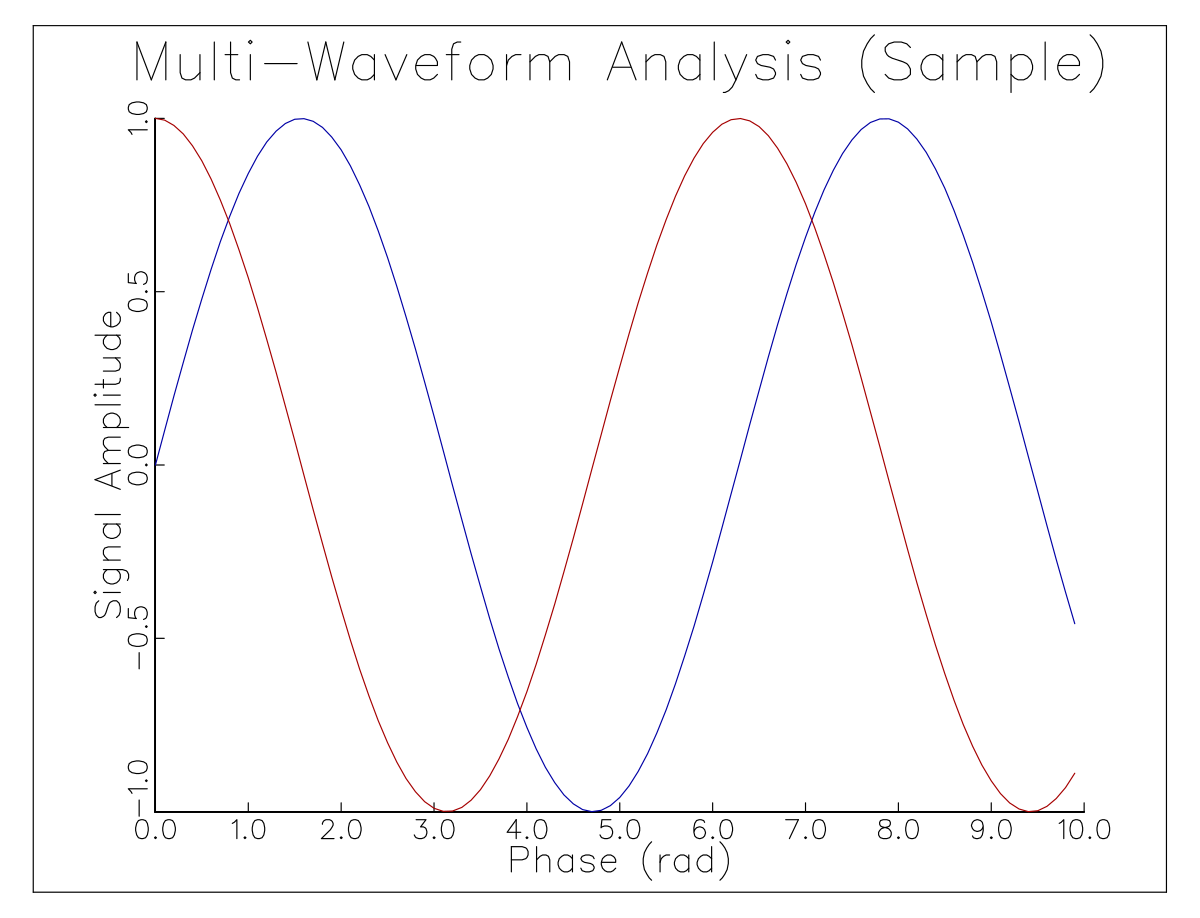
C Implementation
/*==============================================================================
 * GraphiC Classic C Suite: D2test
 *
 * How to Compile & Run (from GraphiC repository root):
 *   make examples
 *   ./bin/D2test
 *
 * Direct Command-Line Compilation:
 *   clang -O2 -IInclude -DGPC_PORTABLE=1 Examples/D2test.c lib/libgraphic.a -lm -o bin/D2test
 *   ./bin/D2test
 *============================================================================*/

#include "graphic.h"

int main() {
    bgnplot(0, 'S', "c/examples/d2.svg");
    page(8.0, 6.0);
    startplot(WHITE);
    area2d(5.5, 4.0);
    physor(1.5, 1.2);
    box();
    heading("Harmonic Oscillations");
    xname("Time (s)");
    yname("Voltage (V)");
    graf("%3.1f", 0.0, 1.0, 10.0, "%3.1f", -1.0, 0.5, 1.0);
    color(BLUE);
    curve(x1, y1, npts, 0);
    color(RED);
    curve(x2, y2, npts, 1);
    endplot();
    stopplot();
    return 0;
}
Fortran Implementation
program d2test
  use graphic
  implicit none
  integer, parameter :: NPTS = 50
  real :: x1(NPTS), y1(NPTS), x2(NPTS), y2(NPTS)
  ! ... populate data arrays ...

  call gpc_bgnplot(DRIVER_SVG, "fortran/examples/d2test.svg")
  call gpc_page(8.0, 6.0)
  call gpc_startplot(COLOR_WHITE)
  call gpc_area2d(5.5, 4.0)
  call gpc_physor(1.5, 1.2)
  call gpc_box()
  call gpc_heading("Harmonic Oscillations")
  call gpc_xname("Time (s)")
  call gpc_yname("Voltage (V)")
  call gpc_graf("%3.1f", 0.0, 1.0, 10.0, "%3.1f", -1.0, 0.5, 1.0)
  call gpc_color(COLOR_BLUE)
  call gpc_curve(x1, y1, NPTS, 0)
  call gpc_color(COLOR_RED)
  call gpc_curve(x2, y2, NPTS, 1)
  call gpc_endplot()
  call gpc_stopplot()
end program d2test
Python Implementation
import graphic as gpc

gpc.bgnplot("S", "python/examples/d2test.svg")
gpc.page(8.0, 6.0)
gpc.startplot(gpc.WHITE)
gpc.area2d(5.5, 4.0)
gpc.physor(1.5, 1.2)
gpc.box()
gpc.heading("Harmonic Oscillations")
gpc.xname("Time (s)")
gpc.yname("Voltage (V)")
gpc.graf("%3.1f", 0.0, 1.0, 10.0, "%3.1f", -1.0, 0.5, 1.0)
gpc.color(gpc.BLUE)
gpc.curve(x1, y1, len(x1), 0)
gpc.color(gpc.RED)
gpc.curve(x2, y2, len(x2), 1)
gpc.endplot()
gpc.stopplot()
Java Implementation
import com.sciend.graphic.GraphiC;
import com.sciend.graphic.Color;

public class D2Test {
    public static void main(String[] args) {
        GraphiC.bgnplot("S", "java/examples/d2test.svg");
        GraphiC.page(8.0f, 6.0f);
        GraphiC.startplot(Color.WHITE);
        GraphiC.area2d(5.5f, 4.0f);
        GraphiC.physor(1.5f, 1.2f);
        GraphiC.box();
        GraphiC.heading("Harmonic Oscillations");
        GraphiC.xname("Time (s)");
        GraphiC.yname("Voltage (V)");
        GraphiC.graf("%3.1f", 0.0f, 1.0f, 10.0f, "%3.1f", -1.0f, 0.5f, 1.0f);
        GraphiC.color(Color.BLUE);
        GraphiC.curve(x1, y1, npts, 0);
        GraphiC.color(Color.RED);
        GraphiC.curve(x2, y2, npts, 1);
        GraphiC.endplot();
        GraphiC.stopplot();
    }
}
Julia Implementation
using GraphiC

out_svg = joinpath(@__DIR__, "sample.svg")
n = 100
t = range(0.0, 10.0, length=n)
y1 = sin.(t)
y2 = cos.(t)

GraphiC.bgnplot(1, 'S', out_svg)
GraphiC.page(8.5, 6.5)
GraphiC.startplot(GraphiC.WHITE)
GraphiC.area2d(6.0, 4.5)
GraphiC.physor(1.5, 1.0)
GraphiC.box()
GraphiC.title("Multi-Waveform Analysis (Sample)", "Time (s)", "Signal (V)")
GraphiC.graf("%3.1f", 0.0, 2.0, 10.0, "%3.1f", -1.0, 0.5, 1.0)
GraphiC.color(GraphiC.BLUE)
GraphiC.curve(t, y1, n, 0)
GraphiC.color(GraphiC.RED)
GraphiC.curve(t, y2, n, 0)
GraphiC.endplot()
GraphiC.stopplot()
10.2 3D Perspective Surface Mesh with Hidden-Line Removal (d3test)
Renders three-dimensional mathematical surfaces using GraphiC’s analytical horizon-scanning hidden-line elimination algorithm (surmat).
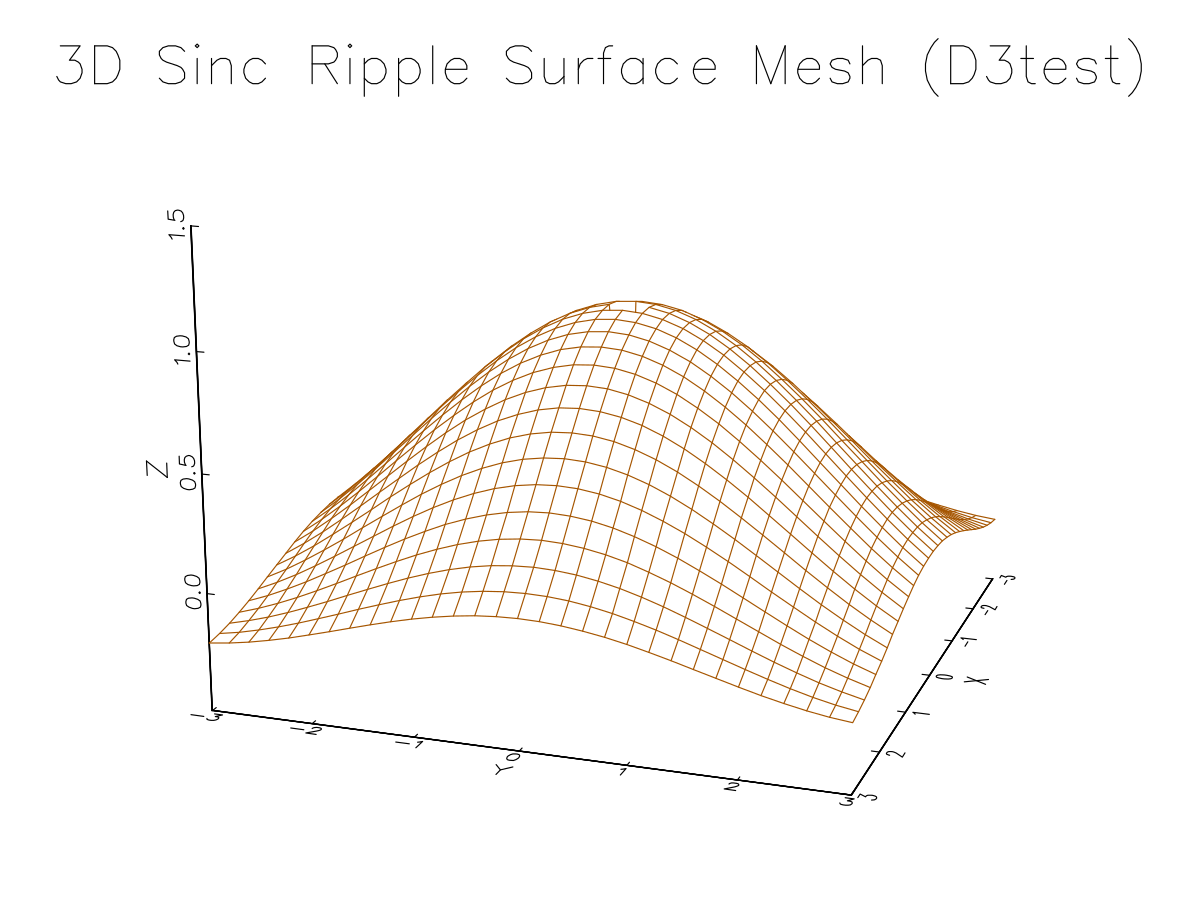
C Implementation
/*==============================================================================
 * GraphiC Classic C Suite: D3test
 *
 * How to Compile & Run (from GraphiC repository root):
 *   make examples
 *   ./bin/D3test
 *
 * Direct Command-Line Compilation:
 *   clang -O2 -IInclude -DGPC_PORTABLE=1 Examples/D3test.c lib/libgraphic.a -lm -o bin/D3test
 *   ./bin/D3test
 *============================================================================*/

#include "graphic.h"

int main() {
    bgnplot(0, 'S', "c/examples/d3.svg");
    page(8.0, 6.0);
    startplot(WHITE);
    volm3d(5.0, 5.0, 3.5);
    vuabs(10.0, -15.0, 12.0);
    graf3d(-5.0, 2.5, 5.0, -5.0, 2.5, 5.0, -1.0, 0.5, 1.0);
    survis("top");
    surmat((float*)zmatrix, 40, 40);
    endplot();
    stopplot();
    return 0;
}
Fortran Implementation
program d3test
  use graphic
  implicit none
  integer, parameter :: NX = 40, NY = 40
  real :: zmat(NX, NY)
  ! ... compute surface elevation array ...

  call gpc_bgnplot(DRIVER_SVG, "fortran/examples/d3test.svg")
  call gpc_page(8.0, 6.0)
  call gpc_startplot(COLOR_WHITE)
  call gpc_volm3d(5.0, 5.0, 3.5)
  call gpc_vuabs(10.0, -15.0, 12.0)
  call gpc_graf3d(-5.0, 2.5, 5.0, -5.0, 2.5, 5.0, -1.0, 0.5, 1.0)
  call gpc_surmat(zmat, NX, NY)
  call gpc_endplot()
  call gpc_stopplot()
end program d3test
Python Implementation
import graphic as gpc

gpc.bgnplot("S", "python/examples/d3test.svg")
gpc.page(8.0, 6.0)
gpc.startplot(gpc.WHITE)
gpc.volm3d(5.0, 5.0, 3.5)
gpc.vuabs(10.0, -15.0, 12.0)
gpc.graf3d(-5.0, 2.5, 5.0, -5.0, 2.5, 5.0, -1.0, 0.5, 1.0)
gpc.survis("top")
gpc.surmat(z_matrix, 40, 40)
gpc.endplot()
gpc.stopplot()
Java Implementation
import com.sciend.graphic.GraphiC;
import com.sciend.graphic.Color;

public class D3Test {
    public static void main(String[] args) {
        GraphiC.bgnplot("S", "java/examples/d3test.svg");
        GraphiC.page(8.0f, 6.0f);
        GraphiC.startplot(Color.WHITE);
        GraphiC.volm3d(5.0f, 5.0f, 3.5f);
        GraphiC.vuabs(10.0f, -15.0f, 12.0f);
        GraphiC.graf3d(-5.0f, 2.5f, 5.0f, -5.0f, 2.5f, 5.0f, -1.0f, 0.5f, 1.0f);
        GraphiC.survis("top");
        GraphiC.surmat(zFlat, 40, 40);
        GraphiC.endplot();
        GraphiC.stopplot();
    }
}
Julia Implementation
using GraphiC

out_svg = joinpath(@__DIR__, "d3test.svg")
nx, ny = 40, 40
x = range(-5.0, 5.0, length=nx)
y = range(-5.0, 5.0, length=ny)

zmat = zeros(Float32, nx, ny)
for j in 1:ny, i in 1:nx
    r = sqrt(x[i]^2 + y[j]^2)
    zmat[i, j] = r < 1e-5 ? 1.0f0 : Float32(sin(r) / r)
end

GraphiC.bgnplot(1, 'S', out_svg)
GraphiC.page(8.0, 6.0)
GraphiC.startplot(GraphiC.WHITE)
GraphiC.volm3d(5.0, 4.0, 3.0)
GraphiC.vuabs(10.0, -15.0, 8.0)
GraphiC.title("3D Sinc Surface Mesh (D3test)", "", "")
GraphiC.graf3d(-5.0, 2.5, 5.0, -5.0, 2.5, 5.0, -0.4, 0.2, 1.0)
GraphiC.color(GraphiC.BLUE)
GraphiC.survis("top")
GraphiC.surmat(zmat, nx, ny)
GraphiC.endplot()
GraphiC.stopplot()
10.3 2D Contour Topography with Elevation Labels (cnttest)
Calculates iso-potential or elevation contour lines through a regular grid matrix and places inline elevation labels using the core conmat routine.
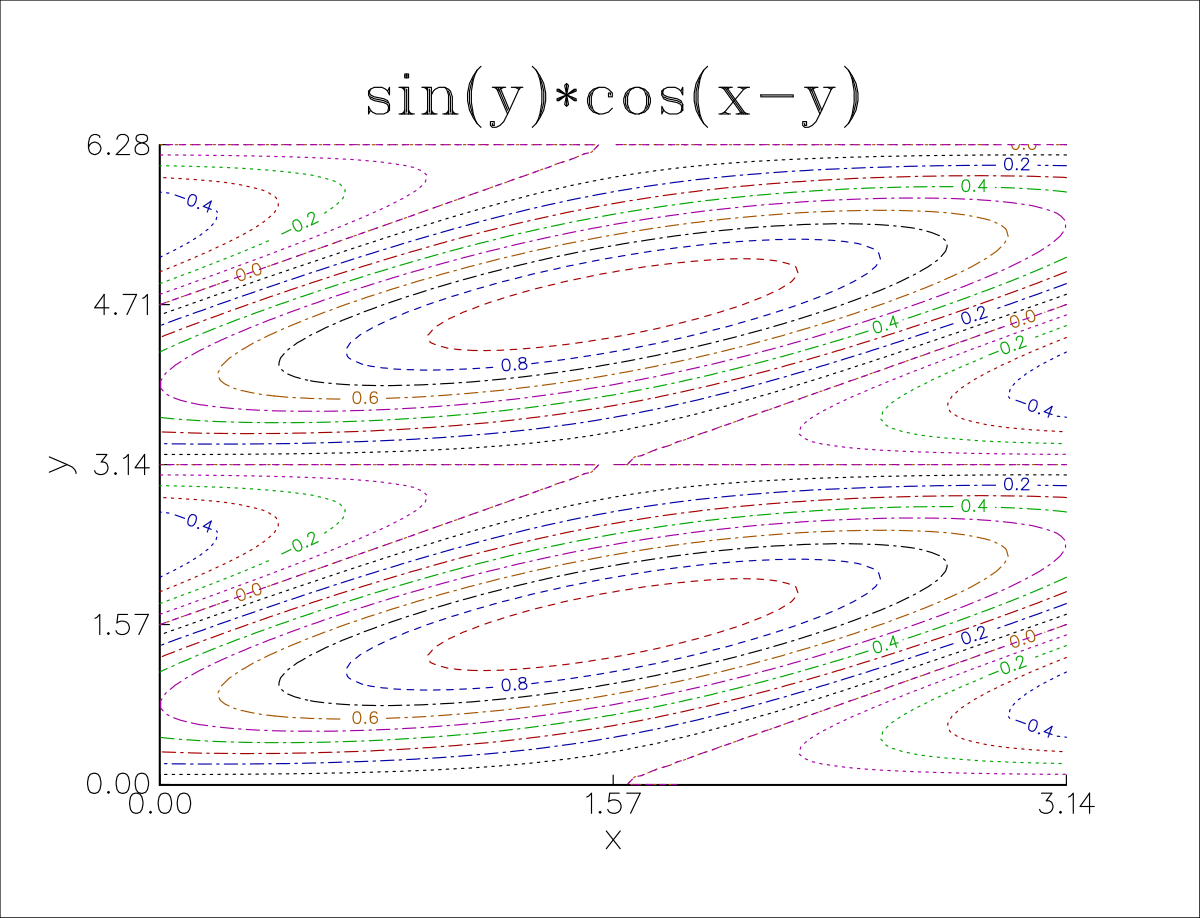
C Implementation
/*==============================================================================
 * GraphiC Classic C Suite: Cnttest
 *
 * How to Compile & Run (from GraphiC repository root):
 *   make examples
 *   ./bin/Cnttest
 *
 * Direct Command-Line Compilation:
 *   clang -O2 -IInclude -DGPC_PORTABLE=1 Examples/Cnttest.c lib/libgraphic.a -lm -o bin/Cnttest
 *   ./bin/Cnttest
 *============================================================================*/

#include "graphic.h"

int main() {
    bgnplot(0, 'S', "c/examples/cnttest.svg");
    page(8.0, 6.0);
    startplot(WHITE);
    area2d(5.0, 4.0);
    physor(1.5, 1.0);
    box();
    heading("2D Contour Topography");
    xname("X Coordinate");
    yname("Y Coordinate");
    graf("%3.1f", -3.0, 1.0, 3.0, "%3.1f", -3.0, 1.0, 3.0);
    color(BLACK);
    conmat((float*)zmatrix, xcoords, 30, ycoords, 30, -0.8, 0.2, 0.8, NULL, 1);
    endplot();
    stopplot();
    return 0;
}
Fortran Implementation
program cnttest
  use graphic
  implicit none
  integer, parameter :: NX = 30, NY = 30
  real :: zmat(NX, NY), xcoords(NX), ycoords(NY)
  ! ... generate grid and matrix ...

  call gpc_bgnplot(DRIVER_SVG, "fortran/examples/cnttest.svg")
  call gpc_page(8.0, 6.0)
  call gpc_startplot(COLOR_WHITE)
  call gpc_area2d(5.0, 4.0)
  call gpc_physor(1.5, 1.0)
  call gpc_box()
  call gpc_heading("2D Contour Topography")
  call gpc_xname("X Coordinate")
  call gpc_yname("Y Coordinate")
  call gpc_graf("%3.1f", -3.0, 1.0, 3.0, "%3.1f", -3.0, 1.0, 3.0)
  call gpc_color(COLOR_BLACK)
  call gpc_conmat(zmat, xcoords, NX, ycoords, NY, -0.8, 0.2, 0.8, 1)
  call gpc_endplot()
  call gpc_stopplot()
end program cnttest
Python Implementation
import graphic as gpc

gpc.bgnplot("S", "python/examples/cnttest.svg")
gpc.page(8.0, 6.0)
gpc.startplot(gpc.WHITE)
gpc.area2d(5.0, 4.0)
gpc.physor(1.5, 1.0)
gpc.box()
gpc.heading("2D Contour Topography")
gpc.xname("X Coordinate")
gpc.yname("Y Coordinate")
gpc.graf("%3.1f", -3.0, 1.0, 3.0, "%3.1f", -3.0, 1.0, 3.0)
gpc.color(gpc.BLACK)
gpc.conmat(z_matrix, x_coords, 30, y_coords, 30, -0.8, 0.2, 0.8, None, 1)
gpc.endplot()
gpc.stopplot()
Java Implementation
import com.sciend.graphic.GraphiC;
import com.sciend.graphic.Color;

public class CntTest {
    public static void main(String[] args) {
        GraphiC.bgnplot("S", "java/examples/cnttest.svg");
        GraphiC.page(8.0f, 6.0f);
        GraphiC.startplot(Color.WHITE);
        GraphiC.area2d(5.0f, 4.0f);
        GraphiC.physor(1.5f, 1.0f);
        GraphiC.box();
        GraphiC.heading("2D Contour Topography");
        GraphiC.xname("X Coordinate");
        GraphiC.yname("Y Coordinate");
        GraphiC.graf("%3.1f", -3.0f, 1.0f, 3.0f, "%3.1f", -3.0f, 1.0f, 3.0f);
        GraphiC.color(Color.BLACK);
        GraphiC.conmat(zFlat, xCoords, 30, yCoords, 30, -0.8f, 0.2f, 0.8f, 1);
        GraphiC.endplot();
        GraphiC.stopplot();
    }
}
Julia Implementation
using GraphiC

out_svg = joinpath(@__DIR__, "cnttest.svg")
nx, ny = 30, 30
xcoords = range(-3.0, 3.0, length=nx)
ycoords = range(-3.0, 3.0, length=ny)

zmat = zeros(Float32, nx, ny)
for j in 1:ny, i in 1:nx
    x, y = xcoords[i], ycoords[j]
    zmat[i, j] = Float32(exp(-0.3 * (x^2 + y^2)) * cos(x) * cos(y))
end

GraphiC.bgnplot(1, 'S', out_svg)
GraphiC.page(8.0, 6.0)
GraphiC.startplot(GraphiC.WHITE)
GraphiC.area2d(5.0, 4.0)
GraphiC.physor(1.5, 1.0)
GraphiC.box()
GraphiC.title("Contour Topography (Cnttest)", "X Coordinate", "Y Coordinate")
GraphiC.graf("%3.1f", -3.0, 1.0, 3.0, "%3.1f", -3.0, 1.0, 3.0)
GraphiC.conmat(zmat, collect(xcoords), nx, collect(ycoords), ny, 8)
GraphiC.endplot()
GraphiC.stopplot()
10.4 RF Microwave Impedance Smith Chart (smtest)
Plots reflection coefficients, transmission line impedances, and admittance circles used internationally in radar and RF microwave engineering using smdraw and plotrx.
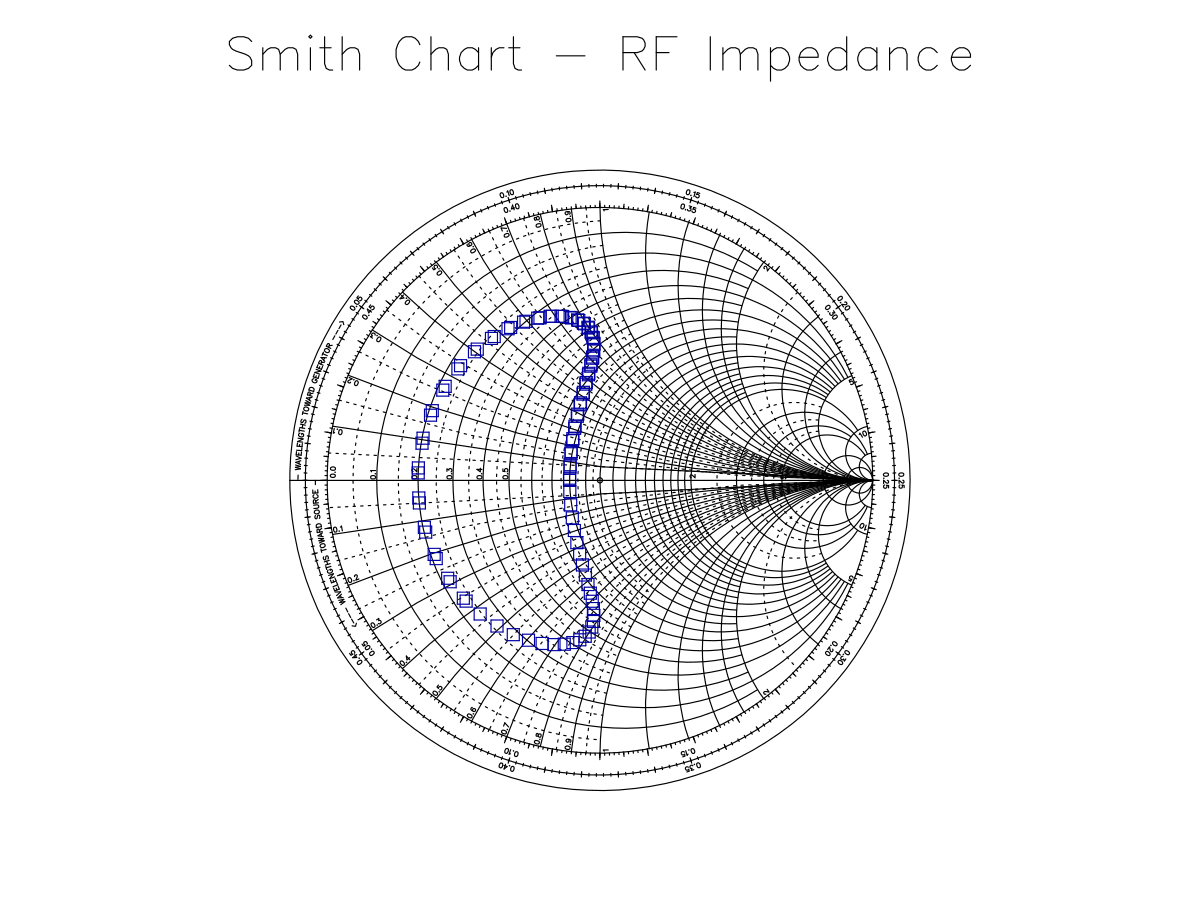
C Implementation
/*==============================================================================
 * GraphiC Classic C Suite: Smtest
 *
 * How to Compile & Run (from GraphiC repository root):
 *   make examples
 *   ./bin/Smtest
 *
 * Direct Command-Line Compilation:
 *   clang -O2 -IInclude -DGPC_PORTABLE=1 Examples/Smtest.c lib/libgraphic.a -lm -o bin/Smtest
 *   ./bin/Smtest
 *============================================================================*/

#include "graphic.h"

int main() {
    bgnplot(0, 'S', "c/examples/smtest.svg");
    page(7.0, 7.0);
    startplot(WHITE);
    smdraw(BLACK);
    plotrx(0.5, 1.0);   // Normalized R = 0.5, X = +1.0
    plotrx(1.0, -0.5);  // Normalized R = 1.0, X = -0.5
    endplot();
    stopplot();
    return 0;
}
Fortran Implementation
program smtest
  use graphic
  implicit none

  call gpc_bgnplot(DRIVER_SVG, "fortran/examples/smtest.svg")
  call gpc_page(7.0, 7.0)
  call gpc_startplot(COLOR_WHITE)
  call gpc_smdraw(COLOR_BLACK)
  call gpc_plotrx(0.5, 1.0)
  call gpc_plotrx(1.0, -0.5)
  call gpc_endplot()
  call gpc_stopplot()
end program smtest
Python Implementation
import graphic as gpc

gpc.bgnplot("S", "python/examples/smtest.svg")
gpc.page(7.0, 7.0)
gpc.startplot(gpc.WHITE)
gpc.smdraw(gpc.BLACK)
gpc.plotrx(0.5, 1.0)
gpc.plotrx(1.0, -0.5)
gpc.endplot()
gpc.stopplot()
Java Implementation
import com.sciend.graphic.GraphiC;
import com.sciend.graphic.Color;

public class SmTest {
    public static void main(String[] args) {
        GraphiC.bgnplot("S", "java/examples/smtest.svg");
        GraphiC.page(7.0f, 7.0f);
        GraphiC.startplot(Color.WHITE);
        GraphiC.smdraw(Color.BLACK);
        GraphiC.plotrx(0.5f, 1.0f);
        GraphiC.plotrx(1.0f, -0.5f);
        GraphiC.endplot();
        GraphiC.stopplot();
    }
}
Julia Implementation
using GraphiC

out_svg = joinpath(@__DIR__, "smtest.svg")
npts = 50
theta = range(0.0, 2π, length=npts)
r = 1.0 .+ 0.5 .* cos.(theta)
x = 0.5 .* sin.(theta)

GraphiC.bgnplot(1, 'S', out_svg)
GraphiC.page(8.0, 6.0)
GraphiC.startplot(GraphiC.WHITE)
GraphiC.area2d(5.0, 5.0)
GraphiC.physor(1.5, 0.5)
GraphiC.title("Julia RF Microwave Smith Chart", "", "")
GraphiC.smdraw(GraphiC.BLACK)

GraphiC.color(GraphiC.RED)
for i in 1:npts
    GraphiC.plotrx(r[i], x[i])
end

GraphiC.endplot()
GraphiC.stopplot()
10.5 Polar Antenna Radiation Patterns (poltest)
Plots circular directional gain profiles for electromagnetic radiation, acoustic transducers, and hydrophones using polgrid and polcurve.
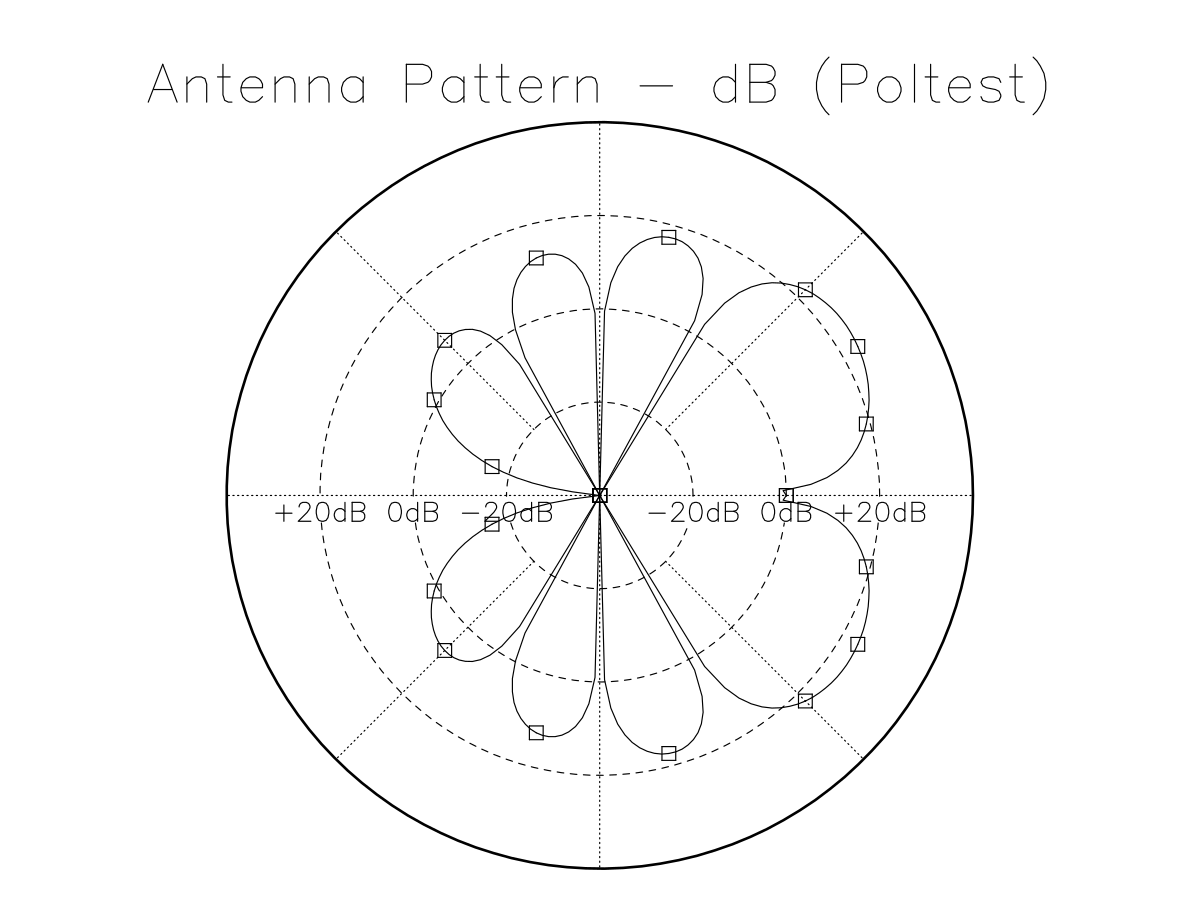
C Implementation
/*==============================================================================
 * GraphiC Classic C Suite: Poltest
 *
 * How to Compile & Run (from GraphiC repository root):
 *   make examples
 *   ./bin/Poltest
 *
 * Direct Command-Line Compilation:
 *   clang -O2 -IInclude -DGPC_PORTABLE=1 Examples/Poltest.c lib/libgraphic.a -lm -o bin/Poltest
 *   ./bin/Poltest
 *============================================================================*/

#include "graphic.h"

int main() {
    bgnplot(0, 'S', "c/examples/poltest.svg");
    page(7.0, 7.0);
    startplot(WHITE);
    area2d(5.0, 5.0);
    physor(1.0, 1.0);
    polgrid(0.0, 360.0, 30.0, 0.0, 1.0, 0.2, "%3.1f", BLACK);
    color(BLUE);
    polcurve(angles, radii, npts, 0);
    endplot();
    stopplot();
    return 0;
}
Fortran Implementation
program poltest
  use graphic
  implicit none
  integer, parameter :: NPTS = 360
  real :: angles(NPTS), radii(NPTS)
  ! ... compute antenna lobe radiation ...

  call gpc_bgnplot(DRIVER_SVG, "fortran/examples/poltest.svg")
  call gpc_page(7.0, 7.0)
  call gpc_startplot(COLOR_WHITE)
  call gpc_area2d(5.0, 5.0)
  call gpc_physor(1.0, 1.0)
  call gpc_polgrid(1.0, 0.0, COLOR_BLACK)
  call gpc_color(COLOR_BLUE)
  call gpc_polcurve(angles, radii, NPTS, 0)
  call gpc_endplot()
  call gpc_stopplot()
end program poltest
Python Implementation
import graphic as gpc

gpc.bgnplot("S", "python/examples/poltest.svg")
gpc.page(7.0, 7.0)
gpc.startplot(gpc.WHITE)
gpc.area2d(5.0, 5.0)
gpc.physor(1.0, 1.0)
gpc.polgrid(0.0, 360.0, 30.0, 0.0, 1.0, 0.2, "%3.1f", gpc.BLACK)
gpc.color(gpc.BLUE)
gpc.polcurve(angles, radii, len(angles), 0)
gpc.endplot()
gpc.stopplot()
Java Implementation
import com.sciend.graphic.GraphiC;
import com.sciend.graphic.Color;

public class PolTest {
    public static void main(String[] args) {
        GraphiC.bgnplot("S", "java/examples/poltest.svg");
        GraphiC.page(7.0f, 7.0f);
        GraphiC.startplot(Color.WHITE);
        GraphiC.area2d(5.0f, 5.0f);
        GraphiC.physor(1.0f, 1.0f);
        GraphiC.polgrid(0.0f, 360.0f, 30.0f, 0.0f, 1.0f, 0.2f, "%3.1f", Color.BLACK);
        GraphiC.color(Color.BLUE);
        GraphiC.polcurve(angles, radii, npts, 0);
        GraphiC.endplot();
        GraphiC.stopplot();
    }
}
Julia Implementation
using GraphiC

out_svg = joinpath(@__DIR__, "polar.svg")
n = 200
theta = range(0.0, 4π, length=n)
r = 0.5 .* theta

GraphiC.bgnplot(1, 'S', out_svg)
GraphiC.page(8.0, 6.0)
GraphiC.startplot(GraphiC.WHITE)
GraphiC.area2d(5.0, 5.0)
GraphiC.physor(1.5, 0.5)
GraphiC.title("Polar Coordinate Pattern (Poltest)", "", "")
GraphiC.polgrid(7.0, 0.0, 1, 4, 12, GraphiC.BLACK)
GraphiC.color(GraphiC.RED)
GraphiC.polcurv(r, theta, n, 0)
GraphiC.endplot()
GraphiC.stopplot()
10.6 Logarithmic & Semi-Log Plots (logtest)
Handles dynamic frequency sweeps, audio Bode plots, and wide-range spectroscopic measurements using xlog and ylog.
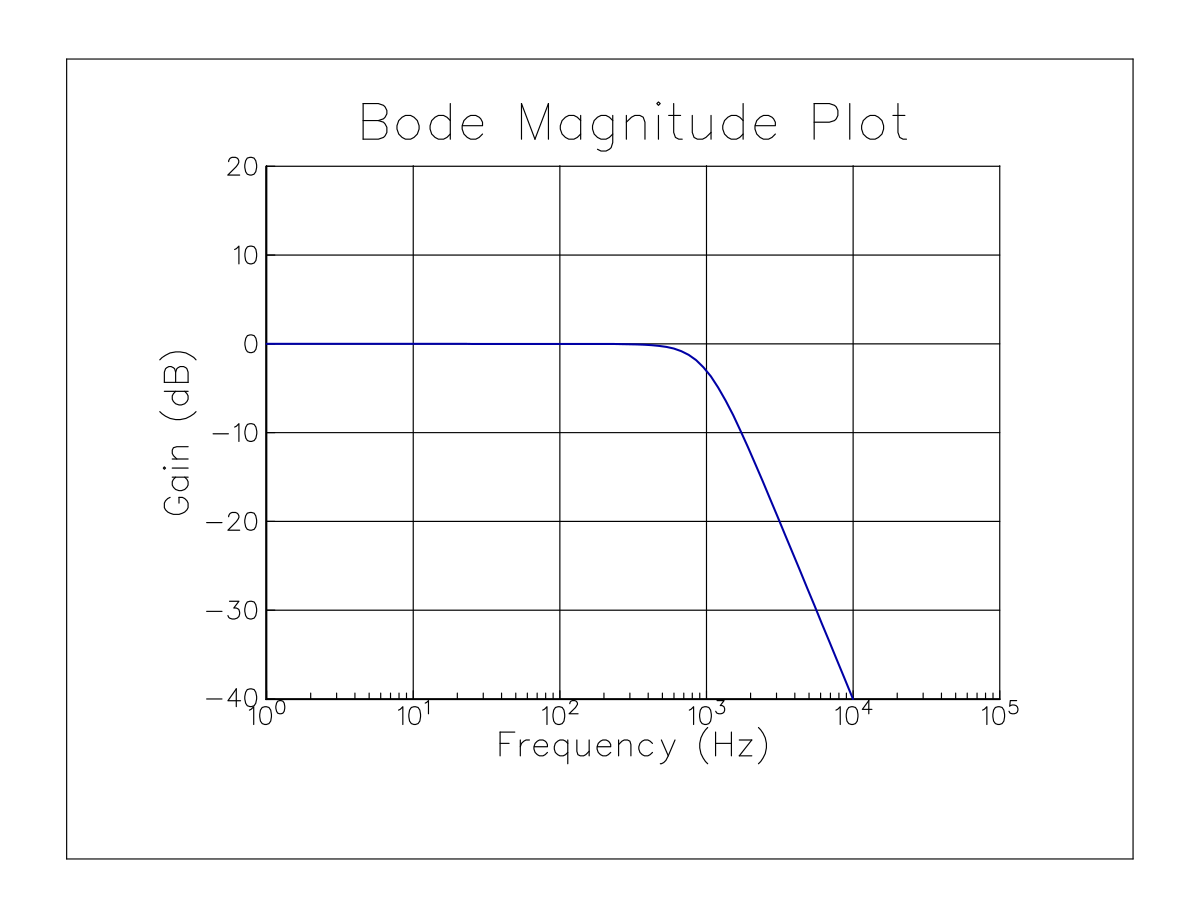
C Implementation
/*==============================================================================
 * GraphiC Classic C Suite: Logtest
 *
 * How to Compile & Run (from GraphiC repository root):
 *   make examples
 *   ./bin/Logtest
 *
 * Direct Command-Line Compilation:
 *   clang -O2 -IInclude -DGPC_PORTABLE=1 Examples/Logtest.c lib/libgraphic.a -lm -o bin/Logtest
 *   ./bin/Logtest
 *============================================================================*/

#include "graphic.h"

int main() {
    bgnplot(0, 'S', "c/examples/logtest.svg");
    page(8.0, 6.0);
    startplot(WHITE);
    area2d(5.5, 4.0);
    physor(1.5, 1.2);
    box();
    heading("Bode Magnitude Plot");
    xname("Frequency (Hz)");
    yname("Gain (dB)");
    xlog(1.0, 1.0e5, "%1.0e", -40.0, 10.0, 20.0);
    color(BLUE);
    curve(freq, gain, npts, 0);
    endplot();
    stopplot();
    return 0;
}
Fortran Implementation
program logtest
  use graphic
  implicit none
  integer, parameter :: NPTS = 100
  real :: freq(NPTS), gain(NPTS)
  ! ... compute frequency response ...

  call gpc_bgnplot(DRIVER_SVG, "fortran/examples/logtest.svg")
  call gpc_page(8.0, 6.0)
  call gpc_startplot(COLOR_WHITE)
  call gpc_area2d(5.5, 4.0)
  call gpc_physor(1.5, 1.2)
  call gpc_box()
  call gpc_heading("Bode Magnitude Plot")
  call gpc_xname("Frequency (Hz)")
  call gpc_yname("Gain (dB)")
  call gpc_xlog(1.0, 1.0e5, "%1.0e", -40.0, 10.0, 20.0)
  call gpc_color(COLOR_BLUE)
  call gpc_curve(freq, gain, NPTS, 0)
  call gpc_endplot()
  call gpc_stopplot()
end program logtest
Python Implementation
import graphic as gpc

gpc.bgnplot("S", "python/examples/logtest.svg")
gpc.page(8.0, 6.0)
gpc.startplot(gpc.WHITE)
gpc.area2d(5.5, 4.0)
gpc.physor(1.5, 1.2)
gpc.box()
gpc.heading("Bode Magnitude Plot")
gpc.xname("Frequency (Hz)")
gpc.yname("Gain (dB)")
gpc.xlog(1.0, 1.0e5, "%1.0e", -40.0, 10.0, 20.0)
gpc.color(gpc.BLUE)
gpc.curve(freq, gain, len(freq), 0)
gpc.endplot()
gpc.stopplot()
Java Implementation
import com.sciend.graphic.GraphiC;
import com.sciend.graphic.Color;

public class LogTest {
    public static void main(String[] args) {
        GraphiC.bgnplot("S", "java/examples/logtest.svg");
        GraphiC.page(8.0f, 6.0f);
        GraphiC.startplot(Color.WHITE);
        GraphiC.area2d(5.5f, 4.0f);
        GraphiC.physor(1.5f, 1.2f);
        GraphiC.box();
        GraphiC.heading("Bode Magnitude Plot");
        GraphiC.xname("Frequency (Hz)");
        GraphiC.yname("Gain (dB)");
        GraphiC.xlog(1.0f, 1.0e5f, "%1.0e", -40.0f, 10.0f, 20.0f);
        GraphiC.color(Color.BLUE);
        GraphiC.curve(freq, gain, npts, 0);
        GraphiC.endplot();
        GraphiC.stopplot();
    }
}
Julia Implementation
using GraphiC

out_svg = joinpath(@__DIR__, "logtest.svg")
npts = 200
x = Float32[0.1 + (i - 1) * 0.5 for i in 1:npts]
y = Float32[sin(v) / (1.0 + 0.1 * v) for v in x]

GraphiC.bgnplot(1, 'S', out_svg)
GraphiC.page(8.0, 6.0)
GraphiC.startplot(GraphiC.WHITE)
GraphiC.area2d(5.5, 4.0)
GraphiC.physor(1.5, 1.2)
GraphiC.box()
GraphiC.title("Semi-Log Frequency Response (Logtest)", "Frequency (kHz, log)", "Gain (dB)")
GraphiC.xlog(0.1, 100.0, "%-1.1f", -1.0, 0.4, 1.0)
GraphiC.color(GraphiC.BLUE)
GraphiC.curve(x, y, npts, 0)
GraphiC.endplot()
GraphiC.stopplot()
10.7 2D Velocity Vector Fields (vfield)
Visualizes fluid dynamics, wind velocities, and magnetic fields using directed vector arrows.
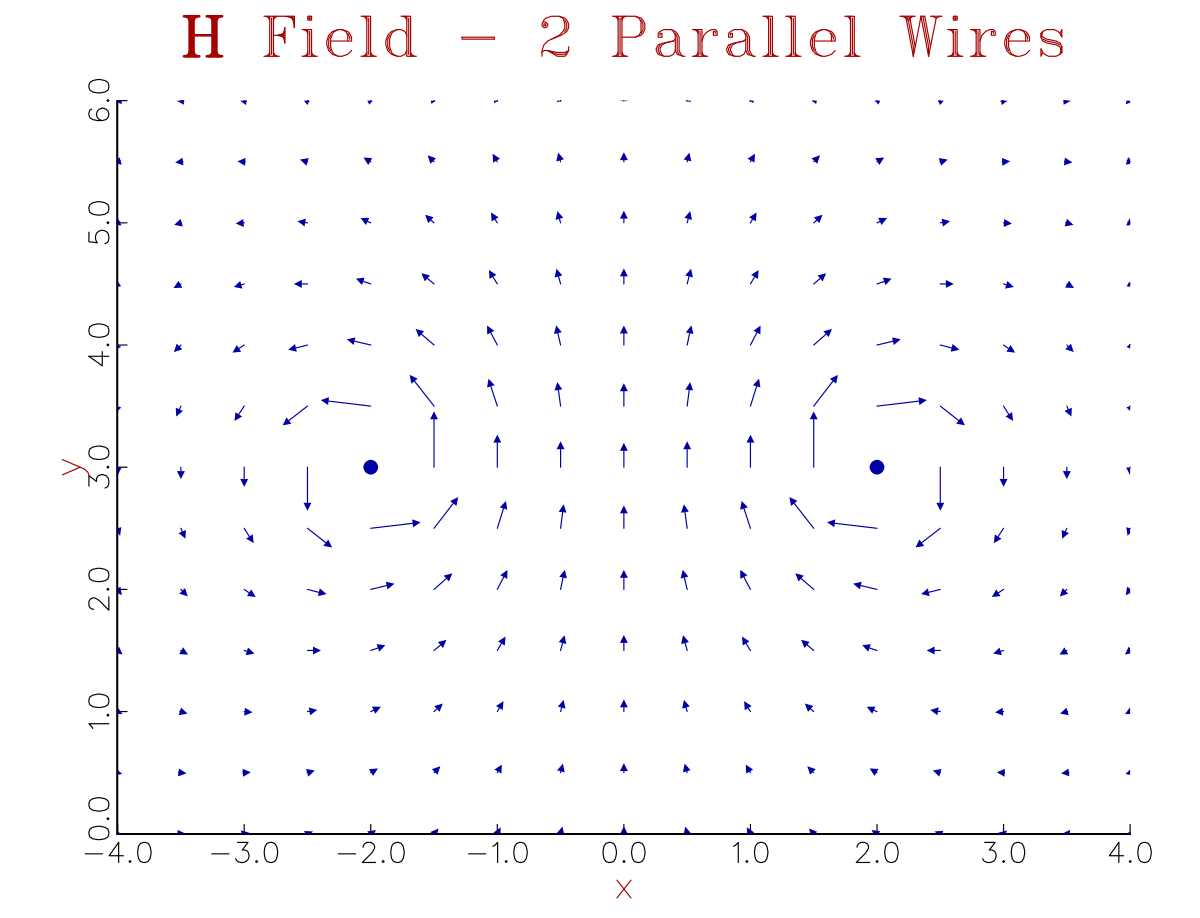
(Source code in Examples directory)
10.8 Ternary Phase Equilibrium Diagrams (tritest)
Specialized triangular coordinate framework for 3-component chemical mixtures, alloy metallurgy, and geology.
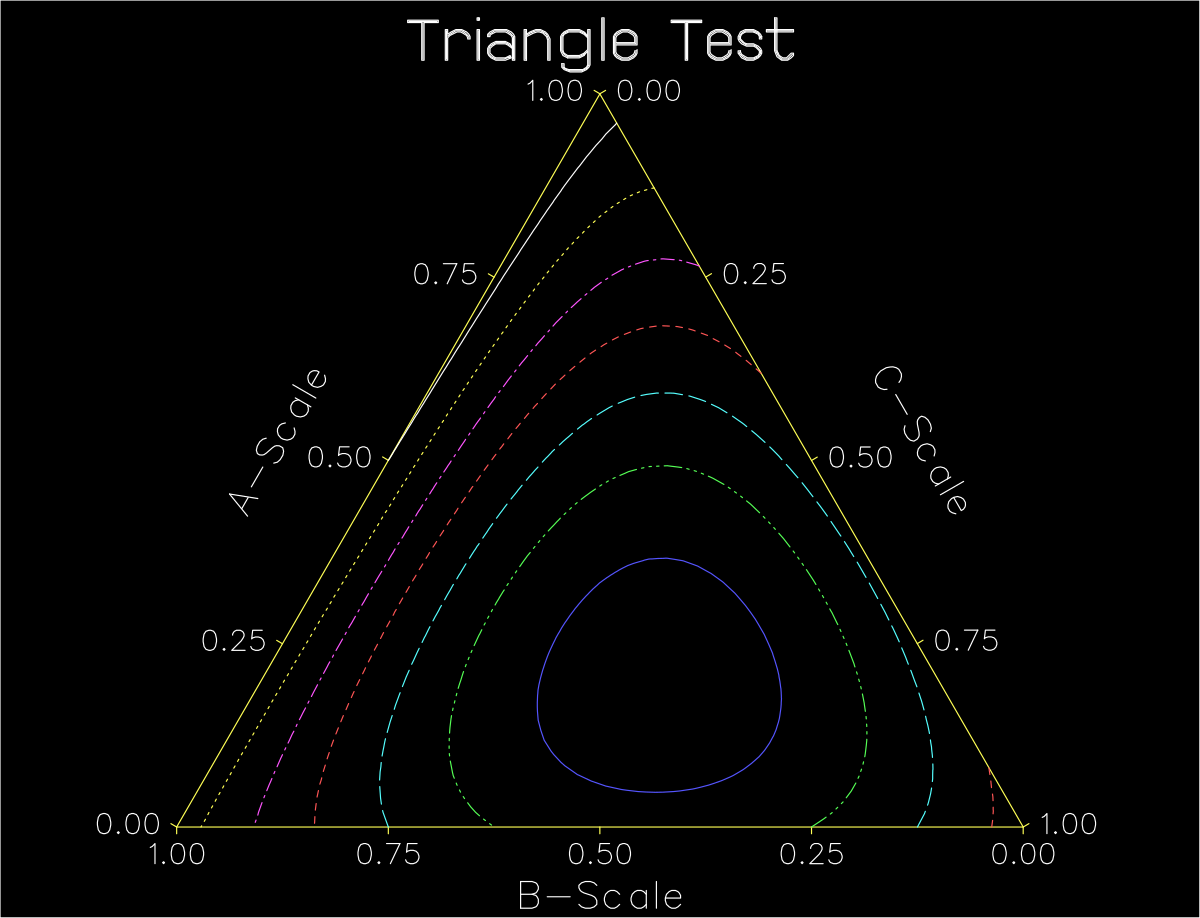
(Source code in Examples directory)
10.9 Grouped Bar Charts with Vector Hatching (bartest)
Scientific bar plots with customizable widths, groupings, and vector crosshatching.
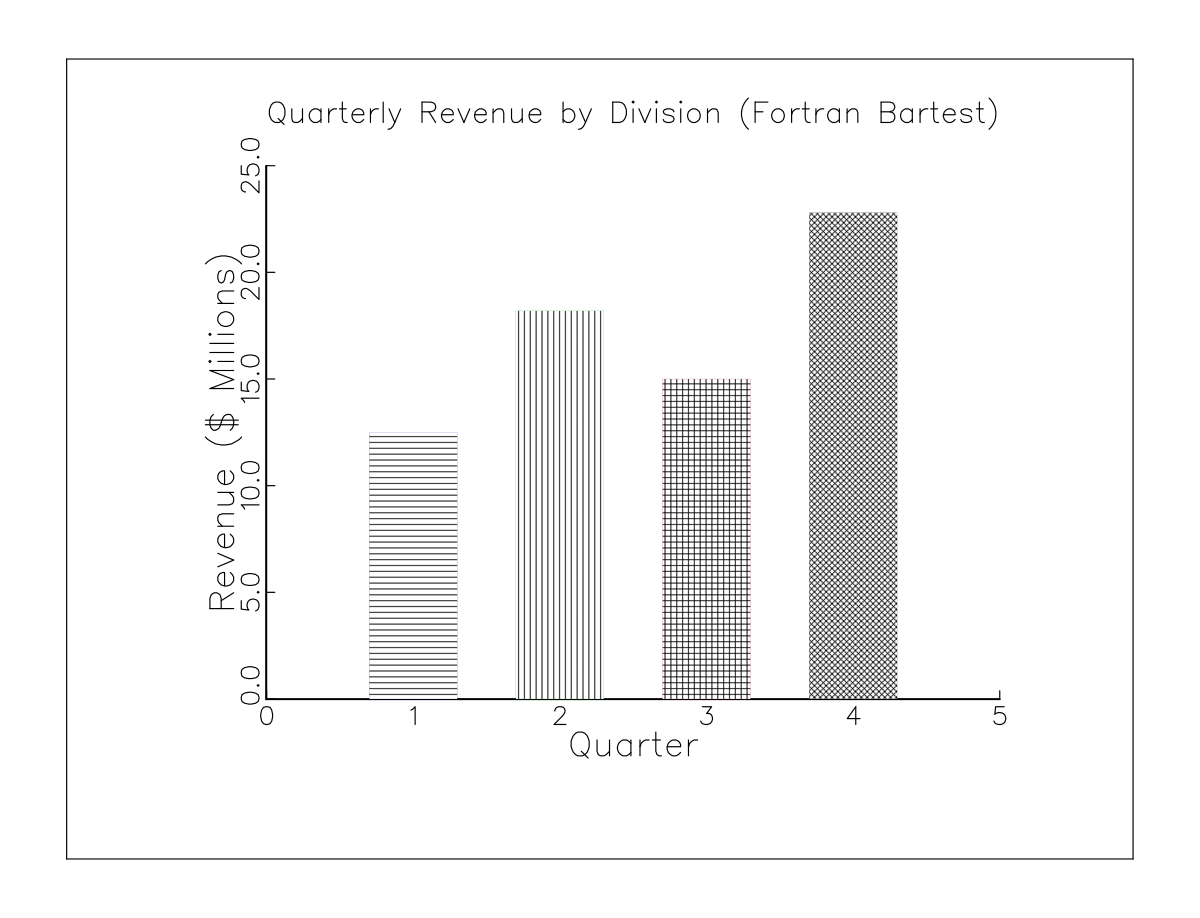
(Source code in Examples directory)
C Implementation
/*==============================================================================
 * GraphiC Classic C Suite: Bartest
 *
 * How to Compile & Run (from GraphiC repository root):
 *   make examples
 *   ./bin/Bartest
 *
 * Direct Command-Line Compilation:
 *   clang -O2 -IInclude -DGPC_PORTABLE=1 c/examples/Bartest.c lib/libgraphic.a -lm -o bin/Bartest
 *   ./bin/Bartest
 *============================================================================*/

#include <graphic.h>

static int tarray[24] = {
    1, 93, 1, 93, 1, 93, 1, 93, 1, 93, 1, 93,
    1, 93, 1, 93, 1, 93, 1, 93, 1, 93, 1, 93
};
static int carray[24] = {
    1, 1, 1, 1, 1, 1, 1, 1, 1, 1, 1, 1,
    1, 1, 1, 1, 1, 1, 1, 1, 1, 1, 1, 1
};
static char *xstring[14] = {
    "", "ÈJan.", "ÈFeb.", "ÈMar.", "ÈApr.",
    "ÈMay", "ÈJune", "ÈJuly", "ÈAug.",
    "ÈSep.", "ÈOct.", "ÈNov.", "ÈDec.", ""
};
static float sales[24] = {
    6.931f, 10.170f, 5.370f, 13.105f, 4.590f, 13.576f, 3.465f, 17.204f,
    5.655f, 13.401f, 4.26f, 11.789f, 7.702f, 10.157f, 5.28f, 7.66f,
    8.155f, 12.897f, 3.735f, 13.318f, 3.925f, 10.785f, 4.085f, 12.612f
};

void GPC_MAIN(void)
{
    float x[24];
    int i, j = 0, nxdiv = 13, npts = 24;

    for (i = 0; i < npts; i++) {
        j++;
        x[i++] = (float)j;
        x[i] = (float)j;
    }

    bgnplot(1, 'S', "c/examples/bartest.svg");
    page(9.0f, 6.884f);
    startplot(BRT_WHITE);
    svgcrop(0.25f);
    font(3, "Swiss.fnt", 'È', "Swissbld.fnt", 'É', "News.fnt", 'Ê');
    area2d(7.6f, 5.3f);
    color(GREEN);
    legpos(2, 6.0f, 4.5f, 1);
    legend(2, "Êgadgets", 1, .15f, 1);
    legend(2, "Êwidgets", 93, .15f, 1);
    box();
    color(GREEN);
    heading("ÉSales");
    xname("Ê""1988");
    yname("ÊThousands");

    xlab(1, xstring);
    graf("%1.2f", 0.f, 1.f, 13.f, "%1.1f", 0.f, 3.f, 18.f);
    xlab(0, xstring);
    bar(nxdiv, x, sales, npts, .6f, 2, carray, tarray);
    color(BLACK);
    dateit((Uchar)'È');
    endplot();
    stopplot();
}
Fortran Implementation
program bartest
  use graphic
  implicit none

  integer, parameter :: NB = 4
  real :: x(NB) = [1.0, 2.0, 3.0, 4.0]
  real :: y(NB) = [12.5, 18.2, 15.0, 22.8]
  integer :: colors(NB) = [COLOR_BLUE, COLOR_GREEN, COLOR_RED, COLOR_BLACK]
  integer :: patterns(NB) = [1, 2, 5, 6]

  call gpc_begin(DRIVER_SVG, "fortran/examples/bartest.svg")
  call gpc_page(8.0, 6.0)
  call gpc_start(COLOR_WHITE)
  call gpc_svgcrop(0.25)
  call gpc_area2d(5.5, 4.0)
  call gpc_physor(1.5, 1.2)
  call gpc_box()
  call gpc_title("Quarterly Revenue by Division (Fortran Bartest)", "Quarter", "Revenue ($ Millions)")
  call gpc_graf("%1.0f", 0.0, 1.0, 5.0, "%3.1f", 0.0, 5.0, 25.0)

  call gpc_bar(x, y, NB, 5, 0.6, 0, colors, patterns)

  call gpc_end()
  call gpc_stop()
end program bartest
Python Implementation
import os
from graphic import Figure

out_svg = "python/examples/bartest.svg"
x_bars = [1.0, 2.0, 3.0, 4.0]
y_bars = [12.5, 18.2, 15.0, 22.8]
colors = ["blue", "green", "red", "black"]
patterns = [1, 2, 5, 6]

with Figure(8.0, 6.0, background="white", output_path=out_svg) as fig:
    fig.title("Quarterly Revenue by Division (Bartest)")
    fig.xlabel("Quarter")
    fig.ylabel("Revenue ($ Millions)")
    fig.setup_axes(0.0, 1.0, 5.0, 0.0, 5.0, 25.0, "%g", "%g", color="black")
    fig.box(color="black")
    fig.bar(x_bars, y_bars, nxdiv=5, bwid=0.6, mode=0, colors=colors, patterns=patterns)
    fig.save(out_svg)
Java Implementation
import com.sciend.graphic.Color;
import com.sciend.graphic.Figure;
import java.nio.file.Path;

public class BarTest {
    public static void main(String[] args) throws Exception {
        float[] xBars = new float[]{1.0f, 2.0f, 3.0f, 4.0f};
        float[] yBars = new float[]{12.5f, 18.2f, 15.0f, 22.8f};
        Color[] colors = new Color[]{Color.BLUE, Color.GREEN, Color.RED, Color.BLACK};
        int[] patterns = new int[]{1, 2, 5, 6};

        try (Figure fig = new Figure(8.0f, 6.0f, Color.WHITE, "bartest.tkf")) {
            fig.title("Quarterly Department Revenue (Java Bartest)");
            fig.xlabel("Quarter");
            fig.ylabel("Revenue ($ Millions)");
            fig.setupAxes(0.0f, 1.0f, 5.0f, 0.0f, 5.0f, 25.0f, "%g", "%g", Color.BLACK);
            fig.box(Color.BLACK);
            fig.bar(xBars, yBars, 5, 0.6f, 0, colors, patterns);
            fig.save(Path.of("java/examples/bartest.svg"));
        }
    }
}
Julia Implementation
using GraphiC

out_svg = joinpath(@__DIR__, "bartest.svg")
x_bars = [1.0, 2.0, 3.0, 4.0]
y_bars = [12.5, 18.2, 15.0, 22.8]
colors = [:blue, :green, :red, :black]
patterns = [1, 2, 5, 6]

GraphiC.bgnplot(1, 'S', out_svg)
GraphiC.page(8.0, 6.0)
GraphiC.startplot(GraphiC.WHITE)
GraphiC.svgcrop(0.25)
GraphiC.area2d(5.5, 4.2)
GraphiC.physor(1.5, 1.0)
GraphiC.box()
GraphiC.title("Grouped Bar Chart (Bartest)", "Category", "Yield (%)")
GraphiC.graf("%1.0f", 0.0, 1.0, 5.0, "%3.1f", 0.0, 5.0, 25.0)
GraphiC.bar(x_bars, y_bars; width=0.6, colors=colors, patterns=patterns)
GraphiC.endplot()
GraphiC.stopplot()
10.10 Exploded Pie Charts (pietest)
Proportional slice charts with independent offset distances for emphasis.
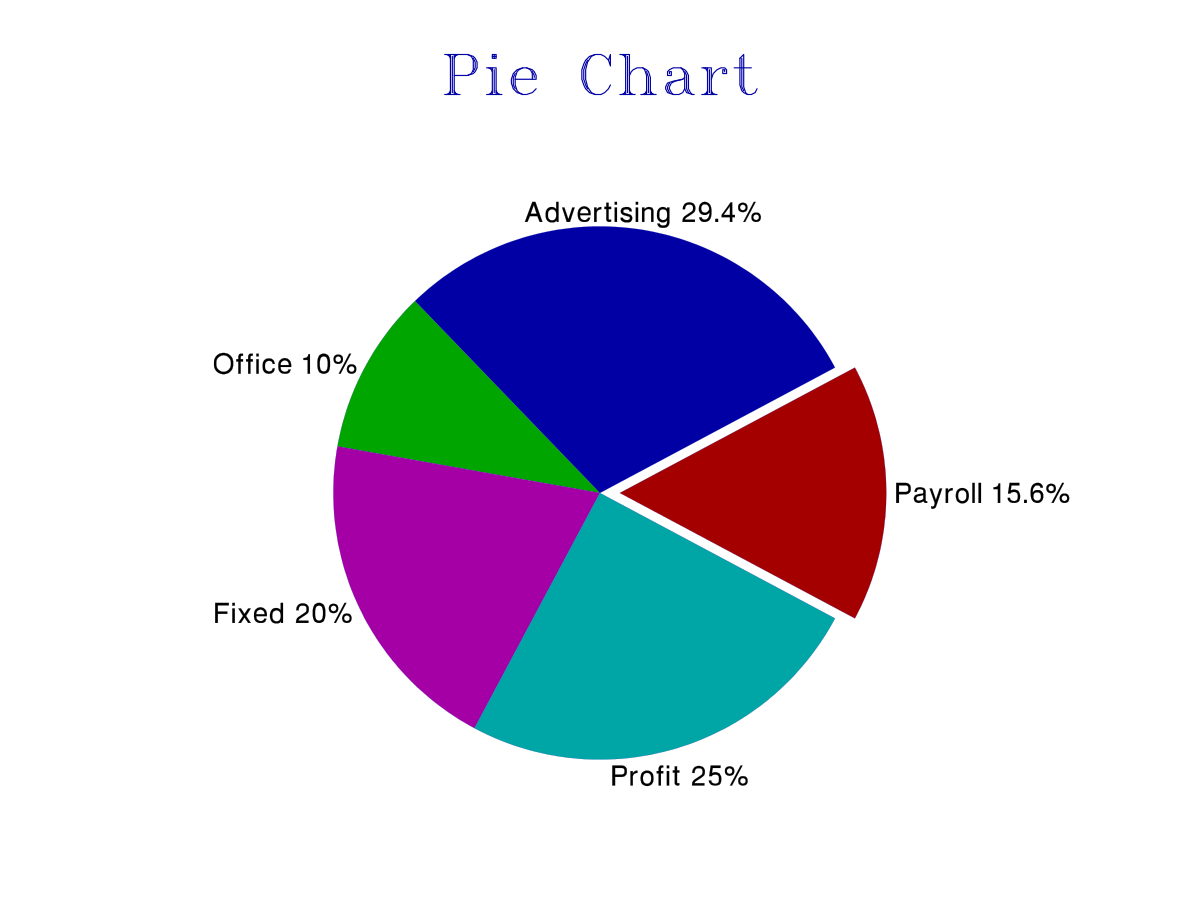
(Source code in Examples directory)
C Implementation
/*==============================================================================
 * GraphiC Classic C Suite: Pietest
 *
 * How to Compile & Run (from GraphiC repository root):
 *   make examples
 *   ./bin/Pietest
 *
 * Direct Command-Line Compilation:
 *   clang -O2 -IInclude -DGPC_PORTABLE=1 c/examples/Pietest.c lib/libgraphic.a -lm -o bin/Pietest
 *   ./bin/Pietest
 *============================================================================*/

#include <graphic.h>

char *caption[] = {
    "Payroll 15.6%", "Advertising 29.4%", "Office 10%",
    "Fixed 20%", "Profit 25%"
};

void GPC_MAIN(void)
{
    float size = 2.0f;
    unsigned dim = 5;
    int clr[5] = {-4, -1, -2, -5, -3};
    float seg[5] = {15.6f, 29.4f, 10.f, 20.f, 25.f};
    float offset[5] = {0.15f, 0.f, 0.f, 0.f, 0.f};

    bgnplot(1, 'S', "c/examples/pietest.svg");
    startplot(WHITE);
    svgcrop(0.25f);
    font(2, "swiss.fnt", 'È', "triplex.fnt", 'É');
    page(9.0f, 6.884f);
    area2d(7.6f, 5.5f);
    color(BLUE);
    heading("ÉPie Chart");
    fillfont(1);
    fntchg('È');
    pieplot(dim, seg, clr, offset, caption, size, 14, 0);
    endplot();
    stopplot();
}
Fortran Implementation
program pietest
  use graphic
  implicit none

  integer, parameter :: NS = 5
  real :: values(NS) = [15.6, 29.4, 10.0, 20.0, 25.0]
  character(len=32) :: captions(NS) = [character(len=32) :: &
    "R&D 15.6%", "Marketing 29.4%", "Operations 10%", "Infrastructure 20%", "Profit 25%"]
  integer :: colors(NS) = [COLOR_RED, COLOR_BLUE, COLOR_GREEN, COLOR_MAGENTA, COLOR_CYAN]
  real :: offsets(NS) = [0.15, 0.0, 0.0, 0.0, 0.0]

  call gpc_begin(DRIVER_SVG, "fortran/examples/pietest.svg")
  call gpc_page(7.5, 6.0)
  call gpc_start(COLOR_WHITE)
  call gpc_svgcrop(0.25)
  call gpc_area2d(5.5, 4.5)
  call gpc_physor(1.0, 0.8)
  call gpc_title("Corporate Budget Allocation (Fortran Pietest)", "", "")

  call gpc_pie(values, NS, captions, colors, offsets, 2.0)

  call gpc_end()
  call gpc_stop()
end program pietest
Python Implementation
import os
from graphic import Figure

out_svg = "python/examples/pietest.svg"
values = [15.6, 29.4, 10.0, 20.0, 25.0]
captions = ["R&D 15.6%", "Marketing 29.4%", "Operations 10%", "Infrastructure 20%", "Profit 25%"]
colors = ["red", "blue", "green", "magenta", "cyan"]
offsets = [0.15, 0.0, 0.0, 0.0, 0.0]

with Figure(7.5, 6.0, background="white", output_path=out_svg) as fig:
    fig.title("Corporate Budget Allocation (Pietest)")
    fig.pie(values, captions=captions, colors=colors, offsets=offsets, size=2.0)
    fig.save(out_svg)
Java Implementation
import com.sciend.graphic.Color;
import com.sciend.graphic.Figure;
import java.nio.file.Path;

public class PieTest {
    public static void main(String[] args) throws Exception {
        float[] values = new float[]{15.6f, 29.4f, 10.0f, 20.0f, 25.0f};
        String[] captions = new String[]{
            "R&D 15.6%", "Marketing 29.4%", "Operations 10%", "Infrastructure 20%", "Profit 25%"
        };
        Color[] colors = new Color[]{Color.RED, Color.BLUE, Color.GREEN, Color.MAGENTA, Color.CYAN};
        float[] offsets = new float[]{0.15f, 0.0f, 0.0f, 0.0f, 0.0f};

        try (Figure fig = new Figure(7.5f, 6.0f, Color.WHITE, "pietest.tkf")) {
            fig.title("Corporate Budget Allocation (Java Pietest)");
            fig.pie(values, captions, colors, offsets, 2.0f);
            fig.save(Path.of("java/examples/pietest.svg"));
        }
    }
}
Julia Implementation
using GraphiC

out_svg = joinpath(@__DIR__, "piechart.svg")
shares = [35.0, 25.0, 20.0, 15.0, 5.0]
colors = [:blue, :green, :red, :yellow, :magenta]
offsets = [0.0, 0.25, 0.0, 0.0, 0.15]

GraphiC.bgnplot(1, 'S', out_svg)
GraphiC.page(8.0, 6.0)
GraphiC.startplot(GraphiC.WHITE)
GraphiC.svgcrop(0.25)
GraphiC.area2d(5.0, 5.0)
GraphiC.physor(1.5, 0.5)
GraphiC.title("Exploded Pie Chart (Pietest)", "", "")
GraphiC.pie(shares; colors=colors, offsets=offsets)
GraphiC.endplot()
GraphiC.stopplot()
10.11 3D Perspective Column Bars (bar3d)
Three-dimensional perspective histogram bars with true spatial occlusion.
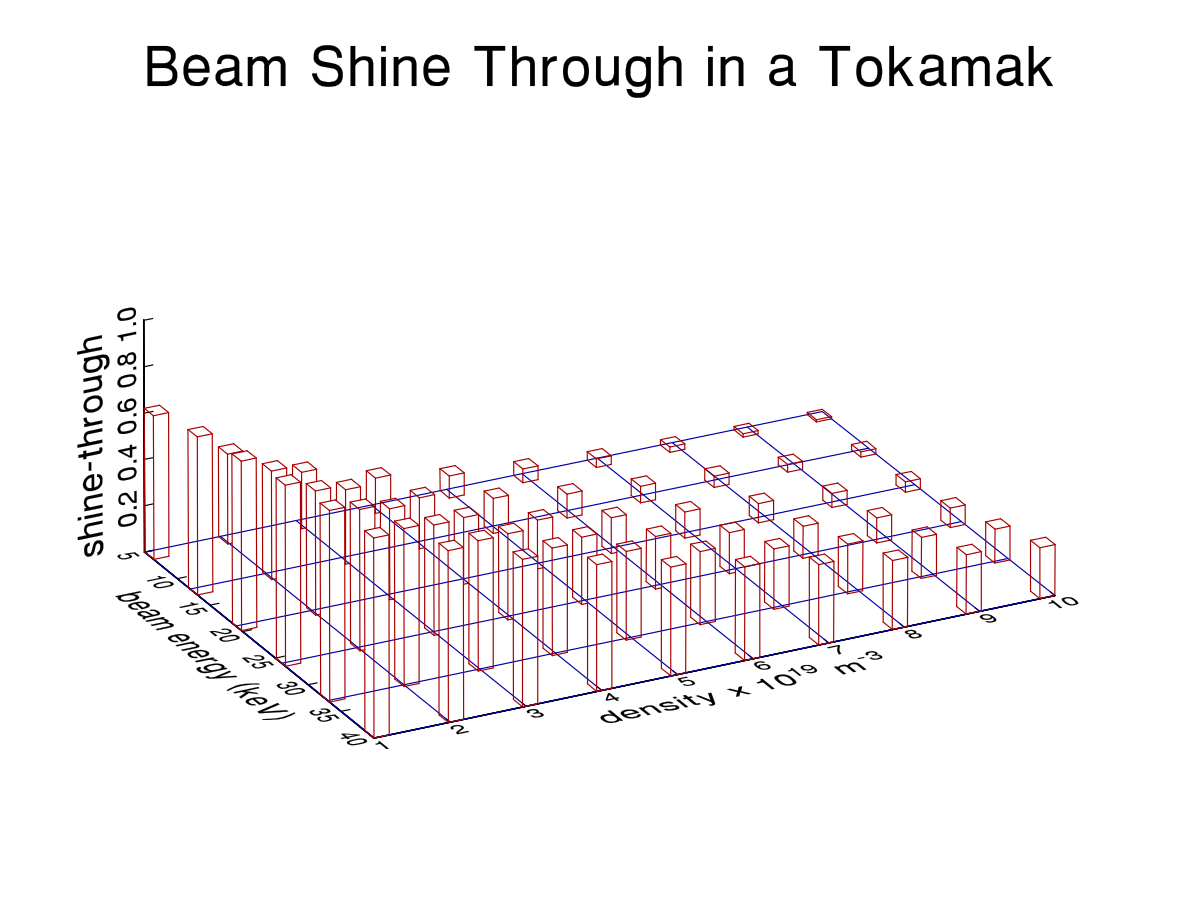
(Source code in Examples directory)
10.12 16 Vector Hatching & Stippling Patterns (pattern)
Vector fills for black-and-white publication printing, including diagonal crosshatch, brickwork, and stipple patterns.
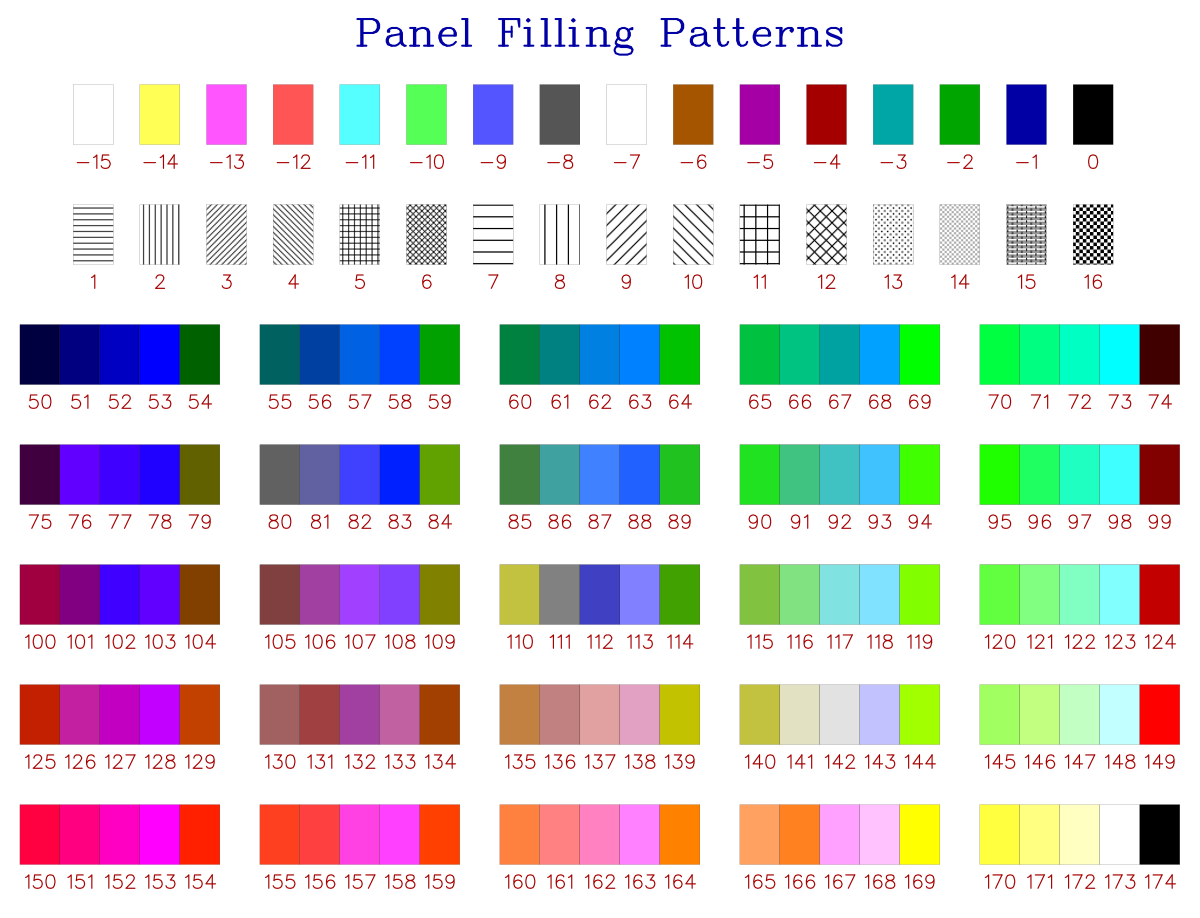
(Source code in Examples directory)
10.13 256-Color Palette Grid (patrn256)
The full 256-color palette featuring a 16-step grayscale ramp and 216-color RGB color cube.
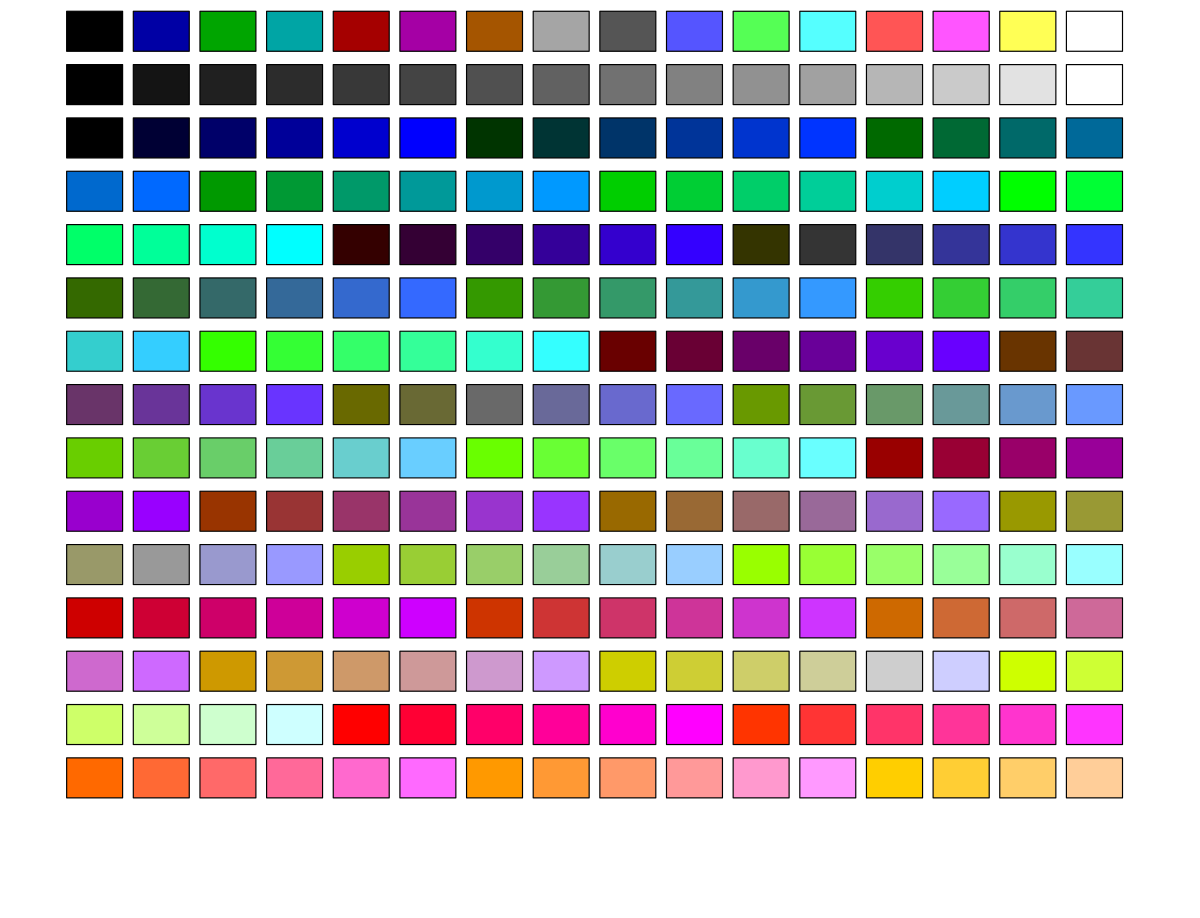
(Source code in Examples directory)
10.14 Multiple Independent Y-Axes (multi_y)
Simultaneous plotting of multiple physical quantities (e.g., pressure, temperature, flow rate) on distinct vertical scales.
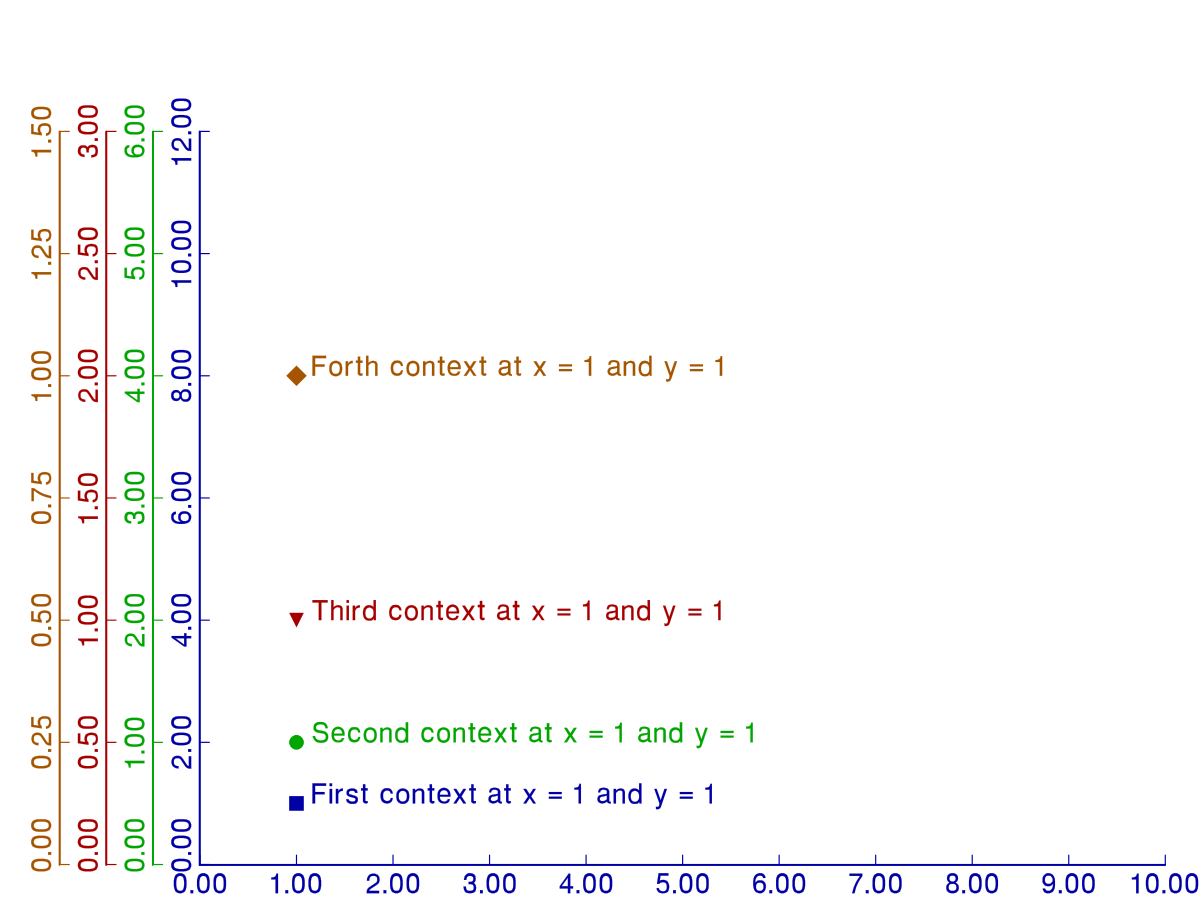
(Source code in Examples directory)
10.15 Multi-Panel Composite Subplots (d2test)
Multi-viewport layouts displaying distinct 2D, 3D, polar, and patterned bar charts in a single composite publication figure using page(), pgshift(), and area2d().
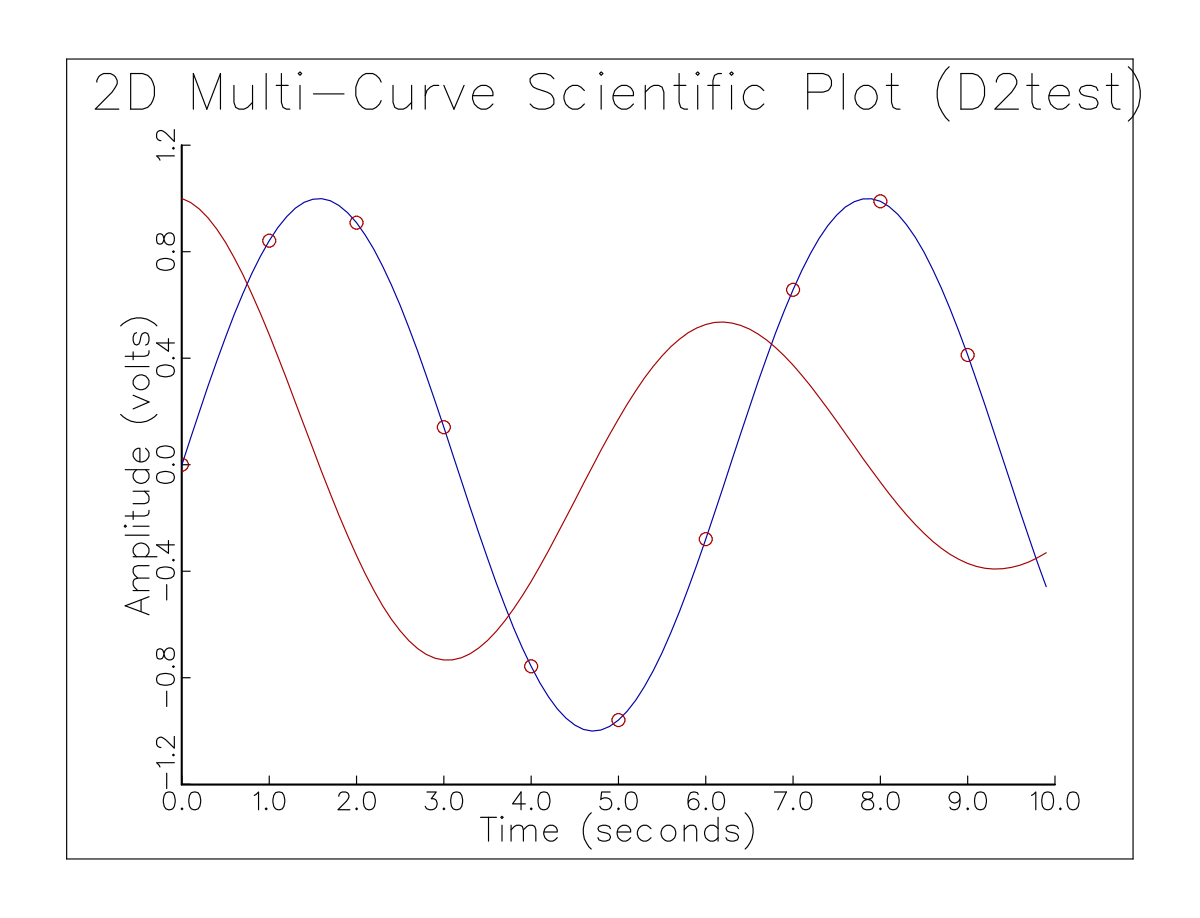
C Implementation
/*==============================================================================
 * GraphiC Classic C Suite: D2test (Multi-Panel Composite Subplots)
 *
 * How to Compile & Run (from GraphiC repository root):
 *   make examples
 *   ./bin/D2test
 *============================================================================*/

#include <graphic.h>

void GPC_MAIN(void)
{
    float *x, *y;
    int i, npts = 50;
    float t;

    x = (float *)gpcalloc(npts, sizeof(float));
    y = (float *)gpcalloc(npts, sizeof(float));

    bgnplot(1, 'S', "c/examples/d2test.svg");
    page(8.0f, 6.0f);
    startplot(WHITE);
    svgcrop(0.25f);
    area2d(5.5f, 4.0f);
    physor(1.5f, 1.2f);
    box();
    title("Multi-Curve Harmonic Oscillations (D2test)", "Time (s)", "Amplitude");
    graf("%3.1f", 0.0f, 1.0f, 10.0f, "%3.1f", -1.0f, 0.5f, 1.0f);

    for (i = 0; i < npts; i++) {
        t = (float)i * 10.0f / (float)(npts - 1);
        x[i] = t;
        y[i] = sinf(t) * expf(-0.1f * t);
    }
    color(BLUE);
    curve(x, y, npts, 0);

    for (i = 0; i < npts; i++) {
        y[i] = cosf(x[i]) * expf(-0.1f * x[i]);
    }
    color(RED);
    curve(x, y, npts, 1);

    endplot();
    stopplot();
    gpcfree((void **)&x);
    gpcfree((void **)&y);
}
Fortran Implementation
program d2test
  use graphic
  implicit none

  integer, parameter :: NPTS = 50
  real :: x1(NPTS), y1(NPTS), x2(NPTS), y2(NPTS)
  real :: t
  integer :: i

  do i = 1, NPTS
    t = real(i - 1) * 10.0 / real(NPTS - 1)
    x1(i) = t
    y1(i) = sin(t) * exp(-0.1 * t)
    x2(i) = t
    y2(i) = cos(t) * exp(-0.1 * t)
  end do

  call gpc_begin(DRIVER_SVG, "fortran/examples/d2test.svg")
  call gpc_page(8.0, 6.0)
  call gpc_start(COLOR_WHITE)
  call gpc_svgcrop(0.25)
  call gpc_area2d(5.5, 4.0)
  call gpc_physor(1.5, 1.2)
  call gpc_box()
  call gpc_title("Fortran 2003 Harmonic Oscillations", "Time (seconds)", "Amplitude (V)")
  call gpc_graf("%3.1f", 0.0, 1.0, 10.0, "%3.1f", -1.0, 0.5, 1.0)

  call gpc_color(COLOR_BLUE)
  call gpc_curve(x1, y1, NPTS, 0)

  call gpc_color(COLOR_RED)
  call gpc_curve(x2, y2, NPTS, 1)

  call gpc_end()
  call gpc_stop()
end program d2test
Python Implementation
import math
from graphic import Figure

out_svg = "python/examples/d2test.svg"
n = 100
x = [i * 0.1 for i in range(n)]
y1 = [math.sin(v) for v in x]
y2 = [math.cos(v) * math.exp(-0.1 * v) for v in x]

with Figure(8.0, 6.0, background="white", output_path=out_svg) as fig:
    fig.title("2D Multi-Curve Scientific Plot (D2test)")
    fig.xlabel("Time (seconds)")
    fig.ylabel("Amplitude (volts)")
    fig.setup_axes(0.0, 1.0, 10.0, -1.2, 0.4, 1.2, "%3.1f", "%3.1f", color="black")
    fig.box(color="black")
    fig.plot(x, y1, color="blue", thickness=2)
    fig.plot(x, y2, color="red", thickness=2)
    xs = [x[i] for i in range(0, n, 10)]
    ys = [y1[i] for i in range(0, n, 10)]
    fig.scatter(xs, ys, symbol_id=1, color="blue")
    fig.save(out_svg)
Java Implementation
import com.sciend.graphic.Color;
import com.sciend.graphic.Figure;
import java.nio.file.Path;

public class D2Test {
    public static void main(String[] args) throws Exception {
        int n = 100;
        float[] x = new float[n];
        float[] y1 = new float[n];
        float[] y2 = new float[n];
        for (int i = 0; i < n; i++) {
            x[i] = i * 0.1f;
            y1[i] = (float) Math.sin(x[i]);
            y2[i] = (float) (Math.cos(x[i]) * Math.exp(-0.1 * x[i]));
        }

        try (Figure fig = new Figure(8.0f, 6.0f, Color.WHITE, "d2test.tkf")) {
            fig.title("2D Multi-Curve Scientific Plot (Java D2test)");
            fig.xlabel("Time (seconds)");
            fig.ylabel("Amplitude (volts)");
            fig.setupAxes(0.0f, 1.0f, 10.0f, -1.2f, 0.4f, 1.2f, "%3.1f", "%3.1f", Color.BLACK);
            fig.box(Color.BLACK);
            fig.plot(x, y1, Color.BLUE, 0);
            fig.plot(x, y2, Color.RED, 0);
            fig.save(Path.of("java/examples/d2test.svg"));
        }
    }
}
Julia Implementation
using GraphiC

out_svg = joinpath(@__DIR__, "d2test.svg")
n = 50
t = range(0.0, 10.0, length=n)
y1 = sin.(t) .* exp.(-0.1 .* t)
y2 = cos.(t) .* exp.(-0.1 .* t)

GraphiC.bgnplot(1, 'S', out_svg)
GraphiC.page(8.0, 6.0)
GraphiC.startplot(GraphiC.WHITE)
GraphiC.area2d(5.5, 4.0)
GraphiC.physor(1.5, 1.2)
GraphiC.box()
GraphiC.title("Multi-Curve Harmonic Oscillations (D2test)", "Time (s)", "Amplitude")
GraphiC.graf("%3.1f", 0.0, 1.0, 10.0, "%3.1f", -1.0, 0.5, 1.0)
GraphiC.color(GraphiC.BLUE)
GraphiC.curve(t, y1, n, 0)
GraphiC.color(GraphiC.RED)
GraphiC.curve(t, y2, n, 0)
GraphiC.endplot()
GraphiC.stopplot()
10.16 Cylindrical Bessel Functions (bess)
High-precision mathematical function visualization evaluating and plotting Bessel functions of the first kind (
) with customized line styles and scientific formatting.
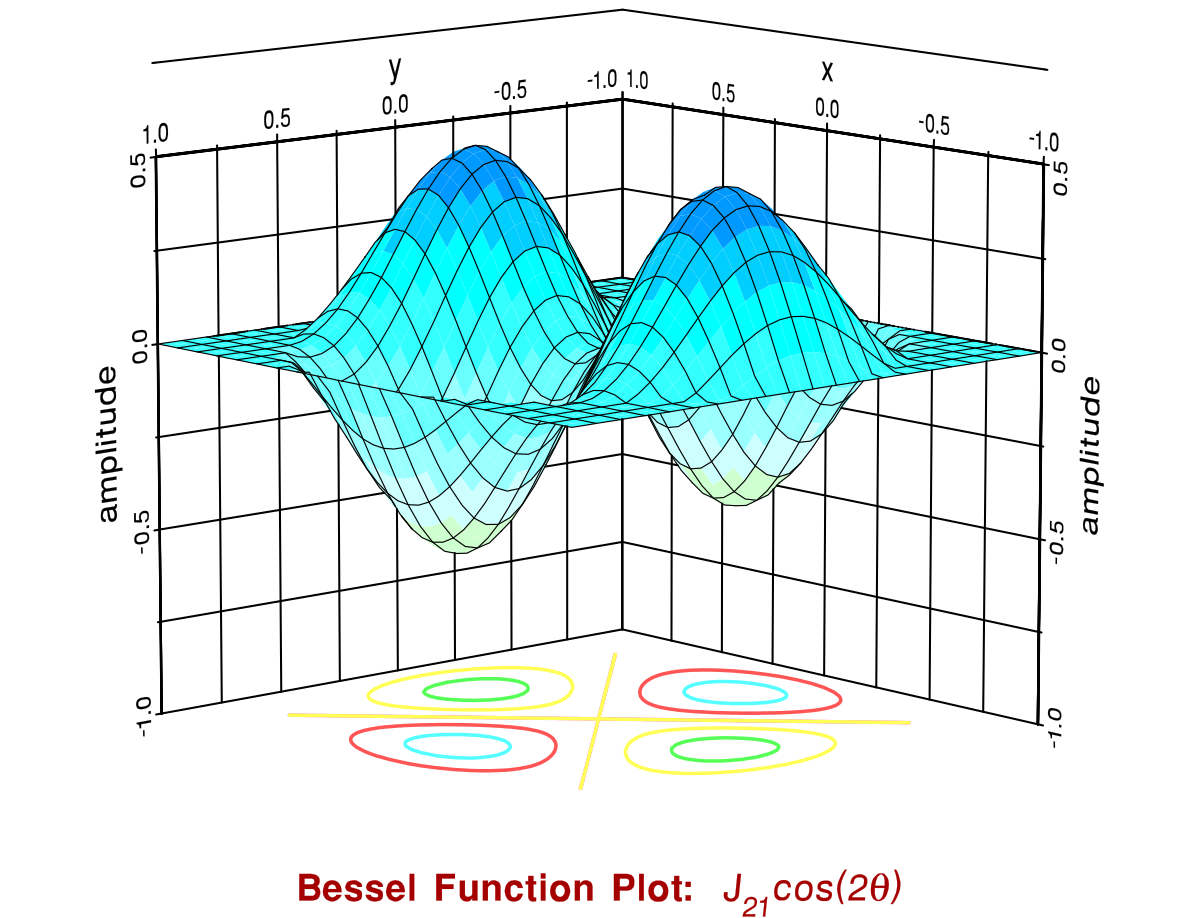
(Source code in Examples directory)
10.17 Continuous 3D Surface Shading (bess3d)
Demonstrates high-resolution continuous scientific colormap shading on a 3-D circular membrane surface (
) using 256 continuous TrueColor elevation levels evaluated across the Viridis colormap via d3color(), combined with floor polar contour projection, boundary grid planes, and a continuous linear vector gradient color bar (ColorKeyGradient).
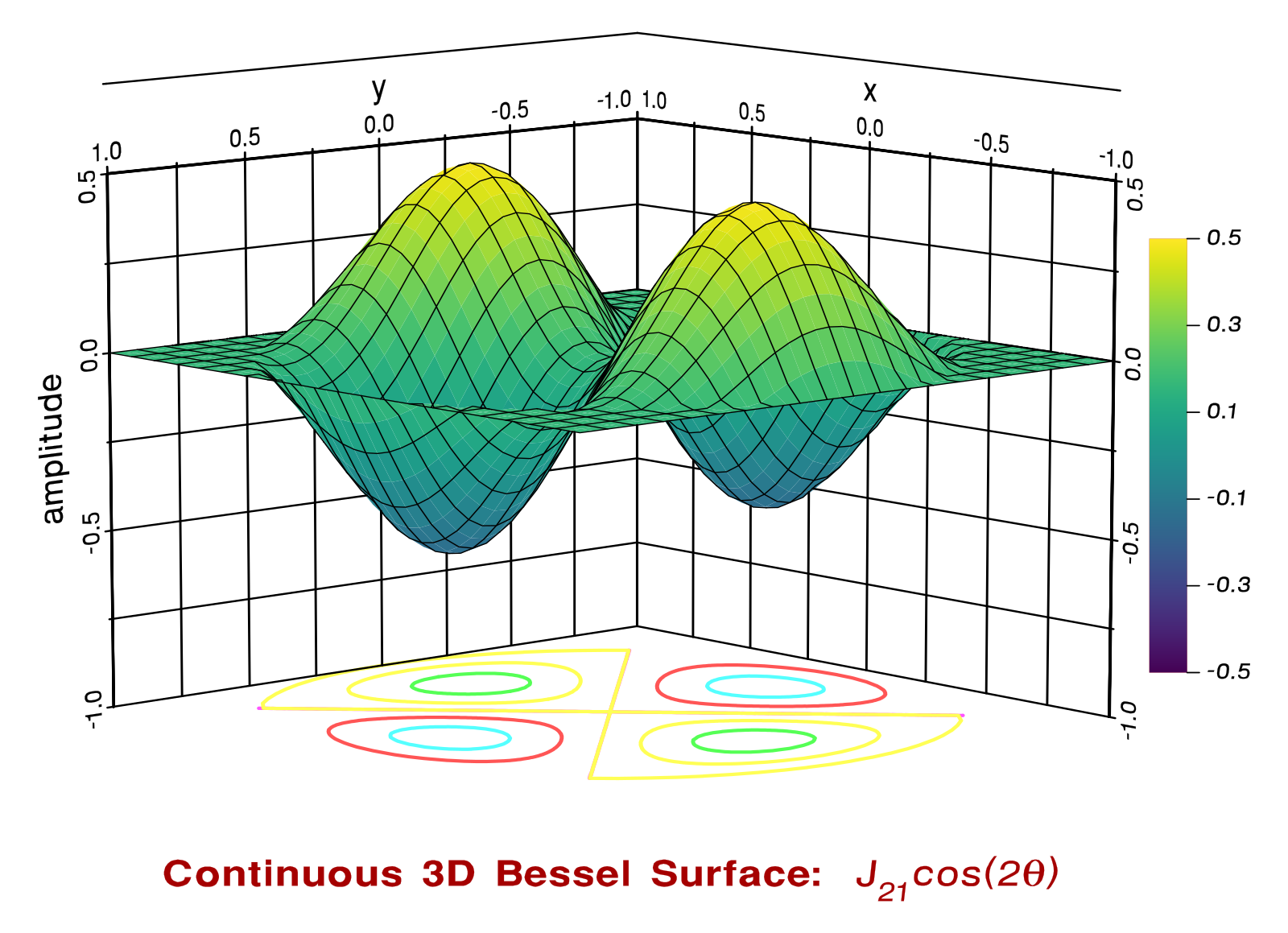
(Source code in Examples directory)
Figure 9.17: Continuous 3D Surface Shading with Linear Gradient Color Bar.
C Implementation
/*==============================================================================
 * GraphiC Classic C Suite: Bess3d (Continuous 3D Surface Shading)
 *
 * How to Compile & Run (from GraphiC repository root):
 *   make examples
 *   ./bin/Bess3d
 *============================================================================*/

#include <stdio.h>
#include <math.h>
#include "graphic.h"
#include "colormap.h"

int GPC_MAIN(void)
{
    int nx = 41, ny = 41;
    float x[41], y[41], zmat[41 * 41];
    int clrs[256];
    int i, j;

    /* Build 256 continuous TrueColor levels across Viridis */
    for (i = 0; i < 256; i++) {
        float t = (float)i / 255.0f;
        clrs[i] = gpc_colormap_eval(GPC_COLORMAP_VIRIDIS, t);
    }

    /* Compute circular membrane elevation: J_2(5.1356 * r) * cos(2 * theta) */
    for (i = 0; i < nx; i++) x[i] = -1.0f + 2.0f * (float)i / (float)(nx - 1);
    for (j = 0; j < ny; j++) y[j] = -1.0f + 2.0f * (float)j / (float)(ny - 1);

    for (j = 0; j < ny; j++) {
        for (i = 0; i < nx; i++) {
            float r = sqrtf(x[i] * x[i] + y[j] * y[j]);
            if (r >= 1.0f)
                zmat[j * nx + i] = 0.0f;
            else
                zmat[j * nx + i] = (1.0f - r * r) * cosf(2.0f * atan2f(y[j], x[i]));
        }
    }

    bgnplot(1, 'S', "c/examples/bess3d.svg");
    page(9.5f, 6.884f);
    startplot(WHITE);
    svgcrop(0.25f);
    volm3d(5.5f, 5.5f, 5.0f);
    vuabs(-48.0f, 48.0f, 15.0f);
    title("Continuous 3D Surface Shading (Bess3d)", "", "");
    graf3d(-1.0f, 0.5f, 1.0f, -1.0f, 0.5f, 1.0f, -1.0f, 0.5f, 0.5f);

    /* Render continuous 256-node colormap 3D surface with mesh overlay */
    d3color(clrs, 256, GPC_DRAW_MESH);
    surmat(zmat, nx, ny);

    /* Continuous linear vector gradient color bar with calibration ticks */
    ColorKeyGradient(-0.5f, 0.5f, GPC_COLORMAP_VIRIDIS,
                      8.05f, 1.8f, 8.30f, 5.2f,
                      5, "%3.1f", '\0', 0.12f, 0);

    endplot();
    stopplot();
    return 0;
}
Fortran Implementation
program bess3d
  use graphic
  implicit none

  integer, parameter :: NX = 41, NY = 41
  real :: zmat(NX, NY)
  real :: x, y, r, theta, pi
  integer :: clrs(256)
  integer :: i, j

  pi = 3.141592653589793

  ! Build 256 continuous TrueColor levels across Viridis
  do i = 1, 256
    clrs(i) = gpc_colormap_eval(GPC_COLORMAP_VIRIDIS, real(i - 1) / 255.0)
  end do

  ! Calculate circular membrane elevation: J_2(5.1356 * r) * cos(2 * theta)
  do j = 1, NY
    y = -1.0 + real(j - 1) * 2.0 / real(NY - 1)
    do i = 1, NX
      x = -1.0 + real(i - 1) * 2.0 / real(NX - 1)
      r = sqrt(x * x + y * y)
      if (r >= 1.0) then
        zmat(i, j) = 0.0
      else
        theta = merge(pi / 2.0, atan2(y, x), abs(x) < 1.0e-20)
        zmat(i, j) = bessel_jn(2, 5.1356 * r) * cos(2.0 * theta)
      end if
    end do
  end do

  call gpc_begin(DRIVER_SVG, "fortran/examples/bess3d.svg")
  call gpc_page(9.5, 6.884)
  call gpc_start(COLOR_WHITE)
  call gpc_volm3d(5.5, 5.5, 5.0)
  call gpc_vuabs(-48.0, 48.0, 15.0)
  call gpc_title("Continuous 3D Surface Shading (Fortran Bess3d)", "", "")
  call gpc_graf3d(-1.0, 0.5, 1.0, -1.0, 0.5, 1.0, -1.0, 0.5, 0.5)

  ! Continuous 256-node colormap 3D surface shading with mesh overlay
  call gpc_d3color(clrs, 256, 1)
  call gpc_surface(zmat, NX, NY)

  ! Linear vector gradient color bar with numerical calibration ticks
  call gpc_colorkey_gradient(-0.5, 0.5, GPC_COLORMAP_VIRIDIS, &
                             8.05, 1.8, 8.30, 5.2, &
                             5, "%3.1f", achar(0), 0.12, 0)

  call gpc_end()
  call gpc_stop()
end program bess3d
Python Implementation
import numpy as np
import ctypes
from graphic import Figure
from graphic.constants import COLORMAP_VIRIDIS

out_svg = "python/examples/bess3d.svg"
nx, ny = 41, 41
x = np.linspace(-1.0, 1.0, nx)
y = np.linspace(-1.0, 1.0, ny)
X, Y = np.meshgrid(x, y)
R = np.sqrt(X**2 + Y**2)
Z = np.where(R >= 1.0, 0.0, (1.0 - R**2) * np.cos(2.0 * np.arctan2(Y, X)))

with Figure(9.5, 6.884, background="white", output_path=out_svg) as fig:
    fig.setup_3d_axes(
        x_range=(-1.0, 0.5, 1.0),
        y_range=(-1.0, 0.5, 1.0),
        z_range=(-1.0, 0.5, 0.5),
        title="Continuous 3D Surface Shading (Bess3d)"
    )
    # Build 256 continuous TrueColor levels across Viridis
    clrs = [fig.lib.gpc_colormap_eval(COLORMAP_VIRIDIS, ctypes.c_float(i / 255.0)) for i in range(256)]
    fig.d3color(clrs, 256, 1)
    fig.surface(Z.tolist())
    fig.colorkey_gradient(-0.5, 0.5, COLORMAP_VIRIDIS,
                          8.05, 1.8, 8.30, 5.2,
                          5, "%3.1f", chr(0), 0.12, 0)
    fig.save(out_svg)
Java Implementation
import com.sciend.graphic.Color;
import com.sciend.graphic.Figure;
import com.sciend.graphic.Graphic;
import java.nio.file.Path;

public class Bess3d {
    public static void main(String[] args) throws Exception {
        int nx = 41, ny = 41;
        float[] zmat = new float[nx * ny];
        for (int j = 0; j < ny; j++) {
            float y = -1.0f + 2.0f * (float) j / (float) (ny - 1);
            for (int i = 0; i < nx; i++) {
                float x = -1.0f + 2.0f * (float) i / (float) (nx - 1);
                float r = (float) Math.sqrt(x * x + y * y);
                if (r >= 1.0f) {
                    zmat[j * nx + i] = 0.0f;
                } else {
                    float theta = (float) Math.atan2(y, x);
                    zmat[j * nx + i] = (1.0f - r * r) * (float) Math.cos(2.0f * theta);
                }
            }
        }

        // Build 256 continuous TrueColor levels across Viridis
        int[] clrs = new int[256];
        for (int i = 0; i < 256; i++) {
            clrs[i] = Graphic.colormapEval(Graphic.COLORMAP_VIRIDIS, (float) i / 255.0f);
        }

        try (Figure fig = new Figure(9.5f, 6.884f, Color.WHITE, "bess3d.tkf")) {
            fig.title("Continuous 3D Surface Shading (Java Bess3d)");
            Graphic.volm3d(5.5f, 5.5f, 5.0f);
            Graphic.vuabs(-48.0f, 48.0f, 15.0f);
            Graphic.graf3d(-1.0f, 0.5f, 1.0f, -1.0f, 0.5f, 1.0f, -1.0f, 0.5f, 0.5f);

            // Render continuous 256-node colormap 3D surface with mesh overlay
            Graphic.d3color(clrs, 256, 1);
            Graphic.surmat(zmat, nx, ny);

            // Continuous linear vector gradient color bar
            Graphic.colorkeyGradient(-0.5f, 0.5f, Graphic.COLORMAP_VIRIDIS,
                                    8.05f, 1.8f, 8.30f, 5.2f,
                                    5, "%3.1f", (char) 0, 0.12f, 0);
            fig.save(Path.of("java/examples/bess3d.svg"));
        }
    }
}
Julia Implementation
using GraphiC

out_svg = joinpath(@__DIR__, "bess3d.svg")
nx, ny = 41, 41
x = range(-1.0, 1.0, length=nx)
y = range(-1.0, 1.0, length=ny)

zmat = zeros(Float32, nx, ny)
for j in 1:ny, i in 1:nx
    xx, yy = x[i], y[j]
    r = sqrt(xx^2 + yy^2)
    zmat[i, j] = r >= 1.0 ? 0.0f0 : Float32((1.0 - r^2) * cos(2 * atan(yy, xx)))
end

# Build 256 continuous TrueColor levels across Viridis
clrs = [GraphiC.colormap_eval(GraphiC.COLORMAP_VIRIDIS, Float32(i - 1) / 255.0f0) for i in 1:256]

GraphiC.bgnplot(1, 'S', out_svg)
GraphiC.page(9.5, 6.884)
GraphiC.startplot(GraphiC.WHITE)
GraphiC.volm3d(5.5, 5.5, 5.0)
GraphiC.vuabs(-48.0, 48.0, 15.0)
GraphiC.title("Continuous 3D Surface Shading (Bess3d)", "", "")
GraphiC.graf3d(-1.0, 0.5, 1.0, -1.0, 0.5, 1.0, -1.0, 0.5, 0.5)

# Render continuous 256-node colormap 3D surface with mesh overlay
GraphiC.d3color(clrs, 256, 1)
GraphiC.surface(zmat, nx, ny)

# Continuous linear vector gradient color bar
GraphiC.ColorKeyGradient(-0.5f0, 0.5f0, GraphiC.COLORMAP_VIRIDIS,
                         8.05f0, 1.8f0, 8.30f0, 5.2f0,
                         5, "%3.1f", '\0', 0.12f0, 0)

GraphiC.endplot()
GraphiC.stopplot()
10.18 Error Functions and Normal Distributions (erftest)
Visualizing the Gaussian error function (
) and complementary error function (
) on specialized probability calibration scales.
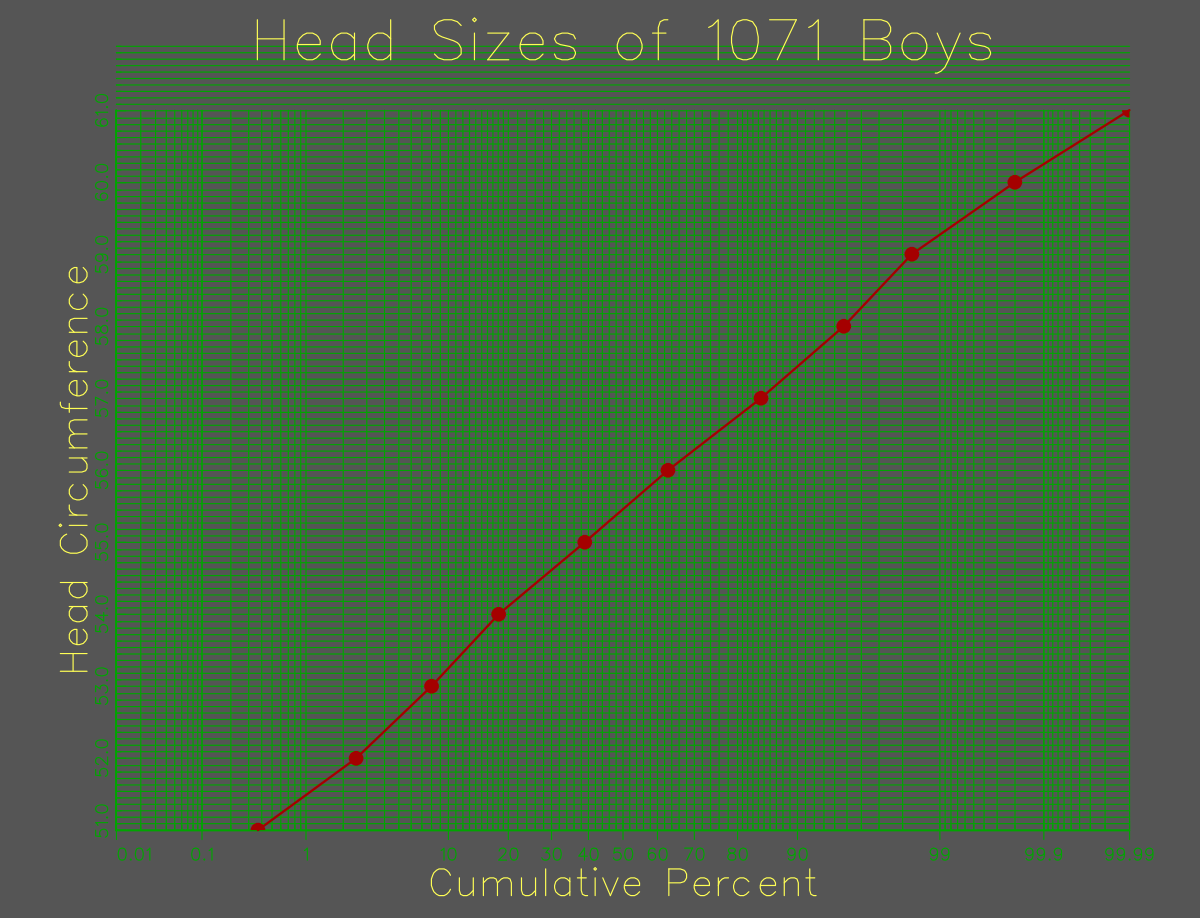
10.19 Celestial Mechanics & Orbital Trajectories (orbits)
Numerical simulation of multi-body gravitational orbital mechanics plotting planetary paths with custom symbols and coordinate origins.
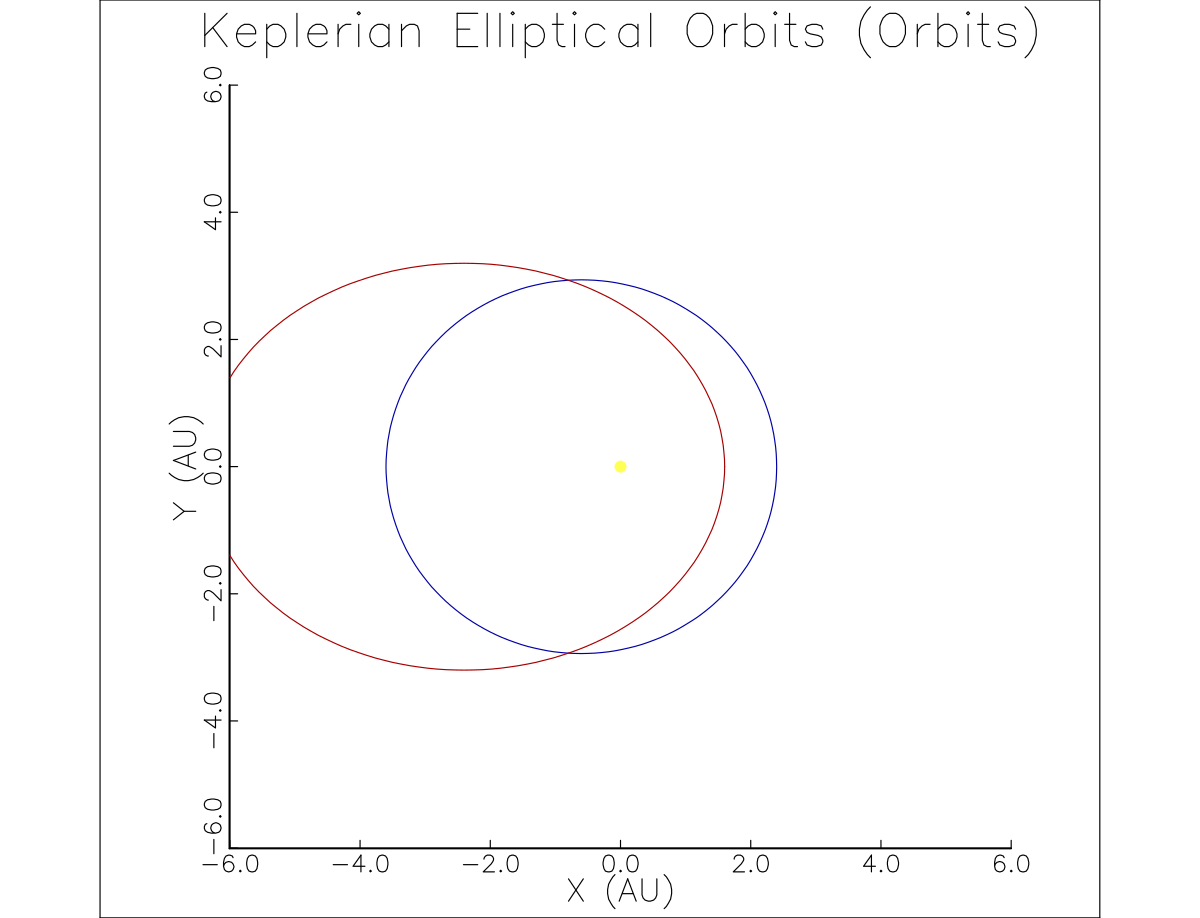
(Source code in Examples directory)
10.20 Industrial Applications: Airline Delay Propagation & Network Scheduling (NWA)
In real-world mission-critical operations, GraphiC has been deployed to model and visualize large-scale aerospace and transport systems. Below are seminal operational research figures produced with GraphiC for Northwest Airlines (NWA), the Federal Aviation Administration (FAA), and the U.S. Department of Transportation (DOT), analyzing air traffic flow management, departure delay propagation down flight connection chains, and hub arrival banking at Minneapolis–Saint Paul International Airport (MSP).
Flight Delay Cascade Propagation
A multi-tier flight connection timeline tracking delay cascade across 17 downstream aircraft rotations. The chart distinguishes scheduled times, actual touchdown/takeoff times, modal block durations, equipment turnaround intervals, and upstream delay propagation.
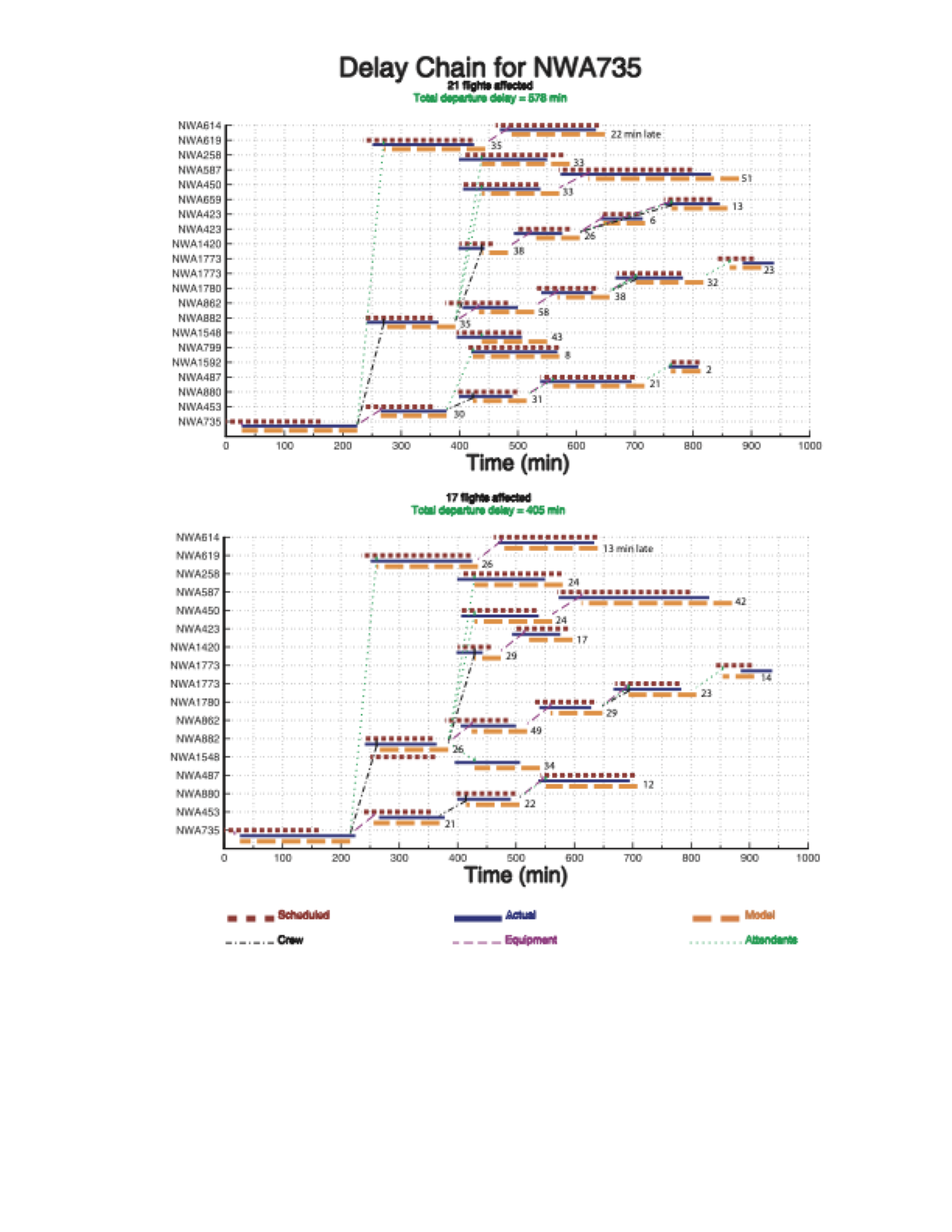
Hub Arrival Bank Operations at Minneapolis–Saint Paul (MSP)
A high-density temporal schedule analysis showing scheduled arrival slots versus actual runway touchdown distributions during heavy traffic banks at MSP International Airport on July 30, 1999.
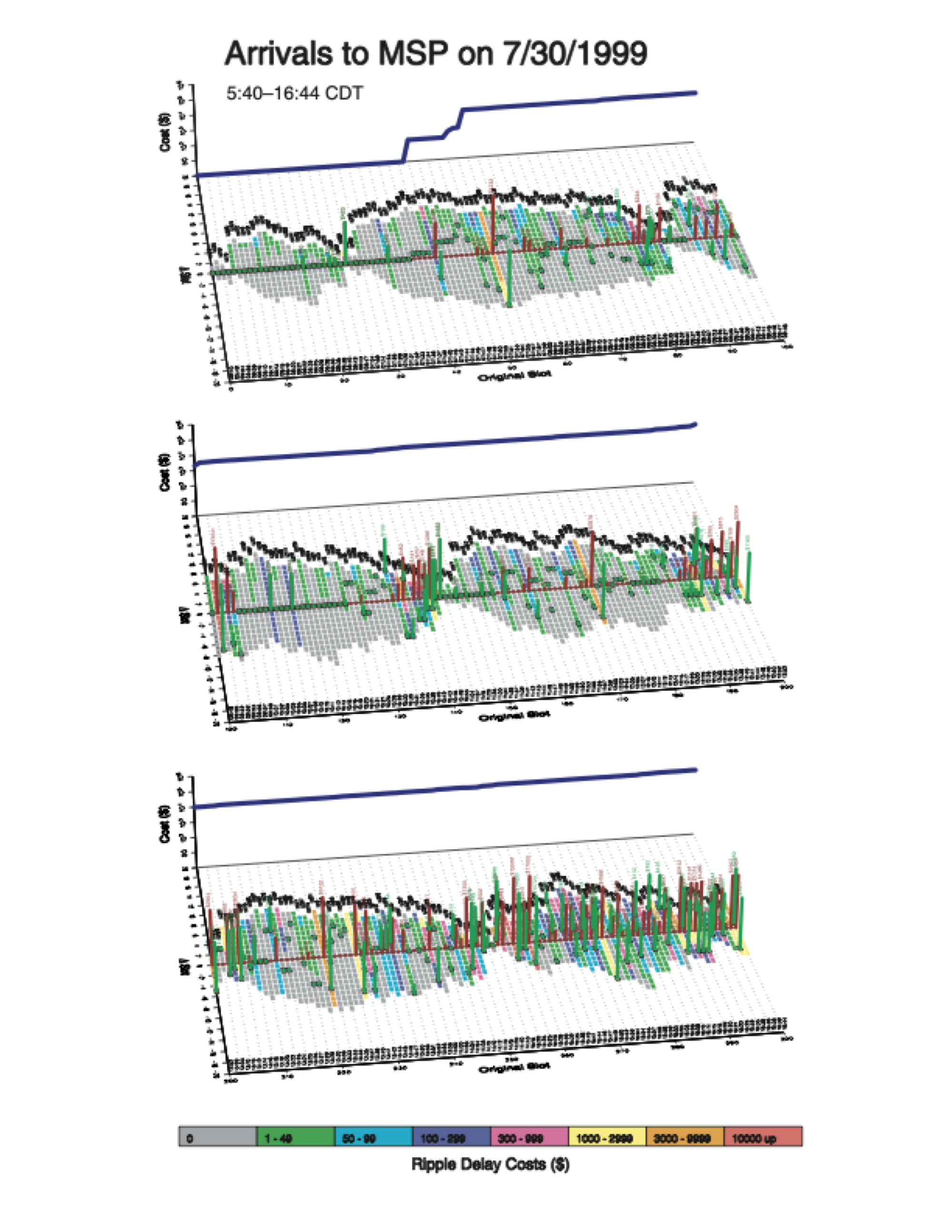
Schedule Resequencing & Fleet Cost Optimization
Statistical modeling and non-linear power-law regression (
) demonstrating multi-million-dollar fleet cost reductions through dynamic flight resequencing and gate pushback optimization.
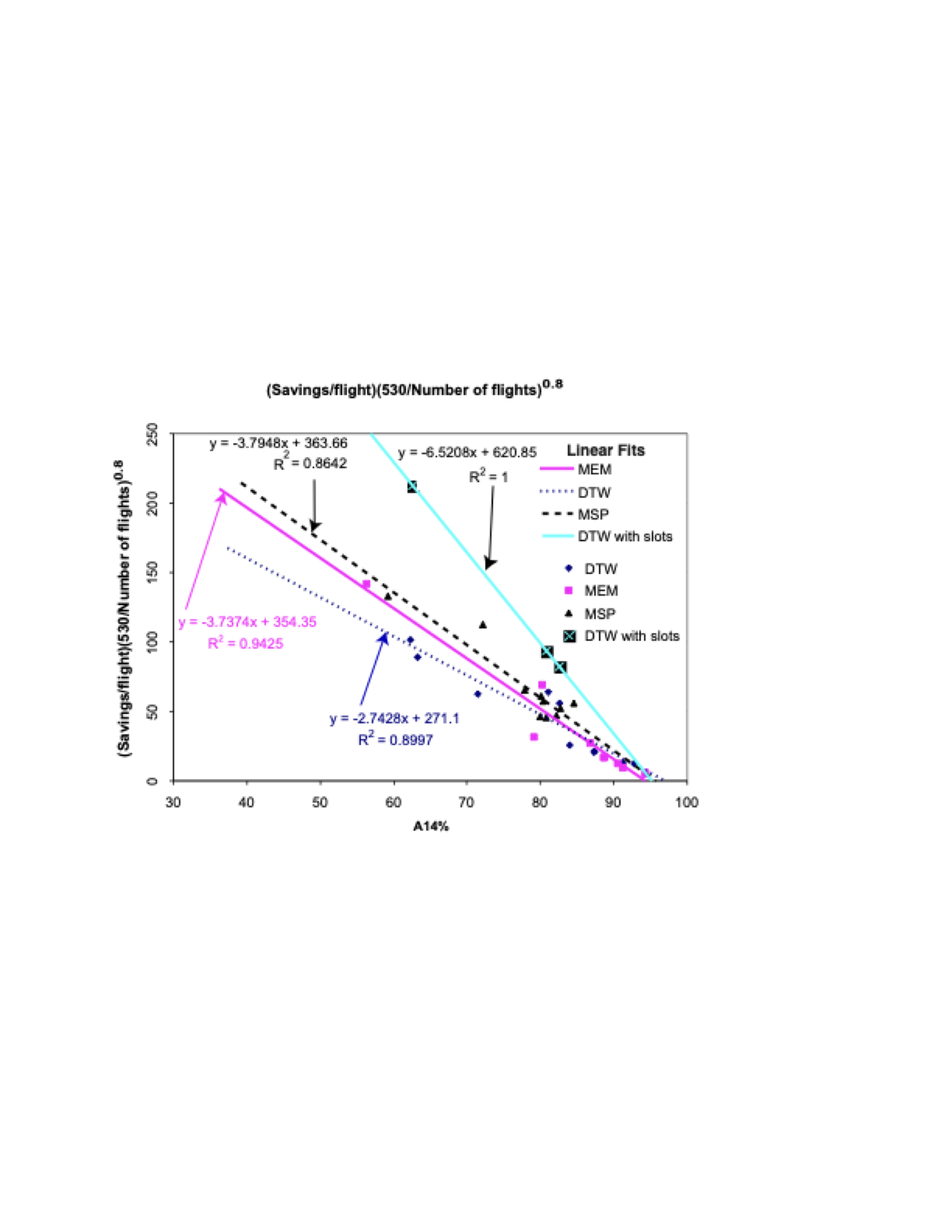
10.21 FAA Airport Runway Demand & Capacity Queuing Dynamics (CLT)
At major hub airports, flight scheduling in tightly clustered arrival and departure banks frequently exceeds the physical acceptance rates of runways, inducing long taxiway queues, gate holds, and ripple delays across the National Airspace System. Developed for the FAA and the Collaborative Decision Making (CDM) program, these visualizations model the exact queue buildup, runway capacity step limits, and demand-to-delay correlation at Charlotte Douglas International Airport (CLT).
Charlotte Douglas International Airport (CLT) Takeoff Demand, Capacity & Queuing Dynamics
A temporal operational queuing analysis (DEMAND.C) tracking 24 hours of flight activity at CLT. The plot models the physical runway takeoff capacity step-function (heavy blue rule, 40–50 flights/hour), actual departure demand surges (green cross-hatched area), resulting takeoff queue length (heavy dotted black line), and average ground departure delay (solid red curve). The statistical cross-correlation between departure demand surges and departure delay is 81.2%, demonstrating that ground delays are overwhelmingly driven by scheduled banking peaks exceeding runway capacity.
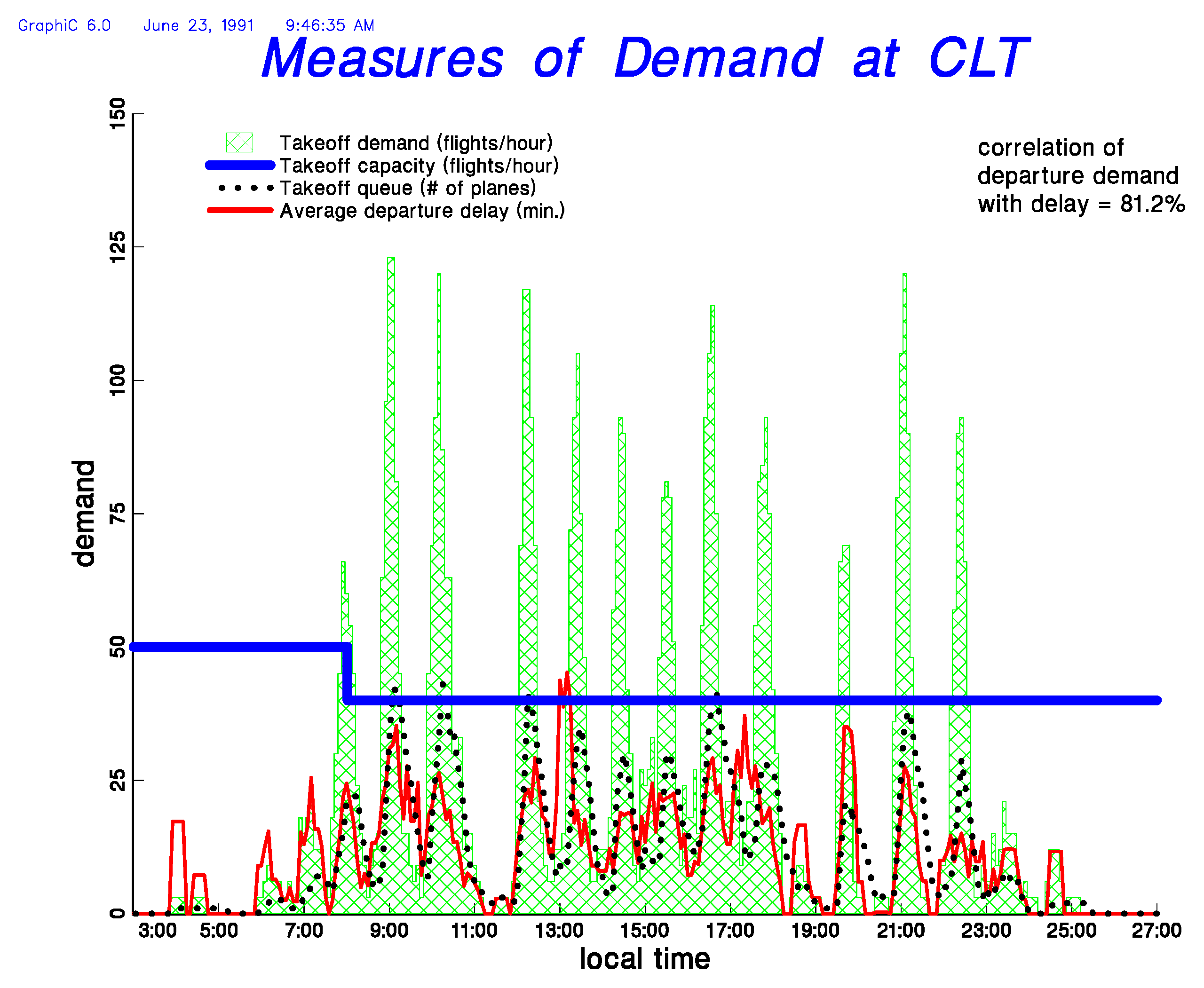
Bidirectional Runway Demand vs. Capacity (Arrivals & Departures Butterfly Plot)
A dual-sided symmetrical time-distribution chart (CLTDEMAND.eps) comparing incoming arrivals against outgoing departures across the 24-hour operational day (03:00 to 27:00 local time). The central vertical axis displays local time, with arrival metrics mirrored on the left and departure metrics on the right: - Left Wing (Arrivals): 568 total arrivals; arrival rate distribution (wavy hatch fill), declared arrival capacity limit (cyan boundary line), and average arrival delay (magenta curve). Correlation of arrival volume with delay is -16.6%. - Right Wing (Departures): 555 total departures; takeoff demand (cross-hatch fill), declared takeoff capacity (blue boundary line), active takeoff queue (black stippled curve), and average departure delay (red curve). Correlation of departure demand with delay is 81.2%.
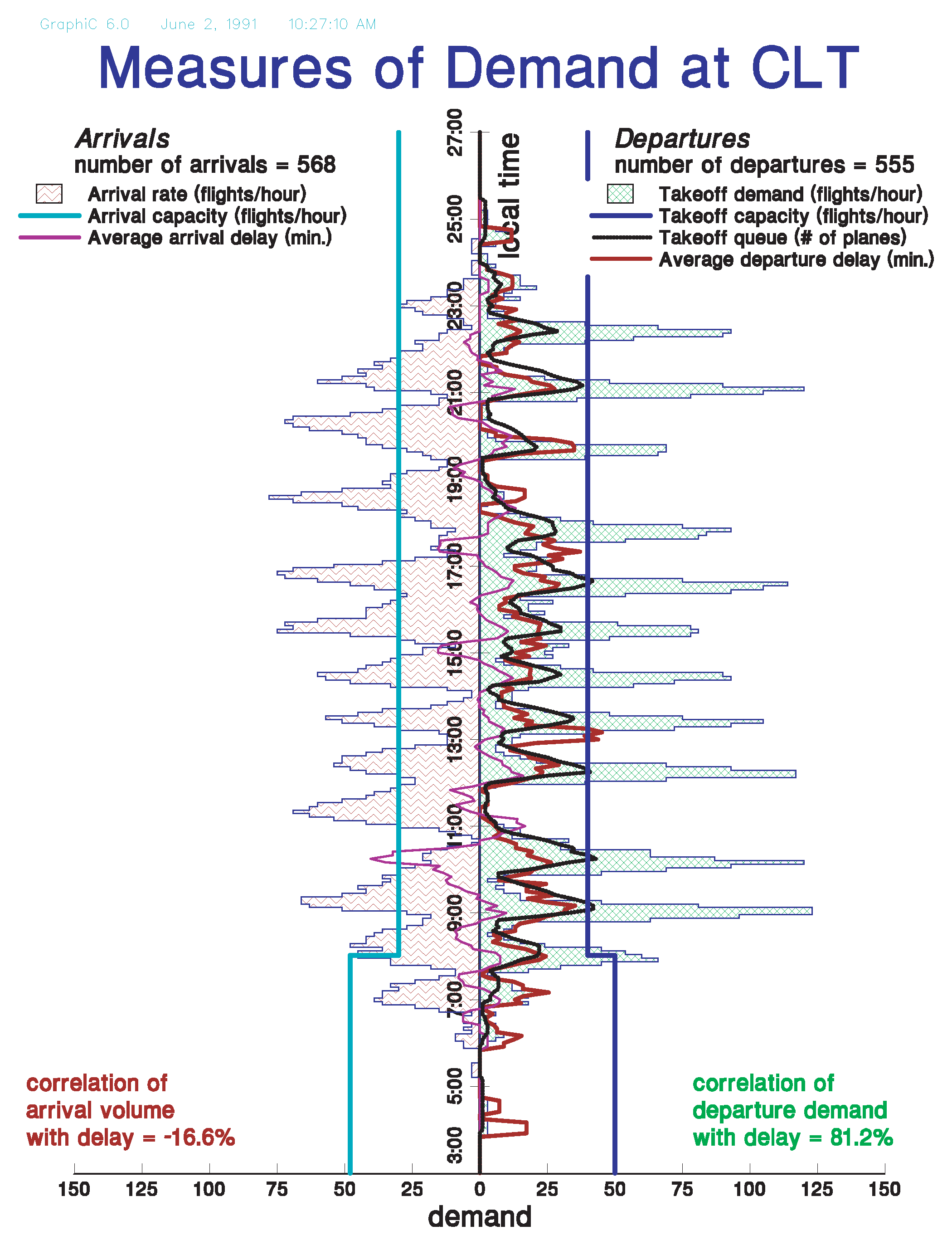
10.22 FAA National Airspace System Flow & Airport Performance Gallery (ORD, EWR, ZOB)
GraphiC has provided the primary visualization engine for national aerospace infrastructure modeling across Federal Aviation Administration research centers, the Volpe National Transportation Systems Center, and Oak Ridge National Laboratory (ORNL).
Chicago O’Hare International Airport (ORD) Arrival Surface Topography
A high-resolution 3D perspective surface mesh (curv3d / surfun with hidden-line removal and surface shading) mapping two months of continuous daily arrival operations (October 20 through December 20) at Chicago O’Hare. The plot plots local time-of-day (03:00 to 27:00) against calendar date and arrival volume (arrivals/hour), highlighting daily cyclical morning and evening banking waves and severe weather arrival disruptions against a baseline of 1,021 average daily arrivals.
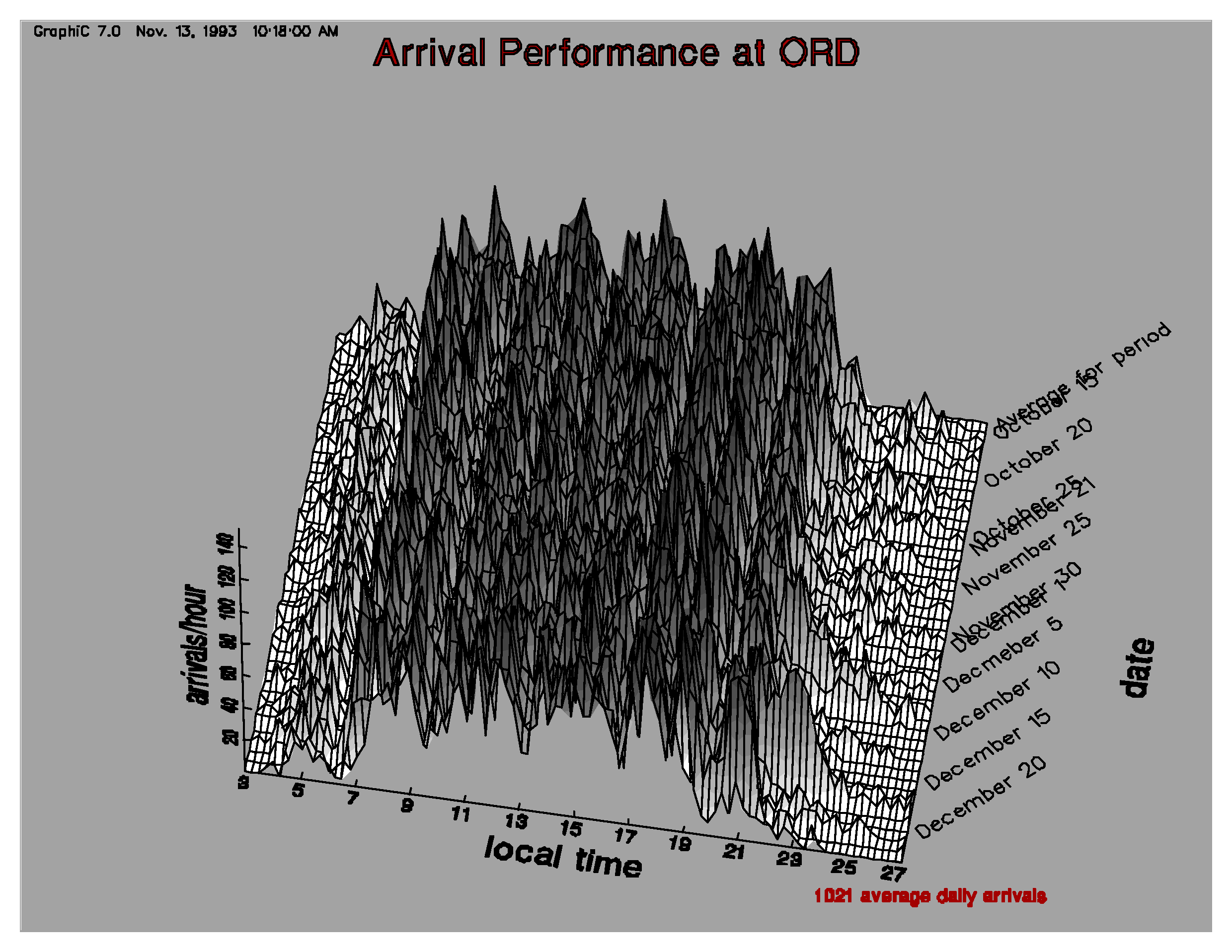
Newark Liberty International Airport (EWR) 24-Hour Polar Clock Delay Distribution
A 24-hour circular polar coordinates chart representing flight schedule compliance and delay types throughout the operational day (GMT). The circular axis represents time of day (0:00 to 23:00 GMT), while radial distance from the circular baseline denotes delay magnitude in hours (concentric circles for Early vs. Late): - Blue Markers: Pre-takeoff taxi and gate holds (
departure time). - Orange Markers: Arrival delays (
arrival time). - Purple & Green Markers: Airborne en route holding and Collaborative Decision Making (CDT) ground delay program holds. - Operational Summary: 649 active departures analyzed; 130 flight cancellations identified.
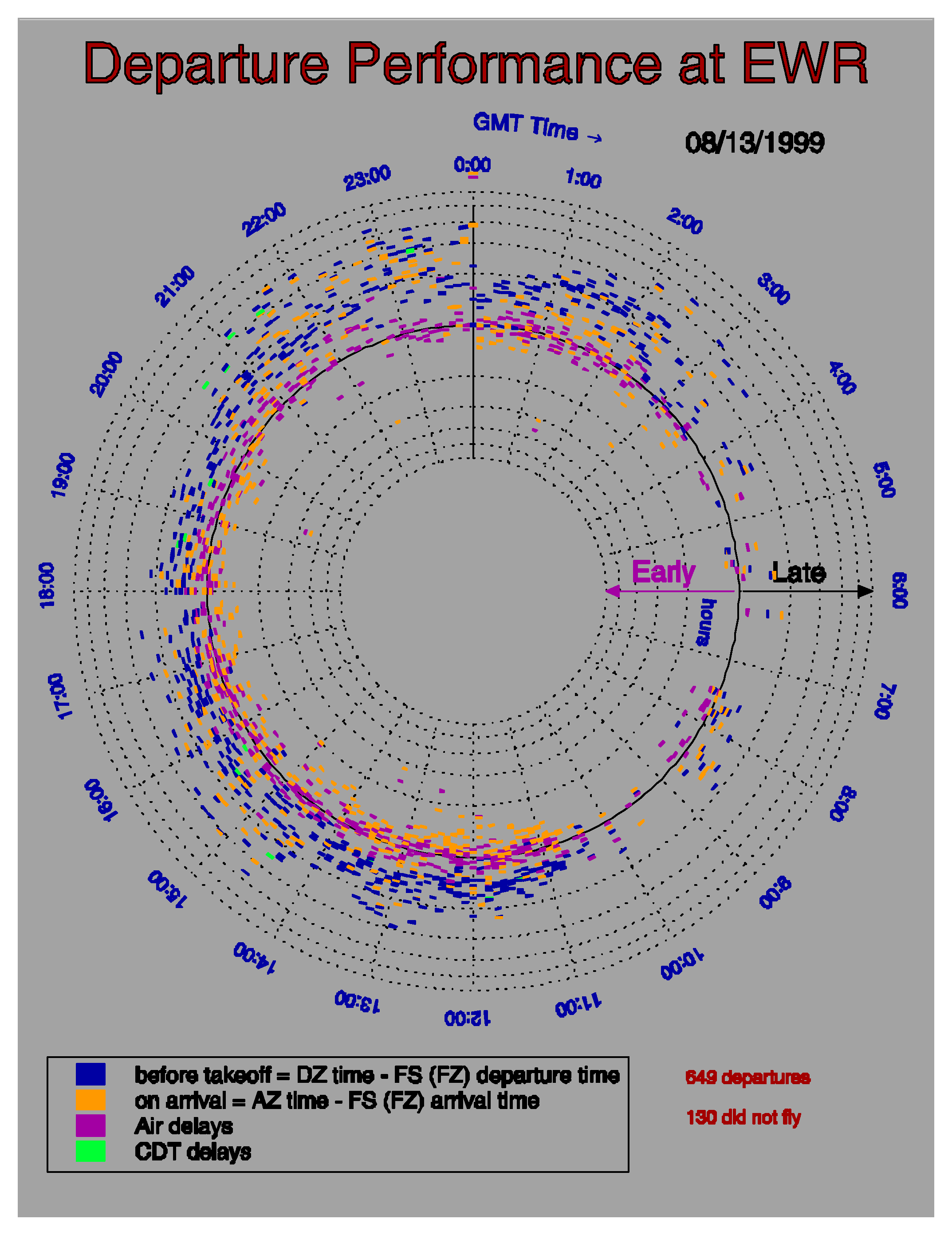
Cleveland Air Route Traffic Control Center (ZOB4800) Airspace Sector Activity Dashboard
A multi-panel operational dashboard analyzing en route high-altitude sector loading and boundary hand-offs for Air Route Traffic Control Center sector ZOB4800: - Top Panel: 24-hour instantaneous sector aircraft occupancy count. - Center
Array: 12 paired bidirectional transfer histograms showing aircraft transitions IN (red bars) and OUT (blue bars) between ZOB4800 and all contiguous boundary sectors (ZOB4600, ZOB4900, ZOB6400, ZOB5700, ZOB3500, ZID8701, UNK, ZID8801, ZOB4000, ZOB2700, ZOB3000, ZOB6700). - Lower Panel: Sector dwell-time distribution (average time in sector = 5.5 min across 754 aircraft) with top origin and destination airport tallies (CLE, ORD, CVG, PIT, PHL, DTW). - Bottom 3D Compass: 3D directional vector flow projection showing directional traffic volume across the 8 horizontal compass bearings (N, NE, E, SE, S, SW, W, NW) and vertical climb/descent transitions (UP, DN).
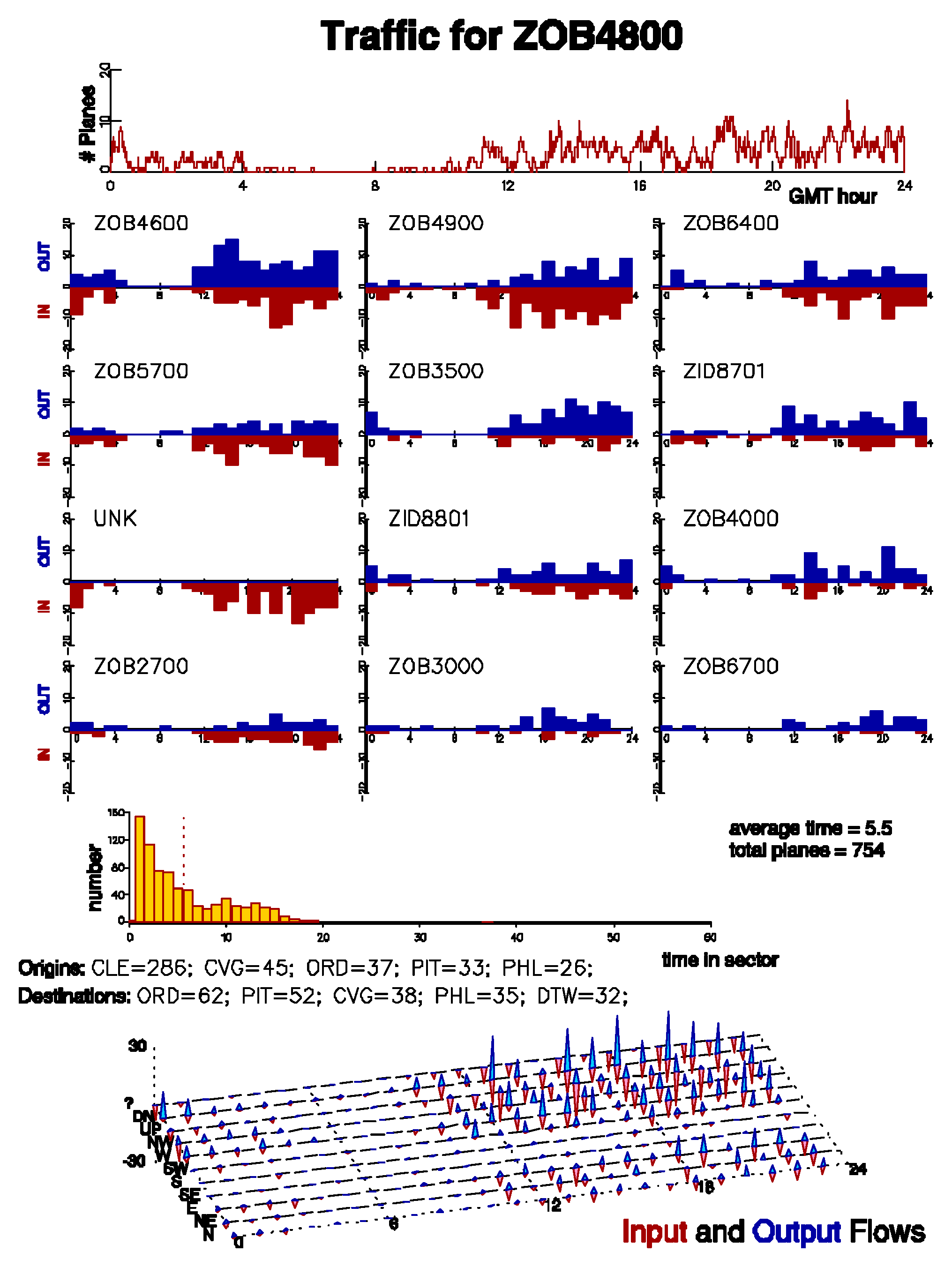
10.23 Typography & Vector Stroke Font Showcase (fnttest)
The GraphiC vector stroke typography engine renders precision Hershey and mathematical fonts identically across any resolution, scale, or output driver. This comprehensive demonstration (documented on Pages E-102 through E-104 of the original manual) showcases: 1. Multi-Font Coexistence: Concurrent active fonts (simplex.fnt, simgrma.fnt, simscr.fnt, duplex.fnt, triplex.fnt, tripital.fnt, complex.fnt, compital.fnt, comscr.fnt, compgrma.fnt, engoth.fnt, microb.fnt, russian.fnt). 2. Mathematical Typesetting: Nested subscripts and superscripts (\[, \]), Greek and math symbols, and integral signs:
(see next example) (see next example) (see next example) (see next example) (see next example) (see next example) (see next example) (see next example) (see next example) (see next example) (see next example) 3. Geometric Character Transformations: - Widening (widen): Dynamically scales horizontal aspect ratio without vertical distortion. - Skewing (skew): Applies arbitrary mathematical slant angles. - Thickening (tfont, #...#): Generates bold stroked contours. - Arbitrary Sizing: Renders headers up to 1.0 inch height (LARGE) down to micro-subscripts (.15).
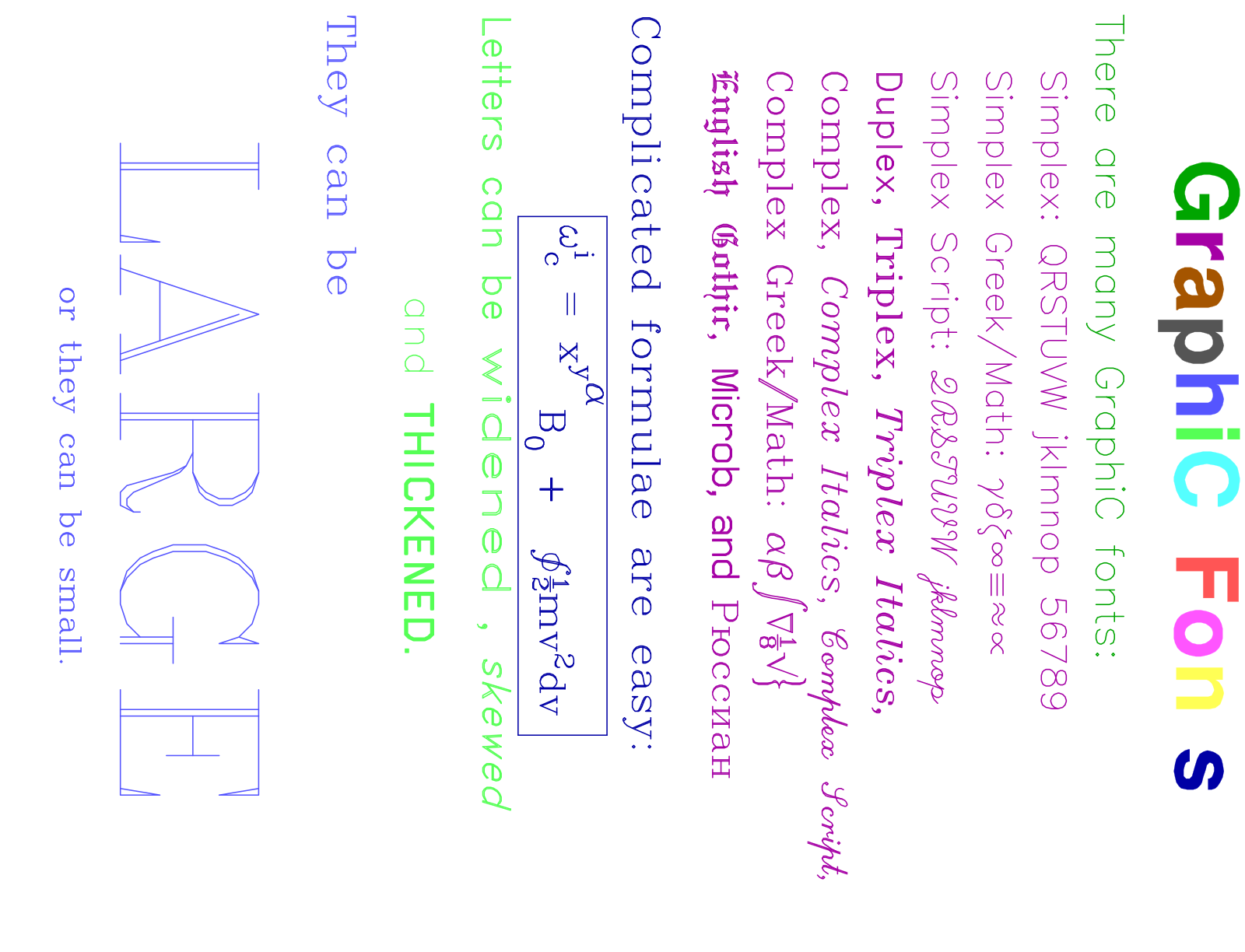
Complete C Implementation (FNTTEST.C)
/*==============================================================================
 * GraphiC Classic C Suite: Fnttest
 *
 * How to Compile & Run (from GraphiC repository root):
 *   make examples
 *   ./bin/Fnttest
 *
 * Direct Command-Line Compilation:
 *   clang -O2 -IInclude -DGPC_PORTABLE=1 Examples/Fnttest.c lib/libgraphic.a -lm -o bin/Fnttest
 *   ./bin/Fnttest
 *============================================================================*/

/****************************************************************************
    (c) 1984-1993 by Scientific Endeavors Corporation.
    This program is a demonstration of the font plotting features.
    Documented on Pages E-102, E-103, and E-104 of the GraphiC User's Manual.
****************************************************************************/
#include <graphic.h>

void GPC_MAIN(void)
{
    bgnplot(0, 'S', "fntdemo.svg");
    startplot(WHITE);
    metricunits(0);                         /* Ensure scaling is in inch units */
    rotate(1);                              /* Plot rotated 90 degrees */
    fillfont(1);                            /* Enable filled fonts */
    page(6.884f, 9.0f);                     /* Size of page and plot area */

    /* The first string is Swiss Bold with each character a different color */
    font(1, "swissbld.fnt", '\310');
    lmargin(0.1f);                          /* Left margin is .1 inch */
    tmargin(0.0f);                          /* No top margin */
    linesp(1.1f);                           /* Line space is 1.1 * char height */
    ctline("\310|2|G|5|r|6|a|8|p|9|h|10|i|11|C |12|F|13|o|14|n|15|t|1|s", .45f);

    /* An example of the Simplex fonts */
    font(3, "simplex.fnt", '\310', "simgrma.fnt", '\311', "simscr.fnt", '\312');
    color(GREEN);
    linesp(2.9f);
    ltline("\310There are many GraphiC fonts:", .2f);
    color(MAGENTA);
    linesp(2.2f);
    lmargin(.5f);
    ltline("\310Simplex: QRSTUVW jklmnop 56789", .18f);
    ltline("\310Simplex Greek/Math: \311gdz8@#$~", .18f);
    ltline("\310Simplex Script: \312QRSTUVW jklmnop", .18f);

    /* Duplex and Triplex fonts */
    font(3, "duplex.fnt", '\310', "triplex.fnt", '\311', "tripital.fnt", '\312');
    ltline("\310Duplex, \311Triplex, \312Triplex Italics,", .18f);

    /* Complex fonts */
    font(4, "complex.fnt", '\310', "compital.fnt", '\311',
            "comscr.fnt", '\312', "compgrma.fnt", '\313');
    ltline("\310Complex, \311Complex Italics, \312Complex Script,", .18f);
    ltline("\310Complex Greek/Math: \313ab,0E&}", .18f);

    /* English Gothic, Microb, and Russian fonts */
    font(3, "engoth.fnt", '\310', "microb.fnt", '\311', "russian.fnt", '\312');
    ltline("\310English Gothic, \311Microb, and \312Russian", .18f);

    /* Mathematical formulae using Greek/Math fonts */
    font(2, "complex.fnt", '\310', "compgrma.fnt", '\311');
    color(BLUE);
    lmargin(0.1f);
    linesp(2.9f);
    ltline("\310Complicated formulae are easy:", .2f);
    fbox(1, .05f);                          /* Box around formula string */
    ctline("\311w\310[i]]c[ = x[y[\311a]]\310B]0[ + \311 2A\310mv[2]dv", .18f);
    fbox(0, .1f);

    /* Widened, skewed, thick, and sizeable characters */
    font(4, "simplex.fnt", '\310', "duplex.fnt", '\311',
            "complex.fnt", '\312', "microb.fnt", '\313');
    color(LGT_GREEN);
    linesp(2.8f);
    widen(1.5f);                            /* Specify aspect ratio for widened text */
    skew(.3f);                              /* Specify slant of skewed text */
    tfont(4);
    ltline("\311Letters can be ^widened^ , `skewed`", .2f);
    charspc(4);
    ctline("\310and \313#THICKENED#.", .2f);
    charspc(0);
    color(LGT_BLUE);
    ltline("\312They can be", .2f);
    linesp(1.5f);
    ctline("\312LARGE", 1.0f);
    linesp(2.9f);
    ctline("\312or they can be small.", .15f);

    endplot();
    stopplot();
}
10.24 Simultaneous Plots: Fermi Acceleration (fermi)
The simultaneous plotting facility in GraphiC (simuplot, context) allows multiple concurrent graphic coordinate windows to evolve and update dynamically on the same page. Documented on Pages E-108 through E-112 of the original GraphiC User’s Manual, this classic scientific demonstration models the nonlinear dynamics of Fermi acceleration—simultaneously charting the Poincaré phase space section alongside the particle’s velocity iteration history.
Physical Model & Hamiltonian Chaos
Enrico Fermi originally proposed (1949) that cosmic rays could attain ultra-relativistic energies through repeated collisions with massive, moving interstellar magnetic cloud structures. Joseph Ford popularized a simplified one-dimensional Hamiltonian realization in “A Picture Book of Stochasticity” (in Topics in Nonlinear Dynamics: A Tribute to Sir Edward Bullard, edited by Siebe Jorna, American Institute of Physics, 1978, p. 140).
A light particle bounces elastically in one dimension between two massive walls. One wall is stationary, while the other oscillates with a periodic sawtooth velocity profile:
where
denotes the fractional part of time.
      V(t)
        ^
        |
     V/4|\    |\    |\    |\    |\    |\
        | \   | \   | \   | \   | \   | \   |
      --|--\--|--\--|--\--|--\--|--\--|--\--|--> t
        |0  \ |1  \ |2  \ |3  \ |4  \ |5  \ |6
        |    \|    \|    \|    \|    \|    \|
Just before the
-th collision with the oscillating wall, the normalized particle velocity
and collision phase
transform according to the discrete area-preserving mapping:
where
,
,
is the mean separation between walls, and
is the maximum oscillation amplitude (
).
Why Fermi Acceleration Fails
As the simultaneous plot vividly illustrates, stochastic acceleration is not unbounded. The phase space is partitioned by invariant KAM curves (Kolmogorov-Arnold-Moser tori) and island chains separated by chaotic seas. In particular, non-stochastic barrier regions arise at integer multiples
. Trajectories initiated on or near the separatrix at
can occasionally wander through local stochastic layers, but cannot penetrate the impermeable barrier at
, strictly bounding the energy that can be acquired.
GraphiC Architectural Features Demonstrated
- Simultaneous Multi-Context Evolution (
simuplot(2),context): GraphiC manages two active virtual display viewports simultaneously. In each iteration step
, the program calls
context(0)to plot the Poincaré phase point usingsymbol(ft, u, 16), then immediately callscontext(1)to draw the incremental trajectory segment withcurve(nstep, u, 2, 0). Both subplots evolve in lockstep without requiring in-memory trajectory caching. - Asymmetric Page Geometries (
page,pgshift,area2d): Context 0 is configured as a tall vertical portrait panel (
inches, shifted by
inches), while Context 1 is configured as a square iteration panel (
inches, shifted by
inches).
- Custom Mathematical Axis Tick Labels (
graf,pltfnt):graf()uses" "format for the Y-axis to suppress automatic numerical tick strings.pltfnt()then places exact mathematical Hershey-font labels at precise user coordinates:
,
,
, and
.
- Solid-Filled Swiss Typography (
font,fillfont(1),prtfnt): Renders the title banner “Fermi Acceleration” in solid-filled Swiss with colored outline (\311|14|Fermi Acceleration), and typesets the mathematical mapping equations using nested subscripts (]n+1[), braces (\312{), absolute value bars (@|), and Greek/math fractions (\312Afor
).
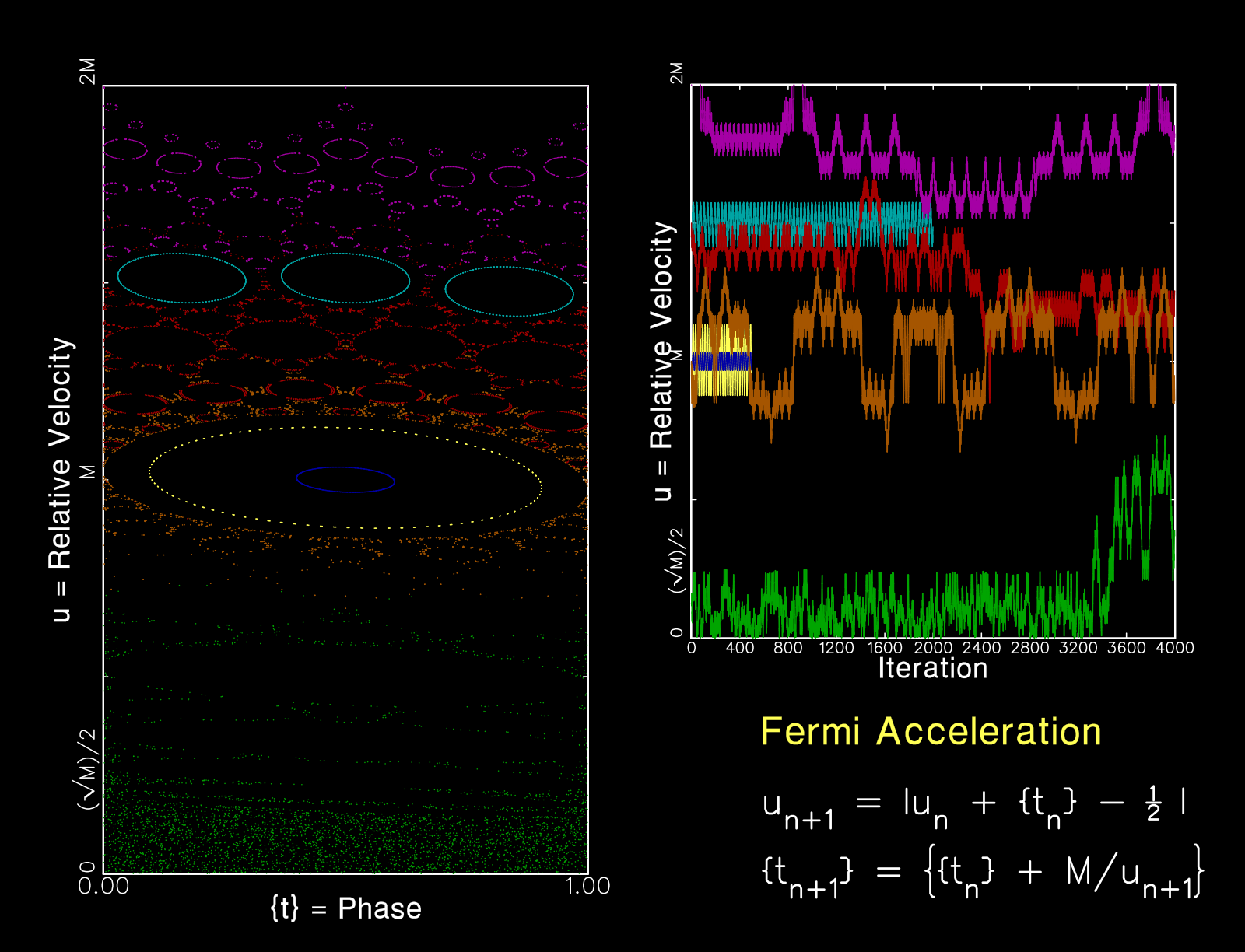
Complete C Implementation (FERMI.C)
/*==============================================================================
 * GraphiC Classic C Suite: Fermi
 *
 * How to Compile & Run (from GraphiC repository root):
 *   make examples
 *   ./bin/Fermi
 *
 * Direct Command-Line Compilation:
 *   clang -O2 -IInclude -DGPC_PORTABLE=1 c/examples/Fermi.c lib/libgraphic.a -lm -o bin/Fermi
 *   ./bin/Fermi
 *============================================================================*/

/* This program gives an example of doing simultaneous plots with GraphiC.
Custom y-axis labels are used.

The example is a simple model of Fermi acceleration. Fermi claimed that
cosmic rays could be accelerated by a similar method to very high velocities.
However, as you can see from the results, the method does not work well
because the stochastic acceleration regions are divided by nonstochastic
regions at M, 2M, etc. The brown points start on this separatrix. They can
sneak through the region at M, but it is unlikely that the trajectory will
also sneak through the separatrix at 2M.

A good reference for this topic is Joseph Ford's "A Picture Book of
Stochasticity" on page 140 in the book Topics in Nonlinear Dynamics: A
Tribute to Sir Edward Bullard, edited by Siebe Jorna, American Institute of
Physics, 1978.
*/

#include <graphic.h>

#define NCURVE 7

#if TCQ                                 /* Set stack for Borland (Turbo) C */
extern unsigned _stklen = 0x3000;
#endif

float M = 10.0f;
int nmax = 4000;
double ustart[NCURVE];
double tstart[NCURVE];
int stepmax[NCURVE];

void gpc_init(void);

void GPC_MAIN(void)
{
    int i, ncolor = 14;
    int ch;
    int n = 0;                                         /* Iteration number */
    float u[2];                      /* Relative velocity before collision */
    float ft[2];                                  /* Fractional parts of t */
    float nstep[2];                     /* Steps (need float for the plot) */

    bgnplot(1, 'g', "fermi.tkf");              /* Generate fermi.svg & fermi.tkf */
    plotabsolute(1);                 /* Prevent GraphiC from resizing axes */
    metricunits(0);                /* Ensure scaling is done in inch units */
    startplot(BLACK);
    font(3, "simplex.fnt", '\310', "swiss.fnt", '\311', "simgrma.fnt", '\312');
    fillfont(1);
    gpc_init();
    ustart[0] = ustart[1] = M;         /* Pick interesting starting points */
    stepmax[0] = stepmax[1] = 500;
    tstart[0] = .1f;
    tstart[1] = .4f;
    ustart[2] = .4f * sqrt((double)M);
    tstart[2] = .5f;
    stepmax[2] = 4000;
    ustart[3] = 1.45f * M;
    tstart[3] = .5f;
    stepmax[3] = 2000;
    ustart[4] = 1.5f * M;
    tstart[4] = 0.0f;
    stepmax[4] = 4000;
    ustart[5] = 2.0f * M;
    tstart[5] = 0.5f;
    stepmax[5] = 4000;
    ustart[6] = M;
    tstart[6] = 0.0f;
    stepmax[6] = 4000;
    for (i = 0; i < NCURVE; i++) {
        u[0] = (float)ustart[i];
        ft[0] = (float)tstart[i];
        nstep[0] = 0.0f;
        context(0);
        symbol(ft[0], u[0], 16);
        for (n = 1; n < stepmax[i]; n++) {
            nstep[1] = (float)n;
            u[1] = u[0] + ft[0] - .5f;
            if (u[1] < 0.0f)
                u[1] = -u[1];
            ft[1] = ft[0] + (M / u[1]);
            while (ft[1] > 1.0f)
                ft[1] -= 1.0f;
            context(0);                                   /* First context */
            symbol(ft[1], u[1], 16);
            context(1);                                  /* Second context */
            curve(nstep, u, 2, 0);
            u[0] = u[1];
            ft[0] = ft[1];
            nstep[0] = nstep[1];
            if ((ch = cstsq()) == 'q')
                goto end;
        }
        ncolor++;
        if (ncolor == 15)
            ncolor = 1;
        if (ncolor == 7)
            ncolor = 9;
        context(0);            /* Change colors for the different contexts */
        color(ncolor);
        context(1);
        color(ncolor);
    }
end:
    simuplot(0);   /* Must end the simultaneous plots to make the TKF file */
    endplot();
    stopplot();
}

/***************************************************************************/
/* Set up the two contexts for the simultaneous plots */
void gpc_init(void)
{
    simuplot(2);                                           /* Two contexts */
    context(0);/* Establish page and plot parameters for the first context */
    color(BRT_WHITE);
    frame(1, 1);
    tcurve(2);
    page(4.0f, 6.884f);
    pgshift(0.5f, 0.0f);
    symht(.05f);                         /* This call must come after page */
    area2d(3.5f, 5.7f);               /* Set the area of the Poincaré plot */
    xname("\311{t} = Phase\310");
    yname("\311u = Relative Velocity\310");
    graf("%-1.2f", 0.0f, 1.0f, 1.0f, " ", 0.0f, 0.5f * M, 2.0f * M);
    pltfnt(-.02f, 0.0f, "\3100", .1f, 90);    /* Custom labels for y axis */
    pltfnt(-.02f, M, "\310M", .1f, 90);
    pltfnt(-.02f, 2.f * M, "\3102M", .1f, 90);
    pltfnt(-.02f, (float)(sqrt((double)M)) * .5f, "\310(\3121\310M)/2", .1f, 90);

    /* LABEL THE PLOT */
    color(BLUE);                /* Outline the title in blue (for printer) */
    prtfnt(5.0f, 1.5f, "\311|14|Fermi Acceleration", 0.2f, 0);
    color(BRT_WHITE);
    tfont(3);
    /* The `#' toggles the thick fonts */
    prtfnt(5.0f, 1.0f, "\310#u]n+1[ = @|u]n[ + {t]n[} - \312A\310 @|", 0.18f, 0);
    prtfnt(5.0f, 0.5f, "\310{t]n+1[} = \312{\310{t]n[} + M/u]n+1[\312}#\310", 0.18f, 0);
    tfont(0);
    tcurve(0);
    color(YELLOW);                                    /* Set context color */

    /* START VELOCITY PLOT */
    context(1);/* Establish page and plot parameters for the second context */
    color(BRT_WHITE);
    symht(.01f);                         /* This call must come after page */
    page(4.5f, 4.0f);
    pgshift(4.5f, 2.3f);
    axnamht(.3f);
    xname("\311Iteration");
    yname("\311u = Relative Velocity");
    area2d(3.5f, 4.0f);
    /* The `-' is to left align the axis labels */
    graf("%-1.0f", 0.0f, 0.1f * nmax, (float)nmax,
        " ", 0.0f, .5f * M, 2.f * M);
    /* Custom labels for y-axis */
    pltfnt(-.02f * nmax, -0.0f, "\3100", .08f, 90);
    pltfnt(-.02f * nmax, M, "\310M", .08f, 90);
    pltfnt(-.02f * nmax, 2.f * M, "\3102M", .08f, 90);
    pltfnt(-.02f * nmax, (float)(sqrt((double)M)) * .5f, "\310(\3121\310M)/2", .08f, 90);
    color(YELLOW);
}
10.25 SVG Auto-Crop, Desktop Auto-Preview & Network Telemetry Push (svgtest)
The modernized vector graphics engine in GraphiC 2026 introduces three core routines designed specifically for modern cloud pipelines, headless HPC clusters, web dashboards, and rapid interactive code development:
-
Automatic Tight Bounding-Box Cropping (
svgcrop): In traditional vector graphics, plots are generated within fixed physical page sheets (e.g.,
inches), leaving large borders of empty canvas around compact figures.
svgcrop(margin_inches)calculates the exact geometric bounding box enclosing all rendered vectors, polylines, axes, ticks, markers, and text strings, outputting a trimmed SVG<svg viewBox="minX minY width height">that eliminates extraneous whitespace. A positive margin (e.g.,0.25inches) pads the bounding box, while passing a negative value (e.g.,-1.0) restores the full uncropped page canvas. -
Network Telemetry Push (
svgpush): Designed as the modern HTTP/HTTPS successor to GraphiC’s historicaltkfpush()routine,svgpush(url, filepath)transmits generated SVG figures directly over HTTP/HTTPS POST to a live web server, central monitoring dashboard, or cloud storage gateway withContent-Type: image/svg+xml. IfurlisNULLor omitted,svgpush()automatically inspects theGPC_SVG_PUSH_URLenvironment variable. Iffilepathis omitted, the most recently finalized plot is automatically dispatched. -
Desktop Auto-Preview (
svgopen):svgopen(filepath)automatically launches the generated SVG or companion HTML5 interactive pan/zoom viewer in the user’s default system browser or image viewer. Operating cross-platform across macOS (invoking nativeopen), Microsoft Windows (invokingstart), and Linux/Unix (invokingxdg-openin the background), callingsvgopen()immediately afterendplot()gives developers the immediate visual feedback of classic CRT graphics terminals without manual browser refresh. To view the plot on your local desktop screen as soon as plotting begins, callsvgopen(NULL)right afterbgnplot(), or set the environment variableexport GPC_AUTOPREVIEW=1.bgnplot()generates the companion HTML viewer (myplot.html) immediately at plot start, and the integrated live poller updates the browser display automatically within 200 ms ofendplot()finishing.
The companion test program svgtest plots a damped sinusoidal oscillation (
), demonstrates tight SVG boundary cropping, and verifies both network push and desktop preview dispatch.
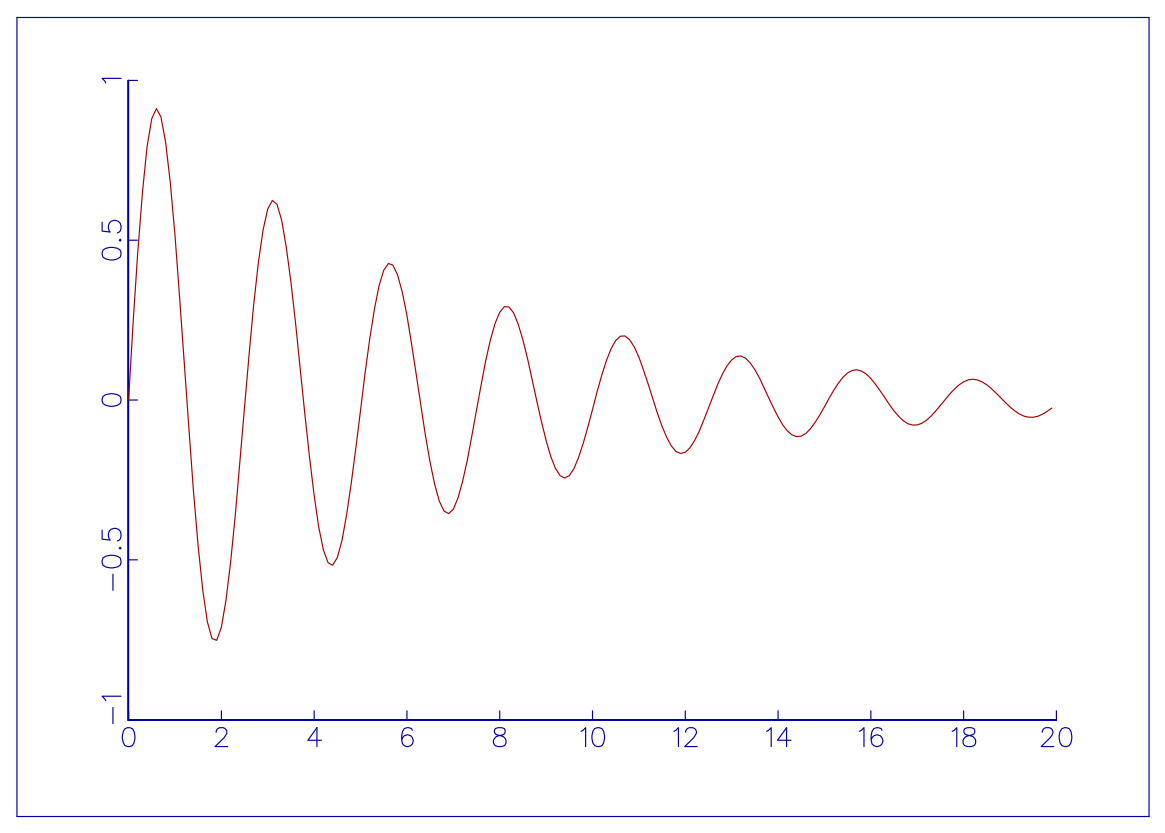
Complete C Implementation (Svgtest.c)
/*==============================================================================
 * GraphiC Modern Test Program: Svgtest
 *
 * Demonstrates:
 *   1. Automatic tight SVG bounding-box cropping with svgcrop()
 *   2. Instant desktop preview in default browser/viewer with svgopen()
 *   3. Network telemetry push via HTTP/HTTPS POST with svgpush()
 *
 * How to Compile & Run (from GraphiC repository root):
 *   make -j4
 *   clang -O2 -IInclude -DGPC_PORTABLE=1 Examples/Svgtest.c lib/libgraphic.a -lm -o bin/Svgtest
 *   ./bin/Svgtest [--open] [push_url]
 *============================================================================*/

#include <stdio.h>
#include <stdlib.h>
#include <string.h>
#include <math.h>
#include <graphic.h>

int main(int argc, char *argv[])
{
    float *x, *y;
    int i, npts = 200;
    int do_open = 0;
    char *push_url = NULL;

    /* Parse command-line flags */
    for (i = 1; i < argc; i++) {
        if (strcmp(argv[i], "--open") == 0 || strcmp(argv[i], "-o") == 0) {
            do_open = 1;
        } else if (push_url == NULL && argv[i][0] != '-') {
            push_url = argv[i];
        }
    }

    printf("=== GraphiC SVG Push & Auto-Preview Test (Svgtest) ===\n");

    /* Allocate data points for a damped sinusoidal curve */
    x = (float *)gpcalloc(npts, sizeof(float));
    y = (float *)gpcalloc(npts, sizeof(float));
    if (x == NULL || y == NULL) {
        fprintf(stderr, "Error: Could not allocate memory for plot data.\n");
        return 1;
    }

    for (i = 0; i < npts; i++) {
        x[i] = (float)i * 0.1f;
        y[i] = (float)(exp(-0.15 * x[i]) * sin(2.5 * x[i]));
    }

    /* Begin plot session: emits svgtest.svg and companion svgtest.html */
    bgnplot(1, 'g', "svgtest.tkf");
    startplot(WHITE);

    /* 1. Set auto-crop margin to 1/4 inch */
    svgcrop(0.25f);

    /* Page and coordinate setup */
    page(8.5f, 6.0f);
    area2d(7.0f, 4.5f);

    font(1, "Swiss.fnt", '\310');
    heading("\310GraphiC 2026: SVG Auto-Crop, Push & Preview Test");
    xname("\310Time (seconds)");
    yname("\310Signal Amplitude (V)");

    color(BLUE);
    graf("%g", 0.0f, 2.0f, 20.0f, "%g", -1.0f, 0.5f, 1.0f);
    grid(1);

    color(RED);
    curve(x, y, npts, 0);

    /* Close the plot */
    endplot();
    printf("✔ Plot successfully rendered to 'svgtest.svg' (tightly cropped with svgcrop).\n");

    /* 2. Test svgpush() if URL specified or configured in environment */
    if (push_url != NULL || getenv("GPC_SVG_PUSH_URL") != NULL) {
        const char *target = push_url ? push_url : getenv("GPC_SVG_PUSH_URL");
        printf("Pushing plot to endpoint '%s' via svgpush()...\n", target);
        int push_rc = svgpush(push_url, "svgtest.svg");
        if (push_rc == 0) {
            printf("✔ svgpush() succeeded (HTTP POST transmitted with Content-Type: image/svg+xml).\n");
        } else {
            printf("Notice: svgpush() returned status code %d.\n", push_rc);
        }
    } else {
        printf("Info: svgpush() test skipped (pass a URL argument or set GPC_SVG_PUSH_URL to push).\n");
        printf("      Example: ./bin/Svgtest http://localhost:8080/live\n");
    }

    /* 3. Test svgopen() */
    if (do_open) {
        printf("Opening 'svgtest.svg' in default system viewer/browser with svgopen()...\n");
        svgopen("svgtest.svg");
        printf("✔ svgopen() dispatched successfully.\n");
    } else {
        printf("Info: Run with '--open' to launch your default browser/viewer automatically:\n");
        printf("      Example: ./bin/Svgtest --open\n");
    }

    /* Free dynamically allocated memory */
    gpcfree((void **)&x);
    gpcfree((void **)&y);

    printf("=== Test Completed Successfully ===\n");
    return 0;
}
Complete Modern Fortran 2003 Implementation (svgtest.f90)
!===============================================================================
! GraphiC Fortran 2003 Suite: svgtest
! Demonstrates:
!   1. Automatic SVG tight cropping with gpc_svgcrop()
!   2. HTTP/HTTPS POST network telemetry push with gpc_svgpush()
!   3. Automatic browser/viewer preview launch with gpc_svgopen()
!
! How to Compile & Run (from GraphiC repository root):
!   make fortran_examples
!   ./fortran/bin/svgtest [--open] [push_url]
!   (or via fpm): fpm run --example svgtest
!===============================================================================

program svgtest
  use graphic
  implicit none

  integer, parameter :: NPTS = 200
  real :: x(NPTS), y(NPTS)
  real :: t
  integer :: i, argc, iarg
  character(len=256) :: arg, push_url
  character(len=256) :: env_url
  logical :: do_open, has_url
  integer :: env_stat

  print *, "=== GraphiC Fortran 2003 SVG Push & Auto-Preview Test (svgtest) ==="

  do_open = .false.
  has_url = .false.
  push_url = ""

  ! Parse command-line arguments
  argc = command_argument_count()
  do iarg = 1, argc
    call get_command_argument(iarg, arg)
    if (trim(arg) == "--open" .or. trim(arg) == "-o") then
      do_open = .true.
    else if (.not. has_url .and. arg(1:1) /= "-") then
      push_url = trim(arg)
      has_url = .true.
    end if
  end do

  if (.not. has_url) then
    call get_environment_variable("GPC_SVG_PUSH_URL", env_url, status=env_stat)
    if (env_stat == 0 .and. len_trim(env_url) > 0) then
      push_url = trim(env_url)
      has_url = .true.
    end if
  end if

  ! Compute damped sinusoidal wave
  do i = 1, NPTS
    t = real(i - 1) * 0.1
    x(i) = t
    y(i) = exp(-0.15 * t) * sin(2.5 * t)
  end do

  ! Initialize plot session to fortran/examples/svgtest.svg
  call gpc_begin(DRIVER_SVG, "fortran/examples/svgtest.svg")
  call gpc_start(COLOR_WHITE)

  ! 1. Auto-crop with 0.25 inch margin
  call gpc_svgcrop(0.25)

  call gpc_page(8.5, 6.0)
  call gpc_area2d(7.0, 4.5)
  call gpc_physor(1.5, 1.2)
  call gpc_box()

  call gpc_title("Fortran 2003 SVG Auto-Crop, Push & Preview Test", "Time (seconds)", "Signal Amplitude (V)")
  call gpc_graf("%g", 0.0, 2.0, 20.0, "%g", -1.0, 0.5, 1.0)
  call gpc_grid(1)

  call gpc_color(COLOR_BLUE)
  call gpc_curve(x, y, NPTS, 0)

  ! Finalize and flush the SVG plot
  call gpc_end()
  print *, "✔ Plot successfully rendered to 'fortran/examples/svgtest.svg' (tightly cropped with gpc_svgcrop)."

  ! 2. Test gpc_svgpush()
  if (has_url) then
    print '(A,A,A)', "Pushing plot to endpoint '", trim(push_url), "' via gpc_svgpush()..."
    call gpc_svgpush(trim(push_url), "fortran/examples/svgtest.svg")
    print *, "✔ gpc_svgpush() dispatched successfully."
  else
    print *, "Info: gpc_svgpush() test skipped (pass a URL argument or set GPC_SVG_PUSH_URL)."
    print *, "      Example: ./fortran/bin/svgtest http://localhost:8080/live"
  end if

  ! 3. Test gpc_svgopen()
  if (do_open) then
    print *, "Opening 'fortran/examples/svgtest.svg' in default viewer with gpc_svgopen()..."
    call gpc_svgopen("fortran/examples/svgtest.svg")
    print *, "✔ gpc_svgopen() dispatched successfully."
  else
    print *, "Info: Run with '--open' to launch your default browser/viewer automatically:"
    print *, "      Example: ./fortran/bin/svgtest --open"
  end if

  call gpc_stop()
  print *, "=== Test Completed Successfully ==="
end program svgtest
Complete Python 3 Implementation (svgtest.py)
#!/usr/bin/env python3
# ==============================================================================
# GraphiC Python 3 Suite: svgtest
#
# Demonstrates:
#   1. Automatic SVG tight cropping with svgcrop()
#   2. HTTP/HTTPS POST network telemetry push with svgpush()
#   3. Automatic browser/viewer preview launch with svgopen()
#
# How to Run:
#   python3 python/examples/svgtest.py [--open] [push_url]
# ==============================================================================
import os, sys, math

sys.path.insert(0, os.path.join(os.path.dirname(__file__), ".."))
import graphic
from graphic import Figure

def main():
    print("=== GraphiC Python 3 SVG Push & Auto-Preview Test (svgtest) ===")

    do_open = False
    push_url = None

    for arg in sys.argv[1:]:
        if arg in ("--open", "-o"):
            do_open = True
        elif push_url is None and not arg.startswith("-"):
            push_url = arg

    if push_url is None:
        push_url = os.environ.get("GPC_SVG_PUSH_URL")

    out_svg = os.path.join(os.path.dirname(__file__), "svgtest.svg")
    n = 200
    x = [i * 0.1 for i in range(n)]
    y = [math.exp(-0.15 * t) * math.sin(2.5 * t) for t in x]

    with Figure(8.5, 6.0, background="white", output_path=out_svg) as fig:
        # 1. Enable tight cropping with 0.25 inch margin
        fig.svgcrop(0.25)

        fig.title("Python 3 SVG Auto-Crop, Push & Preview Test")
        fig.xlabel("Time (seconds)")
        fig.ylabel("Signal Amplitude (V)")
        fig.setup_axes(0.0, 2.0, 20.0, -1.0, 0.5, 1.0, "%g", "%g", color="blue")
        fig.box(color="blue")
        fig.plot(x, y, color="red", thickness=2)

        fig.save(out_svg)

    print(f"✔ Plot successfully rendered to '{out_svg}' (tightly cropped with svgcrop).")

    # 2. Test svgpush()
    if push_url:
        print(f"Pushing plot to endpoint '{push_url}' via svgpush()...")
        rc = graphic.svgpush(push_url, out_svg)
        if rc == 0:
            print("✔ svgpush() succeeded (HTTP POST transmitted with Content-Type: image/svg+xml).")
        else:
            print(f"Notice: svgpush() returned status code {rc}.")
    else:
        print("Info: svgpush() test skipped (pass a URL argument or set GPC_SVG_PUSH_URL).")
        print("      Example: python3 python/examples/svgtest.py http://localhost:8080/live")

    # 3. Test svgopen()
    if do_open:
        print(f"Opening '{out_svg}' in default viewer with svgopen()...")
        graphic.svgopen(out_svg)
        print("✔ svgopen() dispatched successfully.")
    else:
        print("Info: Run with '--open' to launch your default browser/viewer automatically:")
        print("      Example: python3 python/examples/svgtest.py --open")

    print("=== Test Completed Successfully ===")

if __name__ == "__main__":
    main()
Complete Java 22 FFM Implementation (SvgTest.java)
package examples;

import com.sciend.graphic.Color;
import com.sciend.graphic.Figure;
import com.sciend.graphic.Graphic;
import com.sciend.graphic.LineStyle;
import java.nio.file.Path;

public class SvgTest {
    public static void main(String[] args) throws Exception {
        System.out.println("=== GraphiC Java 22 (FFM) SVG Push & Auto-Preview Test (SvgTest) ===");

        boolean doOpen = false;
        String pushUrl = null;

        for (String arg : args) {
            if ("--open".equals(arg) || "-o".equals(arg)) {
                doOpen = true;
            } else if (pushUrl == null && !arg.startsWith("-")) {
                pushUrl = arg;
            }
        }

        if (pushUrl == null) {
            pushUrl = System.getenv("GPC_SVG_PUSH_URL");
        }

        int npts = 200;
        float[] x = new float[npts];
        float[] y = new float[npts];

        for (int i = 0; i < npts; i++) {
            x[i] = i * 0.1f;
            y[i] = (float) (Math.exp(-0.15 * x[i]) * Math.sin(2.5 * x[i]));
        }

        Path svgOut = Path.of("java/examples/svgtest.svg");
        Path htmlOut = Path.of("java/examples/svgtest.html");

        try (Figure fig = new Figure(8.5f, 6.0f, Color.WHITE, "svgtest.tkf")) {
            // 1. Enable tight cropping with 0.25 inch margin
            fig.svgcrop(0.25f);

            fig.setupAxes(0.0f, 2.0f, 20.0f, -1.0f, 0.5f, 1.0f, "%g", "%g", Color.BLUE);
            fig.box(Color.BLUE);
            fig.title("Java 22 (FFM) SVG Auto-Crop, Push & Preview Test");
            fig.xlabel("Time (seconds)");
            fig.ylabel("Signal Amplitude (V)");

            fig.plot(x, y, Color.RED, 0);

            fig.save(svgOut);
            fig.saveHtml(htmlOut);
            System.out.println("✔ Plot successfully rendered to '" + svgOut + "' (tightly cropped with svgcrop).");

            // 2. Test svgpush()
            if (pushUrl != null && !pushUrl.isEmpty()) {
                System.out.println("Pushing plot to endpoint '" + pushUrl + "' via svgpush()...");
                int pushRc = fig.svgpush(pushUrl, svgOut.toString());
                if (pushRc == 0) {
                    System.out.println("✔ svgpush() succeeded (HTTP POST transmitted with Content-Type: image/svg+xml).");
                } else {
                    System.out.println("Notice: svgpush() returned status code " + pushRc + ".");
                }
            } else {
                System.out.println("Info: svgpush() test skipped (pass a URL argument or set GPC_SVG_PUSH_URL).");
                System.out.println("      Example: java -cp java/target/classes:java/bin examples.SvgTest http://localhost:8080/live");
            }

            // 3. Test svgopen()
            if (doOpen) {
                System.out.println("Opening '" + svgOut + "' in default viewer with svgopen()...");
                fig.svgopen(svgOut.toString());
                System.out.println("✔ svgopen() dispatched successfully.");
            } else {
                System.out.println("Info: Run with '--open' to launch your default browser/viewer automatically:");
                System.out.println("      Example: java -cp java/target/classes:java/bin examples.SvgTest --open");
            }
        }

        System.out.println("=== Test Completed Successfully ===");
    }
}
10.26 Continuous Color Scale Plots
GraphiC introduces native continuous scientific colormaps, high-density multidimensional scatter plotting, TrueColor 24-bit shading queries, and SVG linear vector gradient color bars.
This example demonstrates continuous scientific color scaling across 7,850 data points correlating Temperature against Transport, where each measurement point is continuously shaded according to its
scalar value:
-
Continuous Scientific Colormaps (
GPC_COLORMAP_*): Provides 7 mathematically uniform 256-node standard colormaps:VIRIDIS(0),PLASMA(1),INFERNO(2),MAGMA(3),COOLWARM(4),RAINBOW(5), andTURBO(6). These palettes guarantee perceptual linearity and high aesthetic fidelity across color and grayscale reproductions. -
Continuous Scalar-to-Color Query Engine (
gpc_get_color,gpc_get_rgb): Allows applications to evaluate any scalar value in [vmin, vmax] in 𝒪(1) time to obtain packed 24-bit TrueColor RGB integers (0x01RRGGBB) or discrete (R, G, B) byte triplets (0…255). -
High-Density Multidimensional Scatter (
gpc_scatter): Renders large collections of independent scatter markers where each data point
is colored continuously by scalar coordinate
evaluated against the selected colormap without polyline connection artifacts.
-
Continuous Linear Vector Gradient Color Bars (
ColorKeyGradient): Generates hardware-accelerated SVG linear gradients (<linearGradient>) with 33 smooth color stops, bounded border framing, numerical calibration ticks, and publication typography. -
TrueType Typography Engine (
Arial.ttf/Swiss.ttf): Combines TrueType glyph rendering with GraphiC’s superscript/subscript markup and UTF-8 symbols for mathematical fractions, subscripts, and Greek characters.

Complete C Implementation (Turbulence.c)
/*==============================================================================
 * GraphiC Classic C Suite: Continuous Color Scale Plots
 *
 * Demonstrates:
 *   - Continuous Scientific Colormaps (Viridis)
 *   - Querying shading color for each individual data point
 *   - TrueType Font rendering (Arial.ttf)
 *   - Continuous SVG Gradient Color Bar (ColorKeyGradient)
 *   - 7,850 data points colored continuously by log10 density
 *============================================================================*/

#include <graphic.h>
#include <colormap.h>
#include <math.h>

#define NPTS 7850

/* Deterministic pseudo-random generator */
static unsigned long seed = 123456789UL;
static float rand_uniform(void) {
    seed = (seed * 1103515245UL + 12345UL) & 0x7fffffffUL;
    return (float)seed / (float)0x7fffffffUL;
}

static float rand_gauss(void) {
    float u1 = rand_uniform();
    float u2 = rand_uniform();
    if (u1 < 1e-7f) u1 = 1e-7f;
    return sqrtf(-2.0f * logf(u1)) * cosf(6.2831853f * u2);
}

int GPC_MAIN(void)
{
    float x[NPTS], y[NPTS], z[NPTS];
    float zmin = -0.8f, zmax = 0.8f;
    int i;

    /* Generate 7,850 continuous synthetic data points with smooth physical decay */
    for (i = 0; i < NPTS; i++) {
        float u = rand_uniform();
        float x_val;
        float base_y, sigma_y, burst, y_val;
        float norm_y, temp_factor, z_mean, z_val;

        /* Continuous temperature sampling across [5, 250] */
        if (rand_uniform() < 0.45f) {
            x_val = 5.0f + 55.0f * powf(u, 1.15f) + 2.0f * rand_gauss();
        } else {
            x_val = 20.0f + 228.0f * powf(u, 1.30f) + 2.0f * rand_gauss();
        }
        if (x_val < 5.0f) x_val = 5.0f;
        if (x_val > 249.0f) x_val = 249.0f;

        /* Smooth transport decay with natural fluctuation */
        base_y = 0.22f + 0.95f * expf(-x_val / 36.0f) + 0.18f * expf(-x_val / 130.0f);
        sigma_y = 0.045f + 0.22f * expf(-x_val / 40.0f);

        burst = 0.0f;
        if (rand_uniform() < 0.28f * expf(-x_val / 32.0f)) {
            float ub = rand_uniform();
            if (ub < 1e-5f) ub = 1e-5f;
            burst = -0.35f * logf(ub);
        }

        y_val = base_y + sigma_y * rand_gauss() + burst;
        /* Smooth soft boundary to avoid artificial flat floors */
        if (y_val < 0.14f) {
            y_val = 0.14f + 0.06f * expf((y_val - 0.14f) / 0.06f);
        }
        if (y_val > 1.58f) {
            y_val = 1.58f - 0.06f * expf((1.58f - y_val) / 0.06f);
        }

        /* Color scale: log10 Density smoothly correlated with transport and temperature */
        norm_y = (y_val - 0.14f) / 1.44f;
        if (norm_y < 0.0f) norm_y = 0.0f;
        if (norm_y > 1.0f) norm_y = 1.0f;
        temp_factor = expf(-x_val / 65.0f);
        z_mean = -0.76f + 1.28f * powf(norm_y, 0.75f) + 0.26f * temp_factor;
        z_val = z_mean + 0.06f * rand_gauss();
        if (z_val < zmin) z_val = zmin;
        if (z_val > zmax) z_val = zmax;

        x[i] = x_val;
        y[i] = y_val;
        z[i] = z_val;
    }

    /* Start plot session */
    bgnplot(1, 'S', "turbulence.svg");
    startplot(WHITE);
    metricunits(0);

    /* Load TrueType font Arial.ttf */
    font(1, "Arial.ttf", '\310');
    fillfont(1);

    page(9.5f, 6.5f);
    physor(1.35f, 1.0f);
    area2d(5.8f, 4.5f);

    /* Anonymized axis labels without top caption */
    color(BLACK);
    xnamht(0.16f);
    ynamht(0.16f);
    SetNameSpace(0, 0.28f);
    SetNameSpace(1, 0.45f);
    xname("\310Temperature");
    yname("\310Transport");

    /* Cartesian grid and axes */
    numht(0.12f);
    graf("%-1.0f", 0.0f, 50.0f, 250.0f, "%-1.1f", 0.0f, 0.2f, 1.6f);

    /* Plot all 7,850 points colored continuously via Viridis colormap */
    gpc_scatter(x, y, z, NPTS, zmin, zmax, 12, 0.035f, GPC_COLORMAP_VIRIDIS);

    /* Draw continuous SVG Gradient Color Bar on the right */
    ColorKeyGradient(zmin, zmax, GPC_COLORMAP_VIRIDIS,
                     7.5f, 1.0f, 7.8f, 5.5f,
                     8, "%-3.1f", '\310', 0.11f, 0);

    /* Color bar label */
    prtfnt(8.35f, 3.25f, "\310log]10@ Density", 0.13f, 90);

    /* Close plot without interactive pause */
    hardcopy('n');
    endplot();
    stopplot();
    return 0;
}
Complete Modern Fortran 2003 Implementation (turbulence.f90)
!==============================================================================
! GraphiC Modern Fortran Suite: Continuous Color Scale Plots
!
! Demonstrates:
!   - Continuous Scientific Colormaps (Viridis)
!   - Querying shading color for each individual data point
!   - TrueType Font rendering (Arial.ttf)
!   - Continuous SVG Gradient Color Bar (gpc_colorkey_gradient)
!   - 7,850 data points colored continuously by log10 density
!==============================================================================

program turbulence_demo
  use graphic
  implicit none

  integer, parameter :: NPTS = 7850
  real :: x(NPTS), y(NPTS), z(NPTS)
  real :: zmin, zmax, u, x_val, base_y, sigma_y, burst, y_val
  real :: norm_y, temp_factor, z_mean, z_val
  real :: u1, u2, g_val
  integer :: i
  integer(8) :: seed

  seed = 123456789_8
  zmin = -0.8
  zmax = 0.8

  ! Generate 7,850 continuous synthetic data points with smooth physical decay
  do i = 1, NPTS
    ! Box-Muller gaussian
    seed = iand(seed * 1103515245_8 + 12345_8, 2147483647_8)
    u1 = max(1.0e-7, real(seed) / 2147483647.0)
    seed = iand(seed * 1103515245_8 + 12345_8, 2147483647_8)
    u2 = real(seed) / 2147483647.0
    g_val = sqrt(-2.0 * log(u1)) * cos(6.2831853 * u2)

    seed = iand(seed * 1103515245_8 + 12345_8, 2147483647_8)
    u = real(seed) / 2147483647.0

    seed = iand(seed * 1103515245_8 + 12345_8, 2147483647_8)
    if (real(seed) / 2147483647.0 < 0.45) then
      x_val = 5.0 + 55.0 * (u ** 1.15) + 2.0 * g_val
    else
      x_val = 20.0 + 228.0 * (u ** 1.30) + 2.0 * g_val
    end if
    if (x_val < 5.0) x_val = 5.0
    if (x_val > 249.0) x_val = 249.0

    base_y = 0.22 + 0.95 * exp(-x_val / 36.0) + 0.18 * exp(-x_val / 130.0)
    sigma_y = 0.045 + 0.22 * exp(-x_val / 40.0)

    burst = 0.0
    seed = iand(seed * 1103515245_8 + 12345_8, 2147483647_8)
    if (real(seed) / 2147483647.0 < 0.28 * exp(-x_val / 32.0)) then
      seed = iand(seed * 1103515245_8 + 12345_8, 2147483647_8)
      burst = -0.35 * log(max(1.0e-5, real(seed) / 2147483647.0))
    end if

    y_val = base_y + sigma_y * g_val + burst
    if (y_val < 0.14) then
      y_val = 0.14 + 0.06 * exp((y_val - 0.14) / 0.06)
    end if
    if (y_val > 1.58) then
      y_val = 1.58 - 0.06 * exp((1.58 - y_val) / 0.06)
    end if

    norm_y = (y_val - 0.14) / 1.44
    if (norm_y < 0.0) norm_y = 0.0
    if (norm_y > 1.0) norm_y = 1.0
    temp_factor = exp(-x_val / 65.0)
    z_mean = -0.76 + 1.28 * (norm_y ** 0.75) + 0.26 * temp_factor

    seed = iand(seed * 1103515245_8 + 12345_8, 2147483647_8)
    u1 = max(1.0e-7, real(seed) / 2147483647.0)
    seed = iand(seed * 1103515245_8 + 12345_8, 2147483647_8)
    u2 = real(seed) / 2147483647.0
    z_val = z_mean + 0.06 * (sqrt(-2.0 * log(u1)) * cos(6.2831853 * u2))
    if (z_val < zmin) z_val = zmin
    if (z_val > zmax) z_val = zmax

    x(i) = x_val
    y(i) = y_val
    z(i) = z_val
  end do

  ! Start plot session
  call gpc_begin('S', 'turbulence_f.svg')
  call gpc_start(COLOR_WHITE)

  ! Load TrueType font Arial.ttf
  call gpc_font('Arial.ttf', char(200))
  call gpc_fillfont(1)

  call gpc_page(9.5, 6.5)
  call gpc_physor(1.35, 1.0)
  call gpc_area2d(5.8, 4.5)

  ! Graph axis names
  call gpc_color(COLOR_BLACK)
  call gpc_xname(char(200) // 'Temperature')
  call gpc_yname(char(200) // 'Transport')

  ! Cartesian grid and axes
  call gpc_numht(0.12)
  call gpc_graf('%-1.0f', 0.0, 50.0, 250.0, '%-1.1f', 0.0, 0.2, 1.6)

  ! Plot all 7,850 points colored continuously via Viridis colormap
  call gpc_scatter(x, y, z, zmin, zmax, 12, 0.035, GPC_COLORMAP_VIRIDIS)

  ! Draw continuous SVG Gradient Color Bar on the right
  call gpc_colorkey_gradient(zmin, zmax, GPC_COLORMAP_VIRIDIS, &
                             7.5, 1.0, 7.8, 5.5, &
                             8, '%-3.1f', char(200), 0.11, 0)

  ! Label for the color bar
  call gpc_prtfnt(8.35, 3.25, char(200) // 'log]10@ Density', 0.13, 90)

  call gpc_hardcopy('n')
  call gpc_end()
  call gpc_stop()
end program turbulence_demo
Complete Python 3 Implementation (turbulence.py)
"""
GraphiC Python Suite: Continuous Color Scale Plots

Demonstrates:
  - Continuous Scientific Colormaps (Viridis)
  - Querying shading color for each individual data point
  - TrueType Font rendering (Arial.ttf)
  - Continuous SVG Gradient Color Bar (colorkey_gradient)
  - 7,850 data points colored continuously by log10 density
"""

import math
import random
import os
import sys

sys.path.insert(0, os.path.abspath(os.path.join(os.path.dirname(__file__), "..")))
from graphic import procedural as gpc
from graphic.constants import (
    COLORMAP_VIRIDIS,
    WHITE,
    BLACK
)

def main():
    random.seed(123456789)
    npts = 7850
    x, y, z = [], [], []
    zmin, zmax = -0.8, 0.8

    for _ in range(npts):
        u = random.random()
        if random.random() < 0.45:
            x_val = 5.0 + 55.0 * (u ** 1.15) + 2.0 * random.gauss(0, 1)
        else:
            x_val = 20.0 + 228.0 * (u ** 1.30) + 2.0 * random.gauss(0, 1)
        if x_val < 5.0: x_val = 5.0
        if x_val > 249.0: x_val = 249.0

        base_y = 0.22 + 0.95 * math.exp(-x_val / 36.0) + 0.18 * math.exp(-x_val / 130.0)
        sigma_y = 0.045 + 0.22 * math.exp(-x_val / 40.0)

        burst = 0.0
        if random.random() < 0.28 * math.exp(-x_val / 32.0):
            ub = random.random()
            if ub < 1e-5: ub = 1e-5
            burst = -0.35 * math.log(ub)

        y_val = base_y + sigma_y * random.gauss(0, 1) + burst
        if y_val < 0.14:
            y_val = 0.14 + 0.06 * math.exp((y_val - 0.14) / 0.06)
        if y_val > 1.58:
            y_val = 1.58 - 0.06 * math.exp((1.58 - y_val) / 0.06)

        norm_y = (y_val - 0.14) / 1.44
        if norm_y < 0.0: norm_y = 0.0
        if norm_y > 1.0: norm_y = 1.0
        temp_factor = math.exp(-x_val / 65.0)
        z_mean = -0.76 + 1.28 * (norm_y ** 0.75) + 0.26 * temp_factor
        z_val = z_mean + 0.06 * random.gauss(0, 1)
        if z_val < zmin: z_val = zmin
        if z_val > zmax: z_val = zmax

        x.append(x_val)
        y.append(y_val)
        z.append(z_val)

    gpc.bgnplot(1, 'S', "turbulence_py.svg")
    gpc.startplot(WHITE)
    gpc.metricunits(0)
    gpc.font("Arial.ttf", 200)
    gpc.fillfont(1)

    gpc.page(9.5, 6.5)
    gpc.physor(1.35, 1.0)
    gpc.area2d(5.8, 4.5)

    gpc.color(BLACK)
    gpc.xnamht(0.16)
    gpc.ynamht(0.16)
    gpc.set_name_space(0, 0.28)
    gpc.set_name_space(1, 0.45)
    gpc.xname("\310Temperature")
    gpc.yname("\310Transport")

    gpc.numht(0.12)
    gpc.graf("%-1.0f", 0.0, 50.0, 250.0, "%-1.1f", 0.0, 0.2, 1.6)

    # Plot continuous scatter points
    gpc.scatter(x, y, z, zmin, zmax, symnum=12, symheight=0.035, colormap=COLORMAP_VIRIDIS)

    # Draw continuous gradient color bar
    gpc.colorkey_gradient(zmin, zmax, colormap=COLORMAP_VIRIDIS,
                          legllx=7.5, leglly=1.0, legurx=7.8, legury=5.5,
                          nticks=8, format="%-3.1f", fontc=chr(200), height=0.11, angle=0)

    # Color bar label
    gpc.prtfnt(8.35, 3.25, "\310log]10@ Density", 0.13, 90)

    gpc.hardcopy('n')
    gpc.endplot()
    gpc.stopplot()
    print("Generated turbulence_py.svg successfully")

if __name__ == "__main__":
    main()
Complete Java 22 FFM Implementation (Turbulence.java)
package examples;

import com.sciend.graphic.Graphic;
import java.util.Random;

public class Turbulence {
    public static void main(String[] args) {
        Random rand = new Random(123456789L);
        int npts = 7850;
        float[] x = new float[npts];
        float[] y = new float[npts];
        float[] z = new float[npts];
        float zmin = -0.8f, zmax = 0.8f;

        for (int i = 0; i < npts; i++) {
            float u = rand.nextFloat();
            float xVal;
            if (rand.nextFloat() < 0.45f) {
                xVal = 5.0f + 55.0f * (float) Math.pow(u, 1.15) + 2.0f * (float) rand.nextGaussian();
            } else {
                xVal = 20.0f + 228.0f * (float) Math.pow(u, 1.30) + 2.0f * (float) rand.nextGaussian();
            }
            if (xVal < 5.0f) xVal = 5.0f;
            if (xVal > 249.0f) xVal = 249.0f;

            float baseY = 0.22f + 0.95f * (float) Math.exp(-xVal / 36.0f) + 0.18f * (float) Math.exp(-xVal / 130.0f);
            float sigmaY = 0.045f + 0.22f * (float) Math.exp(-xVal / 40.0f);

            float burst = 0.0f;
            if (rand.nextFloat() < 0.28f * (float) Math.exp(-xVal / 32.0f)) {
                float ub = rand.nextFloat();
                if (ub < 1e-5f) ub = 1e-5f;
                burst = -0.35f * (float) Math.log(ub);
            }

            float yVal = baseY + sigmaY * (float) rand.nextGaussian() + burst;
            if (yVal < 0.14f) {
                yVal = 0.14f + 0.06f * (float) Math.exp((yVal - 0.14f) / 0.06f);
            }
            if (yVal > 1.58f) {
                yVal = 1.58f - 0.06f * (float) Math.exp((1.58f - yVal) / 0.06f);
            }

            float normY = (yVal - 0.14f) / 1.44f;
            if (normY < 0.0f) normY = 0.0f;
            if (normY > 1.0f) normY = 1.0f;
            float tempFactor = (float) Math.exp(-xVal / 65.0f);
            float zMean = -0.76f + 1.28f * (float) Math.pow(normY, 0.75) + 0.26f * tempFactor;
            float zVal = zMean + 0.06f * (float) rand.nextGaussian();
            if (zVal < zmin) zVal = zmin;
            if (zVal > zmax) zVal = zmax;

            x[i] = xVal;
            y[i] = yVal;
            z[i] = zVal;
        }

        Graphic.bgnplot(1, 'S', "turbulence_java.svg");
        Graphic.startplot(Graphic.WHITE);
        Graphic.metricunits(0);
        Graphic.font("Arial.ttf", (byte) 200);
        Graphic.fillfont(1);

        Graphic.page(9.5f, 6.5f);
        Graphic.physor(1.35f, 1.0f);
        Graphic.area2d(5.8f, 4.5f);

        Graphic.color(Graphic.BLACK);
        Graphic.setNameSpace(0, 0.28f);
        Graphic.setNameSpace(1, 0.45f);
        Graphic.xname("\310Temperature");
        Graphic.yname("\310Transport");

        Graphic.graf("%-1.0f", 0.0f, 50.0f, 250.0f, "%-1.1f", 0.0f, 0.2f, 1.6f);

        // Continuous colored scatter points via Viridis colormap
        Graphic.scatter(x, y, z, zmin, zmax, 12, 0.035f, Graphic.COLORMAP_VIRIDIS);

        // Continuous SVG Gradient Color Bar
        Graphic.colorkeyGradient(zmin, zmax, Graphic.COLORMAP_VIRIDIS,
                                7.5f, 1.0f, 7.8f, 5.5f,
                                8, "%-3.1f", (char) 200, 0.11f, 0);

        // Color bar label
        Graphic.prtfnt(8.35f, 3.25f, "\310log]10@ Density", 0.13f, 90);

        Graphic.hardcopy((byte) 'n');
        Graphic.endplot();
        Graphic.stopplot();
        System.out.println("Generated turbulence_java.svg successfully");
    }
}
Section 11. Appendix: GraphiC Vector Font Character Tables (FONTTABL)
Overview and Purpose
The GraphiC library includes 23 stroked vector and solid-filled polygon fonts based on the Hershey scientific typographic database, expanded with Cyrillic (Russian), English Gothic (blackletter), mathematical symbols, astronomical signs, and cartographic icons.
The utility program FONTTABL.C (documented on Pages E-105 through E-107 of the original GraphiC User’s Manual) generates a complete, multi-column character reference table for any .fnt file. Each character is displayed alongside its decimal ASCII/stroke index, width metrics, and escape code delimiters.
The Complete FONTTABL.C Program
/*==============================================================================
 * GraphiC Classic C Suite: Fonttabl
 *
 * How to Compile & Run (from GraphiC repository root):
 *   make bin/Fonttabl
 *   ./bin/Fonttabl <fontname>
 *
 * Example:
 *   ./bin/Fonttabl swissbld.fnt
 *============================================================================*/

#include "graphic.h"

int isspecial(int ich)
{
    char ch = (char)ich;
    if (ch == '@' || ch == '[' || ch == ']' || ch == '^' || ch == '`' || ch == '#' || ch == '|')
        return 1;
    return 0;
}

void GPC_MAIN(int argc, char *argv[])
{
    char fontname[80], tkfname[80], title[20];
    char ascii[7], fontchar[5];
    FILE *fptr = NULL;
    int i, j, ch;

    if (argc > 1)
        strcpy(fontname, argv[1]);
    else
        strcpy(fontname, "simplex.fnt");
    strcpy(tkfname, fontname);
    for (i = 0; fontname[i] != '\0'; i++) {
        if (fontname[i] == '.')
            break;
        fontname[i] = (char)tolower((int)fontname[i]);
    }
    if (fontname[i] == '\0')
        strcpy(&(fontname[i]), ".fnt");
    strcpy(&(tkfname[i]), ".tkf");

    fptr = gfopen(fontname, "rb", 0);
    if (fptr == NULL) {
        GPC_PUTS("FONTTABL: Could not open font file\n");
        return;
    }
    gfclose(fptr);

    bgnplot(0, 'S', tkfname);
    startplot(BRT_WHITE);
    metricunits(0);                         /* Ensure scaling is in inches */
    rotate(1);                              /* Rotate 90 degrees */
    font(3, "simplex.fnt", '\310', fontname, '\311', "news.fnt", '\312');
    fillfont(1);
    color(BLACK);
    page(6.884f, 0.5f);                     /* Display font title header */
    pgshift(0.0f, 8.5f);
    tmargin(0.05f);
    sprintf(title, "\312%s", fontname);
    linesp(1.0f);
    ctline(title, 0.3f);

    linesp(2.1f);                           /* Table grid spacing */
    widen(0.8f);                            /* Compact character aspect */
    ch = 33;                                /* Start with character code 33 */
    for (i = 0; i < 10; i++) {              /* 10 columns across page */
        page(0.6884f, 8.5f);
        pgshift((float)i * 0.6884f, 0.0f);
        tmargin(-0.2f);
        lmargin(0.08f);
        rmargin(0.08f);
        linesp(2.5f);
        box();
        for (j = 0; j < 17; j++) {          /* 17 rows per column */
            if (ch > 199)
                break;
            sprintf(ascii, "\310^%d^", ch);
            if (ch == 127)
                fontchar[0] = '\0';
            else
                sprintf(fontchar, "\311@%c", (char)ch);
            lcrline(ascii, 0.1f, "", 0.0f, fontchar, 0.2f);
            ch++;
        }
    }
    endplot();
    stopplot();
}
Reference Font Character Tables
Below are high-resolution character plates generated directly by FONTTABL across all 23 scientific, mathematical, and display fonts:
11.1 Simplex Roman Font Plate (simplex.fnt)
The fundamental high-speed stroke font. Single-stroke vectors optimized for rapid rendering on pen plotters, interactive CRT displays, and compact vector SVGs.
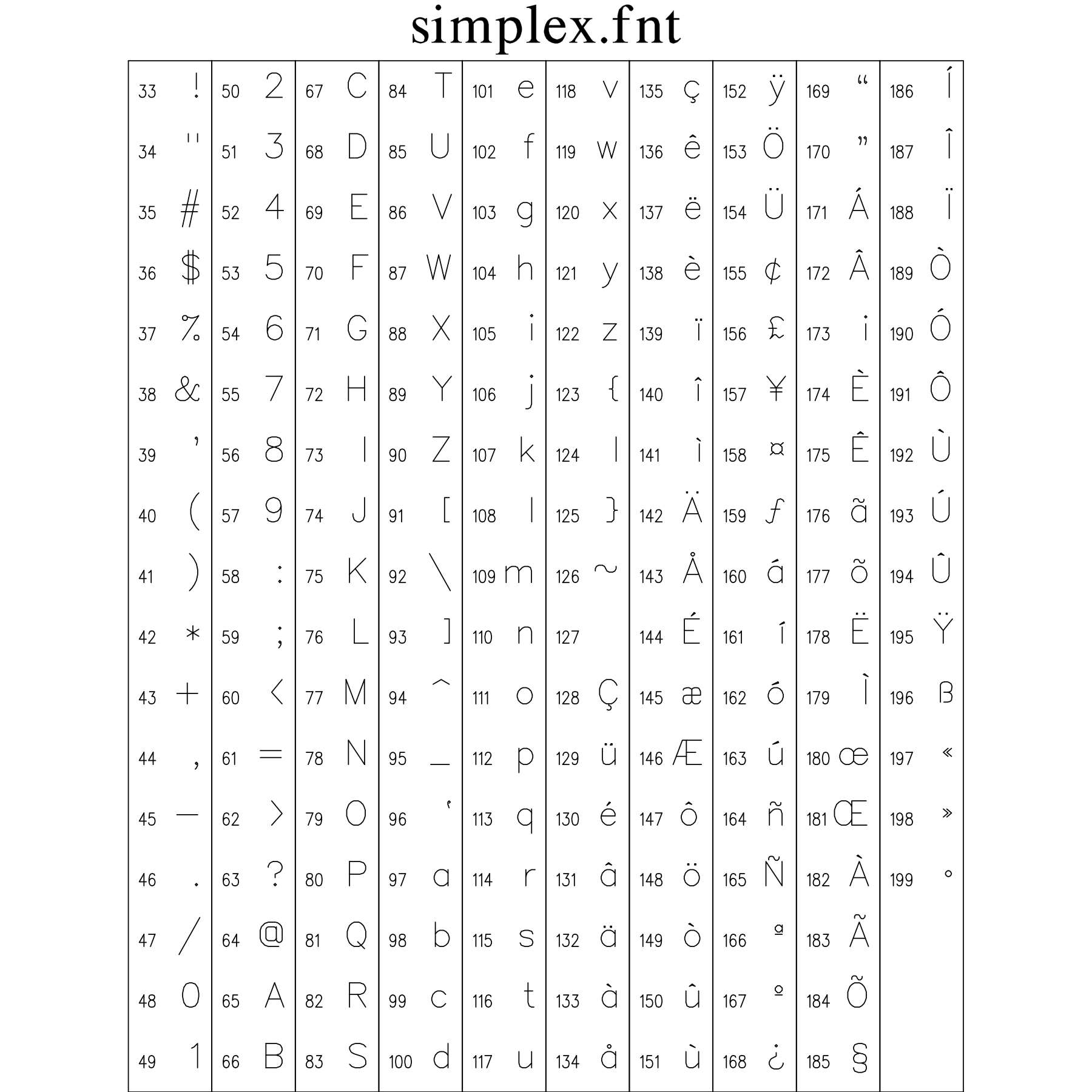
11.2 Complex Roman Font Plate (complex.fnt)
A publication-quality multi-stroke Roman serif typeface patterned after classic mathematical typography with balanced bracketed serifs and proportional stroke weights.
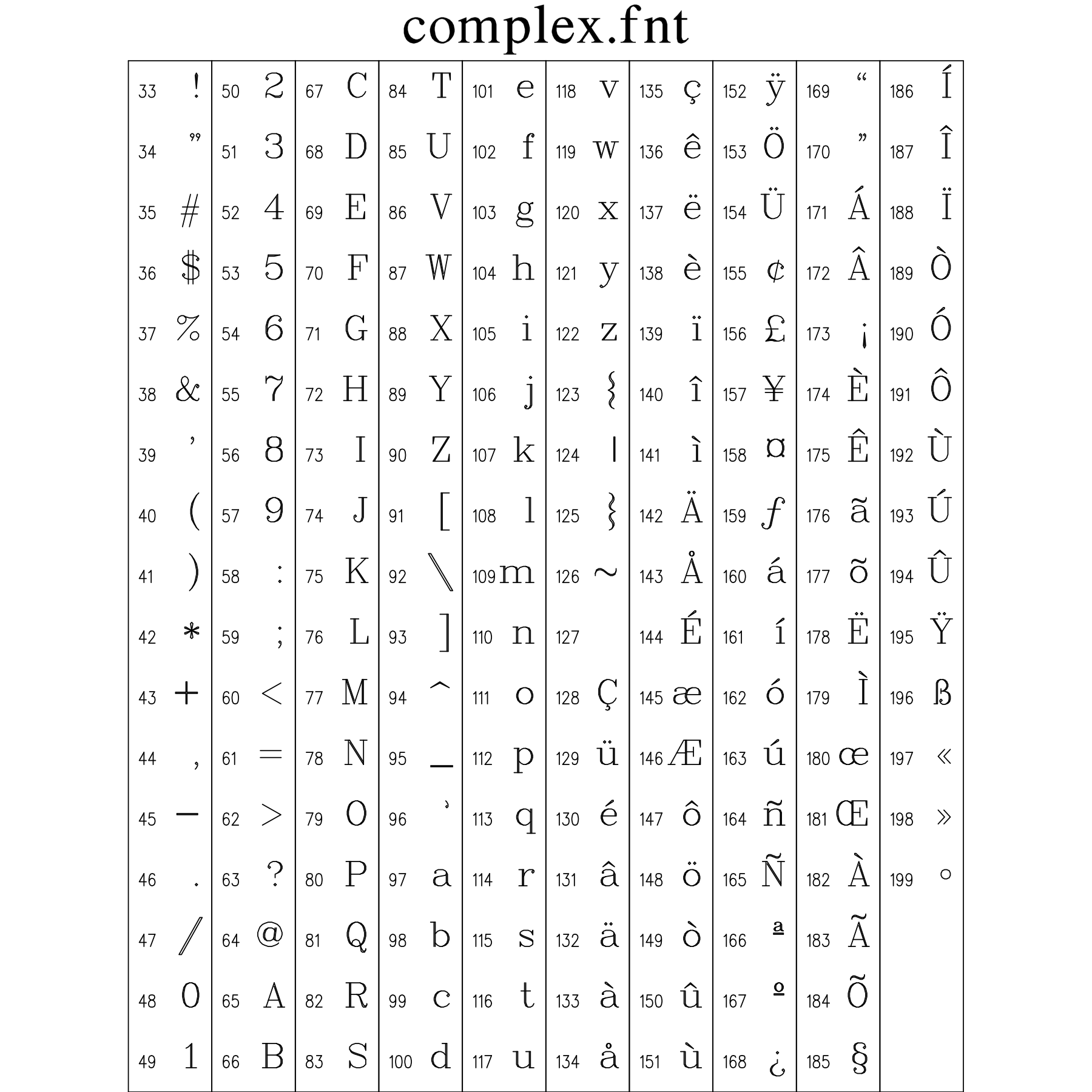
11.3 Triplex Bold Roman Font Plate (triplex.fnt)
A heavy triple-stroked headline font engineered for high-visibility plot titles, presentation slides, and large-format engineering drawings.
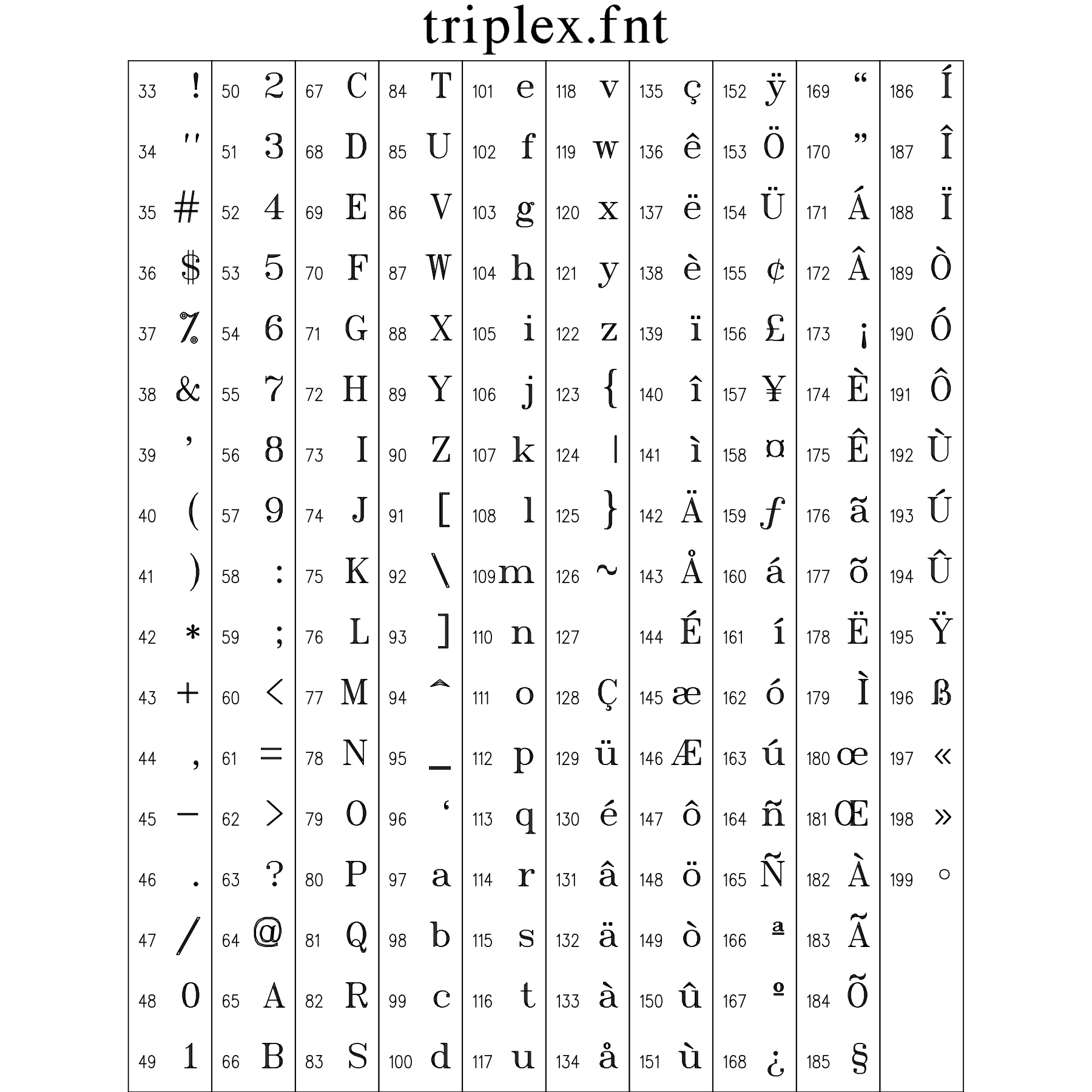
11.4 Duplex Roman Font Plate (duplex.fnt)
Double-stroked sans-serif font offering enhanced visual weight and crisp legibility on medium-resolution displays and desktop laser prints.
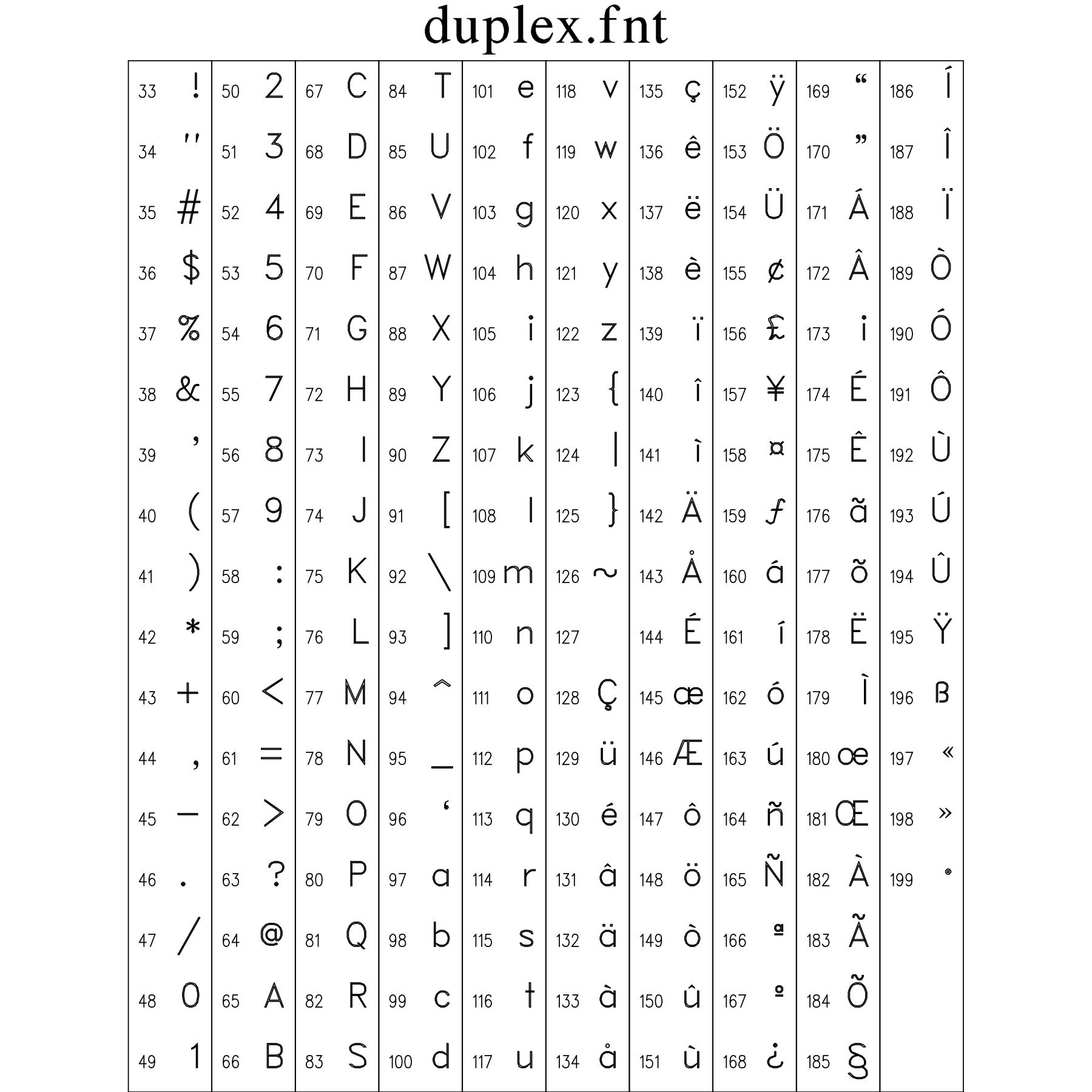
11.5 Triplex Italic Font Plate (tripital.fnt)
Triple-stroked slanted Roman serif font designed for emphasized title strings, book titles, and formal presentation headings.
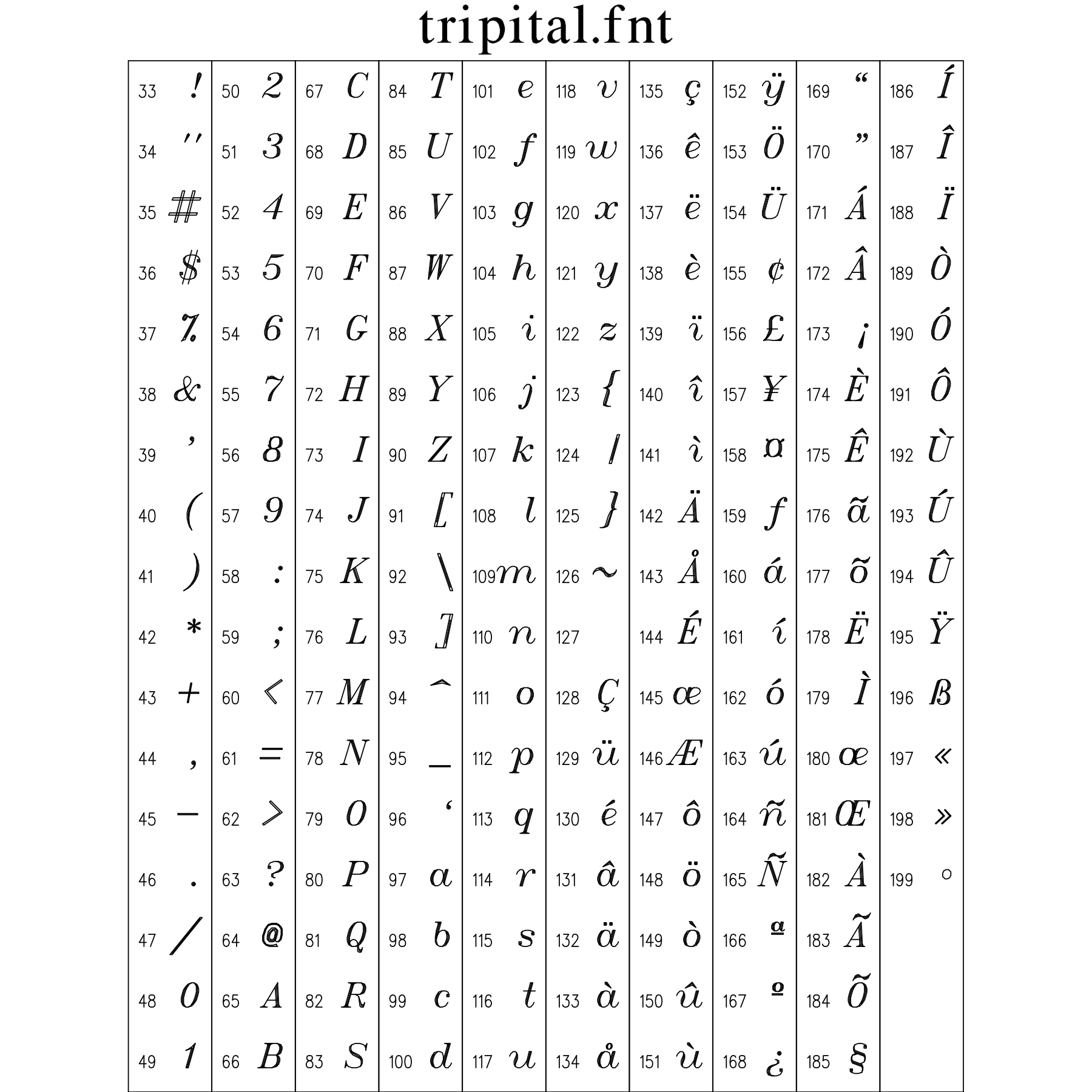
11.6 Complex Italic Font Plate (compital.fnt)
Multi-stroke serif italic font designed for mathematical variables (x, y, z, t), physical parameters, and formal publication annotations.
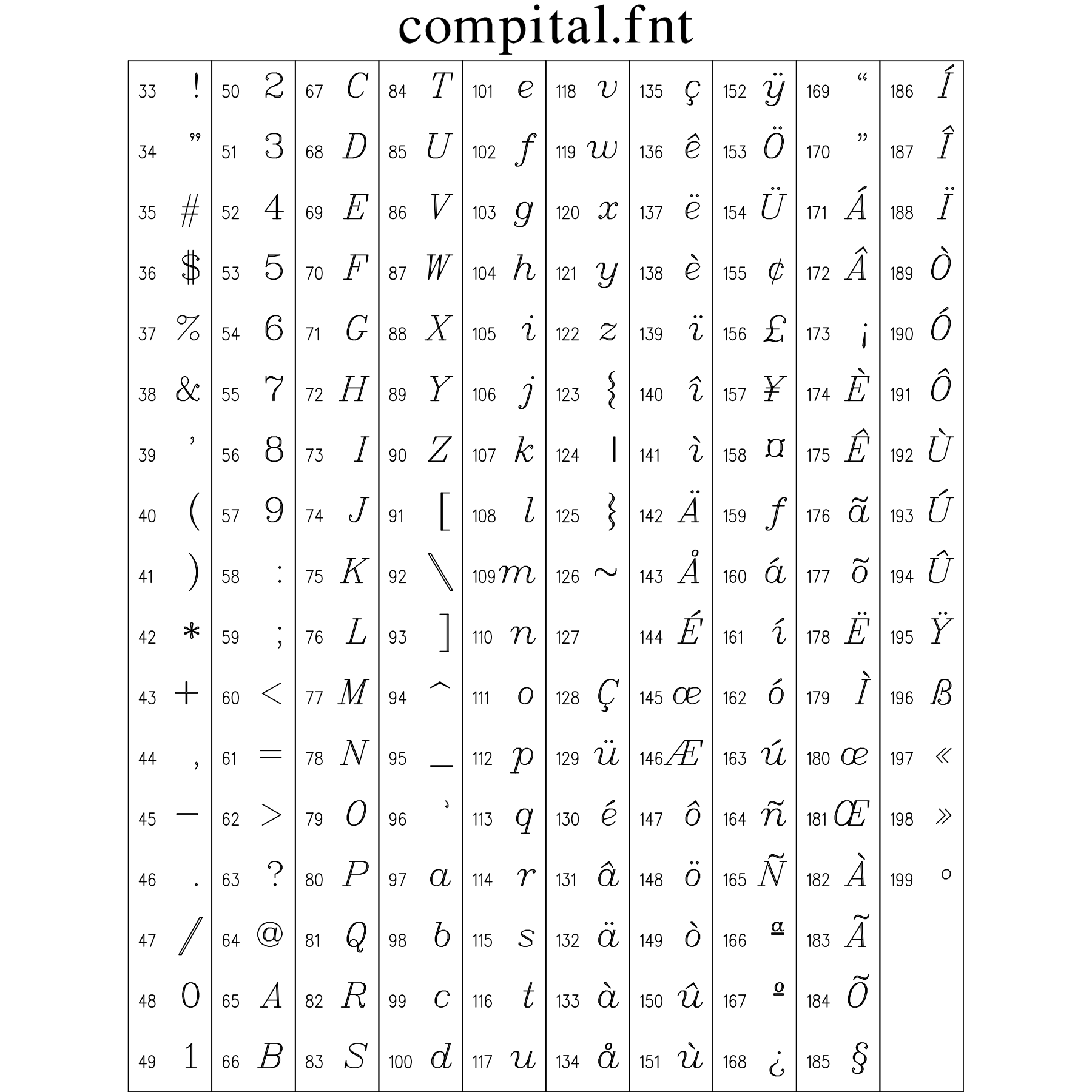
11.7 Complex Script Font Plate (comscr.fnt)
Formal multi-stroke cursive calligraphic script for elegant mathematical operators (e.g. Lagrangian L, Hamiltonian H, Fourier F) and commemorative inscriptions.
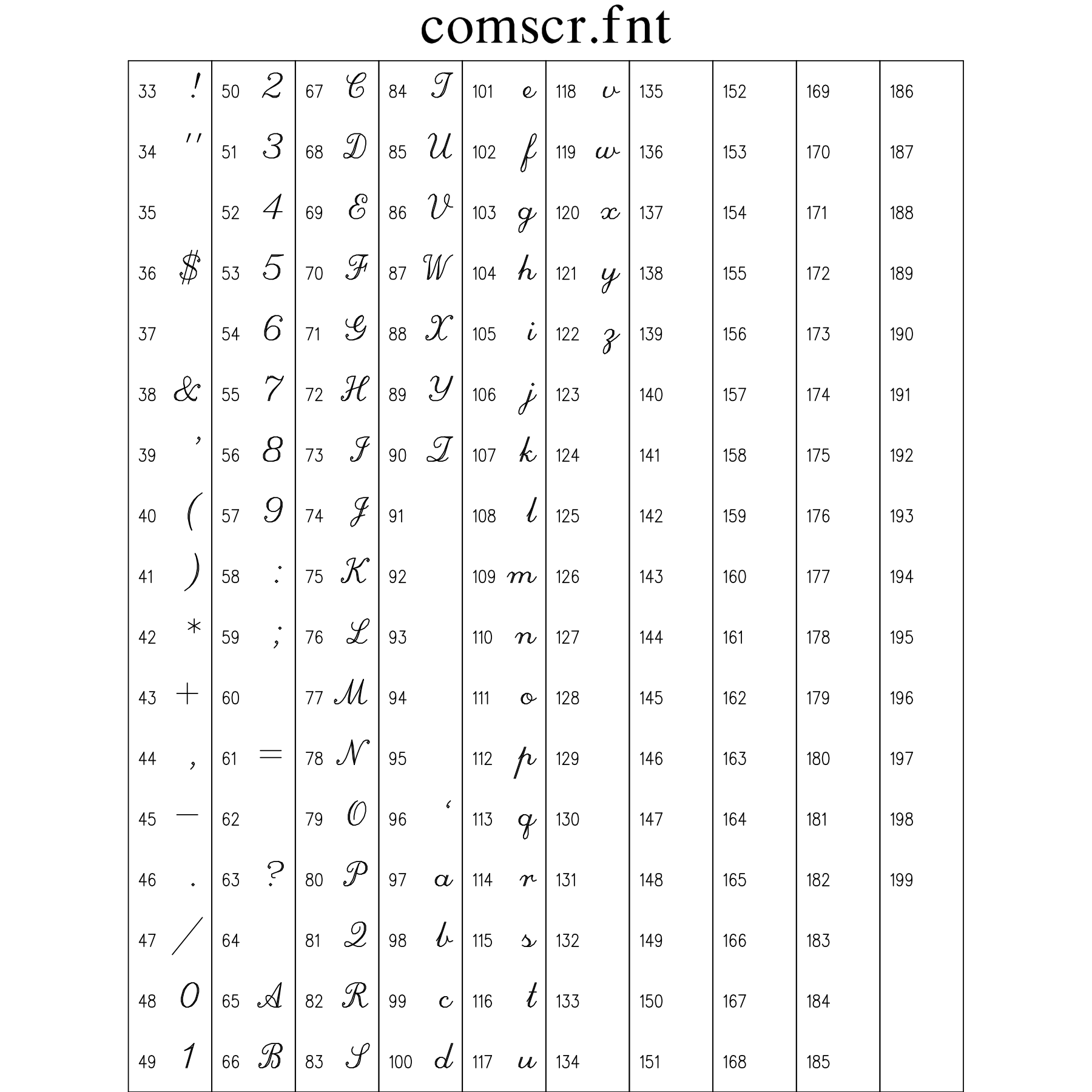
11.8 Simplex Greek & Math Font Plate (simgrma.fnt)
Single-stroke Greek alphabet (alpha, beta, gamma, etc.) and core mathematical operators, relations, and symbols designed for high-speed scientific formula rendering.
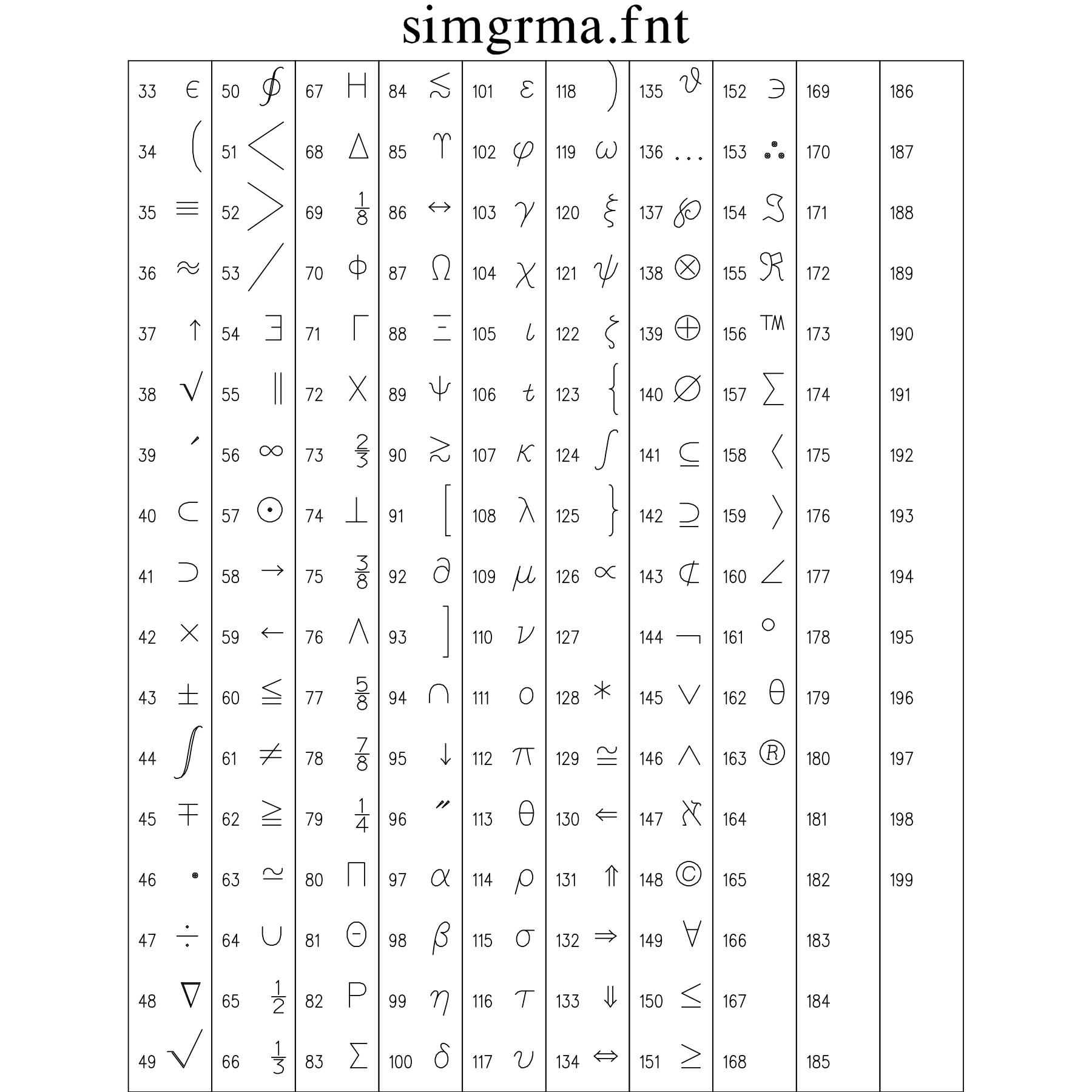
11.9 Simplex Script Font Plate (simscr.fnt)
Single-stroke flowing cursive handwriting font for casual figure annotations, informal titles, and cursive mathematical variables.
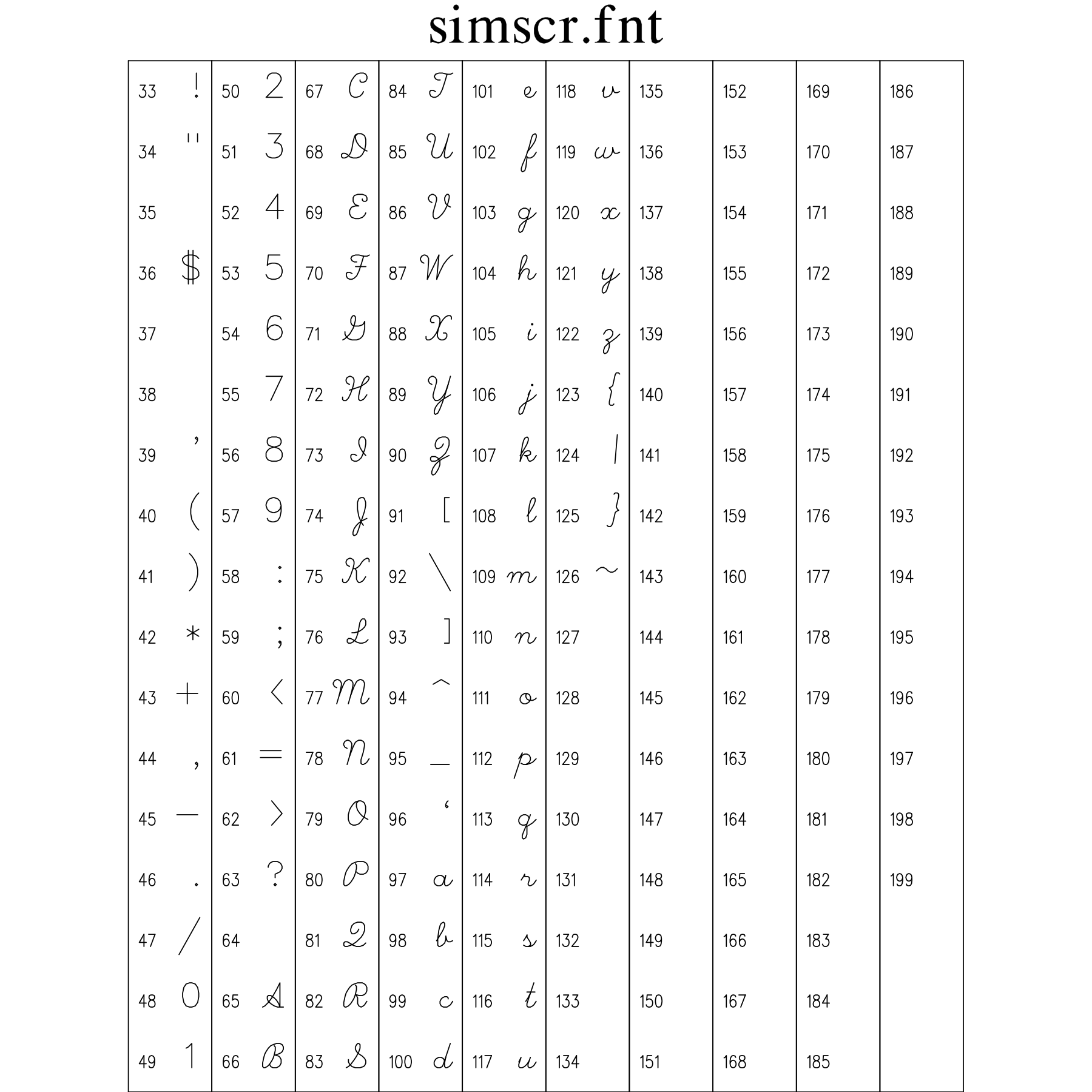
11.10 Complex Greek & Math Font Plate (compgrma.fnt)
High-density multi-stroke Greek letters, contour integrals, nabla/del operator, partial derivatives, and mathematical logic symbols matching Complex Roman.
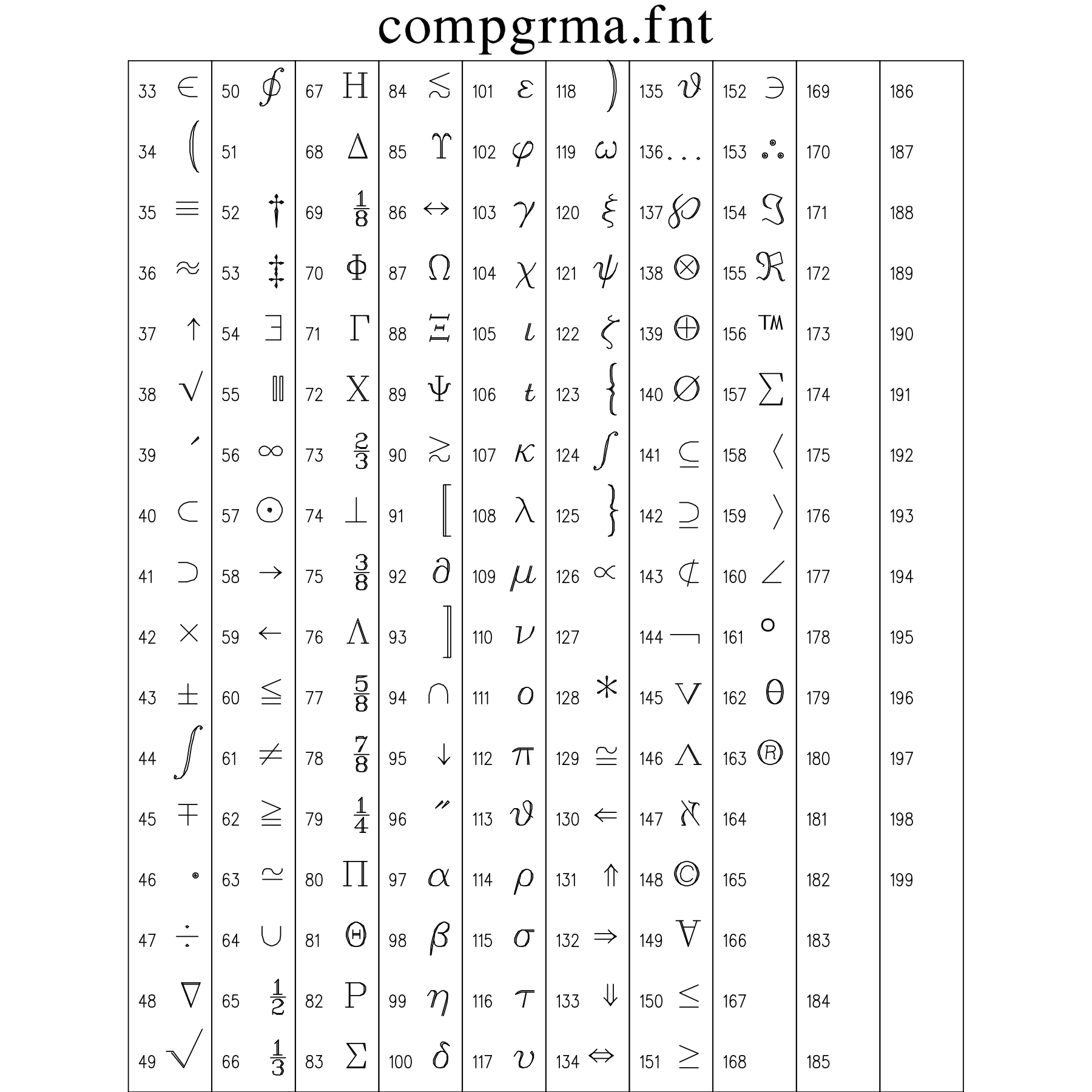
11.11 Swiss Regular Font Plate (swiss.fnt)
Clean Neo-Grotesque sans-serif (Helvetica style) with solid polygon filled glyph interiors. Modern, highly readable, and versatile for technical charting.
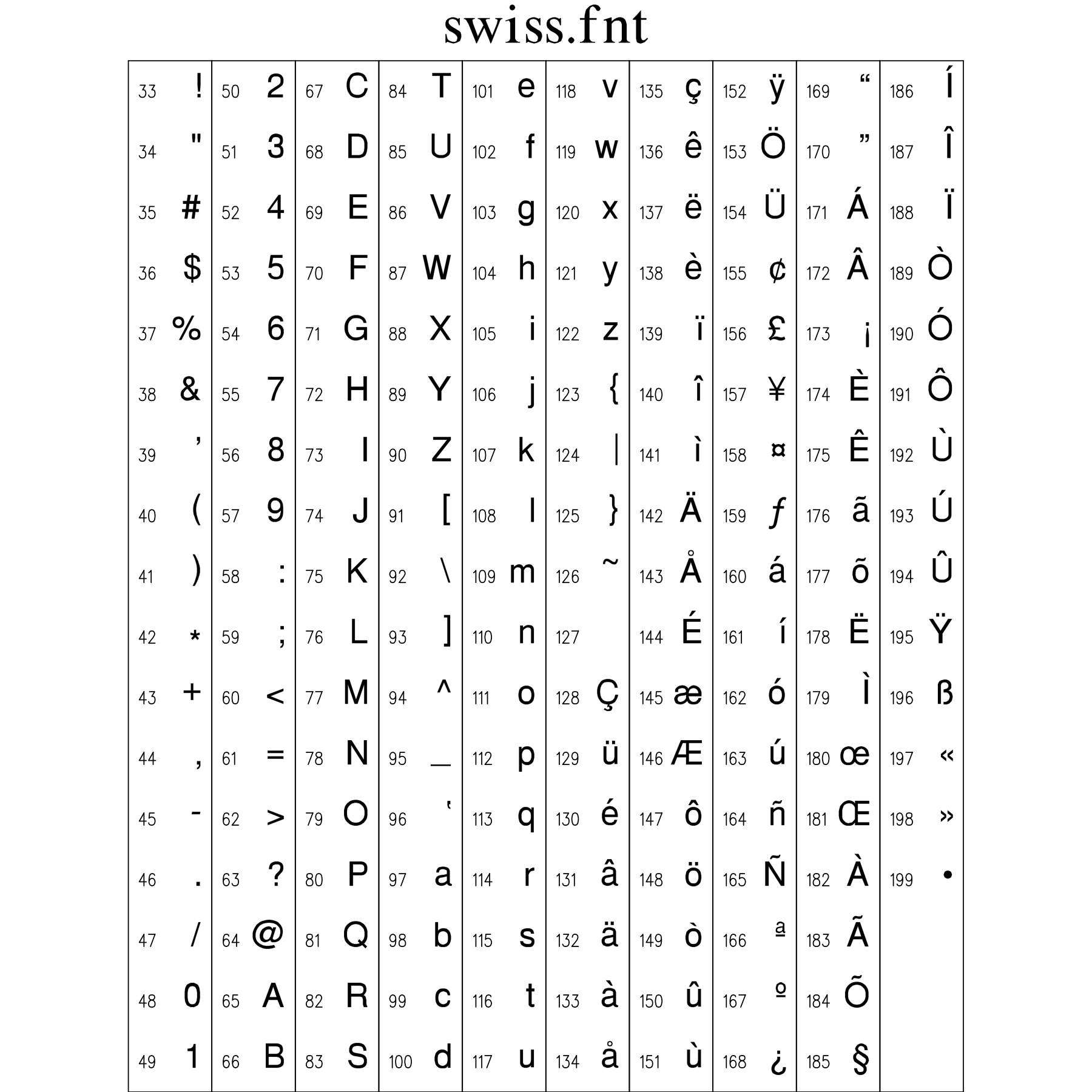
11.12 Swiss Bold Font Plate (swissbld.fnt)
Heavy solid-filled sans-serif font. High-impact bold weight designed for prominent chart headings, callouts, and multi-panel subplot banners.
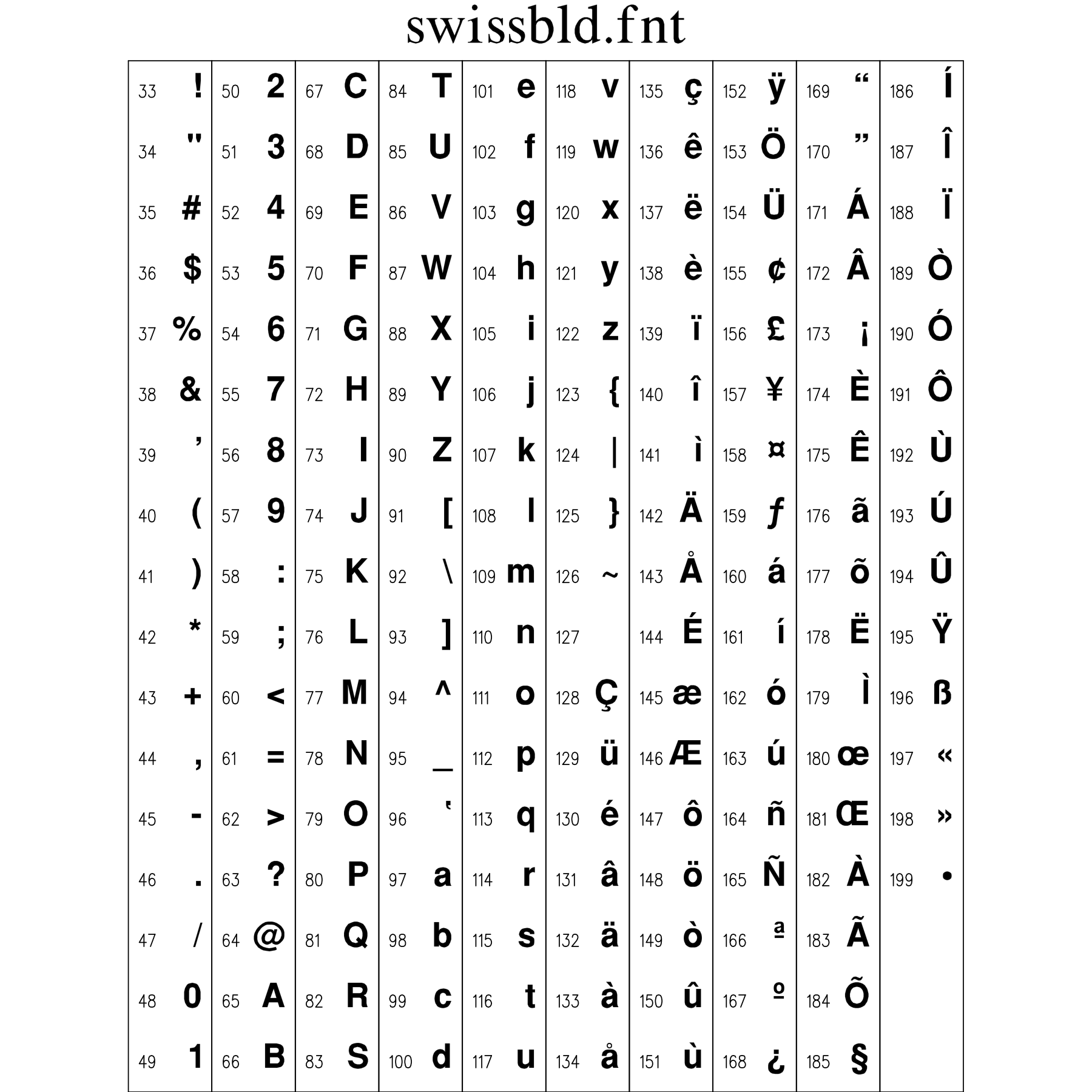
11.13 Swiss Italic Font Plate (swissitl.fnt)
Slanted solid-filled Neo-Grotesque sans-serif for secondary subheadings, figure legends, and technical descriptions.
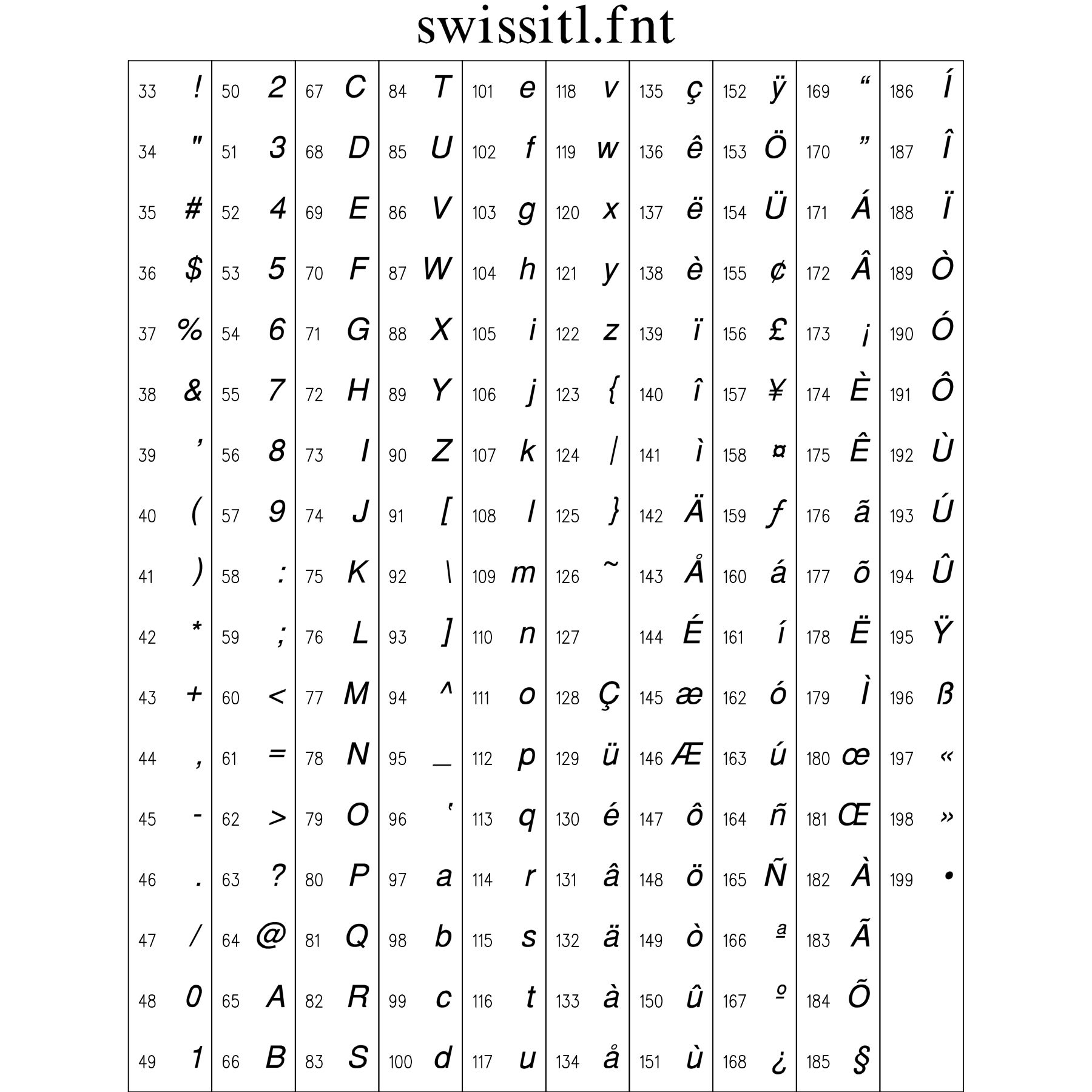
11.14 Swiss Bold Italic Font Plate (swissbit.fnt)
Solid-filled bold oblique sans-serif for high-emphasis callouts, critical parameter warnings, and prominent graphical labels.
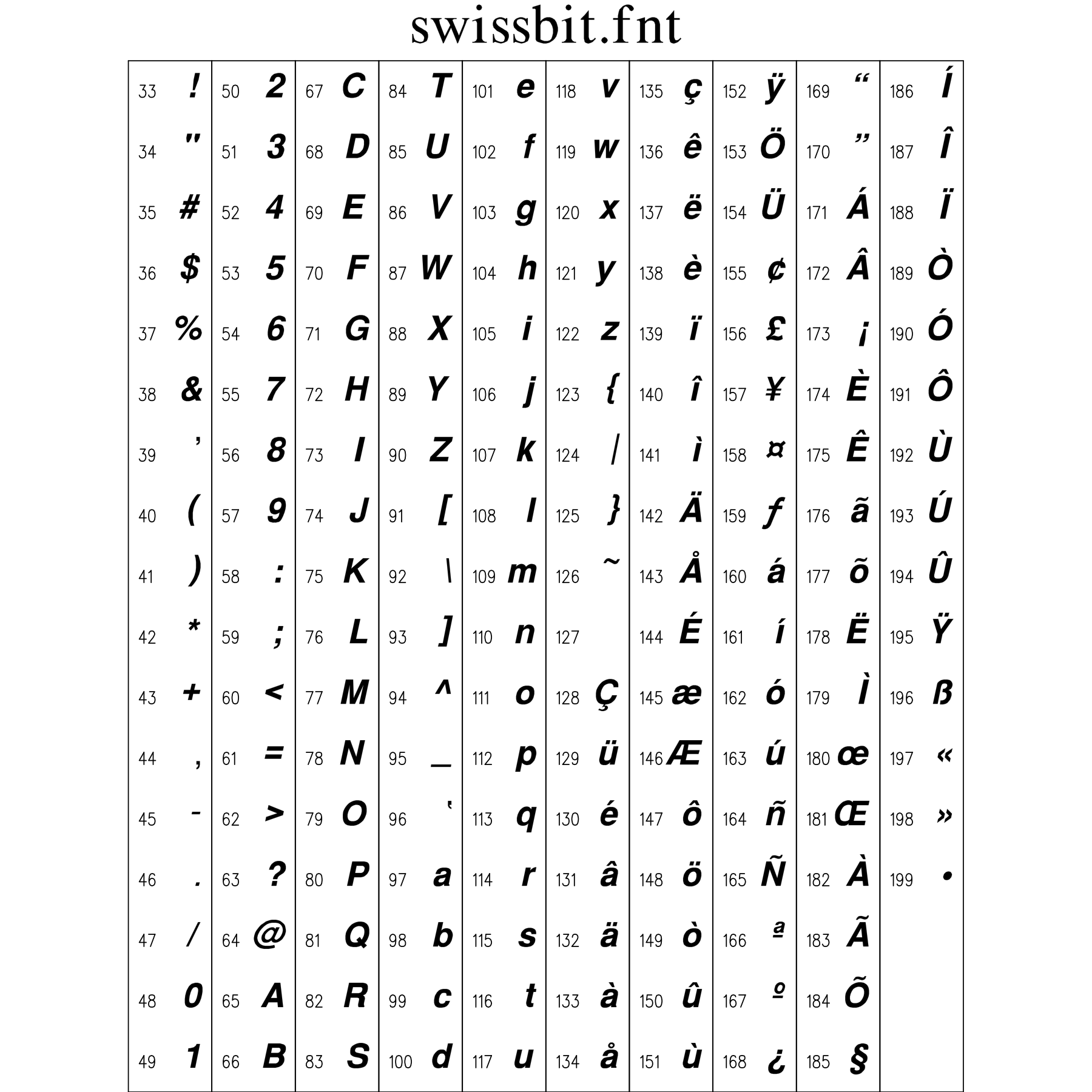
11.15 Swiss Narrow Font Plate (swissn.fnt)
Compact, condensed solid-filled sans-serif designed for high-density data tables, tight axis tick intervals, and constrained chart margins.
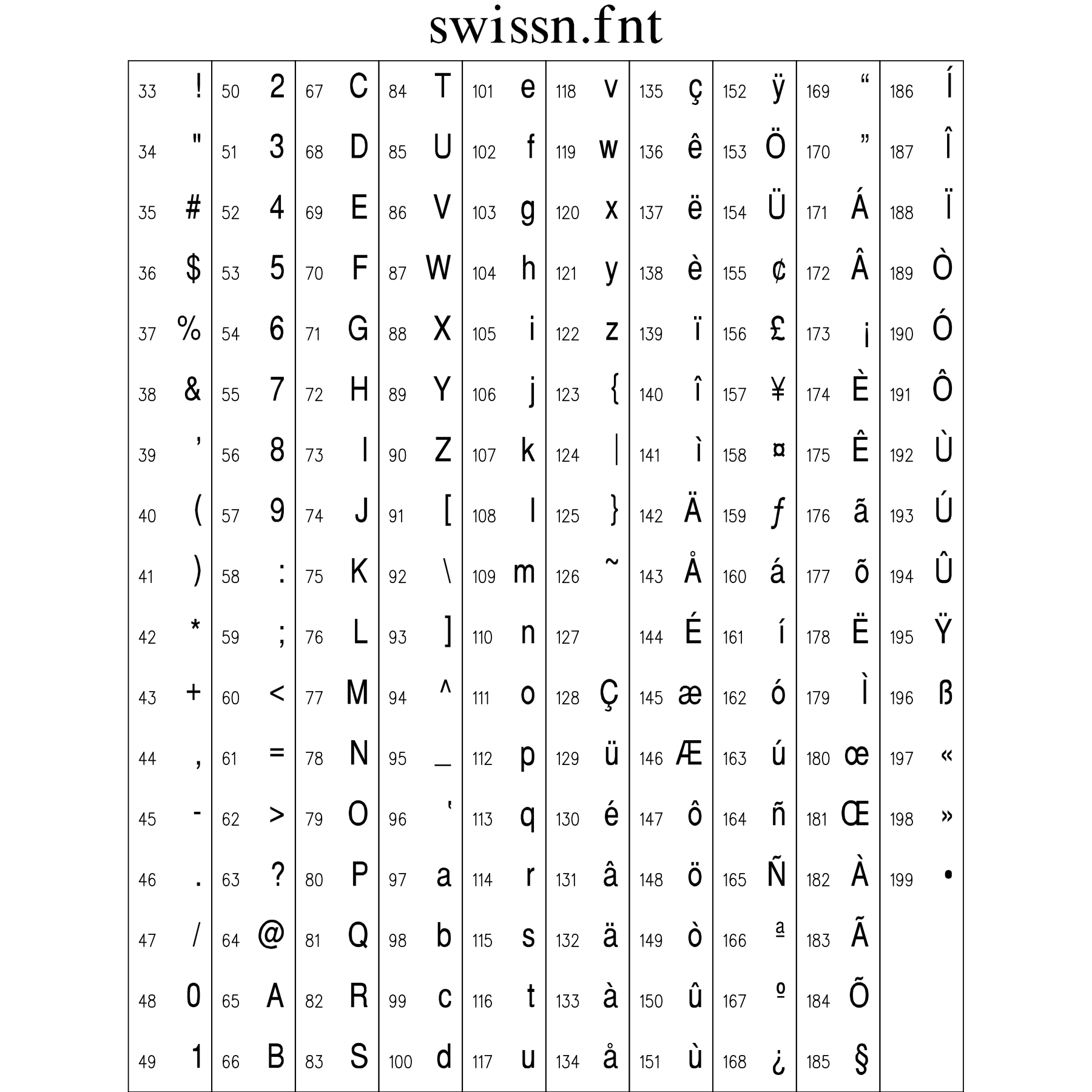
11.16 News Roman Font Plate (news.fnt)
Classic solid-filled Roman serif typeface with traditional proportions, bracketed serifs, and high contrast inspired by classic newspaper typography.
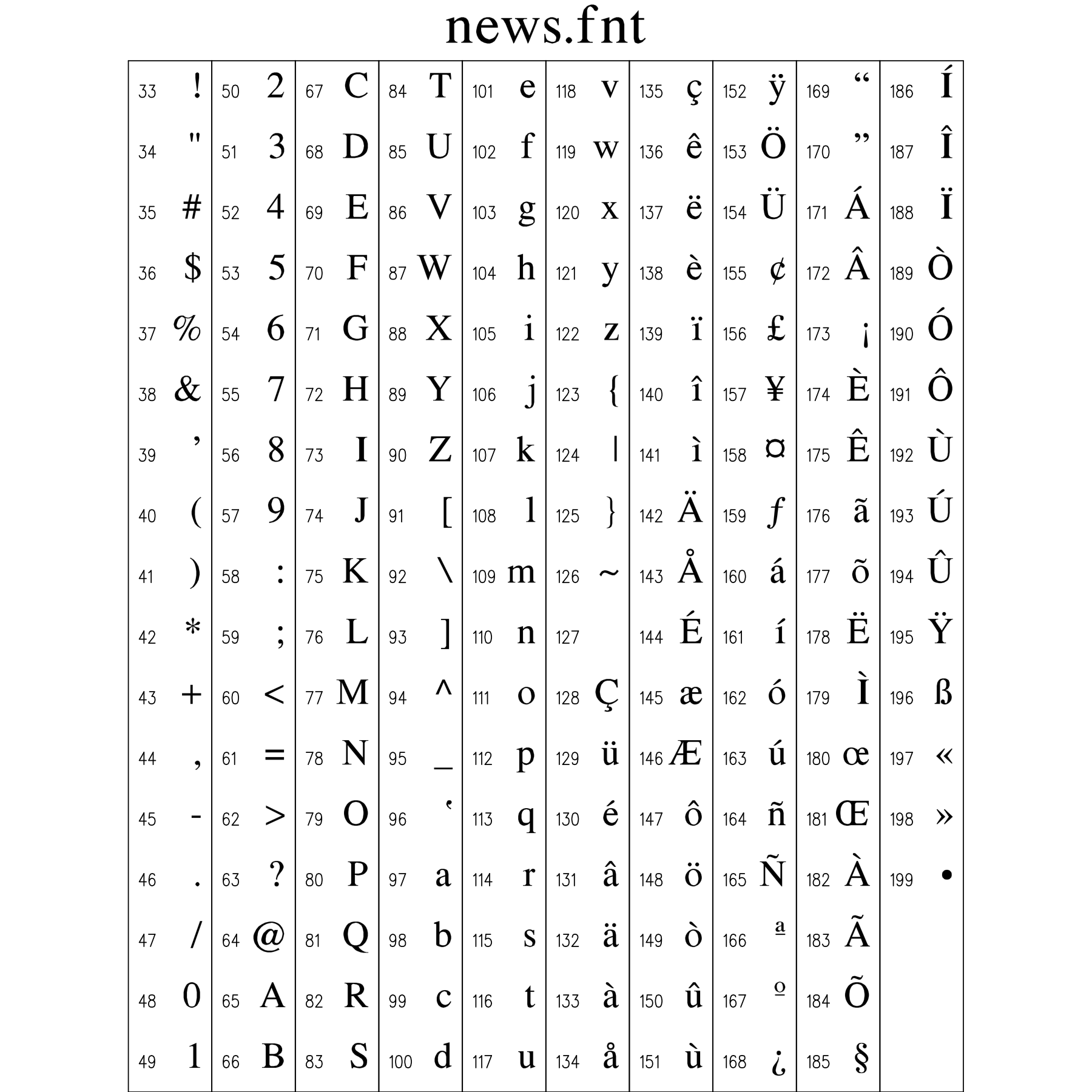
11.17 News Greek & Math Font Plate (newsgrm.fnt)
Solid-filled Greek characters and mathematical operators matching the serif styling and weight of the News Roman typeface.
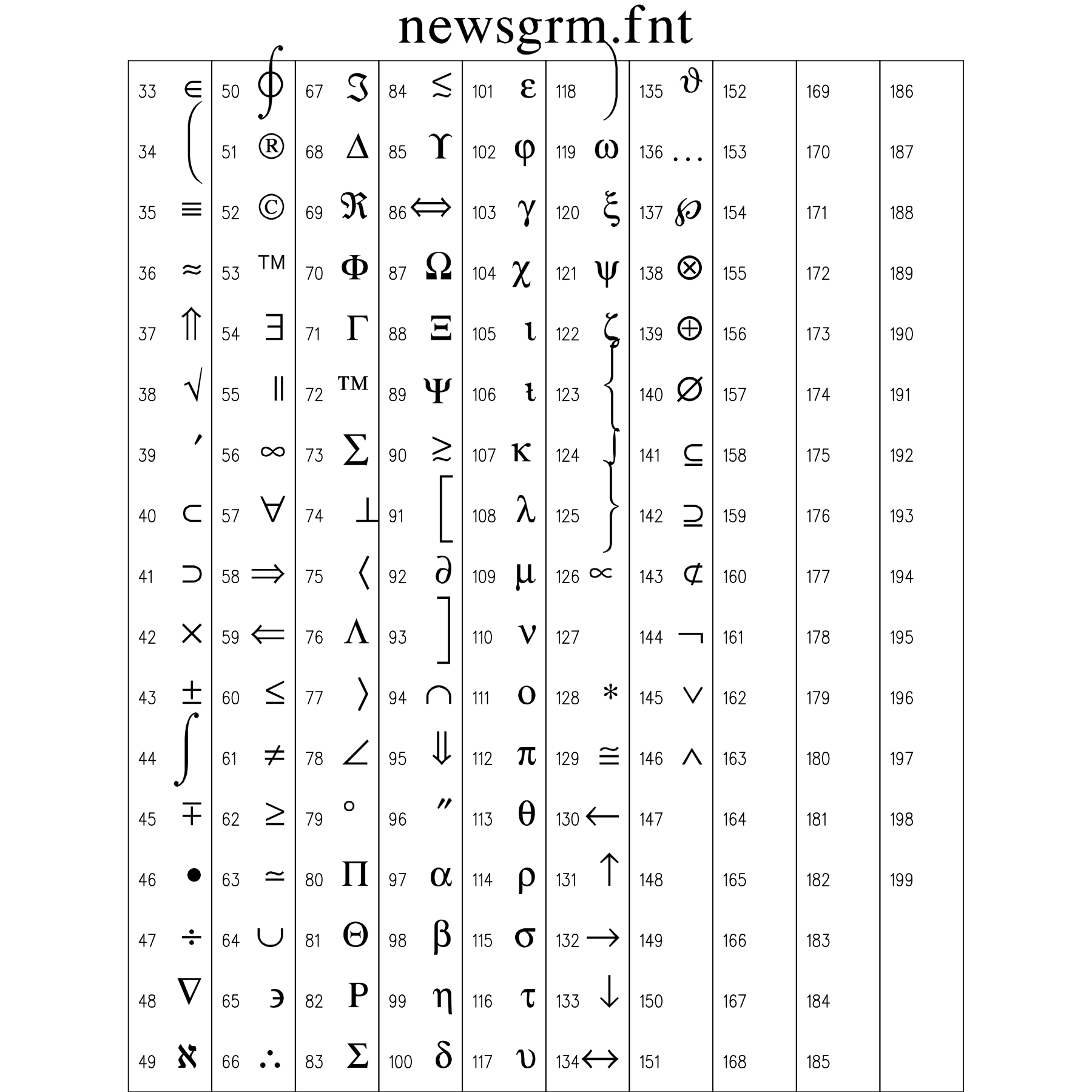
11.18 Block Heavy Gothic Font Plate (block.fnt)
Heavy geometric solid-filled display font for large poster titles, major laboratory equipment schematics, and high-contrast structural banners.
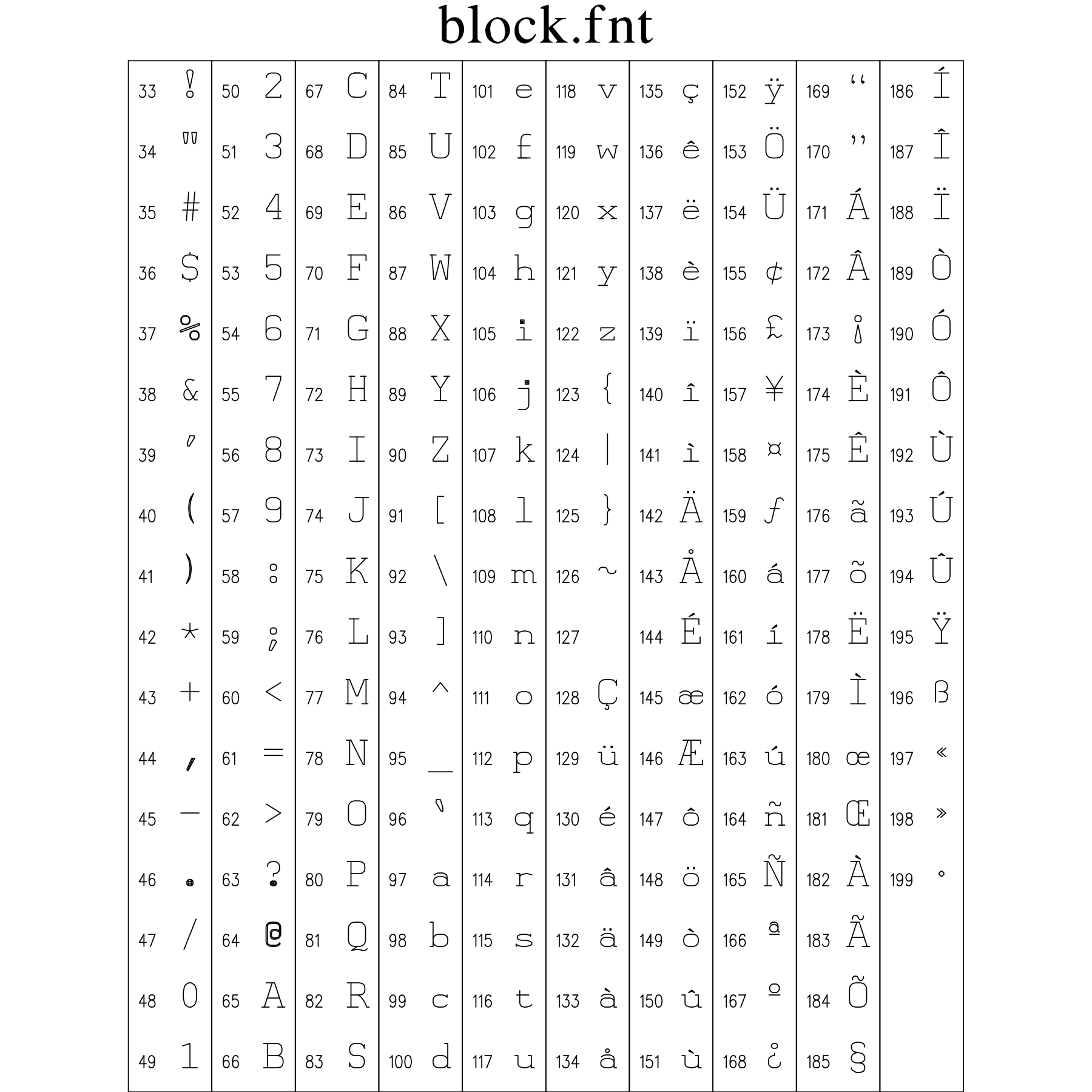
11.19 English Gothic Font Plate (engoth.fnt)
Traditional Old English fraktur/blackletter typeface for formal institutional headings, diploma text, and historical certificate plotting.
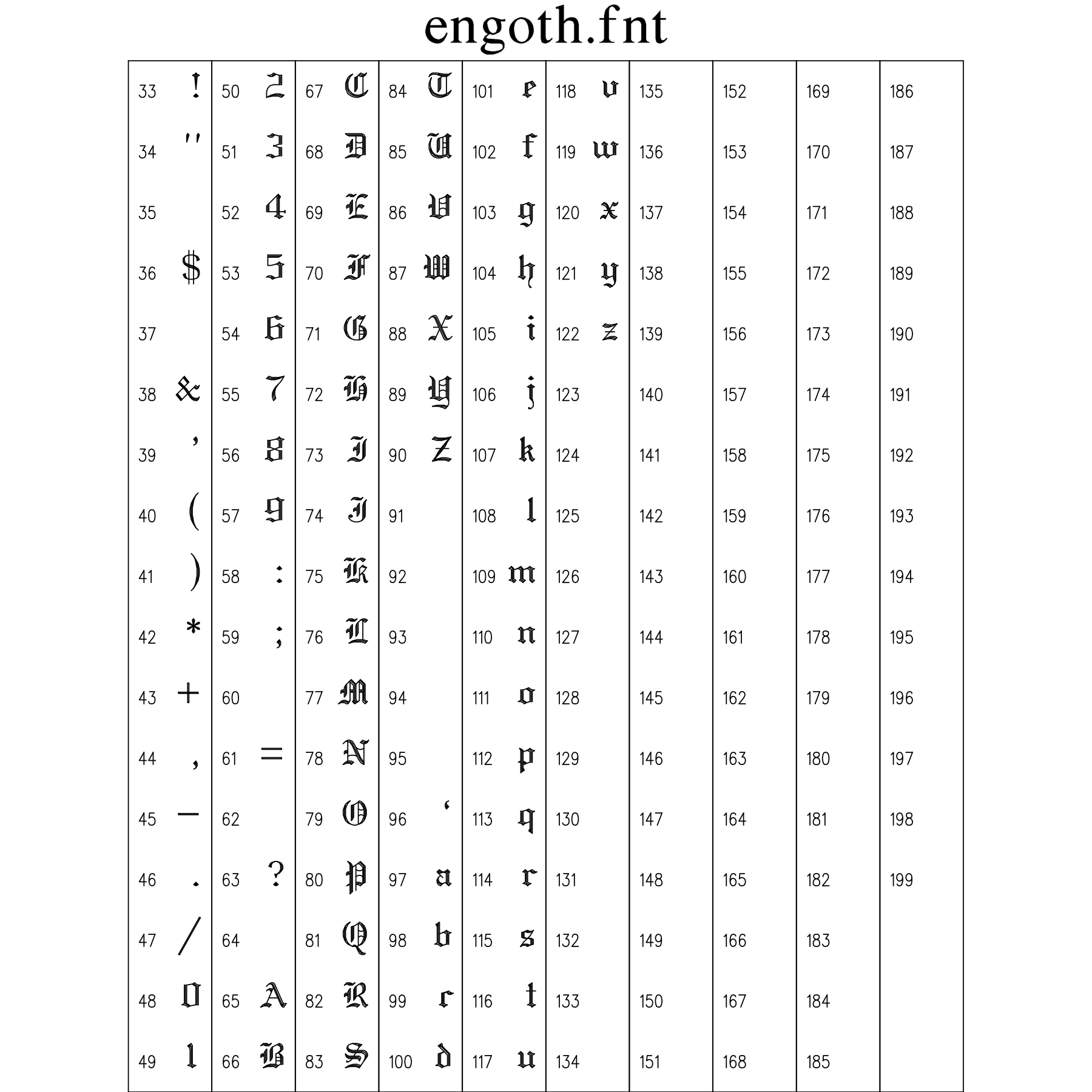
11.20 Russian (Cyrillic) Font Plate (russian.fnt)
Complete Cyrillic alphabet (uppercase and lowercase) with authentic typographic proportions for scientific papers and engineering plots in Russian.
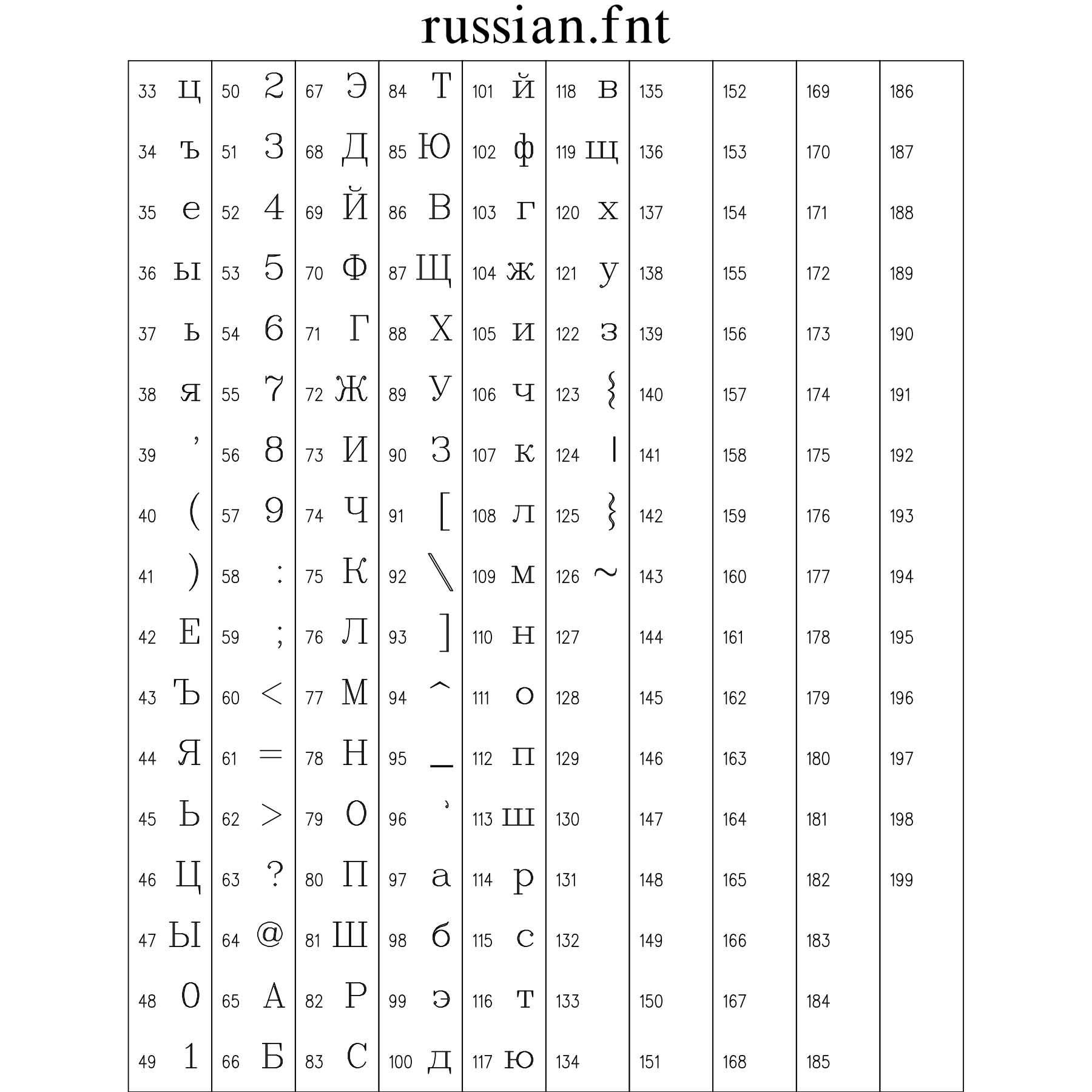
11.21 Matrix Font Plate (matrix.fnt)
Dot-matrix simulation font replicating the aesthetic of 9-pin/24-pin impact matrix printers and hardware instrumentation data logger readouts.
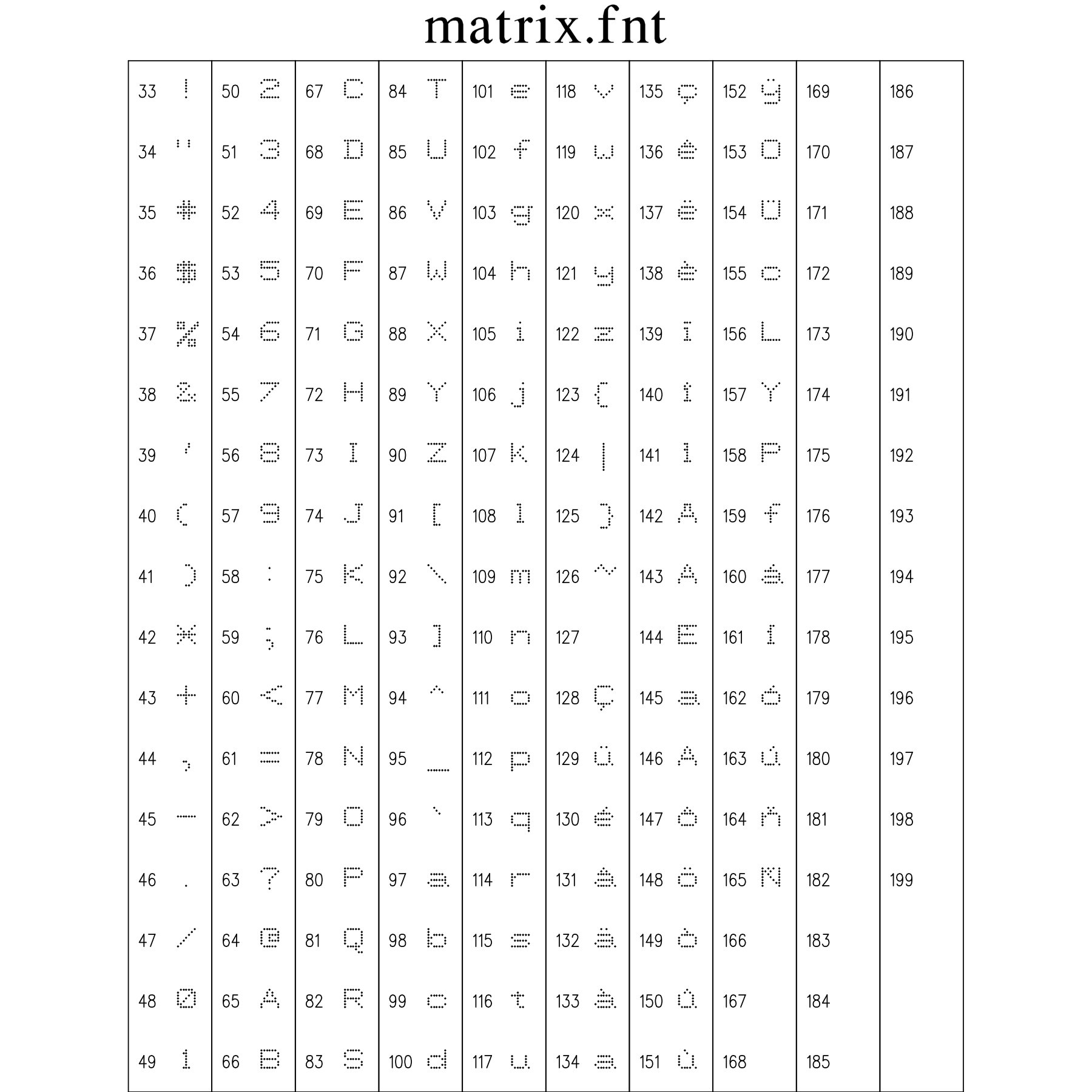
11.22 Micro Bold Font Plate (microb.fnt)
Compact sans-serif font engineered for maximum legibility at tiny point sizes, ideal for dense subscripts, footnotes, and multi-trace legend keys.
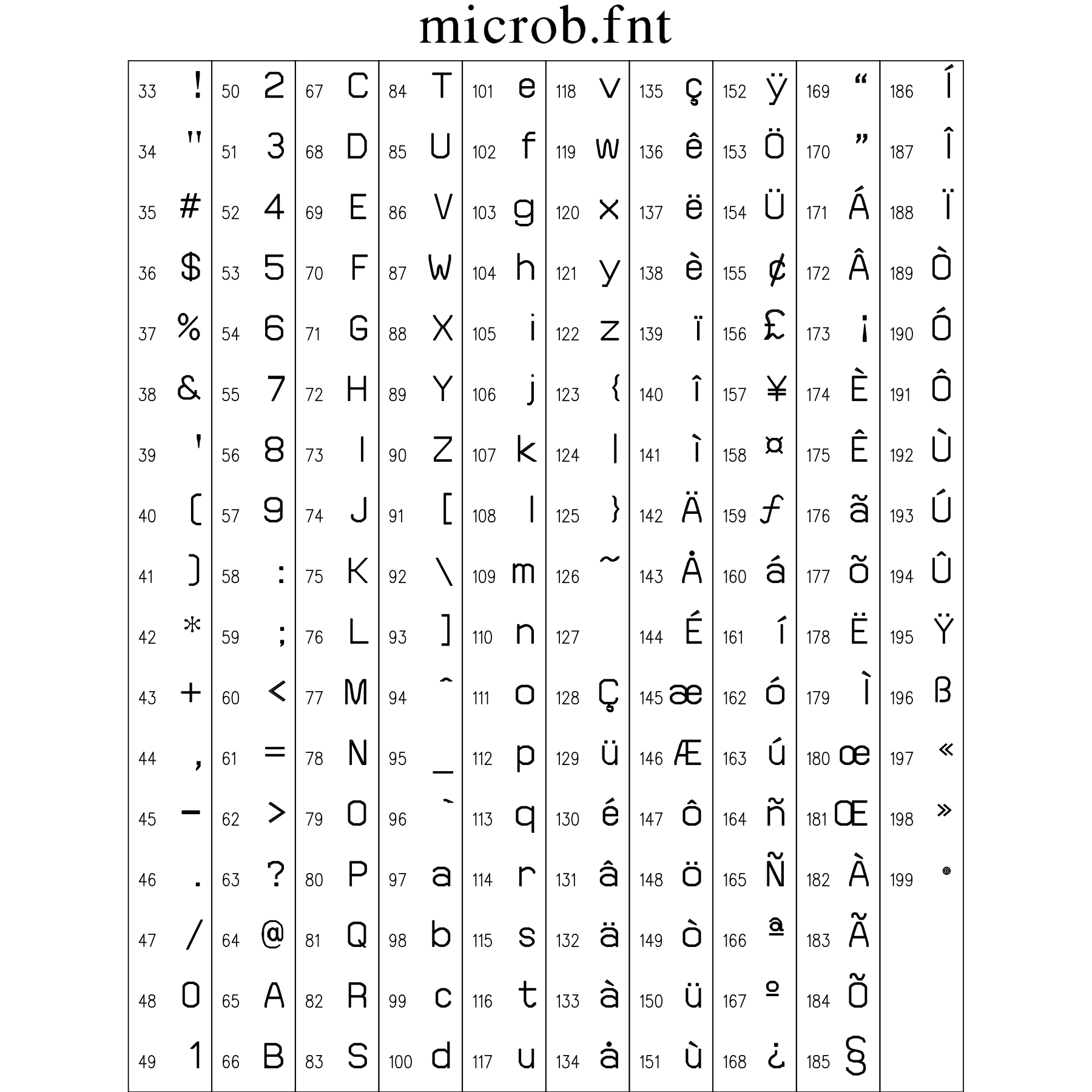
11.23 Micro Graphic Font Plate (microg.fnt)
Fine-detail technical GraphiC stroke font for densely packed scientific engineering schematics and architectural blueprints.
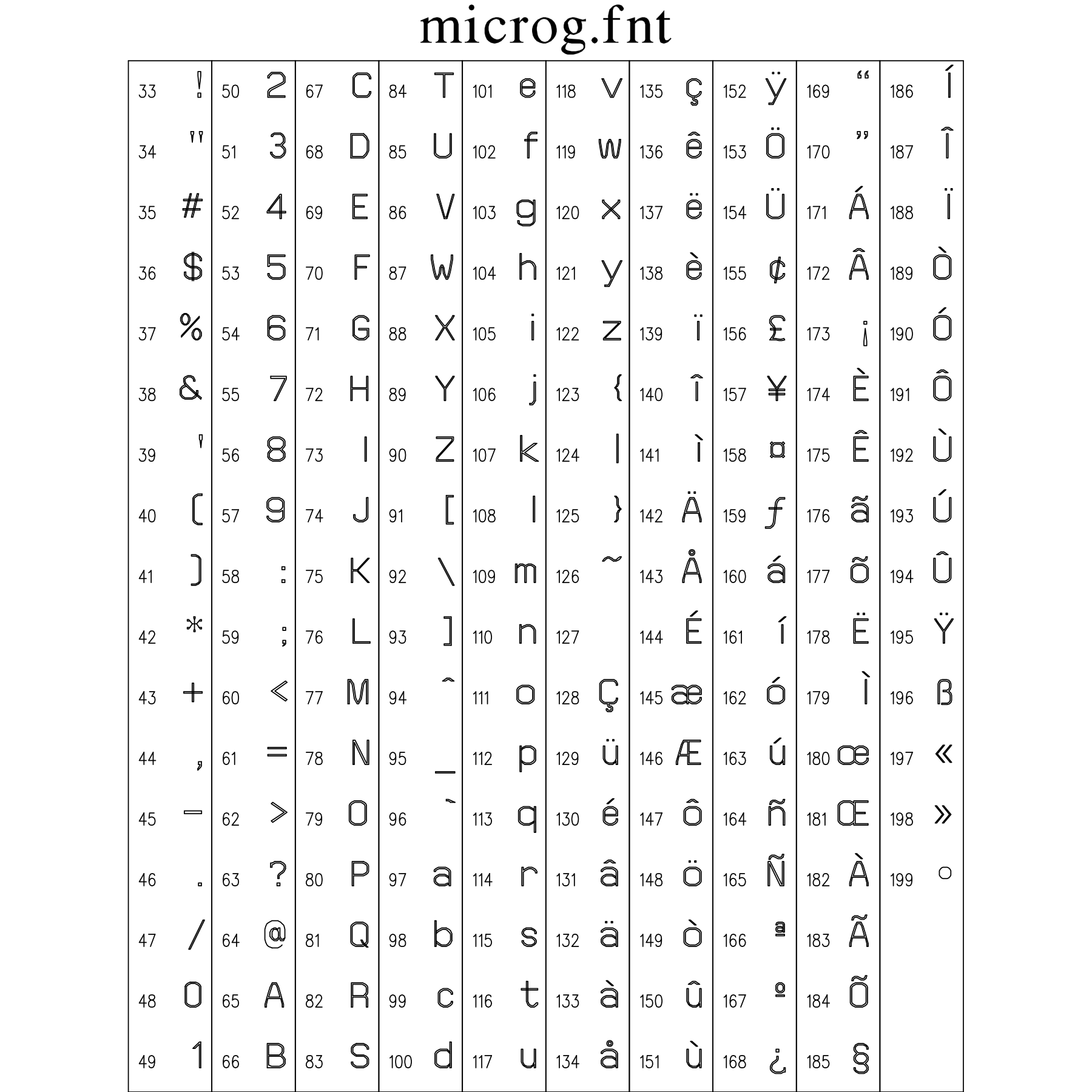
Complete Inventory of GraphiC Vector Fonts
| Font Filename | Typographic Classification | Number of Strokes / Style | Primary Use Case |
|---|---|---|---|
simplex.fnt |
Single-Stroke Roman Sans | Single | The fundamental high-speed stroke font |
simgrma.fnt |
Single-Stroke Greek & Math | Single | Single-stroke Greek alphabet (alpha, beta, gamma, etc |
simscr.fnt |
Single-Stroke Cursive Script | Single | Single-stroke flowing cursive handwriting font for casual figure annotations, informal titles, and cursive mathematical variables |
duplex.fnt |
Double-Stroke Roman Sans | Double | Double-stroked sans-serif font offering enhanced visual weight and crisp legibility on medium-resolution displays and desktop laser prints |
triplex.fnt |
Triple-Stroke Bold Roman | Triple | A heavy triple-stroked headline font engineered for high-visibility plot titles, presentation slides, and large-format engineering drawings |
tripital.fnt |
Triple-Stroke Italic Roman | Triple | Triple-stroked slanted Roman serif font designed for emphasized title strings, book titles, and formal presentation headings |
complex.fnt |
Multi-Stroke Serif Roman | Multi | A publication-quality multi-stroke Roman serif typeface patterned after classic mathematical typography with balanced bracketed serifs and proportional stroke weights |
compital.fnt |
Multi-Stroke Serif Italic | Multi | Multi-stroke serif italic font designed for mathematical variables (x, y, z, t), physical parameters, and formal publication annotations |
comscr.fnt |
Multi-Stroke Script | Multi | Formal multi-stroke cursive calligraphic script for elegant mathematical operators (e |
compgrma.fnt |
Complex Greek & Math | Multi | High-density multi-stroke Greek letters, contour integrals, nabla/del operator, partial derivatives, and mathematical logic symbols matching Complex Roman |
swiss.fnt |
Swiss Neo-Grotesque (Filled) | Solid Fill | Clean Neo-Grotesque sans-serif (Helvetica style) with solid polygon filled glyph interiors |
swissbld.fnt |
Swiss Bold (Filled) | Solid Fill | Heavy solid-filled sans-serif font |
swissitl.fnt |
Swiss Italic (Filled) | Solid Fill | Slanted solid-filled Neo-Grotesque sans-serif for secondary subheadings, figure legends, and technical descriptions |
swissbit.fnt |
Swiss Bold Italic (Filled) | Solid Fill | Solid-filled bold oblique sans-serif for high-emphasis callouts, critical parameter warnings, and prominent graphical labels |
swissn.fnt |
Swiss Narrow (Filled) | Solid Fill | Compact, condensed solid-filled sans-serif designed for high-density data tables, tight axis tick intervals, and constrained chart margins |
news.fnt |
Newspaper Century Serif (Filled) | Solid Fill | Classic solid-filled Roman serif typeface with traditional proportions, bracketed serifs, and high contrast inspired by classic newspaper typography |
newsgrm.fnt |
News Greek & Math (Filled) | Solid Fill | Solid-filled Greek characters and mathematical operators matching the serif styling and weight of the News Roman typeface |
block.fnt |
Geometric Block Caps (Filled) | Solid Fill | Heavy geometric solid-filled display font for large poster titles, major laboratory equipment schematics, and high-contrast structural banners |
engoth.fnt |
English Gothic / Blackletter | Multi | Traditional Old English fraktur/blackletter typeface for formal institutional headings, diploma text, and historical certificate plotting |
russian.fnt |
Cyrillic Alphabet | Multi | Complete Cyrillic alphabet (uppercase and lowercase) with authentic typographic proportions for scientific papers and engineering plots in Russian |
matrix.fnt |
Dot Matrix Emulation | Discrete | Dot-matrix simulation font replicating the aesthetic of 9-pin/24-pin impact matrix printers and hardware instrumentation data logger readouts |
microb.fnt |
Micro Bold | Multi | Compact sans-serif font engineered for maximum legibility at tiny point sizes, ideal for dense subscripts, footnotes, and multi-trace legend keys |
microg.fnt |
Micro Graphic | Multi | Fine-detail technical GraphiC stroke font for densely packed scientific engineering schematics and architectural blueprints |
Section 12. Master Function Index & Technical Cross-Reference
This comprehensive alphabetical index documents every routine in the GraphiC scientific graphics library. For every function, the table maps the exact calling signature, C source implementation file (Source/*.c), manual section reference, multi-language parity status across C, Fortran 2003, Python 3, Java 22, and Julia, and operational notes.
GraphiC 2D Community Edition Availability: Functions highlighted in bold green (e.g. <span style="color: #1E7E34"><strong>void curve(...)</strong></span>) are available in the free GraphiC 2D Community Edition across C/C++, Modern Fortran 2003+, Python 3, and Java 22. All other functions—including 3D surface meshes (surmat), contouring (conmat), RF Smith charts (smdraw), ternary phase diagrams (trimat), polar grids (polgrid), statistical/pie plots, and publication fine-tuning typography controls (tickht, titlht, upright, charspc, widen, skew)—are exclusive to GraphiC Professional.
Important Note on Example & Test Programs: The full GraphiC distribution contains dozens of test and example programs. Those that utilize 3D surfaces, contours, Smith charts, or advanced typography customization routines will not work with the free 2D Community Edition. Dedicated 2D-only test examples are provided in the Community package.
Understanding Language Parity and Auxiliary Functions
- Full Parity (C, Fortran, Python, Java, Julia): Fully implemented and verified across all four language bindings with idiomatic object-oriented and procedural interfaces.
- C / Fortran: Available in the core C library and Fortran 2003 ISO C bindings module.
- C / Python / Java: Available in C, Python 3, and Java 22 packages.
- C-Only / Core: Standard procedural C engine API routines.
- Auxiliary / C-Only (No Direct Bindings): Low-level C companion routines, internal hardware hooks, mathematical kernels, and memory tuning parameters. These routines are retained in C for low-level engine support, but deliberately have no high-level bindings because modern languages (Python, Java, Fortran) and modern operating systems handle these concerns natively (e.g. automatic garbage collection, dynamic multidimensional arrays, resolution-independent vector units, standard timing libraries, and DOM-based interactive web viewers).
| Function & Signature | Source File | Manual Section | Binding Status | Description & Architectural Rationale |
|---|---|---|---|---|
void acrop(char flag) |
Source/SVC.C |
§8.3 Page and Axis Options | Full Parity (C, Fortran, Python, Java, Julia) | Configures automatic plot boundary clipping on or off. |
void aname(char *alabel) |
Source/TRIANGLE.C |
§8.9 Triangle Plots | Full Parity (C, Fortran, Python, Java, Julia) | Sets label string for Axis A in ternary triangle phase diagrams. |
void area2d(float xinch, float yinch) |
Source/BPLT.C |
§8.3 Page and Axis Options | Full Parity (C, Fortran, Python, Java, Julia) | Defines physical dimensions of 2D plot area in inches. |
void axesoff(int noaxes) |
Source/SVC.C |
§8.3 Page and Axis Options | Full Parity (C, Fortran, Python, Java, Julia) | Suppresses drawing of coordinate axes and tick marks. |
void axnamht(float inch) |
Source/GRAPHIC.C |
§8.3 Page and Axis Options | Full Parity (C, Fortran, Python, Java, Julia) | Sets text height for coordinate axis titles in inches. |
void bar(int nxdiv, float *x, float *y, int npts, float bwid, int mode, int *car, int *tpe) |
Source/BARPLT.C |
§8.5 2-D Axes Routines | Full Parity (C, Fortran, Python, Java, Julia) | Plots grouped or stacked vertical bar charts with hatching. |
void barchart(int nbars, float *xarray, float *yarray, int npts, float width, int *carray, int *typearray) |
Source/BARPLT.C |
§8.5 2-D Axes Routines | Full Parity (C, Fortran, Python, Java, Julia) | High-level convenience routine for generating labeled bar charts. |
void bcolor(Uchar value) |
Source/D3PLT.C |
§8.10 Three-Dimensional Plots | Full Parity (C, Fortran, Python, Java, Julia) | Sets palette color index for the bottom/underside of 3D surface meshes. |
void bfreeq(void *ptr) |
Source/memory_portable.c |
§3 Memory Model / §7.19 Utilities | Auxiliary / C-Only (No Direct Bindings) | Low-level heap deallocation kernel with memory block integrity validation. Omitted from high-level bindings as Python, Java, and modern Fortran employ automatic memory management and garbage collection. |
void bgnplot(char mode, char driver, char *plotfile) |
Source/BPLT.C |
§8.1 Initialization Routines | Full Parity (C, Fortran, Python, Java, Julia) | Initializes GraphiC plotting session, allocates display driver and output stream. |
void blank(unsigned char attr) |
Source/BAUX_PORTABLE.C |
§8.19 Memory, File I/O & Utility Routines | Full Parity (C, Fortran, Python, Java, Julia) | Clears terminal console screen buffer with specified ANSI attribute code. |
void bname(char *blabel) |
Source/TRIANGLE.C |
§8.9 Triangle Plots | Full Parity (C, Fortran, Python, Java, Julia) | Sets label string for Axis B in ternary triangle phase diagrams. |
void box(void) |
Source/SVC.C |
§8.3 Page and Axis Options | Full Parity (C, Fortran, Python, Java, Julia) | Draws rectangular bounding frame border around the active 2D plot area. |
void pbox(float x1, float y1, float x2, float y2) |
Source/SVC.C |
§8.3 Page and Axis Options | Full Parity (C, Fortran, Python, Java, Julia) | Draws framed rectangular bounding box connecting opposite diagonal corners in page inches. |
void box3d(void) |
Source/D3PLT.C |
§8.10 Three-Dimensional Plots | Full Parity (C, Fortran, Python, Java, Julia) | Renders a 3D perspective bounding cuboid enclosure frame. |
void BoxPlot(float x, float *y, int ydim, int outlier, int symnum, float width) |
Source/STATFUNS.C |
§8.11 Pie Charts & Statistical Plots | Full Parity (C, Fortran, Python, Java, Julia) | Generates five-number summary box-and-whisker statistical distribution plots. |
void charspc(int width) |
Source/Ttfntplt.c |
§4.4 Typography / §7.15 Text | Full Parity (C, Fortran, Python, Java, Julia) | Sets inter-character tracking and pitch expansion factor in inches for vector stroke fonts. |
int ci_echoq(void) |
Source/baux_portable.c |
§8.19 Utilities | Auxiliary / C-Only (No Direct Bindings) | Reads single keystroke from console with terminal echo enabled. Auxiliary terminal utility for interactive command prompts. |
int ci_scq(void) |
Source/baux_portable.c |
§8.19 Utilities | Auxiliary / C-Only (No Direct Bindings) | Reads extended keyboard scan code for cursor arrow keys and function keys. Hardware console hook replaced by modern GUI event listeners. |
int ciq(void) |
Source/baux_portable.c |
§8.19 Utilities | Auxiliary / C-Only (No Direct Bindings) | Reads single raw keystroke character from standard input without console echo. Legacy interactive console menu polling; high-level environments utilize non-blocking event loops. |
void CMYto4q(float c, float m, float y, int sq[4]) |
Source/Color.c |
§8.14 Color & Palettes | Auxiliary / C-Only (No Direct Bindings) | Synthesizes a 4-pixel ordered dither pattern for cyan, magenta, and yellow color separation on bilevel devices. Omitted as modern display pipelines support 24-bit TrueColor rendering natively. |
void cname(char *clabel) |
Source/TRIANGLE.C |
§8.9 Triangle Plots | Full Parity (C, Fortran, Python, Java, Julia) | Sets label string for Axis C in ternary triangle phase diagrams. |
void color(int col) |
Source/LINEATTR.C |
§8.14 Color & Palettes | Full Parity (C, Fortran, Python, Java, Julia) | Sets active drawing palette color index for strokes and text. |
void ColorKeyL(float minv, float maxv, ...) |
Source/CNTPLT.C |
§8.8 Contour Plots | Full Parity (C, Fortran, Python, Java, Julia) | Renders continuous-tone logarithmic color spectrum calibration scale key. |
void ColorKeyGradient(float minv, float maxv, int colormap_id, float legllx, float leglly, float legurx, float legury, int nticks, char *format, char fontc, float height, int angle) |
Source/Colormap.c |
§8.5 2-D Axes Routines | Full Parity (C, Fortran, Python, Java, Julia) | Renders continuous linear vector gradient color bar with numerical calibration ticks. |
void conmat(float *zmat, float *x, int nx, float *y, int ny, float orig, float step, float maxq, int *lnstyle, int labint) |
Source/CNTPLT.C |
§8.8 Contour Plots | Full Parity (C, Fortran, Python, Java, Julia) | Generates 2D contour plot directly from a 2D elevation data matrix. |
void contcolor(int *colors, int border, ...) |
Source/CNTPLT.C |
§8.8 Contour Plots | Full Parity (C, Fortran, Python, Java, Julia) | Sets color mapping scheme for contour elevation levels. |
void context(int plot_number) |
Source/SIMPLT.C |
§8.4 Simultaneous Plots | Full Parity (C, Fortran, Python, Java, Julia) | Switches active plotting context among simultaneous composite subplots. |
void cross(int iscross) |
Source/SVC.C |
§8.3 Page and Axis Options | Full Parity (C, Fortran, Python, Java, Julia) | Enables drawing of central coordinate axes crossing at the origin (0,0). |
void CrossAt(float x, float y) |
Source/AXESDRAW.C |
§8.3 Page and Axis Options | Full Parity (C, Fortran, Python, Java, Julia) | Draws coordinate axes intersecting at a user-specified coordinate (x, y). |
unsigned int cstsq(void) |
Source/baux_portable.c |
§8.19 Utilities | Auxiliary / C-Only (No Direct Bindings) | Polls keyboard input buffer status returning non-zero if a keystroke is waiting. Omitted in favor of host runtime event handling. |
void ctline(char *string, float height) |
Source/FNTPLT.C |
§8.15 Text Routines | Full Parity (C, Fortran, Python, Java, Julia) | Renders centered line of text using active vector stroke font. |
void curson(int srow, int scol, float **fx, float **fy, int *find) |
Source/CURSORW.C |
§8.16 Interactive Crosshairs & Digitization | C-Only / Core | Activates interactive graphical crosshair digitizer and returns coordinate. |
void curv3d(float *x, float *y, float *z, int npts) |
Source/D3PLT.C |
§8.10 Three-Dimensional Plots | Full Parity (C, Fortran, Python, Java, Julia) | Plots 3D spatial trajectory curve in perspective coordinate space. |
void curve(float *x, float *y, int npts, int sym) |
Source/CURVES.C |
§8.5 2-D Axes Routines | Full Parity (C, Fortran, Python, Java, Julia) | Plots 2D polyline curve with optional line style and symbol markers. |
void curvefollow(int row, int col, float *x, float *y, int npts) |
Source/CURSORW.C |
§8.16 Interactive Crosshairs & Digitization | C-Only / Core | Interactive crosshair digitizer with snap-to-curve coordinate tracking. |
void curvfill(float *x, float *y, int npts, float *x1, float *y1, int npts1, int pcolor, int curv) |
Source/SVC.C |
§8.5 2-D Axes Routines | Full Parity (C, Fortran, Python, Java, Julia) | Fills area beneath or between curves with solid color or hatch pattern. |
void d3base(int isbase, int colorb) |
Source/D3plt.c |
§8.10 Three-Dimensional Plots | Full Parity (C, Fortran, Python, Java, Julia) | Configures baseline elevation plane and skirt color for 3D perspective surface meshes. |
void d3color(int *array, int nlevels, int mesh) |
Source/D3PLT.C |
§8.10 Three-Dimensional Plots | Full Parity (C, Fortran, Python, Java, Julia) | Configures color elevation mapping palette for 3D surface meshes. |
void d3grid(int grid_flags) |
Source/D3plt.c |
§8.10 Three-Dimensional Plots | Full Parity (C, Fortran, Python, Java, Julia) | Draws 3D perspective coordinate grid lines across back and base reference planes. Managed through composite 3D axis drawing options in high-level wrappers. |
void d3head(char *title, int place) |
Source/D3PLT.C |
§8.10 Three-Dimensional Plots | Full Parity (C, Fortran, Python, Java, Julia) | Renders centered perspective title heading above 3D surface plots. |
void d3line(float xf, float yf, float zf, float xt, float yt, float zt) |
Source/D3PLT.C |
§8.10 Three-Dimensional Plots | Full Parity (C, Fortran, Python, Java, Julia) | Draws 3D perspective line between two user space coordinates (x1,y1,z1) to (x2,y2,z2). |
void d3pltfnt(float x, float y, float z, char *string, float height, int angle) |
Source/D3PLT.C |
§8.10 Three-Dimensional Plots | Full Parity (C, Fortran, Python, Java, Julia) | Selects active font for 3D perspective coordinate axis labels. |
void dashf(int type) |
Source/LINEATTR.C |
§8.13 Line and Symbol Styles | Full Parity (C, Fortran, Python, Java, Julia) | Defines custom user dash-space pattern for line drawing. |
void dateit(Uchar font) |
Source/BPLT.C |
§8.2 Plot Termination Routines | Full Parity (C, Fortran, Python, Java, Julia) | Appends automated timestamp and library version watermark to bottom margin. |
float **dim2(int nr, int nc) |
Source/memory_portable.c |
§3 Memory Model / §7.19 Utilities | Auxiliary / C-Only (No Direct Bindings) | Allocates dynamic contiguous 2D floating-point matrix with row pointer table in C. Omitted because Python (NumPy/lists), Java (float[][]), and Fortran (rank-2 arrays) allocate multi-dimensional arrays natively. |
void ellipse(float xc, float yc, float xr, float yr, float rotation, float th1, float th2, char degrees, int units) |
Source/CIRCLES.C |
§8.12 Line-Drawing Routines | Full Parity (C, Fortran, Python, Java, Julia) | Draws outline of an ellipse or elliptical arc in user coordinates. |
int endplot(void) |
Source/BPLT.C |
§8.2 Plot Termination Routines | Full Parity (C, Fortran, Python, Java, Julia) | Flushes pending graphics vectors, completes frame, and prompts for page advance. |
void erfcurve(float *x, float *y, int npts, int sym) |
Source/ERFPLT.C |
§8.11 Pie Charts & Statistical Plots | Full Parity (C, Fortran, Python, Java, Julia) | Plots standard Gaussian cumulative normal distribution probability curve. |
void erfgrid(float ymin, float ystep, float ymax, char *yformat) |
Source/ERFPLT.C |
§8.11 Pie Charts & Statistical Plots | Full Parity (C, Fortran, Python, Java, Julia) | Renders probability grid lines on normal error distribution axes. |
void erfscales(int nydiv, float *y, int npts) |
Source/ERFPLT.C |
§8.11 Pie Charts & Statistical Plots | Full Parity (C, Fortran, Python, Java, Julia) | Establishes probability scaling coordinates for error function plots. |
void errorbar(float x, float xmin, float xmax, float y, float ymin, float ymax) |
Source/CURVES.C |
§8.5 2-D Axes Routines | Full Parity (C, Fortran, Python, Java, Julia) | Draws vertical or horizontal symmetric/asymmetric error bars on data points. |
void fgrid(int fon, int ndiv) |
Source/GRIDOPTS.C |
§8.3 Page and Axis Options | Full Parity (C, Fortran, Python, Java, Julia) | Draws full rectangular grid mesh with specified frequency divisions. |
void fillellipse(int onoff, int pattern, int border) |
Source/CIRCLES.C |
§8.12 Line-Drawing Routines | Full Parity (C, Fortran, Python, Java, Julia) | Draws filled solid or patterned ellipse in user coordinates. |
void fntchg(char sym) |
Source/Ttfntplt.c |
§4.3 / §4.4 Typography | Full Parity (C, Fortran, Python, Java, Julia) | Low-level font table switching and Hershey vector stroke typeface selector. |
void font(int nfont, ...) |
Source/TTFNTLD.C |
§8.15 Text Routines | Full Parity (C, Fortran, Python, Java, Julia) | Loads and activates Hershey vector stroke, TrueType, or Type 1 font. |
void fillfont(int fill) |
Source/TTFNTLD.C |
§8.15 Text Routines | Full Parity (C, Fortran, Python, Java, Julia) | 0 = hollow vector outlines; 1 = solid filled glyphs (default for TrueType & PostScript). |
void fontfill(int fill, int pat, int bdr) |
Source/TTFNTLD.C |
§8.15 Text Routines | Full Parity (C, Fortran, Python, Java, Julia) | Fills glyph interiors with pattern index pat and outlines characters in color bdr. |
void frame(int frameon, int ftick) |
Source/SVC.C |
§8.3 Page and Axis Options | Full Parity (C, Fortran, Python, Java, Julia) | Draws rectangular bounding frame with inward or outward facing tick marks. |
void free2(float **matrix) |
Source/memory_portable.c |
§3 Memory Model / §7.19 Utilities | Auxiliary / C-Only (No Direct Bindings) | Deallocates dynamic 2D matrix allocated by dim2(). Unnecessary in managed high-level runtimes. |
char *get_time(int timer_id) |
Source/baux_portable.c |
§8.19 Utilities | Auxiliary / C-Only (No Direct Bindings) | Queries elapsed wall-clock execution time string since set_time() for benchmarking. High-level runtimes provide native high-precision timers (perf_counter, nanoTime). |
void GetDataPoint(float *x, float *y) |
Source/Cursorw.c |
§8.16 Interactive Crosshairs | Auxiliary / C-Only (No Direct Bindings) | Reads single user data coordinate from active digitized crosshair. Replaced by client-side browser interactivity in modern SVG viewer (viewer.html). |
void getfilenameq(char *fname) |
Source/baux_portable.c |
§8.19 Utilities | Auxiliary / C-Only (No Direct Bindings) | Parses file path to isolate base root filename and strip directory paths. Standard path libraries (os.path, java.nio.file.Path) supersede this helper. |
int gfclose(FILE *stream) |
Source/BAUX_PORTABLE.C |
§8.19 Memory, File I/O & Utility Routines | C-Only / Core | Environment-aware file closing helper ensuring driver output buffer flush. |
FILE *gfopen(char *filename, char *mode, size_t bigbuff) |
Source/BAUX_PORTABLE.C |
§8.19 Memory, File I/O & Utility Routines | C-Only / Core | Environment-aware file opener searching GRAPHIC directory and system paths. |
void gpcBeep(int freq, int duration) |
Source/baux_portable.c |
§8.19 Utilities | Full Parity (C, Fortran, Python, Java, Julia) | Triggers audible tone alert on terminal console speaker at specified frequency and duration. Hardware-dependent console alert. |
int gpc_colormap_eval(int colormap_id, float t) |
Source/Colormap.c |
§8.14 Color & Palettes | Full Parity (C, Fortran, Python, Java, Julia) | Evaluates normalized parameter t in [0.0, 1.0] across scientific colormap, returning 24-bit TrueColor RGB. |
int gpc_get_color(int colormap_id, float value, float minv, float maxv) |
Source/Colormap.c |
§8.14 Color & Palettes | Full Parity (C, Fortran, Python, Java, Julia) | Queries continuous colormap shading for scalar value in [minv, maxv] in 𝒪(1) time, returning 24-bit TrueColor RGB. |
void gpc_get_rgb(int colormap_id, float value, float minv, float maxv, int *r, int *g, int *b) |
Source/Colormap.c |
§8.14 Color & Palettes | Full Parity (C, Fortran, Python, Java, Julia) | Queries continuous colormap shading for scalar value, returning individual R, G, B color components (0…255). |
int gpc_rgb(int r, int g, int b) |
Source/Colormap.c |
§8.14 Color & Palettes | Full Parity (C, Fortran, Python, Java, Julia) | Packs discrete 8-bit R, G, B color channels into 24-bit TrueColor integer (0x01RRGGBB). |
void gpc_scatter(float *x, float *y, float *z, int dim, float minv, float maxv, int symnum, float symheight, int colormap_id) |
Source/Colormap.c |
§8.5 2-D Axes Routines | Full Parity (C, Fortran, Python, Java, Julia) | Renders 2D scatter points with continuous point-by-point colormap shading based on scalar coordinate z. |
void GPCFreeResourcesq(void) |
Source/memory_portable.c |
§3 Memory Model / §7.19 Utilities | Auxiliary / C-Only (No Direct Bindings) | Explicitly releases global font tables, polyline buffers, and graphics device memory. Handled automatically on plot termination and process exit. |
int gpcGetCharWidth(int ch) |
Source/Ttfntplt.c |
§4.4 Typography | Auxiliary / C-Only (No Direct Bindings) | Queries advance width of individual character glyph in active font. Low-level typographic metrics helper; strwidth() is preferred. |
void gpcTextMode(int mode) |
Source/baux_portable.c |
§8.19 Utilities | Auxiliary / C-Only (No Direct Bindings) | Switches console between graphics display mode and alphanumeric text mode. Obsolete legacy DOS/Win16 video BIOS interrupt hook. |
void graf(char *xformat, float xori, float xste, float xma, char *yformat, float yori, float yste, float yma) |
Source/LINPLT.C |
§8.5 2-D Axes Routines | Full Parity (C, Fortran, Python, Java, Julia) | Establishes linear 2D scaling and draws numbered coordinate axes. |
void graf3d(float xorig, float xstp, float xmax, float yorig, float ystp, float ymax, float zorig, float zstp, float zmax) |
Source/D3PLT.C |
§8.10 Three-Dimensional Plots | Full Parity (C, Fortran, Python, Java, Julia) | Establishes 3D perspective projection scaling and draws coordinate axes. |
void GRCtoIBM(int col, int *r, int *g, int *b, int *ibmc) |
Source/Color.c |
§8.14 Color & Palettes | Auxiliary / C-Only (No Direct Bindings) | Translates GraphiC palette index to nearest IBM 16-color palette RGB representation. Legacy color quantization mapping. |
void grid(int gridon) |
Source/GRIDOPTS.C |
§8.3 Page and Axis Options | Full Parity (C, Fortran, Python, Java, Julia) | Draws standard Cartesian grid lines aligned with major axis tick marks. |
void GTfont(int id) |
Source/Ttfntplt.c |
§4.5 GrafText PostScript | Auxiliary / C-Only (No Direct Bindings) | GrafText standard Adobe PostScript Level 1 printer font selector. Obsolete 30-font printer driver hook superseded by TrueType and modern SVG typography. |
void heading(char *title) |
Source/FNTPLT.C |
§8.3 Page and Axis Options | Full Parity (C, Fortran, Python, Java, Julia) | Renders centered publication title heading above the active plot area. |
void histogram(float *x, float *y, int npts, int type, int *colors) |
Source/BARPLT.C |
§8.5 2-D Axes Routines | Full Parity (C, Fortran, Python, Java, Julia) | Constructs statistical frequency distribution bar histogram. |
void HLStoRGB(int h, int l, int s, int *r, int *g, int *b) |
Source/COLOR.C |
§8.14 Color & Palettes | Full Parity (C, Fortran, Python, Java, Julia) | Converts Hue-Lightness-Saturation color coordinates to RGB color triplet. |
long HowMuchMem(void) |
Source/memory_portable.c |
§3 Memory Model / §7.19 Utilities | Auxiliary / C-Only (No Direct Bindings) | Interrogates heap memory availability for dynamic array allocations. Legacy 16-bit conventional memory check rendered obsolete by 64-bit virtual memory. |
int intopix(float inches) |
Source/SVC.C |
§8.19 Memory, File I/O & Utility Routines | Full Parity (C, Fortran, Python, Java, Julia) | Converts physical page inches to device raster pixels. |
void lconmat(float *zmat, float *x, int nx, float *y, int ny, float *level, int *lnstyle, int nlevel, int labint, char *formt) |
Source/CNTPLT.C |
§8.8 Contour Plots | C-Only / Core | Generates 2D contour plot with logarithmic elevation contour intervals. |
void lcontour(GPC_FUNQ fun, float *x, int nx, float *y, int ny, float *level, int nlevel, int *lnstyle, int labint, char *format) |
Source/CNTPLT.C |
§8.8 Contour Plots | C-Only / Core | Plots logarithmic elevation contour lines from irregularly scattered data points. |
void legend(int marker, char *string, int style, float strhgt, int scolor) |
Source/LEGEND.C |
§8.3 Page and Axis Options | Full Parity (C, Fortran, Python, Java, Julia) | Adds an entry (line style, symbol marker, label text) to plot legend. |
void legpos(int entries, float xleg, float yleg, int border) |
Source/LEGEND.C |
§8.3 Page and Axis Options | Full Parity (C, Fortran, Python, Java, Julia) | Sets physical location, entry count, and border style for plot legend box. |
void lglgscle(float *x, float *y, int npts) |
Source/LOGPLT.C |
§8.5 2-D Axes Routines | Full Parity (C, Fortran, Python, Java, Julia) | Establishes logarithmic scaling on both horizontal and vertical axes. |
void linch(float xfrom, float yfrom, float xto, float yto, int newcurv) |
Source/Lines.c |
§8.12 Line-Drawing Routines | Full Parity (C, Fortran, Python, Java, Julia) | Draws two-point line segment in physical page canvas inches. |
void line(float xfrom, float yfrom, float xto, float yto, int newcurv) |
Source/Lines.c |
§8.12 Line-Drawing Routines | Full Parity (C, Fortran, Python, Java, Julia) | Draws two-point line segment in device raster pixels. |
void linesp(float ratio) |
Source/Ttfntplt.c |
§4.4 Typography | Full Parity (C, Fortran, Python, Java, Julia) | Sets line-spacing leading between multi-line text strings in inches. |
void lmargin(float marginch) |
Source/Ttfntplt.c |
§4.4 Typography | Full Parity (C, Fortran, Python, Java, Julia) | Sets left bounding margin offset in inches for multi-line text blocks. |
void loglog(float xorig, float xmax, float yorig, float ymax) |
Source/LOGPLT.C |
§8.5 2-D Axes Routines | Full Parity (C, Fortran, Python, Java, Julia) | Draws full log-log coordinate axes with multi-decade logarithmic grid. |
void ltline(char *string, float height) |
Source/FNTPLT.C |
§8.15 Text Routines | Full Parity (C, Fortran, Python, Java, Julia) | Renders left-justified line of text using active vector stroke font. |
void matinverse(double **a, double **y, int n) |
Source/MATSOLVE.C |
§8.17 Spline Interpolation & Numerical Methods | C-Only / Core | Calculates matrix inverse using Gauss-Jordan elimination with partial pivoting. |
void matsolve(double **a, int n, double *b) |
Source/MATSOLVE.C |
§8.17 Spline Interpolation & Numerical Methods | C-Only / Core | Solves linear system of equations Ax = b using LU decomposition. |
float mean(float *x, int xdim) |
Source/STATFUNS.C |
§8.11 Pie Charts & Statistical Plots | Full Parity (C, Fortran, Python, Java, Julia) | Calculates arithmetic mean of floating-point data array. |
float median(float *x, int xdim) |
Source/STATFUNS.C |
§8.11 Pie Charts & Statistical Plots | Full Parity (C, Fortran, Python, Java, Julia) | Calculates median value of floating-point data array. |
void minmax(float *minq, float *maxq, float *xy, int npts) |
Source/ROUNDOFF.C |
§8.19 Memory, File I/O & Utility Routines | C / Fortran | Scans array for extrema and calculates rounded ‘nice’ scaling limits. |
void NewFile(char *NewName) |
Source/BPLT.C |
§8.1 Initialization Routines | Full Parity (C, Fortran, Python, Java, Julia) | Redirects subsequent graphics vector output stream to a new file destination. |
void nohide(int visible) |
Source/D3PLT.C |
§8.10 Three-Dimensional Plots | Full Parity (C, Fortran, Python, Java, Julia) | Disables hidden-line removal for transparent wireframe mesh rendering. |
void numht(float inch) |
Source/GRAPHIC.C |
§8.3 Page and Axis Options | Full Parity (C, Fortran, Python, Java, Julia) | Sets character height for axis numeric tick labels in inches. |
void openoffq(char *fname) |
Source/baux_portable.c |
§4.1 / §7.19 Utilities | Auxiliary / C-Only (No Direct Bindings) | Opens .OFF character offset index table for Hershey vector stroke fonts. Low-level binary font loader primitive. |
void orel(float xorel, float yorel) |
Source/SVC.C |
§8.3 Page and Axis Options | Full Parity (C, Fortran, Python, Java, Julia) | Sets relative origin offset between multiple subplots in inches. |
void panel(float *x, float *y, int nlines, int pcolor, int border) |
Source/SVC.C |
§8.18 Polygons & Panel Filling | Full Parity (C, Fortran, Python, Java, Julia) | Fills an arbitrary closed polygonal boundary with solid color or pattern. |
void panelinch(...) |
Source/SVC.C |
§8.18 Polygons & Panel Filling | Full Parity (C, Fortran, Python, Java, Julia) | Fills closed polygon defined in absolute physical page inches. |
void panproc(void) |
Source/Panfil.c |
§8.18 Polygons & Panel Filling | Full Parity (C, Fortran, Python, Java, Julia) | Flushes accumulated polygon fill panels to active graphics driver pipeline. |
void pgshift(float xshift, float yshift) |
Source/BPLT.C |
§8.3 Page and Axis Options | Full Parity (C, Fortran, Python, Java, Julia) | Translates physical plotting origin across page surface in inches. |
void physor(float xphys, float yphys) |
Source/SVC.C |
§8.3 Page and Axis Options | Full Parity (C, Fortran, Python, Java, Julia) | Establishes physical origin coordinates (bottom-left corner) on the page in inches. |
void pieplot(int dim, float *seg, int *color, float *offset, char *caption[], float size, int border, int txtclr) |
Source/PIEPLT.C |
§8.11 Pie Charts & Statistical Plots | Full Parity (C, Fortran, Python, Java, Julia) | Draws proportional 2D pie chart with exploded sector offsets and labels. |
float pixtoin(int pixels) |
Source/SVC.C |
§8.19 Memory, File I/O & Utility Routines | Full Parity (C, Fortran, Python, Java, Julia) | Converts device raster pixels to physical page inches. |
void pixtouser(int x_in, int y_in, float *x_out, float *y_out) |
Source/SVC.C |
§8.19 Memory, File I/O & Utility Routines | Full Parity (C, Fortran, Python, Java, Julia) | Maps screen raster pixel coordinates back to floating-point user data space. |
void plane3d(float x1, float y1, float z1, float x2, float y2, float z2, float x3, float y3, float z3, float x4, float y4, float z4, int col) |
Source/D3plt.c |
§8.10 Three-Dimensional Plots | Full Parity (C, Fortran, Python, Java, Julia) | Renders an arbitrary 3D reference planar polygon in perspective coordinates. Specialized geometric primitive for 3D floor/ceiling boundaries. |
void plotabsolute(int set_flag) |
Source/SVC.C |
§8.4 Simultaneous Plots | Full Parity (C, Fortran, Python, Java, Julia) | Moves pen cursor to absolute device pixel coordinate. |
void plotadd(void) |
Source/SVC.C |
§8.2 Plot Termination Routines | Full Parity (C, Fortran, Python, Java, Julia) | Enables multi-pass vector layering onto existing plot frame without clear. |
void plotrho(float rho, float theta) |
Source/SMITH.C |
§8.6 Smith Charts | Full Parity (C, Fortran, Python, Java, Julia) | Plots complex reflection coefficient curve on microwave Smith chart. |
void plotrx(float r, float x) |
Source/SMITH.C |
§8.6 Smith Charts | Full Parity (C, Fortran, Python, Java, Julia) | Plots complex impedance/admittance locus curve on microwave Smith chart. |
void pltfnt(float x, float y, char *string, float height, int angle) |
Source/TTFNTLD.C |
§8.15 Text Routines | Full Parity (C, Fortran, Python, Java, Julia) | Selects active font for plot labels, headings, and tick marks. |
void polcurve(float *r, float *theta, int npts, int sym) |
Source/POLPLT.C |
§8.7 Polar Plots | Full Parity (C, Fortran, Python, Java, Julia) | Plots data points in polar coordinates (radius, angle) on polar grid. |
void polgrid(float rmax, float rmin, int mode, char *larray[], int dim, int ntheta, int col) |
Source/POLPLT.C |
§8.7 Polar Plots | Full Parity (C, Fortran, Python, Java, Julia) | Draws circular polar coordinate grid with radial range and angular rays. |
void prtfnt(float xinch, float yinch, char *string, float height, int angle) |
Source/TTFNTLD.C |
§8.15 Text Routines | Full Parity (C, Fortran, Python, Java, Julia) | Selects active font for hardcopy printer output device drivers. |
void putlabel(char *str, float xpos, float ypos, float height, int border, int units) |
Source/Ttfntplt.c |
§8.15 Text Routines | Full Parity (C, Fortran, Python, Java, Julia) | Draws text string at absolute coordinates with directional alignment (0=left, 1=center, 2=right). |
void rfit(float *x, float *y, int npts, int nits, float sfact, int nout, float *xout, float *yout) |
Source/RFIT.C |
§8.17 Spline Interpolation & Numerical Methods | C / Python / Java | Fits smoothed bivariate surface to irregularly spaced 3D data points. |
int RGBcolor(int r, int g, int b) |
Source/LINEATTR.C |
§8.14 Color & Palettes | C-Only / Core | Defines 24-bit TrueColor RGB stroke color directly. |
void RGBtoCMY(float r, float g, float b, float *c, float *m, float *y) |
Source/Color.c |
§8.14 Color & Palettes | Auxiliary / C-Only (No Direct Bindings) | Converts 24-bit RGB values to subtractive Cyan-Magenta-Yellow color separations. Specialized color model conversion for color printing. |
void RGBtoCMYK(int r, int g, int b, int *c, int *m, int *y, int *k) |
Source/COLOR.C |
§8.14 Color & Palettes | C-Only / Core | Converts 24-bit RGB values to 4-color process CMYK printing separations. |
void RGBtoHLS(int r, int g, int b, int *h, int *l, int *s) |
Source/COLOR.C |
§8.14 Color & Palettes | Full Parity (C, Fortran, Python, Java, Julia) | Converts RGB color triplet to Hue-Lightness-Saturation color space. |
int RGBtoIBM(int rgb[3]) |
Source/COLOR.C |
§8.14 Color & Palettes | C-Only / Core | Maps 24-bit RGB color to nearest standard 16-color IBM palette index. |
void rmargin(float marginch) |
Source/Ttfntplt.c |
§4.4 Typography | Full Parity (C, Fortran, Python, Java, Julia) | Sets right bounding margin offset in inches for multi-line text blocks. |
void rotate(char isrot) |
Source/BOTHPLT.C |
§8.3 Page and Axis Options | Full Parity (C, Fortran, Python, Java, Julia) | Rotates page orientation by 90 degrees between portrait and landscape. |
void rowcolq(int row, int col) |
Source/baux_portable.c |
§8.19 Utilities | Auxiliary / C-Only (No Direct Bindings) | Positions text cursor in terminal console window at (row, col) using ANSI escape sequences. Console layout utility. |
void rtline(char *string, float height) |
Source/FNTPLT.C |
§8.15 Text Routines | Full Parity (C, Fortran, Python, Java, Julia) | Renders right-justified line of text using active vector stroke font. |
void saveplotq(char *name) |
Source/Simplt.c |
§8.4 Simultaneous Plots | Full Parity (C, Fortran, Python, Java, Julia) | Serializes current plot environment and subplot transformation matrix to disk. Low-level binary state checkpointing. |
void scales(int nxdiv, int nydiv, float *x, float *y, int npts) |
Source/LINPLT.C |
§8.5 2-D Axes Routines | Full Parity (C, Fortran, Python, Java, Julia) | Establishes user data to physical inch scaling ratios for 2D axes. |
void scatplot(char dot) |
Source/SVC.C |
§8.5 2-D Axes Routines | Full Parity (C, Fortran, Python, Java, Julia) | Generates 2D scatter plot with specified symbol markers and no connecting lines. |
void sclfix(int isfixed) |
Source/D3PLT.C |
§8.10 Three-Dimensional Plots | Full Parity (C, Fortran, Python, Java, Julia) | Locks isometric 1:1:1 aspect ratio scaling across all 3D perspective axes. |
void scr_aputsq(char *str, int attr) |
Source/baux_portable.c |
§8.19 Utilities | Auxiliary / C-Only (No Direct Bindings) | Directly writes styled string with video color attributes to console screen buffer. Low-level direct video memory write. |
void screentype(int mode) |
Source/baux_portable.c |
§8.19 Utilities | Auxiliary / C-Only (No Direct Bindings) | Configures hardware display adapter and screen resolution mode. Obsolete DOS/VGA display adapter selector. |
void set_time(int timer_id) |
Source/baux_portable.c |
§8.19 Utilities | Full Parity (C, Fortran, Python, Java, Julia) | Initializes high-resolution wall-clock timer benchmark for performance profiling. Replaced by standard runtime profiling tools. |
void settolerance(float tolerance) |
Source/R3PLT.C |
§8.19 Memory, File I/O & Utility Routines | Full Parity (C, Fortran, Python, Java, Julia) | Sets numerical convergence tolerance and collinearity threshold for triangulation. |
void SetTTFull(int full) |
Source/Truetype.c |
§4.2 / §4.4 Typography | Full Parity (C, Fortran, Python, Java, Julia) | Toggles full 256-glyph pre-caching vs. lazy on-demand character decoding in TrueType engine. Internal memory optimization knob. |
void SetTTKerning(int on_off) |
Source/Truetype.c |
§4.2 / §4.4 Typography | Full Parity (C, Fortran, Python, Java, Julia) | Toggles pairwise TrueType kerning table evaluation. Internal typography engine flag; modern SVG renderers perform kerning automatically. |
void SetTTMaxError(float err) |
Source/Truetype.c |
§4.2 / §4.4 Typography | Full Parity (C, Fortran, Python, Java, Julia) | Configures quadratic B-spline chordal tessellation tolerance for TrueType glyph outlines. Internal numerical curve tessellation tolerance. |
void SetTTUseMemory(int flag) |
Source/Truetype.c |
§4.2 / §4.4 Typography | Full Parity (C, Fortran, Python, Java, Julia) | Configures heap memory caching for TrueType font file buffers versus disk streaming. Internal I/O caching flag. |
void simuplot(int numplots) |
Source/SIMPLT.C |
§8.4 Simultaneous Plots | Full Parity (C, Fortran, Python, Java, Julia) | Initializes simultaneous multi-panel composite plot layout subsystem. |
void skew(float deg) |
Source/Ttfntplt.c |
§4.4 Typography / §7.15 Text | Full Parity (C, Fortran, Python, Java, Julia) | Sets oblique italic slant angle in degrees for vector stroke fonts. |
void smdraw(Uchar lcolor) |
Source/SMITH.C |
§8.6 Smith Charts | Full Parity (C, Fortran, Python, Java, Julia) | Draws RF microwave impedance Smith chart with resistance and reactance circles. |
void smithcir(float u, float v, float radius) |
Source/SMITH.C |
§8.6 Smith Charts | Full Parity (C, Fortran, Python, Java, Julia) | Draws constant resistance or constant reactance circle on Smith chart. |
void smove(float dell) |
Source/SMITH.C |
§8.6 Smith Charts | Full Parity (C, Fortran, Python, Java, Julia) | Moves pen to coordinate in microwave Smith chart coordinate space. |
void spline(float *x, float *y, int n, int n1, float s1, float s2, float *xn, float *yn) |
Source/SMOOTH.C |
§8.17 Spline Interpolation & Numerical Methods | Full Parity (C, Fortran, Python, Java, Julia) | Calculates cubic spline interpolation curve passing through data points. |
void stack(char stacked) |
Source/CNTPLT.C |
§8.8 Contour Plots | Full Parity (C, Fortran, Python, Java, Julia) | Draws stacked 3D contour elevation slices with perspective separation. |
void startplot(int bcolor) |
Source/BPLT.C |
§8.1 Initialization Routines | Full Parity (C, Fortran, Python, Java, Julia) | Begins new page or frame and clears display buffer with background color. |
float StdDev(float *x, int xdim) |
Source/STATFUNS.C |
§8.11 Pie Charts & Statistical Plots | Full Parity (C, Fortran, Python, Java, Julia) | Computes sample standard deviation of floating-point data array. |
void stopplot(void) |
Source/BPLT.C |
§8.2 Plot Termination Routines | Full Parity (C, Fortran, Python, Java, Julia) | Terminates plotting session, closes device drivers, and releases resources. |
float strwidth(char *string, float height) |
Source/FNTPLT.C |
§8.15 Text Routines | Full Parity (C, Fortran, Python, Java, Julia) | Computes physical width of a text string in inches using active font. |
void subsym(char ch) |
Source/Ttfntplt.c |
§8.15 Text Routines | Full Parity (C, Fortran, Python, Java, Julia) | Sets escape character delimiter for subscript mode typesetting (default ’_’ or ‘]’). |
void supsym(char ch) |
Source/Ttfntplt.c |
§4.3 / §4.4 Typography | Full Parity (C, Fortran, Python, Java, Julia) | Sets vertical upward baseline shift fraction for superscript typesetting. |
void surfun(GPC_FUNQ zfun, int ixpts, float xdel, int iypts, float ydel) |
Source/D3PLT.C |
§8.10 Three-Dimensional Plots | Full Parity (C, Fortran, Python, Java, Julia) | Plots 3D perspective surface from continuous mathematical function z = f(x, y). |
void surmat(float *zmat, int xdim, int ydim) |
Source/D3PLT.C |
§8.10 Three-Dimensional Plots | Full Parity (C, Fortran, Python, Java, Julia) | Plots 3D perspective surface with hidden-line removal from 2D elevation grid. |
void surmat2(float **zmat, int xdim, int ydim) |
Source/D3PLT.C |
§8.10 Three-Dimensional Plots | Full Parity (C, Fortran, Python, Java, Julia) | Plots 3D perspective surface with dual top/bottom independent color shading. |
void survis(char *str) |
Source/D3PLT.C |
§8.10 Three-Dimensional Plots | Full Parity (C, Fortran, Python, Java, Julia) | Sets 3D surface mesh face visibility mode (‘top’, ‘bottom’, or ‘both’). |
void svgcrop(float margin_inches) |
Source/BPLT.C |
§8.3 Page and Axis Options | Full Parity (C, Fortran, Python, Java, Julia) | Sets SVG plot auto-cropping margin in inches (default 0.25”). Negative margin disables cropping. |
void svgopen(char *filepath) |
Source/gpc_driver_svg.c |
§8.2 Plot Termination Routines | Full Parity (C, Fortran, Python, Java, Julia) | Spawns native system viewer or browser window to display generated SVG or interactive HTML plot. |
int svgpush(char *url, char *filepath) |
Source/gpc_driver_svg.c |
§8.2 Plot Termination Routines | Full Parity (C, Fortran, Python, Java, Julia) | Transmits rendered SVG plot to remote telemetry endpoint or cloud dashboard via HTTP POST. |
void symbol(float x, float y, int symnum) |
Source/SYMBOLS.C |
§8.13 Line and Symbol Styles | Full Parity (C, Fortran, Python, Java, Julia) | Plots single centered symbol marker glyph at user coordinate (x, y). |
void sympick(int symbol) |
Source/SYMBOLS.C |
§8.13 Line and Symbol Styles | Full Parity (C, Fortran, Python, Java, Julia) | Selects standard marker glyph shape (circle, square, triangle, diamond, cross). |
void tcolor(Uchar value) |
Source/D3PLT.C |
§8.10 Three-Dimensional Plots | Full Parity (C, Fortran, Python, Java, Julia) | Sets palette color index for the top (upper) face of 3D surface meshes. |
void tcurve(int width) |
Source/SVC.C |
§8.13 Line and Symbol Styles | Full Parity (C, Fortran, Python, Java, Julia) | Plots polyline curve using absolute physical inch coordinates. |
void tfont(int wid) |
Source/Ttfntplt.c |
§4.4 Typography / §7.15 Text | Full Parity (C, Fortran, Python, Java, Julia) | Sets stroke pen width in device raster pixels for vector fonts. |
void tickht(float height) |
Source/GRIDOPTS.C |
§8.3 Page and Axis Options | Full Parity (C, Fortran, Python, Java, Julia) | Sets length of coordinate axis tick marks in inches. |
void tickout(int is_out) |
Source/GRIDOPTS.C |
§8.3 Page and Axis Options | Full Parity (C, Fortran, Python, Java, Julia) | Toggles whether axis tick marks point outwards away from plot or inwards. |
void tifont(float wid) |
Source/Ttfntplt.c |
§4.4 Typography / §7.15 Text | Full Parity (C, Fortran, Python, Java, Julia) | Sets stroke pen width in physical inches for vector fonts. |
void titlht(float inch) |
Source/GRAPHIC.C |
§8.3 Page and Axis Options | Full Parity (C, Fortran, Python, Java, Julia) | Sets character height for main plot title heading in inches. |
void tline(int width) |
Source/SVC.C |
§8.13 Line and Symbol Styles | Full Parity (C, Fortran, Python, Java, Julia) | Draws straight line segment between two coordinates in physical inches. |
void tmargin(float margin) |
Source/Ttfntplt.c |
§4.4 Typography | Full Parity (C, Fortran, Python, Java, Julia) | Sets vertical margin spacing above plot titles in inches. |
void trifun(GPC_FUNQ fun, int dim, float zmin, float zstep, float zmax, int *lnstyle, int border) |
Source/TRIANGLE.C |
§8.9 Triangle Plots | Full Parity (C, Fortran, Python, Java, Julia) | Plots ternary phase surface from continuous function over triangular domain. |
void trimat(...) |
Source/TRIANGLE.C |
§8.9 Triangle Plots | Full Parity (C, Fortran, Python, Java, Julia) | Plots ternary phase equilibrium diagram with triangular coordinate grid. |
void upright(char uplab) |
Source/SVC.C |
§8.3 Page and Axis Options | Full Parity (C, Fortran, Python, Java, Julia) | Forces numeric tick labels on vertical Y-axis to be drawn horizontally. |
void usertoinch(float x_in, float y_in, float *x_out, float *y_out) |
Source/SVC.C |
§8.19 Memory, File I/O & Utility Routines | Full Parity (C, Fortran, Python, Java, Julia) | Converts user floating-point data coordinates to absolute page inches. |
void usertopix(float x_in, float y_in, float z_in, int *x_out, int *y_out) |
Source/SVC.C |
§8.19 Memory, File I/O & Utility Routines | Full Parity (C, Fortran, Python, Java, Julia) | Converts user floating-point data coordinates to device raster pixels. |
void uline(float xfrom, float yfrom, float xto, float yto, int newcurv) |
Source/Lines.c |
§8.12 Line-Drawing Routines | Full Parity (C, Fortran, Python, Java, Julia) | Draws two-point line segment in user mathematical data units. |
void uvector(float xfrom, float yfrom, float xto, float yto, float ltow, float size, char *type) |
Source/ARROW.C |
§8.12 Line-Drawing Routines | Full Parity (C, Fortran, Python, Java, Julia) | Draws directional vector arrow between two user space data coordinates. |
float valueq(float n1, float n2, float hue) |
Source/Color.c |
§8.14 Color & Palettes | Auxiliary / C-Only (No Direct Bindings) | Internal chromatic conversion kernel for HLS-to-RGB color transformation. |
void vector(...) |
Source/ARROW.C |
§8.12 Line-Drawing Routines | Full Parity (C, Fortran, Python, Java, Julia) | Draws directional vector arrow between two coordinates in physical inches. |
void view(float a, float b, float c) |
Source/D3PLT.C |
§8.10 Three-Dimensional Plots | Full Parity (C, Fortran, Python, Java, Julia) | Establishes custom 4x4 perspective transformation matrix for 3D viewing. |
void volm3d(float x3axis, float y3axis, float z3axis) |
Source/D3PLT.C |
§8.10 Three-Dimensional Plots | Full Parity (C, Fortran, Python, Java, Julia) | Defines physical dimensions of 3D perspective bounding cube in inches. |
void vuabs(float xvu, float yvu, float zvu) |
Source/D3PLT.C |
§8.10 Three-Dimensional Plots | Full Parity (C, Fortran, Python, Java, Julia) | Sets 3D perspective viewpoint using spherical coordinates (radius, theta, phi). |
void vuangl(float phi, float theta, float radius) |
Source/D3PLT.C |
§8.10 Three-Dimensional Plots | Full Parity (C, Fortran, Python, Java, Julia) | Sets 3D perspective viewpoint elevation and azimuth angles in degrees. |
void d3bars(float bwid) |
Source/D3PLT.C |
§8.10 Three-Dimensional Plots | Full Parity (C, Fortran, Python, Java, Julia) | Configures surface to render perspective 3D column bars/histograms of normalized width bwid centered on each grid node. |
void WaterfallPlot(float *x, float *y, float **z, int nx, int ny) |
Source/D3PLT.C |
§8.10 Three-Dimensional Plots | Full Parity (C, Fortran, Python, Java, Julia) | Renders a succession of ny 2D spectral curves staggered along the Y axis with automated hidden-line removal. |
void WaterfallCurve(float *x, float *y, float z, int npts) |
Source/D3PLT.C |
§8.10 Three-Dimensional Plots | Full Parity (C, Fortran, Python, Java, Julia) | Renders a single discrete spectral curve at baseline position y with amplitude z and hidden-line removal against preceding traces. |
void wedge(float rmin, float rmax, float thmin, float thmax, int pattern, int border) |
Source/POLPLT.C |
§8.7 Polar Plots | Full Parity (C, Fortran, Python, Java, Julia) | Draws solid or patterned angular sector wedge on polar coordinate plot. |
void widen(float factor) |
Source/Ttfntplt.c |
§4.4 Typography / §7.15 Text | Full Parity (C, Fortran, Python, Java, Julia) | Sets horizontal glyph width expansion/compression multiplier for vector fonts. |
void x3name(char *xname) |
Source/D3PLT.C |
§8.10 Three-Dimensional Plots | Full Parity (C, Fortran, Python, Java, Julia) | Sets label string for X-axis in 3D perspective plots. |
void xfgrid(int fon, int nx) |
Source/LINPLT.C |
§8.3 Page and Axis Options | Full Parity (C, Fortran, Python, Java, Julia) | Draws vertical grid lines with custom sub-interval division counts. |
void xlab(char on_off, char **strlab) |
Source/LINPLT.C |
§8.3 Page and Axis Options | Full Parity (C, Fortran, Python, Java, Julia) | Assigns alphanumeric string labels to individual X-axis tick positions. |
void xlog(float xorig, float xmax, char *format, float yorig, float ystep, float ymax) |
Source/LOGPLT.C |
§8.5 2-D Axes Routines | Full Parity (C, Fortran, Python, Java, Julia) | Draws semi-logarithmic axes with logarithmic X-axis and linear Y-axis. |
void xname(char *xlabel) |
Source/FNTPLT.C |
§8.3 Page and Axis Options | Full Parity (C, Fortran, Python, Java, Julia) | Sets descriptive label string for horizontal X-axis. |
void y3name(char *yname) |
Source/D3PLT.C |
§8.10 Three-Dimensional Plots | Full Parity (C, Fortran, Python, Java, Julia) | Sets label string for Y-axis in 3D perspective plots. |
void yfgrid(int fon, int ny) |
Source/LINPLT.C |
§8.3 Page and Axis Options | Full Parity (C, Fortran, Python, Java, Julia) | Draws horizontal grid lines with custom sub-interval division counts. |
void ylab(char on_off, char **strlab) |
Source/LINPLT.C |
§8.3 Page and Axis Options | Full Parity (C, Fortran, Python, Java, Julia) | Assigns alphanumeric string labels to individual Y-axis tick positions. |
void ylog(char *format, float xorig, float xstep, float xmax, float yorig, float ymax) |
Source/LOGPLT.C |
§8.5 2-D Axes Routines | Full Parity (C, Fortran, Python, Java, Julia) | Draws semi-logarithmic axes with linear X-axis and logarithmic Y-axis. |
void yname(char *ylabel) |
Source/FNTPLT.C |
§8.3 Page and Axis Options | Full Parity (C, Fortran, Python, Java, Julia) | Sets descriptive label string for vertical Y-axis. |
void z3name(char *zname) |
Source/D3PLT.C |
§8.10 Three-Dimensional Plots | Full Parity (C, Fortran, Python, Java, Julia) | Sets label string for vertical Z-axis in 3D perspective plots. |